
YOMILUVE 65 Inch Computer Desk Instruction Manual
Model: 65 Inch Computer Desk (Black & White)
Important Safety Information
Always assemble the desk on a stable, level surface. Use appropriate tools and follow the instructions carefully to avoid injury. Once assembled, ensure the desk is properly anchored to the wall or floor to prevent tipping. Do not overload the desk, as this could cause it to become unstable. Keep the desk clear of any flammable materials and do not place heavy objects on the edges to prevent tipping.
1. Setup and Assembly
This section provides detailed instructions for assembling your YOMILUVE 65 Inch Computer Desk. Please ensure all parts are present before beginning assembly.
1.1 Unpacking and Part Identification
Carefully unpack all components from the packaging. Verify that all labeled parts and tools listed in the included instructions are present. Refer to the assembly diagram for part identification.

Image: Detailed dimensions and component breakdown of the YOMILUVE 65 Inch Computer Desk.
1.2 Assembly Steps
Follow the detailed assembly instructions provided in the package. It is recommended to have two people for assembly, and a drill may be helpful for tightening screws. Assembly typically takes 3-5 hours.
Key Assembly Features:
- Integrated Design: This workstation combines a desk, file cabinet, and storage shelves into one unit.
- Adjustable Shelves: The left storage compartment features adjustable shelves for flexible organization.
- Monitor Stand: The full-length monitor stand is designed to support multiple displays.

Image: Fully assembled YOMILUVE 65 Inch Computer Desk, showcasing its design and functionality in a home office.
2. Operating Your Desk
Your YOMILUVE 65 Inch Computer Desk is designed for optimal functionality and organization in your home office.
2.1 Workspace Utilization
The desk provides a generous surface area of 18.9"D x 65.0"W x 35.4"H. The integrated monitor stand elevates your displays, promoting an ergonomic setup to reduce eye strain and neck fatigue.
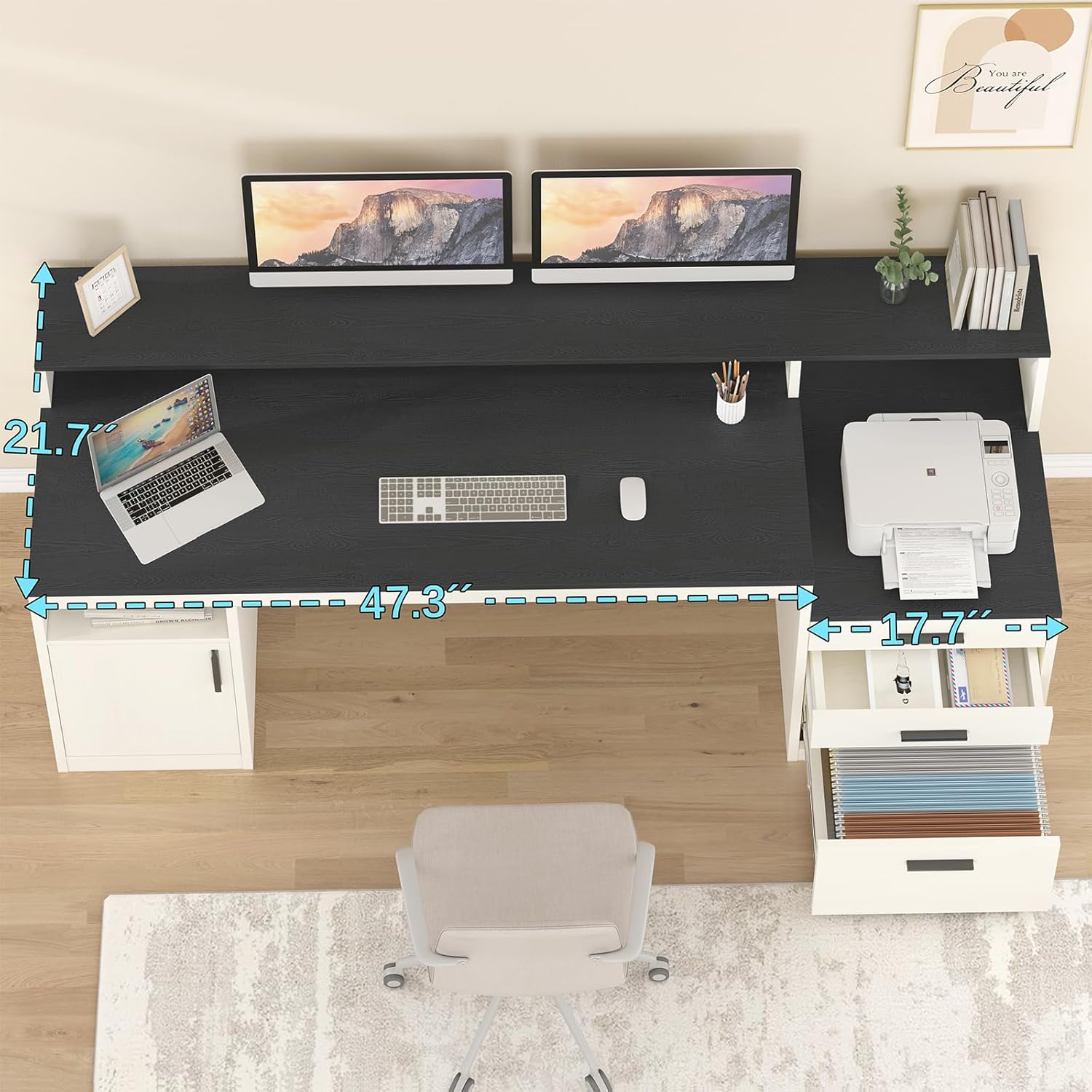
Image: Top-down view of the desk highlighting the spacious work surface and monitor stand capable of holding multiple screens.
2.2 Storage Features
The desk includes various storage options to keep your workspace tidy:
- File Cabinet: Located on the right side, it features two smaller drawers and one file drawer. The file drawer accommodates LETTER, A4, and LEGAL-sized documents with sliding hanging rods.
- Printer Shelf: The top space of the file drawer cabinet can be used as a dedicated printer stand.
- Storage Compartment: The left side offers a spacious compartment with adjustable shelves for books, headphones, or other office supplies.

Image: Detailed view of the multi-functional file drawer, illustrating its capacity for various document sizes and additional storage.

Image: The left storage cabinet with adjustable shelves, demonstrating its versatility for storing various items.
Product Overview Video
Video: An official overview of the YOMILUVE Computer Desk, demonstrating its storage features and overall design.
3. Care and Maintenance
To ensure the longevity and appearance of your YOMILUVE computer desk, follow these care instructions:
- Cleaning: Wipe surfaces with a soft, damp cloth. Avoid abrasive cleaners or harsh chemicals that may damage the finish.
- Spills: Promptly clean up any spills to prevent staining or damage to the engineered wood.
- Heat and Moisture: Avoid placing hot items directly on the desk surface. Use coasters for drinks to prevent water rings.
- Sunlight: Prolonged exposure to direct sunlight may cause fading. Position the desk away from direct sun or use window coverings.
- Hardware: Periodically check and tighten all screws and fasteners to maintain stability.
4. Troubleshooting Common Issues
If you encounter any issues with your desk, refer to the following common solutions:
- Desk Wobbles: Ensure all assembly screws are securely tightened. Verify the desk is on a level surface; use furniture glides or shims if necessary.
- Drawers Stick: Check that the drawer slides are properly aligned and free of obstructions. Lubricate slides with a silicone-based spray if needed.
- Surface Scratches: Minor scratches can sometimes be minimized with furniture repair markers or polishes designed for engineered wood.
- Missing Parts: If any parts were missing upon delivery, please contact customer support with your purchase details.
5. Product Specifications
| Feature | Detail |
|---|---|
| Brand | YOMILUVE |
| Model Name | 65 Inch Computer Desk |
| Product Dimensions | 21.7"D x 65"W x 35.4"H |
| Color | Black & White |
| Material Type | Engineered Wood |
| Number of Drawers | 3 (2 small, 1 file) |
| File Drawer Compatibility | LETTER, A4, LEGAL |
| Number of Shelves | 3 (adjustable in left cabinet) |
| Special Features | Ergonomic Monitor Stand, Printer Shelf |
| Assembly Required | Yes, detailed instructions included. |
6. Warranty Information
This YOMILUVE computer desk comes with a Limited Warranty. Please refer to the warranty documentation included with your purchase for specific terms, conditions, and duration. Keep your proof of purchase for any warranty claims.
7. Customer Support
For assembly assistance, missing parts, or any other inquiries regarding your YOMILUVE 65 Inch Computer Desk, please contact our customer support team. Refer to the contact information provided in your product packaging or visit the official YOMILUVE website for support options.
Online Resources: