
1. Introduction
This manual provides comprehensive instructions for the installation, operation, and maintenance of your LWOHSI A108F-US-D Wireless Home Security Alarm System. This system is designed to enhance the security of your home, apartment, or office with its WiFi and 4G dual-network capabilities, Tuya APP integration, and compatibility with smart home assistants like Alexa and Google Assistant. Please read this manual thoroughly before using the product to ensure proper functionality and safety.
2. Package Contents
Upon unpacking, please verify that all components listed below are present and in good condition. If any items are missing or damaged, contact customer support.
- 1 x A108F Alarm System Control Panel
- 6 x Wireless Door/Window Sensors
- 3 x Wireless Motion Detectors
- 2 x Remote Controls
- 2 x RFID Tags
- 1 x Wired Siren
- Power Adapter for Control Panel
- Mounting Hardware
- User Manual (this document)
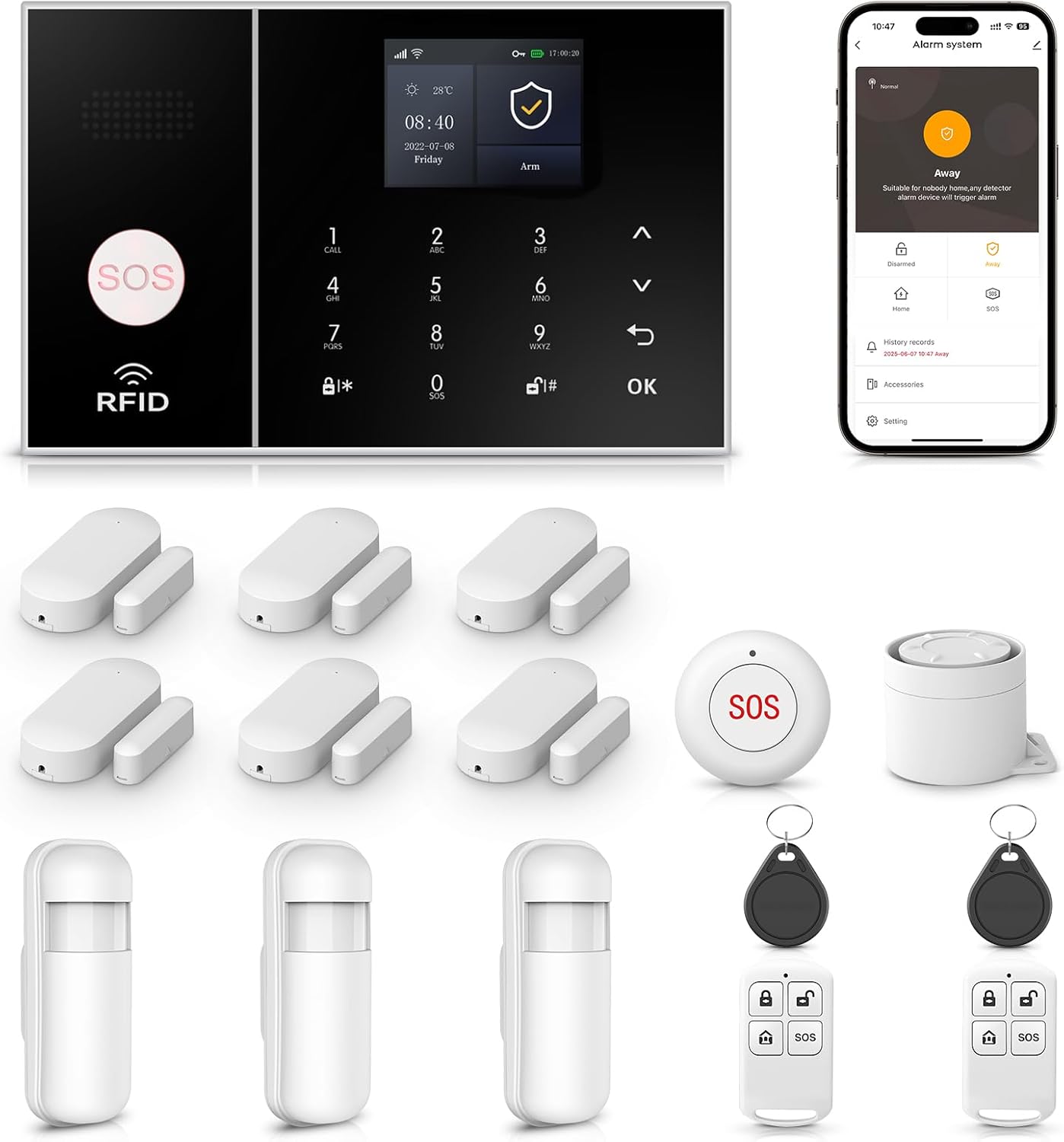
Figure 2.1: Overview of the LWOHSI A108F-US-D Home Security Alarm System components.
3. Product Features
- Dual-Network Connectivity: Supports Wi-Fi and 4G GSM for reliable alarm notifications via APP push, SMS, and voice calls.
- Expandable System: Accommodates up to 100 wireless detectors, RFID cards, and controllers.
- Tuya APP Integration: Remote control and monitoring via the Tuya Smart Life application.
- Voice Assistant Compatibility: Works with Amazon Alexa and Google Assistant for voice control.
- Scheduled Arm/Disarm: Program specific times for automatic system arming and disarming.
- Anti-Demolition Alarm: The control panel triggers an alarm and sends notifications if tampered with or removed from its mounting.
- Multi-Language Support: The system supports 11 languages for menu display and voice prompts.
- Emergency SOS Function: Dedicated SOS button for immediate emergency alerts.

Figure 3.1: Key features of the LWOHSI A108F-US-D system, including dual-network support and APP control.
4. Setup Guide
4.1 Initial Power-Up and Network Connection
- Connect the control panel to a power outlet using the provided adapter.
- Insert a 4G SIM card (if desired for cellular backup) into the designated slot on the control panel.
- Download the "Tuya Smart" or "Smart Life" application from your smartphone's app store.
- Register or log in to your account in the app.
- Follow the in-app instructions to add the A108F-US-D alarm system. This typically involves putting the control panel into pairing mode and connecting it to your 2.4GHz Wi-Fi network.
4.2 Sensor Installation and Pairing
The included sensors are typically pre-paired with the control panel. If you need to add new sensors or re-pair existing ones:
- Access the "Accessories" or "Sensor Management" section on the control panel or via the Tuya app.
- Select "Add Sensor" or "Pair Device."
- Trigger the sensor (e.g., separate the door/window sensor magnets, wave hand in front of motion detector). The control panel will confirm successful pairing.
- Install door/window sensors on frames, ensuring the two parts are aligned and within 1 cm of each other when the door/window is closed.
- Install motion detectors in corners or areas covering entry points, typically 2-2.5 meters (6.5-8 feet) above the ground.

Figure 4.1: Example of an instant notification received when a door or window sensor is triggered.
4.3 Anti-Demolition Feature
The control panel includes an anti-demolition switch. Install the control panel securely using the provided mounting hardware. If the panel is forcibly removed from its mounting, the anti-demolition switch will trigger an alarm and send notifications to your registered contacts.

Figure 4.2: Illustration of the anti-demolition alarm function and corresponding app notification.
5. Operating Instructions
5.1 Arming and Disarming the System
The system can be armed or disarmed using the control panel, remote controls, RFID tags, or the Tuya app.
- Control Panel: Enter your PIN and select the desired arming mode (Arm, Stay Arm, Disarm).
- Remote Control: Press the arm, disarm, or stay arm buttons on the remote.
- RFID Tag: Tap the RFID tag on the designated area of the control panel to arm or disarm.
- Tuya App: Use the app interface to remotely arm, disarm, or set the system to stay arm mode.
5.2 Scheduled Arming and Disarming
You can set up schedules for automatic arming and disarming through the Tuya app. This feature allows the system to arm when you typically leave home and disarm when you return, or arm at night and disarm in the morning.

Figure 5.1: Examples of setting up regular arming and disarming schedules via the app.
5.3 Emergency SOS Function
Press the SOS button on the control panel or remote control in an emergency. The system will immediately trigger the siren and send emergency notifications (calls/SMS) to pre-programmed numbers.
5.4 Voice Control with Alexa and Google Assistant
Integrate your LWOHSI A108F-US-D system with Amazon Alexa or Google Assistant for convenient voice control. Follow the instructions in the Tuya app to link your security system with your preferred voice assistant. Once linked, you can use voice commands to arm or disarm your system.

Figure 5.2: Using voice commands with Alexa to control the alarm system.
5.5 Multi-Language Support
The system supports 11 languages. You can change the language settings for the menu display and voice operation prompts through the control panel settings.

Figure 5.3: The control panel interface showing multiple language options.
6. Maintenance
- Battery Replacement: Regularly check the battery status of wireless sensors and replace them as needed. The system will typically notify you of low battery levels.
- Cleaning: Use a soft, dry cloth to clean the control panel and sensors. Avoid using abrasive cleaners or solvents.
- Firmware Updates: Check the Tuya app periodically for any available firmware updates for your alarm system to ensure optimal performance and security.
- Signal Strength: Ensure the control panel and sensors maintain good wireless signal strength. Avoid placing them near large metal objects or other sources of interference.
7. Troubleshooting
| Problem | Possible Cause | Solution |
|---|---|---|
| System not connecting to Wi-Fi. | Incorrect Wi-Fi password, 5GHz network, weak signal, or firewall issues. | Ensure correct 2.4GHz Wi-Fi network and password. Move panel closer to router. Check router settings. |
| Sensors not triggering alarm. | Low sensor battery, sensor not paired, or incorrect installation. | Replace sensor batteries. Re-pair sensor. Verify correct sensor alignment and placement. |
| No APP notifications. | App permissions, network connectivity issues, or notification settings. | Check app notification permissions on your phone. Ensure control panel has stable internet connection. Verify notification settings in Tuya app. |
| Remote control not working. | Low remote battery or remote not paired. | Replace remote battery. Re-pair remote control with the system. |
| Voice control not responding. | Incorrect voice commands, integration not set up, or network issues. | Ensure correct commands. Verify Tuya app is linked to Alexa/Google Assistant. Check internet connection. |
8. Specifications
| Feature | Detail |
|---|---|
| Brand | LWOHSI |
| Model Number | A108F-US-D (LWOHSI A108F) |
| Connectivity Technology | Wireless (Wi-Fi, 4G GSM) |
| Power Source | Battery Powered (for sensors), AC Powered (for control panel) |
| Compatible Devices | Smartphone (Tuya App), Amazon Alexa, Google Assistant |
| Item Dimensions (L x W x H) | 8 x 6 x 4 inches |
| Item Weight | 0.8 Pounds (12.8 ounces) |
| Installation Type | Screw-In |
| Alert Type | Audio & Motion, APP Push, SMS, Voice Call |
| Recommended Uses | Indoor/Outdoor (sensors may vary) |
| Included Components | 1 x A108F Alarm System (Control Panel, 6 Door/Window Sensors, 3 Motion Detectors, 2 Remotes, 2 RFID Tags, Siren) |
9. Warranty and Support
For warranty information and technical support, please refer to the official LWOHSI website or contact their customer service directly. Keep your purchase receipt as proof of purchase for any warranty claims.
Customer Service Contact: Refer to the contact information provided with your product packaging or on the official LWOHSI website.