
1. Introduction
Thank you for choosing the findtime SD6252 Men's Sport Watch. This timepiece combines both digital and analog displays with a robust design, making it suitable for various activities. It features a range of functions including LED backlight, stopwatch, countdown timer, alarm, and calendar. This manual provides detailed instructions to help you set up and operate your watch effectively.
Package Contents:
- 1 x findtime SD6252 Men's Sport Watch
- 1 x Instruction Manual (this document)
- 1 x Metal Watch Box
2. Watch Components and Button Functions
Familiarize yourself with the watch's buttons and their primary functions:

Figure 2.1: Watch button layout. This diagram illustrates the location and primary function of each button on the watch: LIGHT, MODE, START, and RESET, along with indicators for DATE, TIME, and WEEK.
- LIGHT Button (Top Left): Activates the LED backlight for visibility in low-light conditions.
- MODE Button (Bottom Left): Cycles through different operational modes: Normal Time, Stopwatch, Alarm, and Countdown Timer.
- START Button (Top Right): Used to start/stop functions in Stopwatch and Countdown modes. Also used to increase numerical values during setting.
- RESET Button (Bottom Right): Used to reset values in Stopwatch and Countdown modes.
- SET Button (Crown, Right Side): Used to enter setting mode and confirm selections. During setting, it can be used to convert or adjust hours, minutes, weeks, months, and days.
3. Setup and Time Setting
3.1. Setting Analog Time
The analog hands are typically synchronized with the digital time. If they are not, or if you need to adjust them independently:
- Gently pull out the SET Button (Crown) on the right side of the watch.
- Rotate the SET Button (Crown) to adjust the analog hands to the correct time.
- Once set, push the SET Button (Crown) back in to secure the time.
3.2. Setting Digital Time and Date
To set the digital time, date, and other parameters:
- From the Normal Time display, press the MODE Button repeatedly until the seconds begin to flash, indicating you are in setting mode.
- Press the RESET Button to cycle through the settings: Seconds → Hours → Minutes → Year → Month → Day → 12/24H Format.
- While a value is flashing, press the START Button to increase the numerical value. Hold the START Button to rapidly advance the numbers.
- Once all settings are adjusted, press the MODE Button again to exit the setting mode and return to the Normal Time display.
4. Operating Instructions
4.1. Normal Time Display
In this mode, the watch displays the current time (digital and analog), day of the week, and date. Use the LIGHT Button to illuminate the display in dark environments.

Figure 4.1: Luminous Display. A close-up of the watch face with its green LED backlight illuminated, making the digital and analog displays visible in low light.
4.2. Stopwatch Mode
The stopwatch measures elapsed time.
- Press the MODE Button until 'STW' or 'STOPWATCH' appears on the digital display.
- Press the START Button to begin timing.
- Press the START Button again to pause timing.
- Press the RESET Button to clear the stopwatch to zero.
- To resume timing after pausing, press the START Button.
4.3. Alarm Mode
Set an alarm to sound at a specific time.
- Press the MODE Button until 'ALM' or 'ALARM' appears on the digital display.
- Press the RESET Button to select the hour or minute setting. The selected value will flash.
- Press the START Button to adjust the flashing hour or minute.
- Press the MODE Button to exit alarm setting.
- To activate/deactivate the alarm, press the START Button while in Alarm Mode (without any value flashing). An alarm icon will appear/disappear.
- To activate/deactivate the hourly chime, press the RESET Button while in Alarm Mode (without any value flashing). A chime icon will appear/disappear.
4.4. Countdown Timer Mode
Set a timer to count down from a specified time.
- Press the MODE Button until 'TMR' or 'TIMER' appears on the digital display.
- Press the RESET Button to select the hour or minute setting. The selected value will flash.
- Press the START Button to adjust the flashing hour or minute.
- Press the MODE Button to exit countdown setting.
- Press the START Button to begin the countdown.
- Press the START Button again to pause the countdown.
- Press the RESET Button to reset the countdown to its initial set time.
5. Maintenance and Care
5.1. Water Resistance
Your findtime SD6252 watch is designed with 5ATM water resistance, suitable for:
- Washing hands
- Cold showering
- Swimming
Important Notes:
- DO NOT press any buttons while the watch is underwater.
- After swimming, gently shake off excess water and wipe the watch dry.
- Avoid exposure to hot water and steam, as this can compromise the watch's water resistance seals.

Figure 5.1: Water Resistance. The watch is shown with water droplets, demonstrating its 5ATM water resistance suitable for splashes and swimming.
5.2. Cleaning
To maintain the appearance of your watch, wipe it regularly with a soft, dry cloth. For stubborn dirt, a slightly damp cloth can be used, followed by drying.
5.3. Battery Information
The watch is powered by one nonstandard battery (included). When the display dims or functions become erratic, it may be time for a battery replacement. It is recommended to have battery replacement performed by a qualified watch technician to ensure water resistance is maintained.
6. Troubleshooting
- Display is blank or dim: The battery may be low. Replace the battery as described in Section 5.3.
- Time is inaccurate: Ensure the digital and analog times are set correctly as per Section 3. If the issue persists, the battery may be weak.
- Buttons are unresponsive: Ensure the watch is not wet when pressing buttons. If the issue continues, contact customer support.
- Water inside the watch: Immediately stop using the watch and seek professional service. Avoid exposing the watch to extreme temperature changes.
7. Specifications
Key technical specifications for the findtime SD6252 watch:
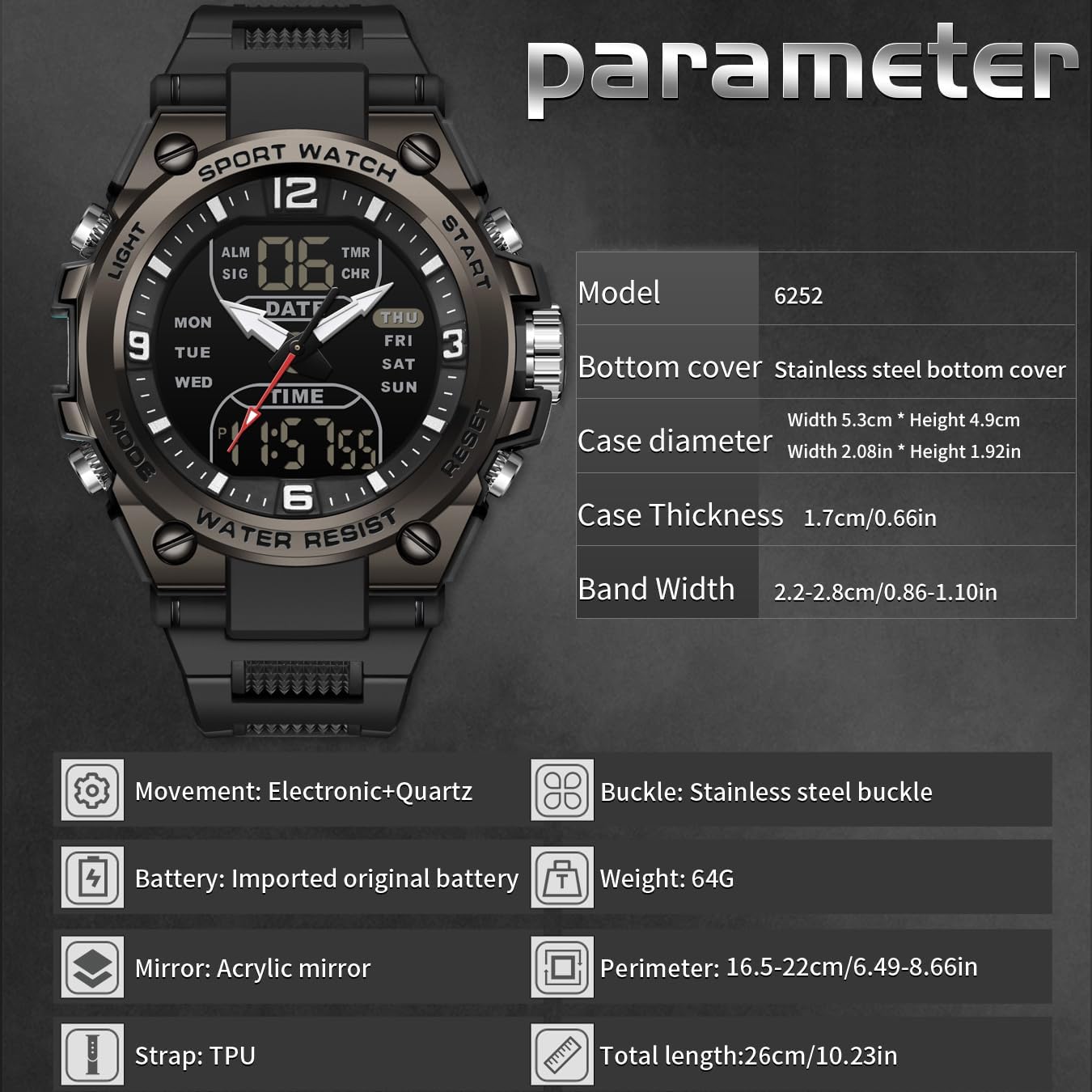
Figure 7.1: Product Specifications. Detailed technical specifications of the watch, including case width, thickness, band width, movement type, battery, mirror material, strap material, and total length.
| Feature | Detail |
|---|---|
| Model Number | SD6252 |
| Product Dimensions | 10 x 2 x 0.67 inches (254 x 51 x 17 mm) |
| Weight | 2.26 ounces (64 grams) |
| Case Width | 2 inches (51 mm) |
| Case Thickness | 0.67 inches (17 mm) |
| Band Width | 0.86 - 1.10 inches (22 - 28 mm) |
| Max Wrist Circumference | 8.66 inches (220 mm) |
| Min Wrist Circumference | 6.5 inches (165 mm) |
| Movement | Electronic + Quartz |
| Mirror Material | Acrylic |
| Case Material | ABS |
| Strap Material | TPU |
| Clasp Type | Buckle |
| Water Resistance | 5 ATM |
| Battery | 1 Nonstandard Battery (included) |
8. Customer Support
If you have any questions, encounter issues not covered in this manual, or require further assistance with your findtime SD6252 watch, please do not hesitate to contact our customer support. We are committed to providing you with the best possible experience.