
ASAHOM S108B
ASAHOM Permanent Outdoor Light Pro S108B User Manual
Model: S108B
1. Introduction
This manual provides comprehensive instructions for the installation, operation, and maintenance of your ASAHOM Permanent Outdoor Light Pro S108B. This advanced lighting system features 72 RGBCW LEDs, WLED integration, AI lighting capabilities, and is designed for year-round outdoor use with an IP67 waterproof rating.

Image 1.1: ASAHOM Permanent Outdoor Light Pro S108B packaging and components.
2. What's in the Box
Verify that all components are present before beginning installation:
- Power adapter x 1
- 6ft Power extension cord x 1
- Control Box x 1
- 5m (12 LEDs) string section x 4
- 2.5m (6 LEDs) string section x 3
- 0.42m (1 LED) string section x 6
- 6ft Light string extension cord x 1
- 3ft Light string extension cord x 2
- Fault detection module x 1
- Wire clips x 30
- Screw pack x 9
- Adhesive backing x 6
- Waterproof junction box x 2
- End cap x 2
- Mounting ruler x 1
- User manual x 1

Image 2.1: Visual representation of all components included in the ASAHOM S108B package.
3. Setup and Installation
3.1 Planning Your Installation
Before installation, plan the layout of your lights. The system supports dual output from the control box and can be extended up to 800ft with additional accessories. Consider the placement of the control box and power adapter for optimal reach and weather protection.

Image 3.1: Illustration of various light string section lengths and extension cords for flexible installation.
3.2 Mounting the Lights
- Clean Surface: Ensure the mounting surface (e.g., soffit, eaves) is clean and dry.
- Temporary Placement: Use the adhesive backing on each LED light to temporarily position them along your desired path.
- Secure Installation: For permanent installation, use the provided screws to secure each light fixture. Pre-drilled holes are available on each light for this purpose.
- Cable Management: Use the included wire clips to neatly secure any excess cabling.

Image 3.2: The lights can be mounted on various surfaces including fiber cement, wood, vinyl, and metal.
3.3 Connecting Components
- Control Box: Connect the light string sections to the dual output ports of the control box.
- Power Adapter: Connect the control box to the power adapter, then plug the adapter into a suitable outdoor power outlet.
- Extension Cords: Use the provided extension cords to bridge gaps or extend the light string as needed.
- Cutting and Splicing: If a specific length is required, the light string can be cut. Use the included wire connector and waterproof junction box to splice the lights and ensure waterproof integrity.
- End Caps: Use end caps to seal any cut ends of the light string to maintain waterproofing.

Image 3.3: The controller features dual outputs for flexible light string routing.

Image 3.4: Screw clips provide secure mounting, and end caps seal cut light string ends.
4. Operating Instructions
4.1 ASAHOM App Control
The ASAHOM App provides full control over your lights. Download the app from your device's app store.
- Pairing: Open the ASAHOM App and follow the on-screen instructions to pair your lights via Bluetooth.
- AIGC Lighting: Use the AI Lighting feature to generate custom lighting effects by inputting preferences or voice prompts.
- Color and Effects: Choose from 289 color palettes and 142 effects, offering over 30,000 combinations. Customize color, speed, and intensity.
- Zone Control: Independently control different sections or zones of your lighting setup.
- Timer Functions: Set calendar or weekly timers for automated lighting schedules.
- Music Modes: Utilize 23 music modes for dynamic lighting synchronized with audio.

Image 4.1: The ASAHOM App's AI Lighting feature allows for easy creation of custom lighting scenes.

Image 4.2: The Palette System within the ASAHOM App offers numerous color options and customization.
4.2 WLED Integration
The ASAHOM Permanent Outdoor Lights Pro S108B supports WLED integration for advanced customization.
- Activate WLED Mode:
- Long press the 'B' button on the control box for approximately 10 seconds, OR
- Enable the WLED button via the ASAHOM App.
- Connect to WLED Network: Search for a WiFi network named 'WLED-AP' on your device and connect using the default password:
wled1234.

Image 4.3: WLED integration allows for detailed DIY lighting effects.
4.3 Voice Control
Pair your lights with Amazon Alexa or Google Assistant for convenient voice control of various functions.
5. Maintenance and Durability
The ASAHOM Permanent Outdoor Light Pro S108B is designed for year-round outdoor use with robust features:
- IP67 Waterproof Rating: The LED lights, control box, and adapter are all rated IP67, providing protection against dust and water immersion.
- Anti-UV Material: Constructed with anti-UV materials to resist degradation from sun exposure.
- Temperature Resistance: Operates reliably in temperatures ranging from -4°F to 113°F (-20°C to 45°C).
- Cleaning: Periodically clean the light fixtures with a soft, damp cloth to remove dirt and debris. Avoid abrasive cleaners.

Image 5.1: All critical components are IP67 rated for outdoor durability.
6. Troubleshooting
6.1 Fault Detection Module
The included Fault Detection Module helps identify issues within your lighting setup:
- Power Loss: Indicates a break in the power supply.
- Signal Failure: Suggests a communication issue between light sections or the control box.
- Broken Light Sections: Pinpoints specific sections that are not functioning.
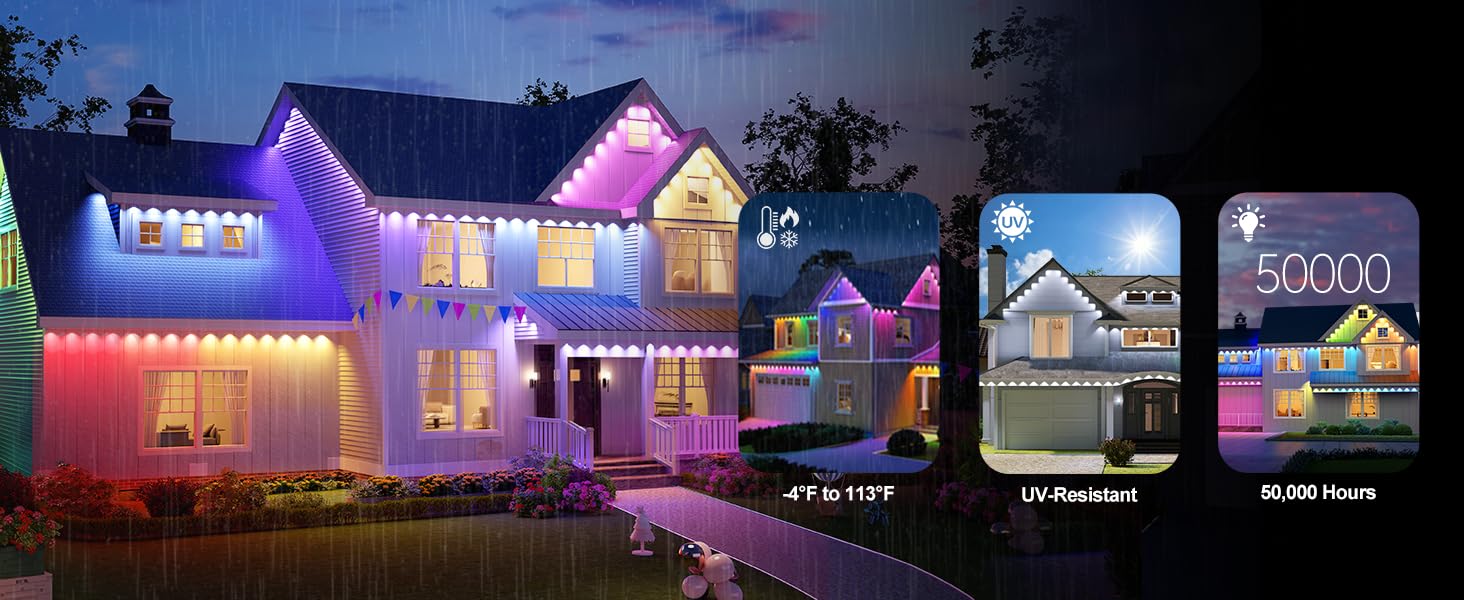
Image 6.1: The Fault Detection Module assists in diagnosing common lighting issues.
6.2 Common Issues
- Lights Not Responding: Ensure all connections are secure and the power adapter is plugged in. Check the Fault Detection Module for specific errors.
- WLED Connection Issues: Verify you are connected to the 'WLED-AP' network and using the correct default password 'wled1234'.
- App Functionality: It is recommended to upgrade to the latest firmware of the ASAHOM APP to ensure all features function smoothly.
7. Specifications
| Feature | Detail |
|---|---|
| Model Number | S108B |
| Color | Black |
| Material | Plastic |
| Light Source Type | LED (RGBCW, 5-in-1) |
| Number of Light Sources | 72 |
| Brightness | 5040 Lumen (70lm per LED) |
| Color Temperature | 2700K-6500K |
| Power Source | Corded Electric |
| Voltage | 120 Volts (AC) |
| Wattage | 72 watts |
| IP Rating | IP67 (LEDs, Control Box, Adapter) |
| Operating Temperature | -4°F to 113°F (-20°C to 45°C) |
| Max. Extension Length | 800ft |
| Special Features | Color Changing, Dimmable, Linkable, Timer, Waterproof, WLED Integration, AI Lighting, Dual Output |

Image 7.1: The innovative 5-in-1 RGBCW LED beads provide a wide range of colors and white light.

Image 7.2: Dimensional and electrical specifications for the lighting system.
8. Warranty and Support
8.1 Warranty Information
Specific warranty details are typically provided with your purchase documentation or can be found on the official ASAHOM website. Please retain your proof of purchase for warranty claims.
8.2 Customer Support
For further assistance, technical support, or inquiries, please refer to the contact information provided on the ASAHOM official website or within the ASAHOM App.
Related Documents - S108B
 |
ASAHOM Quick Start Guide: Installing Outdoor String Lights Concise guide for installing ASAHOM permanent outdoor string lights, covering setup, connection, and mounting for optimal lighting effects. Includes safety tips and extension information. |
 |
ASAHOM S1050 Series Permanent Outdoor Lights User Manual This user manual provides comprehensive instructions for the ASAHOM S1050 Series Permanent Outdoor Lights, covering safety, installation, component details, remote and app control, troubleshooting, and technical specifications. |
 |
ASAHOM Permanent Outdoor Lights Pro - Quick Start Guide & Troubleshooting Get started with your ASAHOM Permanent Outdoor Lights Pro. This guide provides quick start instructions, troubleshooting tips, and information on connecting to the ASAHOM App. |
 |
ASAHOM S1020 LED Bulb String Lights: User Manual & Setup Guide Learn how to set up and use your ASAHOM S1020 LED Bulb String Lights. This guide covers installation, pairing with the Tuya Smart app, troubleshooting, and specifications for these IP65 rated outdoor lights. |
 |
ASAHOM S1050 Series Permanent Outdoor Lights User Manual Comprehensive user manual for ASAHOM S1050 Series Permanent Outdoor Lights, detailing installation, Smart Life app setup, remote control functions, troubleshooting, and specifications for models S105A, S105B, S105C, and S105D. |
 |
ASAHOM Permanent Outdoor Lights Installation Manual and Quick Start Guide Comprehensive installation manual for ASAHOM Permanent Outdoor Lights, covering quick start guide, mounting, wiring, accessories like T-splitters and power injection connectors, and control box functions. |
Ask a question about this manual
Ask about setup, troubleshooting, compatibility, parts, safety, or missing instructions. Manuals+ will review the question and use this page’s manual context to help answer it.