
Introduction
This manual provides instructions for the Snrigw replacement remote control, designed for use with Naomi Home Idealbase adjustable beds. This remote control is compatible with models 89607, 85307, 96807, 85587W, 77793, 77705, and 77794. It offers full control over your bed's positioning functions, including head adjustment, foot elevation, and preset positions, ensuring seamless operation with your existing system.
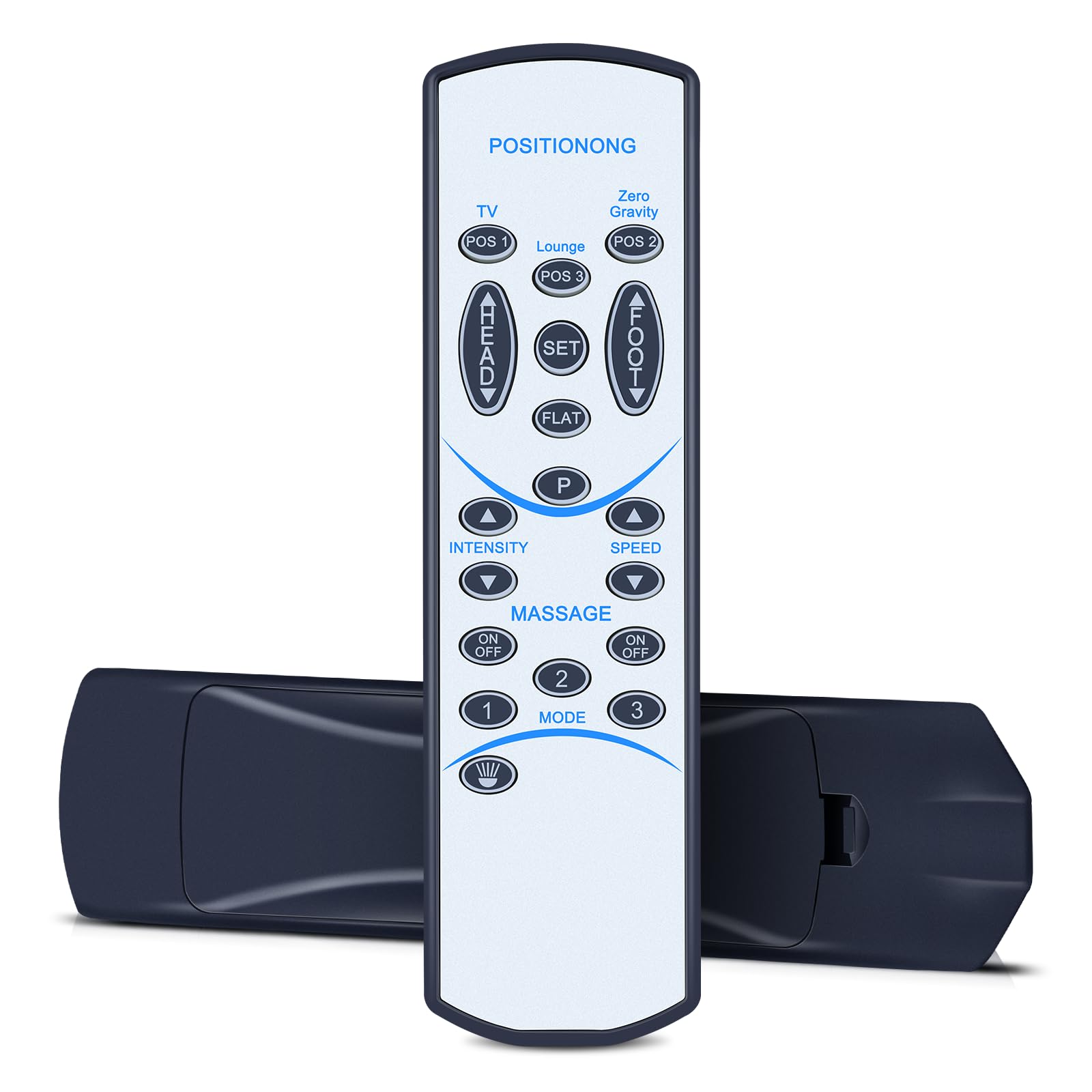
Image: The Snrigw replacement remote control, designed for adjustable beds.
The remote features an intuitive button layout with clear icon labeling and responsive buttons for effortless operation. It is engineered for consistent, lag-free wireless performance with a strong connection to your adjustable base, offering a range of up to 26 feet.
Setup and Pairing Instructions
Follow these steps to pair your new Snrigw replacement remote control with your Naomi Home Idealbase adjustable bed.
Pairing Process
- Step 1: Disconnect the power cord of the control box from the electrical outlet. Wait for 1 minute before reinserting it into the socket.
- Step 2: Within 10 seconds of reinserting the power cord, press and hold the HEAD UP and FOOT UP buttons on the remote control simultaneously.
- Step 3: While still holding the HEAD UP and FOOT UP buttons, press and hold the pair button on the plug cable for 3 seconds until you hear a beep. If there is no pairing button on the power cord, locate it on the control box itself.
- Step 4: Quickly press and release the HEAD UP button to complete the pairing process.

Image: Visual guide for pairing methods, showing the remote and pairing steps.

Image: Textual breakdown of the pairing process, emphasizing button presses.
Important Notes for Pairing:
- Ensure batteries are correctly installed and have sufficient charge before attempting to pair.
- Verify that the child lock function on the bed's control box is not activated, as this can prevent normal operation and pairing.
- If pairing is unsuccessful, disconnect the bed from the power supply for 1 minute, then reconnect and attempt the pairing process again.
Operating Instructions
The remote control is designed for ease of use, allowing you to adjust your bed's position with simple button presses. The ergonomic design ensures a comfortable grip.

Image: Close-up of the remote control highlighting its sensitive and durable buttons.

Image: The remote control shown with an adjustable bed, illustrating its universal compatibility.
Button Functions:
- HEAD UP / HEAD DOWN: Adjusts the head section of the bed upwards or downwards.
- FOOT UP / FOOT DOWN: Adjusts the foot section of the bed upwards or downwards.
- FLAT: Returns the bed to a completely flat position.
- POSITIONONG (POS 1, POS 2, POS 3): Activates pre-set memory positions.
- LOUNGE: Activates a pre-set lounge position.
- ZERO GRAVITY: Activates a pre-set zero gravity position.
- MASSAGE (ON/OFF, INTENSITY, SPEED, MODE): Controls the massage function, including turning it on/off, adjusting intensity, speed, and mode (if available on your bed model).
- TV: Activates a pre-set TV viewing position.
- SET: Used to program or save custom positions (refer to your bed's main manual for detailed programming instructions).
The remote operates wirelessly with a strong signal stability, effective up to 26 feet, allowing you to control your bed from various points in your room.

Image: Illustration demonstrating the remote control's strong wireless range of up to 26 feet.
Maintenance
Battery Replacement:
The remote control requires two AAA batteries for operation. These batteries are not included and must be purchased separately.
- Locate the battery compartment on the back of the remote control.
- Slide open the battery compartment cover.
- Remove the old batteries (if any) and dispose of them properly.
- Insert two new AAA batteries, ensuring the correct polarity (+/-) as indicated inside the compartment.
- Close the battery compartment cover securely.

Image: Visual reminder that the remote control requires two AAA batteries, which are not included.
Regularly check battery charge to ensure optimal performance. If the remote's range or responsiveness decreases, it may be time to replace the batteries.
Troubleshooting
If you encounter issues with your remote control, please refer to the following common solutions:
- Remote Not Responding:
- Check the batteries. Ensure they are correctly inserted and have sufficient power. Replace if necessary.
- Verify that the child lock function on your adjustable bed's control box is not engaged.
- Pairing Failure:
- Ensure you are following the pairing steps precisely, especially the timing for reinserting the power cord and pressing buttons.
- Disconnect the bed from the power supply for 1 minute, then reconnect and attempt the pairing process again. This can reset the control box.
- Ensure you are pressing the correct pairing button on the plug cable or control box.
- Limited Range:
- Replace the batteries with fresh ones.
- Ensure there are no obstructions between the remote control and the bed's receiver.
If these troubleshooting steps do not resolve the issue, please contact customer support for further assistance.
Specifications
| Brand | Snrigw |
| Compatible Devices | Naomi Home Idealbase Adjustable Beds (Models: 89607, 85307, 96807, 85587W, 77793, 77705, 77794) |
| Connectivity Technology | Infrared |
| Controller Type | Button Control |
| Maximum Range | 26 Feet |
| Power Source | 2 x AAA Batteries (not included) |
| Item Dimensions (L x W x H) | 7"L x 1.97"W x 0.9"H |
| Material | Durable ABS Plastic |

Image: Illustration of the high-performance chip, indicating quick response capabilities.
Warranty and Support
For any questions, technical support, or warranty inquiries regarding your Snrigw replacement remote control, please contact the manufacturer or your retailer. Refer to your purchase documentation for specific contact information.
The manufacturer is committed to providing reliable after-sales service.