
1. Introduction
The Wengart WG521 8-Zone Wiring Center Controller is an intelligent control unit specifically designed for hydronic underfloor heating systems. It integrates the control of thermostats, actuators, and connections for boilers and water pumps. This central control unit manages multiple independent heating zones, providing precise room temperature control and optimizing energy usage.
The system monitors heating demand in real-time, intelligently starting and stopping boilers and water pumps to ensure on-demand heating and effective energy savings. Its centralized wiring design ensures a tidy and aesthetically pleasing installation, simplifying daily maintenance.
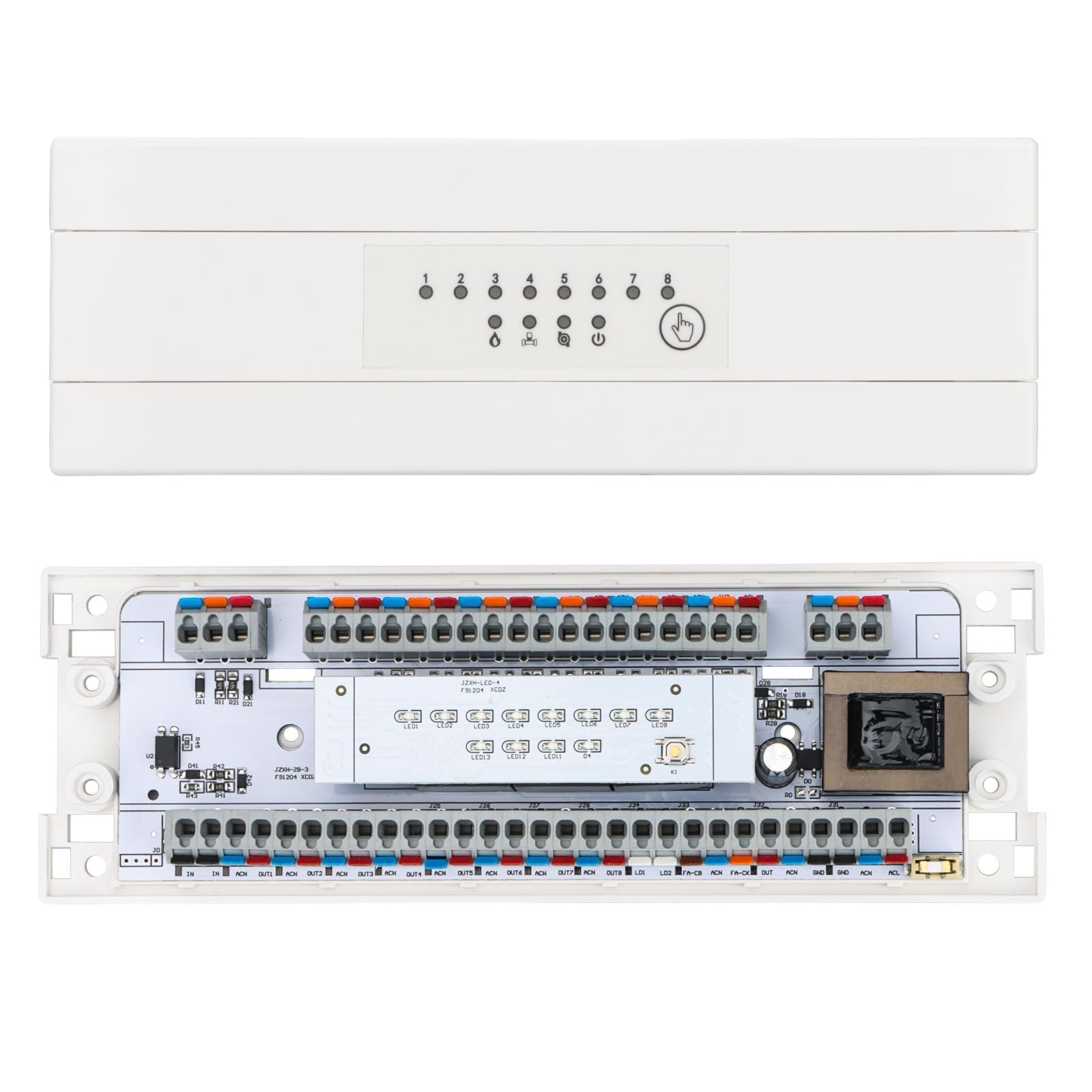
Figure 1.1: Overview of the Wengart WG521 wiring center controller system, showing connections to thermostats, a master control panel, pump, NC actuators, and a boiler.

Figure 1.2: Illustration demonstrating simultaneous temperature control in multiple rooms using the Wengart WG521 system, showing individual thermostats in different zones.
2. Safety Information
- Always disconnect power before installation, maintenance, or troubleshooting.
- Installation should be performed by a qualified electrician in accordance with local electrical codes and regulations.
- Ensure the power supply voltage matches the product's specifications (AC 200-240V, 50/60Hz).
- Do not expose the device to water, excessive humidity, or extreme temperatures.
- Do not attempt to open or repair the device yourself. Refer to qualified personnel for service.
- Ensure all wiring connections are secure and properly insulated to prevent short circuits or electrical hazards.

Figure 2.1: The product packaging, highlighting the included warning card which contains important safety instructions in multiple languages.
3. Package Contents
Upon opening the package, please verify that all components are present and undamaged:
- Wengart WG521 Wiring Center Controller (1 unit)
- User Manual (this document)
- Warning Card (as shown in Figure 2.1)
4. Product Features
- Integrated Power Supply & Simple Installation: The wiring center directly supplies 220V power to the water heater thermostat and external water pump. No specialized wiring is needed, only an existing power source, making installation quick and easy.
- Multi-Zone Control: Supports up to eight underfloor heating thermostats, independently controlling eight electric heating actuator outputs to meet the heating needs of various rooms.
- Smart Energy-Saving Connection: Automatically connects to start and stop the boiler and water pump, activating them only when a heating zone requires it and disconnecting when not needed, effectively reducing energy consumption.
- Status Display: Features multi-color indicators that clearly show the heating status of zones 1-8, boiler/water pump operation, and main valve on/off status, allowing for real-time monitoring.
- Centralized Management & Convenient Maintenance: Consolidates all room wiring into a single connection box, creating a clean and aesthetically pleasing layout and simplifying wiring verification and maintenance.
- Multifunctional Debugging & Expansion: Supports manual debugging buttons for quick output testing. Compatible with external 220V signal input (multiple boxes in parallel) and features a power-isolated input port for safety and flexibility.
5. Setup and Installation
Follow these steps for proper installation of your Wengart WG521 Wiring Center Controller:
- Mounting: Choose a suitable location for the wiring center, typically near the heating manifold or boiler, ensuring it is protected from moisture and direct sunlight. Securely mount the unit to a wall using appropriate fasteners.
- Power Connection: Connect the main AC 200-240V, 50/60Hz power supply to the designated terminals on the wiring center. Ensure proper polarity (Live, Neutral, Ground).
- Thermostat Connections: Connect each room thermostat to its corresponding zone input on the wiring center. The WG521 supports up to eight thermostats.
- Actuator Connections: Connect the electric heating actuators for each zone to their respective outputs on the wiring center. Each port can connect up to 10 actuators.
- Boiler and Water Pump Connections: Connect the boiler and water pump control wires to the dedicated outputs on the wiring center. The system will intelligently manage their operation based on heating demand.
- External Signal Input (Optional): If expanding the system with multiple wiring centers, connect the external 220V signal input as required. Ensure the port is isolated from the main power supply.
- Final Checks: Before restoring power, double-check all connections for security and correctness. Ensure no bare wires are exposed.

Figure 5.1: Detailed wiring diagram for the Wengart WG521 controller, illustrating connections for thermostats, actuators, boiler, and water pump, along with power input.

Figure 5.2: An example application of the Wengart WG521 wiring center in an underfloor heating system, showing its integration with a boiler, manifold, actuators, and room thermostats.
6. Operating Instructions
Once installed and powered on, the Wengart WG521 operates largely automatically based on the settings of your connected thermostats. Here's how to monitor and interact with the unit:
6.1 Status Indicators
The front panel of the wiring center features several LED indicators to provide real-time status information:
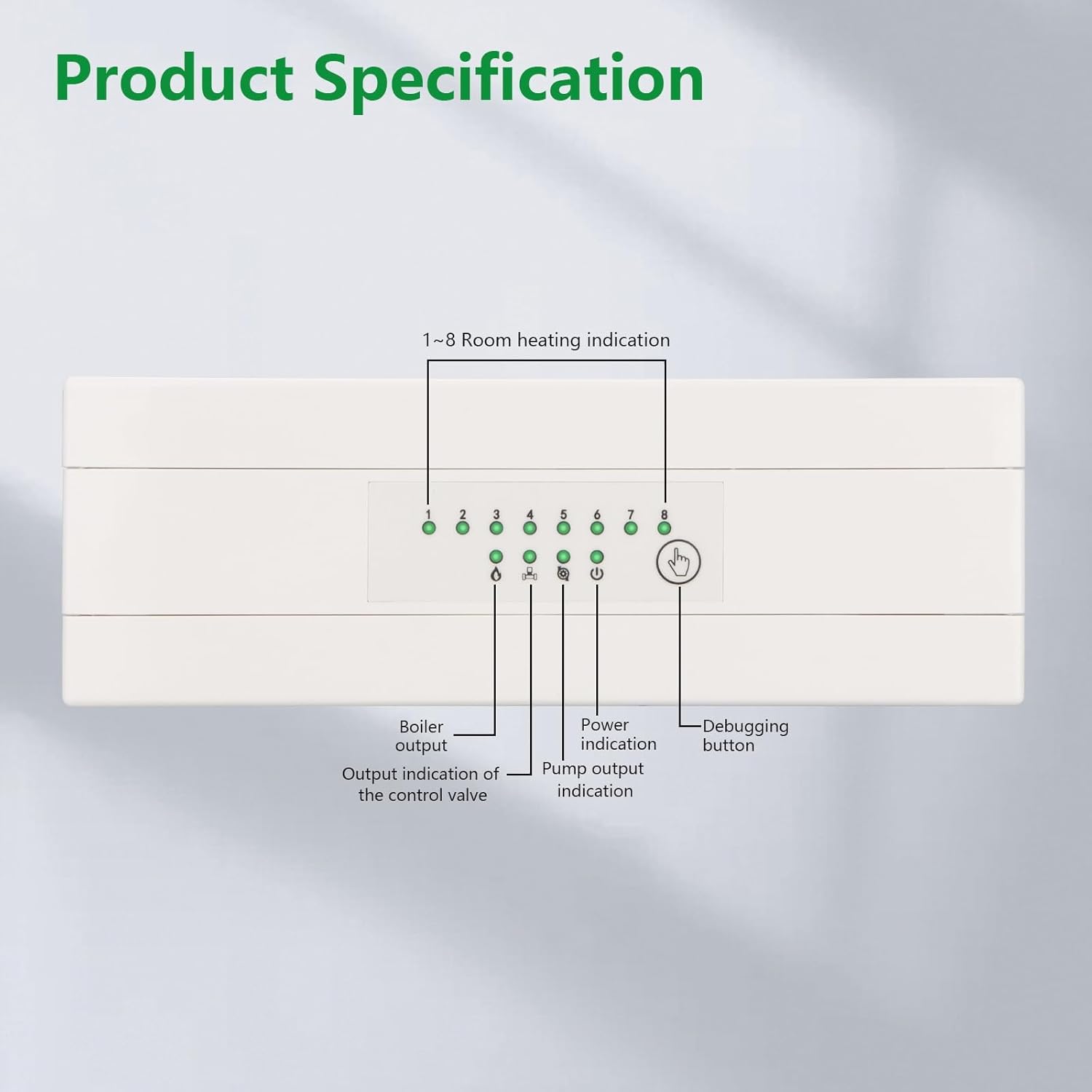
Figure 6.1: Front panel of the Wengart WG521, detailing the location and function of the 1-8 room heating indicators, boiler output, control valve output, pump output, power indicator, and debugging button.
- 1-8 Room Heating Indication: Individual LEDs for each zone (1-8) illuminate when that specific zone's thermostat is calling for heat.
- Boiler Output: Indicates when the wiring center is signaling the boiler to activate.
- Output Indication of the Control Valve: Shows the status of the control valve output.
- Pump Output Indication: Indicates when the wiring center is signaling the water pump to operate.
- Power Indication: Illuminates when the unit is receiving power.
6.2 Debugging Button
A debugging button is provided on the front panel (refer to Figure 6.1). This button allows for manual testing of the outputs, which can be useful during installation or troubleshooting to quickly verify connections and functionality without waiting for thermostat calls.
7. Product Specifications
| Specification | Value |
|---|---|
| Manufacturer | WENGART ELECTRIC CO.,LTD |
| Model Number | WG521 |
| Power Supply | AC 200-240 V, 50/60 Hz |
| Maximum Load (each port) | 10 A |
| Actuator Connection Capacity (each port) | Up to 10 actuators |
| Power Consumption | 10 W |
| Operating Temperature | -20 ℃ ~ 60 ℃ (-4 °F ~ 140 °F) |
| Storage Temperature | -20 ℃ ~ 70 ℃ (-4 °F ~ 158 °F) |
| Material | PC + ABS anti-combustible (Flame-retardant plastic) |
| Product Dimensions | 20 x 6.8 x 3.2 cm (7.87 x 2.68 x 1.26 inches) |
| Product Weight | 384 g |
| Certifications | RoHS, CE |
| Delay Time | 60 seconds |
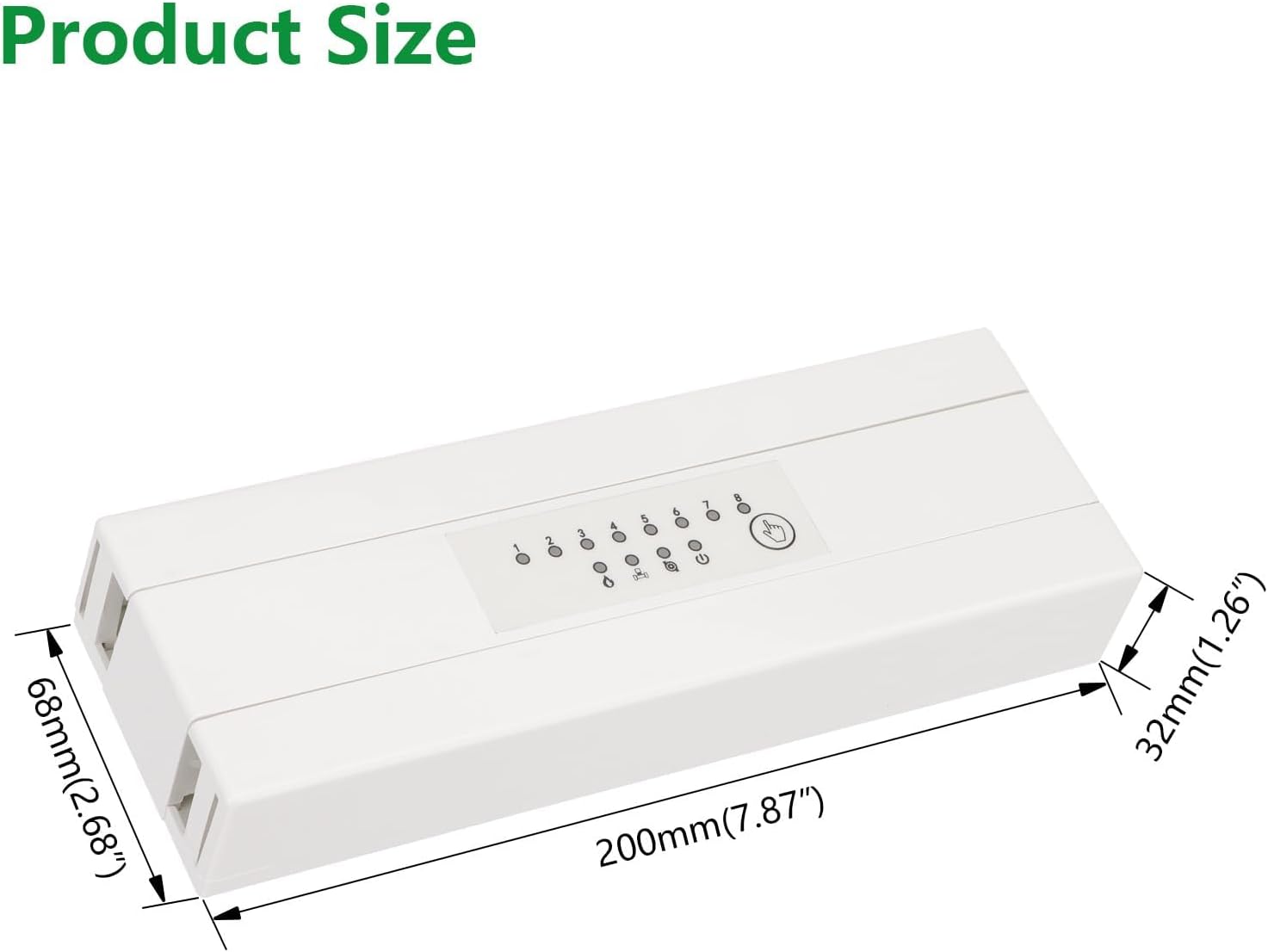
Figure 7.1: Dimensions of the Wengart WG521 wiring center controller, showing its length (200mm), width (68mm), and height (32mm).
8. Troubleshooting
If you encounter issues with your Wengart WG521 Wiring Center Controller, please refer to the following common troubleshooting steps:
- No Power Indication:
- Check the main power supply to the unit.
- Ensure the power cable is securely connected.
- Verify the circuit breaker or fuse for the power circuit.
- Zone Not Heating:
- Check the thermostat for that zone to ensure it is calling for heat and set to a temperature above the current room temperature.
- Verify the wiring connection between the thermostat and the wiring center.
- Check the wiring connection between the wiring center and the actuators for that zone.
- Use the debugging button to test the output for that specific zone.
- Boiler/Pump Not Activating:
- Ensure at least one zone is calling for heat.
- Check the wiring connections to the boiler and water pump.
- Verify that the boiler and pump are receiving power and are in working order independently.
- Intermittent Operation:
- Check for loose wiring connections throughout the system.
- Ensure the operating environment is within the specified temperature range.
If problems persist after following these steps, please contact customer support for further assistance.
9. Maintenance
The Wengart WG521 Wiring Center Controller is designed for minimal maintenance. To ensure optimal performance and longevity:
- Regular Cleaning: Periodically wipe the exterior of the unit with a soft, dry cloth to remove dust. Do not use abrasive cleaners or solvents.
- Connection Checks: Annually, or if issues arise, visually inspect all wiring connections to ensure they remain tight and free from corrosion.
- Environmental Conditions: Ensure the unit remains in a dry environment, free from excessive humidity or extreme temperature fluctuations, as specified in the product specifications.
10. Warranty and Support
Wengart products are manufactured to high-quality standards. For warranty information, please refer to the documentation provided at the time of purchase or contact your retailer. For technical support or service inquiries, please reach out to Wengart customer service through their official channels.