1. Introduction
The Kiprim AG01 Digital Inclinometer is a precision tool designed for accurate angle measurement in various applications, including woodworking, construction, and general DIY projects. This manual provides essential information on the product's features, setup, operation, maintenance, and troubleshooting to ensure optimal performance and longevity.

Figure 1: Kiprim AG01 Digital Inclinometer. A compact, teal-colored digital angle gauge with a clear LCD display, showing the Kiprim logo and model number AG01.
2. Product Overview
2.1 Key Features
- High Accuracy: Provides measurements with an accuracy of ±0.2° and a resolution of 0.05°.
- 3-Sided Magnetic Base: Equipped with strong magnets on three sides for secure attachment to metallic surfaces, enabling hands-free operation.
- Two Measurement Modes: Easily switch between absolute (ABS) and relative (REF) angle measurement.
- Versatile Units: Displays measurements in degrees (°) or percentage (%).
- Backlit LCD Screen: Ensures clear readability in various lighting conditions, including dark environments.
- Automatic Shut-off: Powers off after 3 minutes of inactivity to conserve battery life.
- Robust Construction: Made from PC+15% GF material for enhanced durability and stability.
- Compact and Lightweight: Designed for portability and easy handling.

Figure 2: Robust Quality. An illustration showing the internal structure of the inclinometer and a drop test scenario, highlighting its PC+15% GF casing for impact resistance.

Figure 3: Portable Design. The inclinometer is shown fitting easily into a tool belt pocket, demonstrating its compact size and portability for various work environments.
2.2 Components
Familiarize yourself with the main components of your Kiprim AG01 Digital Inclinometer:
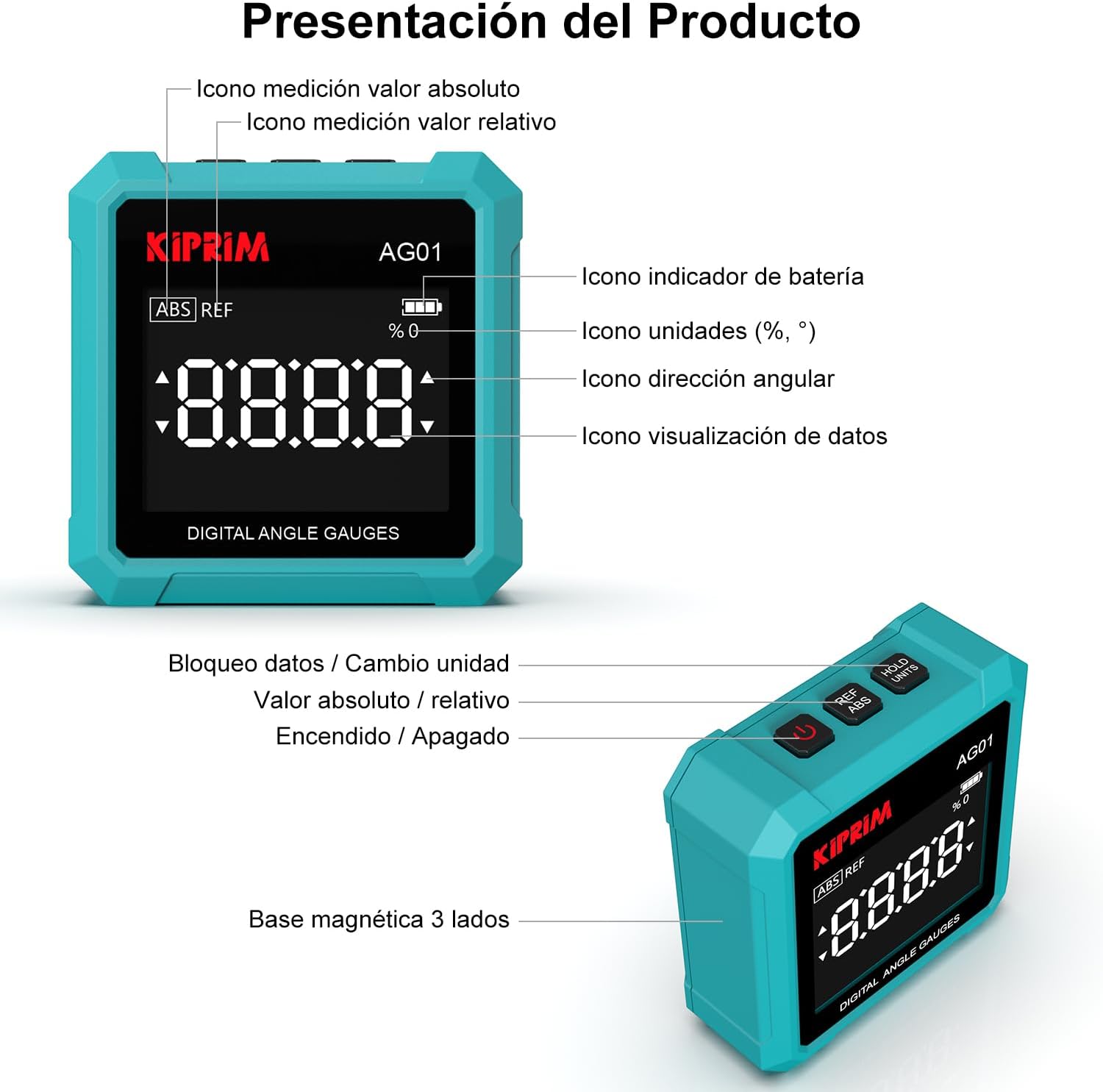
Figure 4: Product Presentation. A diagram illustrating the various parts of the inclinometer, including the LCD display, control buttons (Power, ABS/REF, HOLD/UNITS), and the 3-sided magnetic base.
- LCD Display: Shows angle readings, battery indicator, unit indicator, angular direction, and data visualization.
- Power Button: Turns the device on/off.
- ABS/REF Button: Switches between absolute and relative measurement modes.
- HOLD/UNITS Button: Locks the current reading (HOLD) or changes measurement units (degrees/percentage).
- 3-Sided Magnetic Base: Allows for secure attachment to metal surfaces.
3. Setup
3.1 Battery Installation
The Kiprim AG01 requires two 1.5V AAA batteries for operation. These are typically included with the product.
- Locate the battery compartment cover on the back of the device.
- Slide or unclip the cover to open the compartment.
- Insert two AAA batteries, ensuring correct polarity (+/-).
- Close the battery compartment cover securely.
3.2 Initial Calibration
For accurate measurements, it is recommended to perform an initial calibration or zero-setting on a known flat, level surface.
- Place the inclinometer on a perfectly flat and level surface.
- Press the Power button to turn on the device.
- In ABS mode, the display should ideally read 0.00°. If not, press and hold the ABS/REF button until the display shows 0.00° or a calibration sequence is initiated (refer to specific instructions if a calibration sequence appears).
- Once zeroed, the device is ready for use.
4. Operating Instructions
4.1 Power On/Off
- To turn on: Press the Power button.
- To turn off: Press and hold the Power button for approximately 3 seconds. The device will also automatically shut off after 3 minutes of inactivity.

Figure 5: Automatic Shut-off. An illustration showing the inclinometer on a surface with a timer indicating a 3-minute auto-off feature to preserve battery life.
4.2 Measurement Modes (Absolute and Relative)
The Kiprim AG01 offers two measurement modes:
- Absolute (ABS) Mode: Measures the angle relative to a true horizontal plane (0°). This is useful for determining the actual tilt of a surface.
- Relative (REF) Mode: Allows you to set any surface as a temporary 0° reference. This is ideal for measuring the angle difference between two surfaces or for transferring angles.
To switch between modes, press the ABS/REF button.

Figure 6: ABS and REF Modes. Illustrations demonstrating how the inclinometer measures angles in Absolute mode (relative to horizontal) and Relative mode (relative to a user-defined zero point).
4.3 Unit Switching (Degrees and Percentage)
The device can display measurements in degrees (°) or percentage (%).
- To switch units: Briefly press the HOLD/UNITS button.
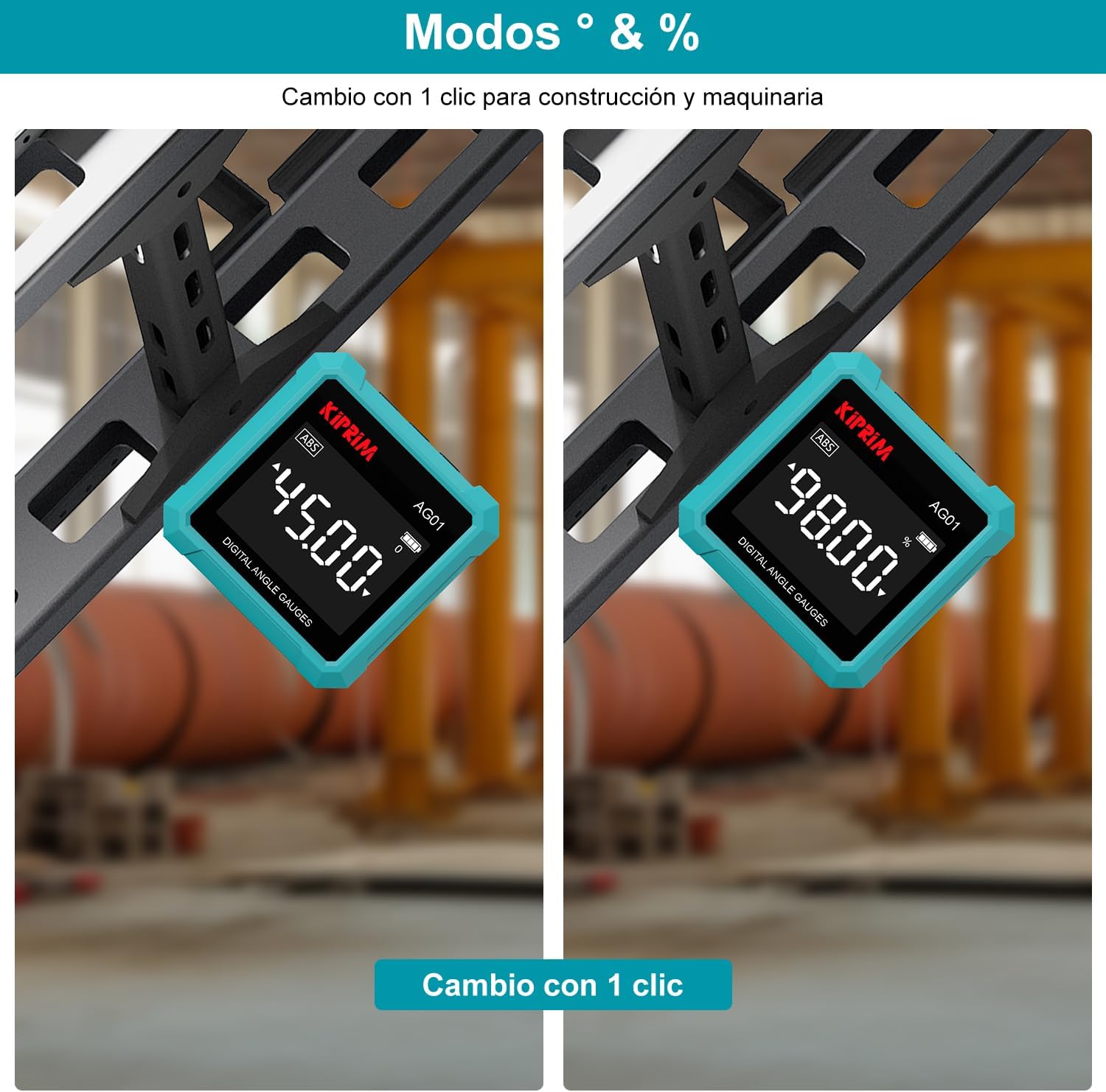
Figure 7: Degrees and Percentage. Images showing the inclinometer displaying angles in degrees (e.g., 45.00°) and percentage (e.g., 98.00%), illustrating the unit switching capability.
4.4 Hold Function
The Hold function allows you to freeze the current measurement on the display.
- To activate Hold: Briefly press the HOLD/UNITS button. The display will show 'HOLD' or a similar indicator.
- To release Hold: Briefly press the HOLD/UNITS button again.

Figure 8: Hold Function. An image showing a hand pressing the HOLD button on the inclinometer, with the display showing a locked reading, indicating the data hold feature.
4.5 Measurement Range (4x90°)
The inclinometer provides a full 360° measurement range, covering all four 90° quadrants without requiring a reset.
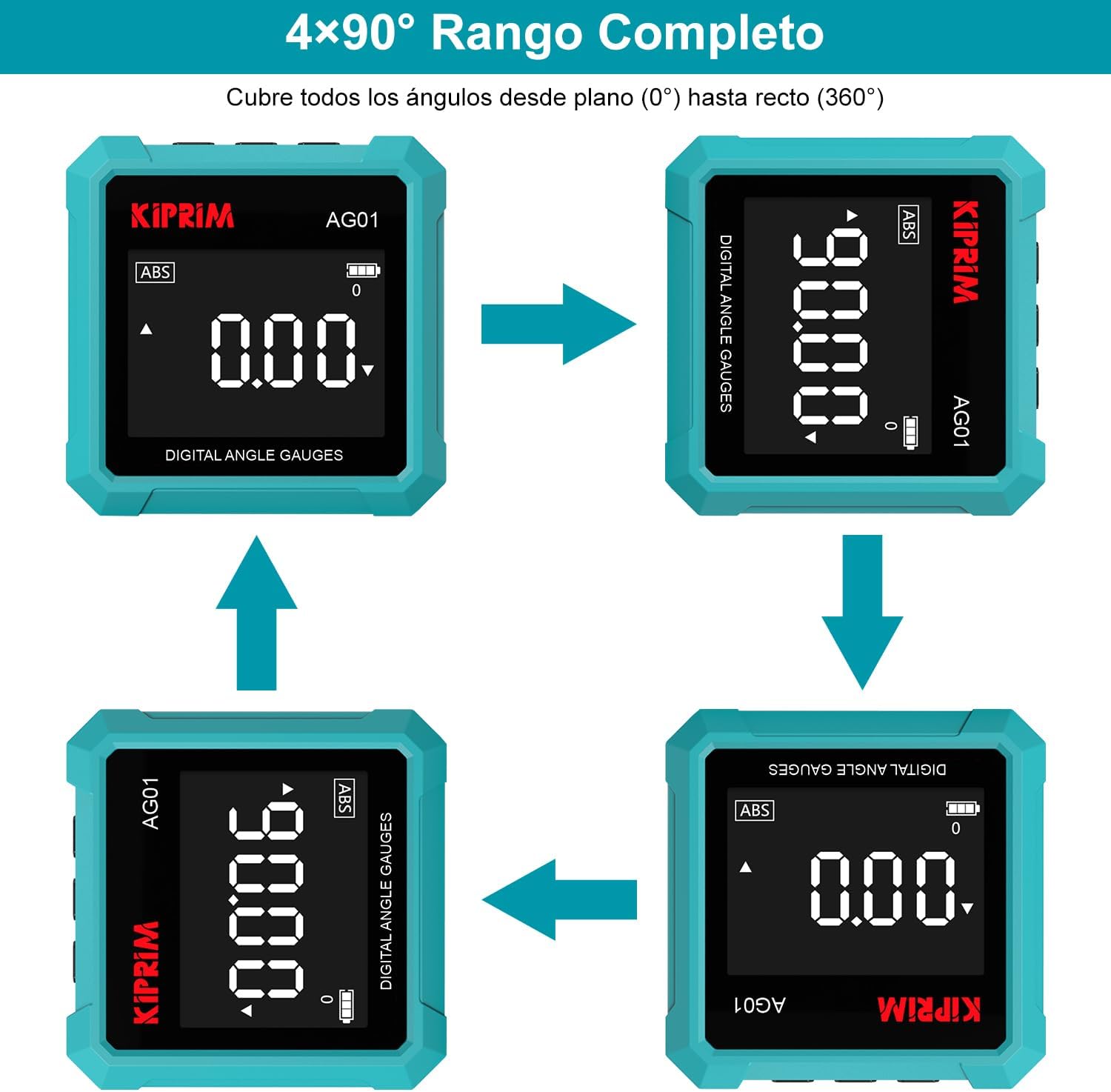
Figure 9: 4x90° Full Range. A sequence of images showing the inclinometer measuring angles across all four 90-degree quadrants, demonstrating its continuous 360-degree measurement capability.
4.6 Magnetic Base Usage
The 3-sided magnetic base allows for versatile and hands-free measurements on metal surfaces.
- Simply attach any of the three magnetic sides to a ferrous metal surface.
- Ensure the inclinometer is stable before taking a reading.
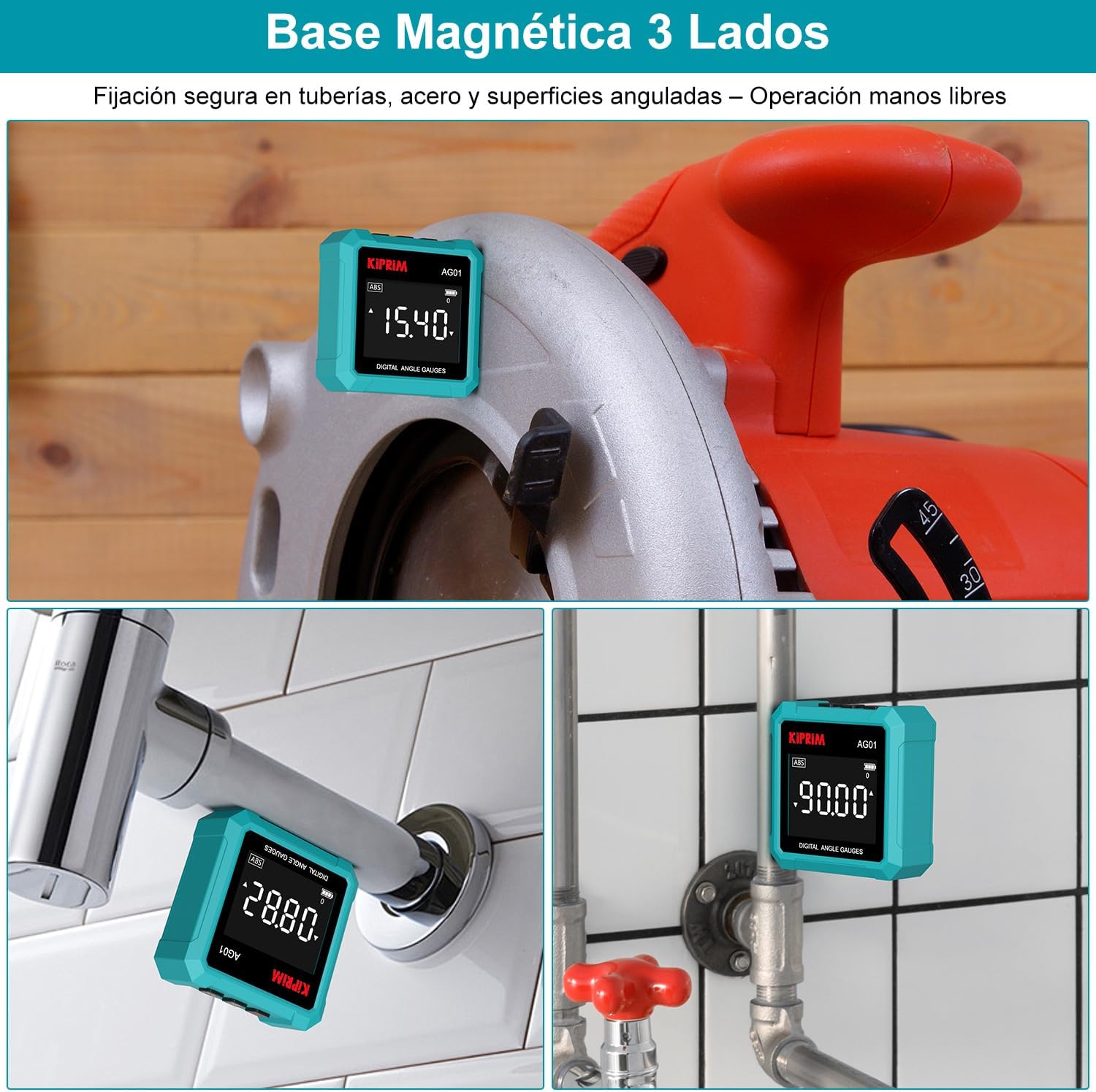
Figure 10: Magnetic Base Applications. Images illustrating the inclinometer attached to various metal surfaces, such as a circular saw blade, a pipe, and a metal frame, showcasing its magnetic versatility.
5. Maintenance
5.1 Cleaning
- Wipe the device with a soft, dry cloth.
- Do not use abrasive cleaners, solvents, or immerse the device in water.
- Keep the magnetic surfaces clean to ensure strong adhesion.
5.2 Battery Replacement
- When the battery indicator on the LCD display shows low power, replace the batteries promptly.
- Follow the battery installation steps in Section 3.1.
- Dispose of used batteries according to local regulations.
5.3 Storage
- Store the inclinometer in a dry, cool place, away from direct sunlight and extreme temperatures.
- If storing for an extended period, remove the batteries to prevent leakage.
6. Troubleshooting
If you encounter issues with your Kiprim AG01, refer to the following common problems and solutions:
| Problem | Possible Cause | Solution |
|---|---|---|
| Device does not turn on | Dead or incorrectly installed batteries | Check battery polarity; replace with new AAA batteries. |
| Inaccurate readings | Not properly calibrated; device moved during measurement; magnetic interference | Perform initial calibration (Section 3.2); ensure device is stable; move away from strong magnetic fields. |
| Display is dim or flickering | Low battery power | Replace batteries. |
| Magnetic base not adhering | Surface is not ferrous metal; magnetic base is dirty | Ensure surface is suitable for magnets; clean the magnetic base. |
7. Specifications
| Feature | Specification |
|---|---|
| Brand | Kiprim |
| Model Number | AG01 |
| Accuracy | ±0.2° |
| Resolution | 0.05° |
| Measurement Range | 4 x 90° (360°) |
| Units | Degrees (°), Percentage (%) |
| Display | Backlit LCD |
| Power Source | 2 x 1.5V AAA Alkaline Batteries |
| Automatic Shut-off | 3 minutes |
| Material | Polycarbonate (PC+15% GF) |
| Product Weight | 120 g |
| Dimensions | 7.3 x 7.2 x 2.9 cm (Package) |
| Operation Mode | Manual |
8. Warranty and Support
8.1 Warranty Information
Kiprim products are manufactured to high-quality standards. This product is covered by a limited warranty against defects in materials and workmanship from the date of purchase. Please retain your proof of purchase for warranty claims.
The warranty does not cover damage caused by misuse, unauthorized modification, accident, or normal wear and tear. For specific warranty terms and conditions, please refer to the documentation included with your purchase or contact Kiprim customer support.
8.2 Customer Support
For technical assistance, troubleshooting, or warranty inquiries, please contact Kiprim customer support through the official website or the retailer where the product was purchased. Please have your model number (AG01) and purchase information ready when contacting support.


