
Y&H GES-12KW-UP
Y&H 12kW Hybrid Solar Inverter (Model GES-12KW-UP) User Manual
Comprehensive instructions for installation, operation, and maintenance.
1. Introduction
This manual provides essential information for the safe and efficient operation of your Y&H 12kW Hybrid Solar Inverter, Model GES-12KW-UP. Please read this manual thoroughly before installation and use, and retain it for future reference.

Figure 1: Front view of the Y&H 12kW Hybrid Solar Inverter.
2. Safety Information
Adherence to safety guidelines is crucial for preventing injury and damage. This inverter is UL1741 certified, meeting US safety standards for grid integration.
2.1 General Safety Precautions
- Installation must be performed by qualified personnel.
- Ensure all wiring complies with local and national electrical codes.
- Do not attempt to repair the inverter yourself. Contact qualified service personnel.
- Keep the inverter away from flammable materials and moisture.
- Ensure proper grounding of the unit.
2.2 Protection Features
The inverter incorporates multiple protection mechanisms:
- Overload Protection
- Short-Circuit Protection
- Over-Temperature Protection
- Reverse Polarity Protection
- Under Voltage Protection
- Over Voltage Protection
- Over Charge Protection

Figure 2: Inverter Protection Features.

Figure 3: UL1741 and other certifications for the inverter.
3. Product Overview
The Y&H 12kW Hybrid Solar Inverter is an all-in-one solution combining solar power, battery storage, and grid electricity. It supports 120V/240V split-phase output and features dual MPPT trackers for high efficiency.
3.1 Key Features
- Output: 120V/240V Split-Phase (L1-L2: 208V/240V, L1-N/L2-N: 120V)
- PV Input: 500V maximum with dual MPPT trackers (99.9% efficiency)
- Battery Compatibility: Supports GEL/SLD/FLD lead-acid and LFP/NCM lithium batteries (BMS communication via RS485/CAN)
- Charging Current: 220A maximum charging current
- Operating Modes: Four charging modes (Solar Only, Utility Priority, Solar Priority, Hybrid) and four load output working modes.
- Parallel Operation: Expandable up to 6 units for increased power output.
- Grid Integration: Anti-feed-in CT detection for self-consumption mode.
- Monitoring: Wi-Fi/RS485 monitoring for remote control via app.
- Safety: UL1741 Certified.
- Battery Management: Low battery recovery (52V) and over-discharge cutoff (42V).
- Output Waveform: Pure sine wave output.
- Battery-Free Operation: Direct PV-to-load power (solar + grid hybrid) without a battery.

Figure 4: Key Features of the Inverter.
3.2 Inverter Ports and Connections
Familiarize yourself with the inverter's connection ports before installation.
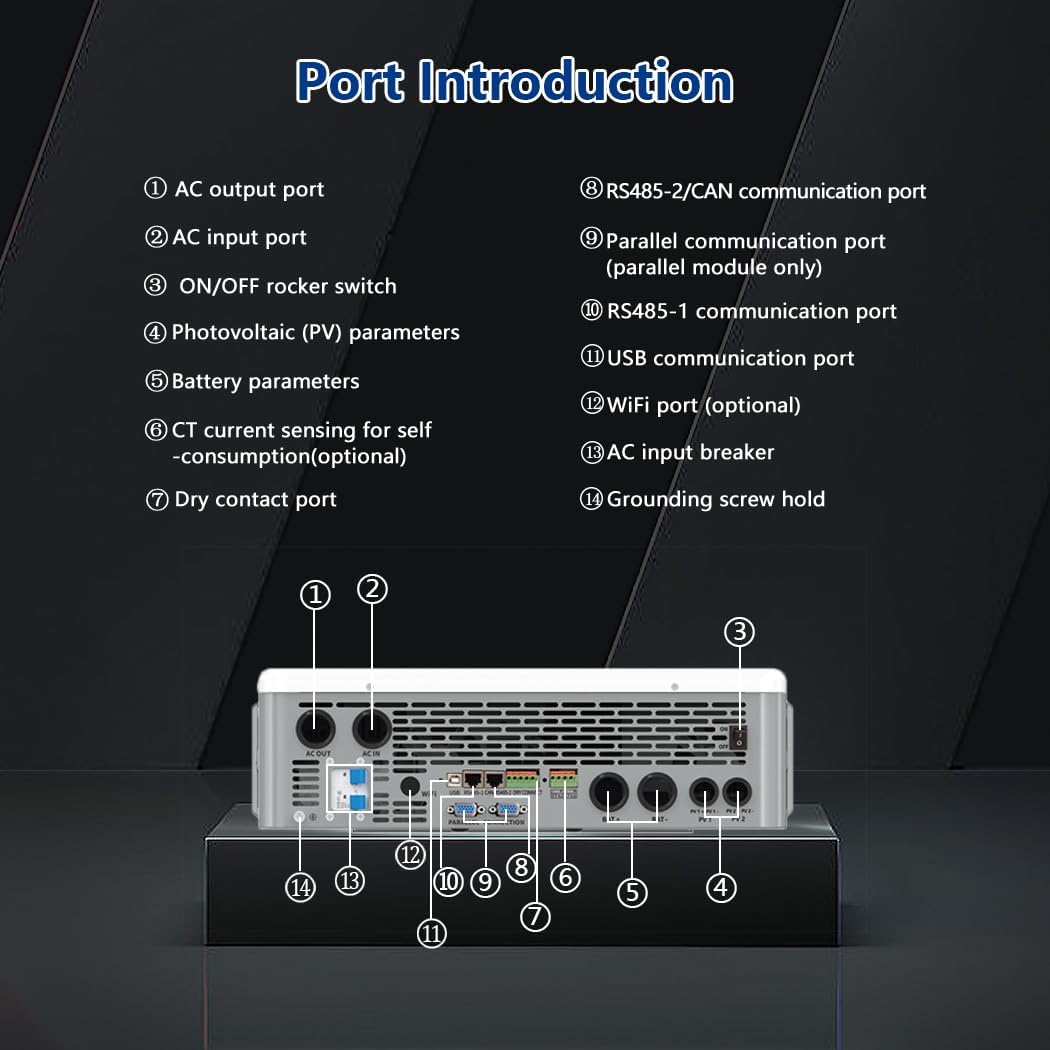
Figure 5: Inverter Port Introduction.
- AC output port
- AC input port
- ON/OFF rocker switch
- Photovoltaic (PV) parameters
- Battery parameters
- CT current sensing for self-consumption (optional)
- Dry contact port
- RS485-2/CAN communication port
- Parallel communication port (parallel module only)
- RS485-1 communication port
- USB communication port
- WiFi port (optional)
- AC input breaker
- Grounding screw hold
4. Setup and Installation
Proper installation is critical for the inverter's performance and safety. Refer to the following guidelines.
4.1 Mounting the Inverter
- Choose a suitable location that is well-ventilated, dry, and protected from direct sunlight and extreme temperatures.
- Ensure the mounting surface can support the inverter's weight (approximately 52.4 pounds).
- Use the provided expansion bolts and pre-drilled mounting holes for secure installation.
4.2 Wiring Connections
All wiring should be performed by a qualified electrician. Ensure all power sources are disconnected before making any connections.
4.2.1 PV Array Connection
Connect the solar panel array to the PV input terminals. Observe correct polarity. The inverter supports a maximum PV input of 500V.
4.2.2 Battery Connection
Connect the 48V battery bank to the battery terminals. The inverter is compatible with lead-acid (GEL/SLD/FLD) and lithium (LFP/NCM) batteries. Ensure BMS communication is established for lithium batteries via RS485/CAN.

Figure 6: Battery Compatibility and Battery-Free Operation.
4.2.3 AC Input and Output Connection
Connect the AC grid input and the AC load output according to the split-phase or single-phase configuration required for your application.
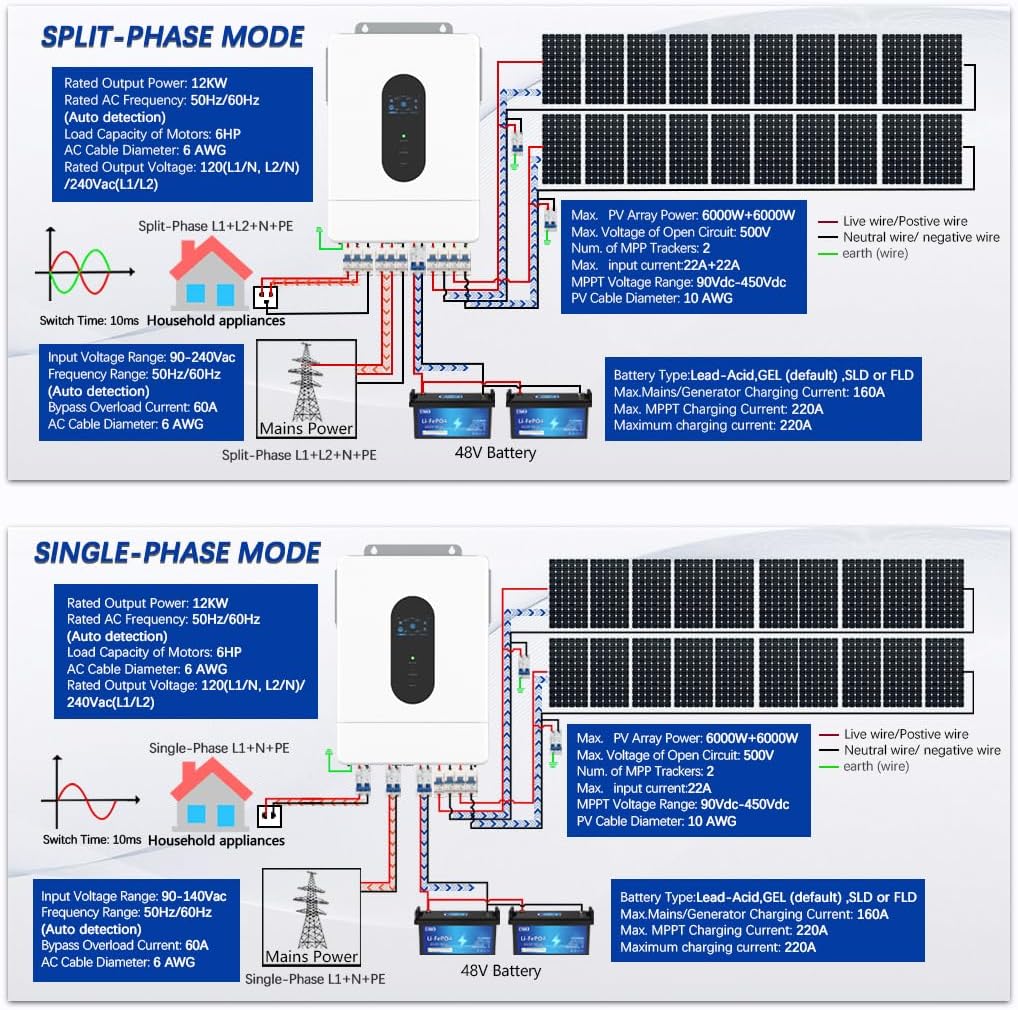
Figure 7: Split-Phase and Single-Phase Wiring Diagrams.
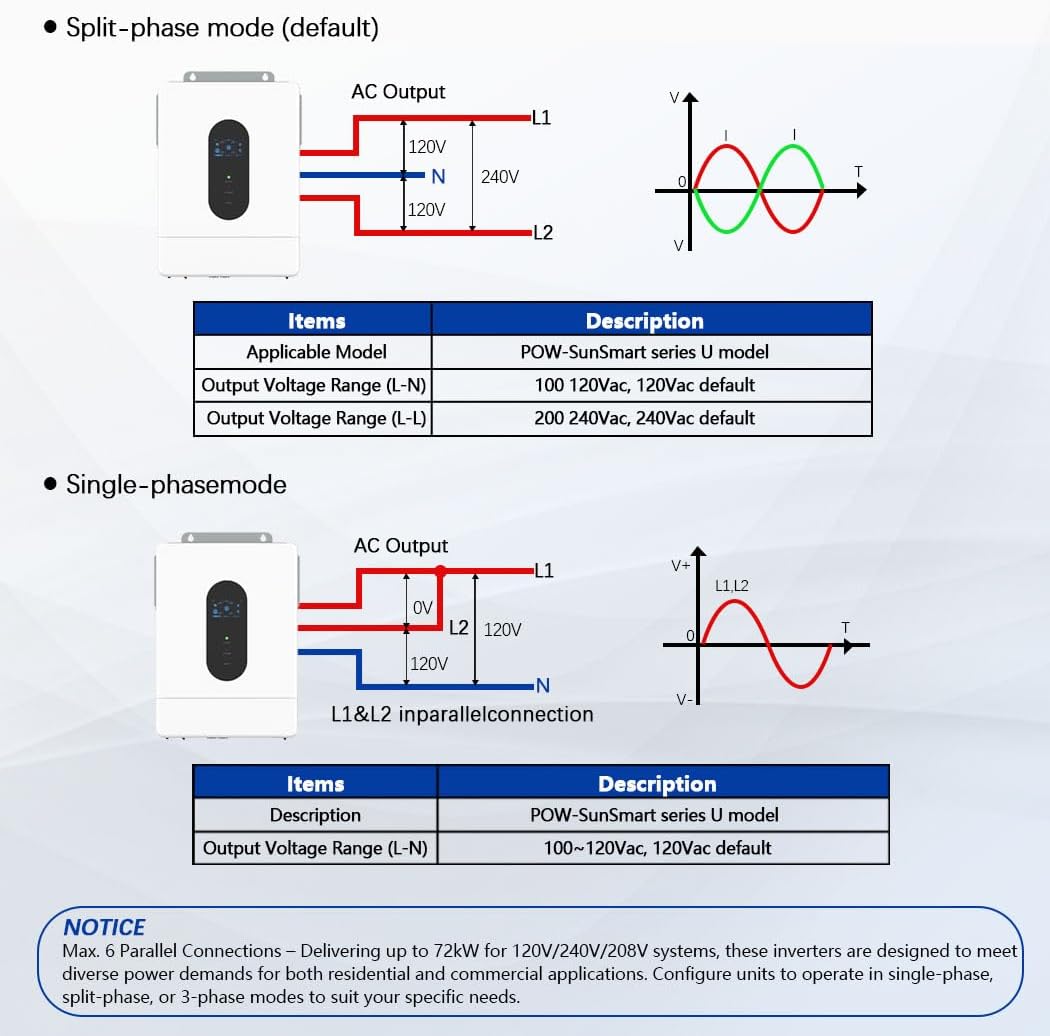
Figure 8: Output Voltage Configurations.
4.3 Parallel Operation
The inverter supports parallel operation of up to 6 units to achieve higher power output, up to 72kW for 120V/240V/208V systems. This allows for flexible configuration in single-phase, split-phase, or 3-phase modes.

Figure 9: Parallel Connection Configurations.
5. Operating Instructions
Understand the various operating modes and display functions for optimal use of your inverter.
5.1 LCD Display Screen
The LCD screen provides real-time monitoring of the photovoltaic system's operating data.

Figure 10: LCD HD Display Screen Overview.
5.2 Operating Modes
The inverter offers flexible charging and load output modes to suit different energy management strategies.
5.2.1 Charging Modes
- Solar Only: Charges batteries exclusively from solar power.
- Utility Priority: Prioritizes grid power for charging, using solar as a supplement.
- Solar Priority: Prioritizes solar power for charging, using grid as a supplement.
- Hybrid (PV + Grid): Utilizes both solar and grid power for charging.
5.2.2 Load Output Working Modes
- Solar Priority: Prioritizes solar power to supply loads.
- Utility Priority: Prioritizes grid power to supply loads.
- Solar and Utility: Uses both solar and grid power for loads.
- Inverter Priority Output: Prioritizes inverter output (from battery/solar) for loads.
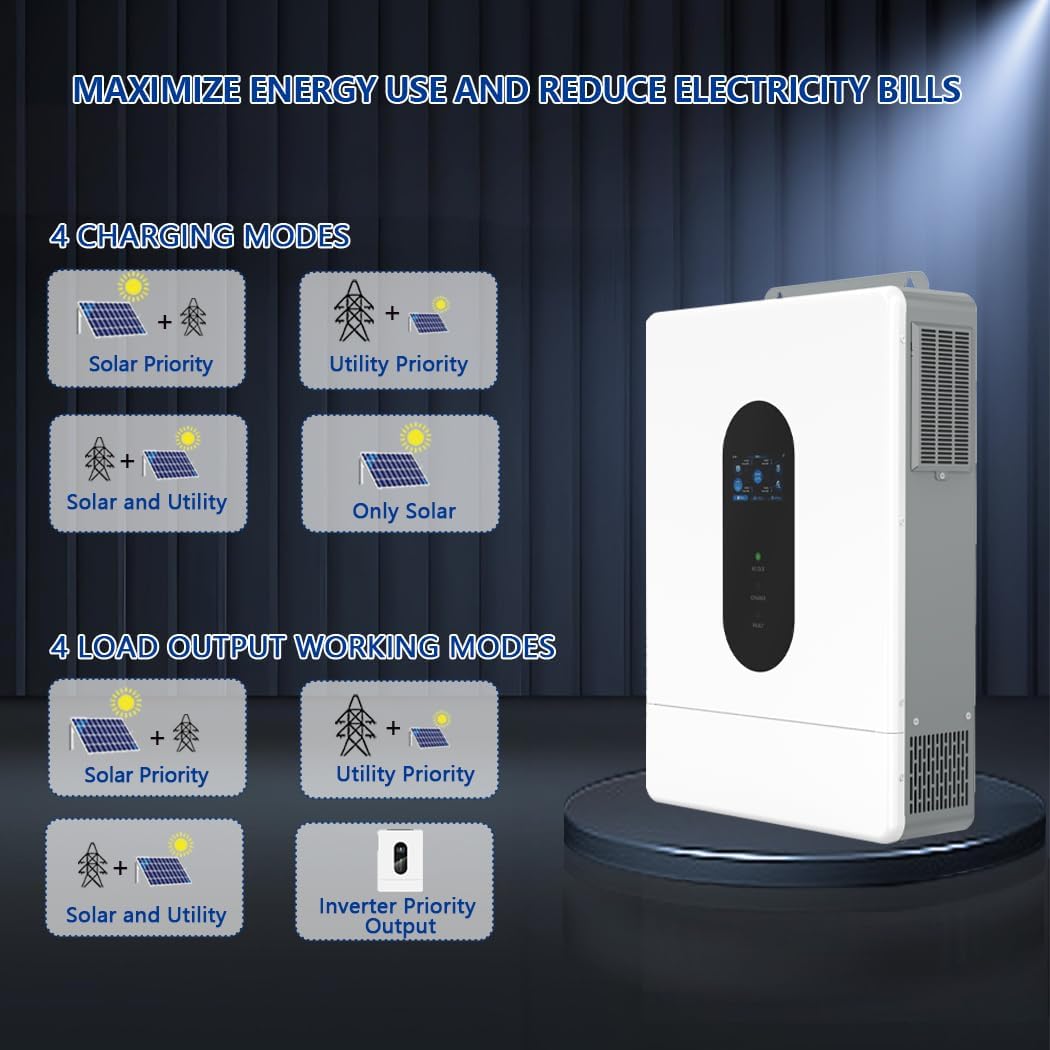
Figure 11: Charging and Load Output Working Modes.
5.3 Battery-Free Operation
The inverter can supply power to loads directly from the PV array or AC grid without requiring a connected battery. This mode is useful for specific applications or emergencies.
5.4 Smart Time-Based Control
Configure up to 3 customizable periods for charging and discharging to optimize solar usage and manage electricity costs. This feature allows automatic switching between grid and battery power during peak and off-peak hours, while also protecting battery lifespan.
5.5 Remote Monitoring and Control
The inverter supports Wi-Fi and RS485 communication for remote monitoring and control via a dedicated app (SmartESS App). A Wi-Fi module may need to be purchased separately.

Figure 12: SmartESS App Monitoring Interface.
6. Maintenance
Regular maintenance ensures the longevity and optimal performance of your inverter.
- Cleaning: Periodically clean the inverter's exterior with a dry cloth. Ensure ventilation openings are free from dust and debris. Do not use liquid cleaners.
- Inspection: Regularly inspect all wiring connections for tightness and signs of corrosion or damage.
- Environment: Ensure the operating environment remains within specified temperature and humidity ranges.
- Cooling Fans: The inverter is equipped with intelligent cooling fans. Ensure they are not obstructed.
7. Troubleshooting
This section provides solutions for common issues. For problems not listed here, contact customer support.
| Problem | Possible Cause | Solution |
|---|---|---|
| Inverter not powering on | No DC input from PV or battery; AC input breaker tripped; ON/OFF switch off. | Check PV connections and voltage; verify battery connection and voltage; reset AC input breaker; ensure ON/OFF switch is in the 'ON' position. |
| No AC output | Overload; short circuit; inverter fault; AC output breaker tripped. | Reduce load; check for short circuits in wiring; check inverter display for fault codes; reset AC output breaker. |
| Battery not charging | PV input too low; charging mode incorrect; battery fault; communication error with lithium battery BMS. | Verify PV array output; check selected charging mode; inspect battery health; ensure RS485/CAN communication is active for lithium batteries. |
| High temperature warning | Insufficient ventilation; obstructed cooling fans; ambient temperature too high. | Ensure adequate clearance around the inverter; clean cooling fan vents; relocate inverter to a cooler environment if necessary. |
8. Specifications
Technical specifications for the Y&H 12kW Hybrid Solar Inverter, Model GES-12KW-UP.
| Parameter | Value |
|---|---|
| Brand Name | Y&H |
| Model Name | GES-12KW-UP |
| Item Model Number | GES-12KW-UP |
| Wattage | 12000 watts |
| Item Weight | 52.4 pounds |
| Package Dimensions | 24.4 x 17.7 x 5.19 inches |
| Power Source | Solar Powered |
| Batteries Included? | No |
| Batteries Required? | No |
| Date First Available | July 31, 2025 |
| UPC | 704334203822 |
9. Warranty and Support
For warranty information or technical support, please refer to the product packaging or contact Y&H customer service through their official channels. Keep your purchase receipt for warranty claims.