
1. Introduction
Thank you for choosing the HIENA PRO Professional Cordless Hair Clippers, Model HYN-273. This device is designed for precise and efficient hair and beard trimming, suitable for both professional and home use. Please read this manual thoroughly before operating the clippers to ensure safe and optimal performance.
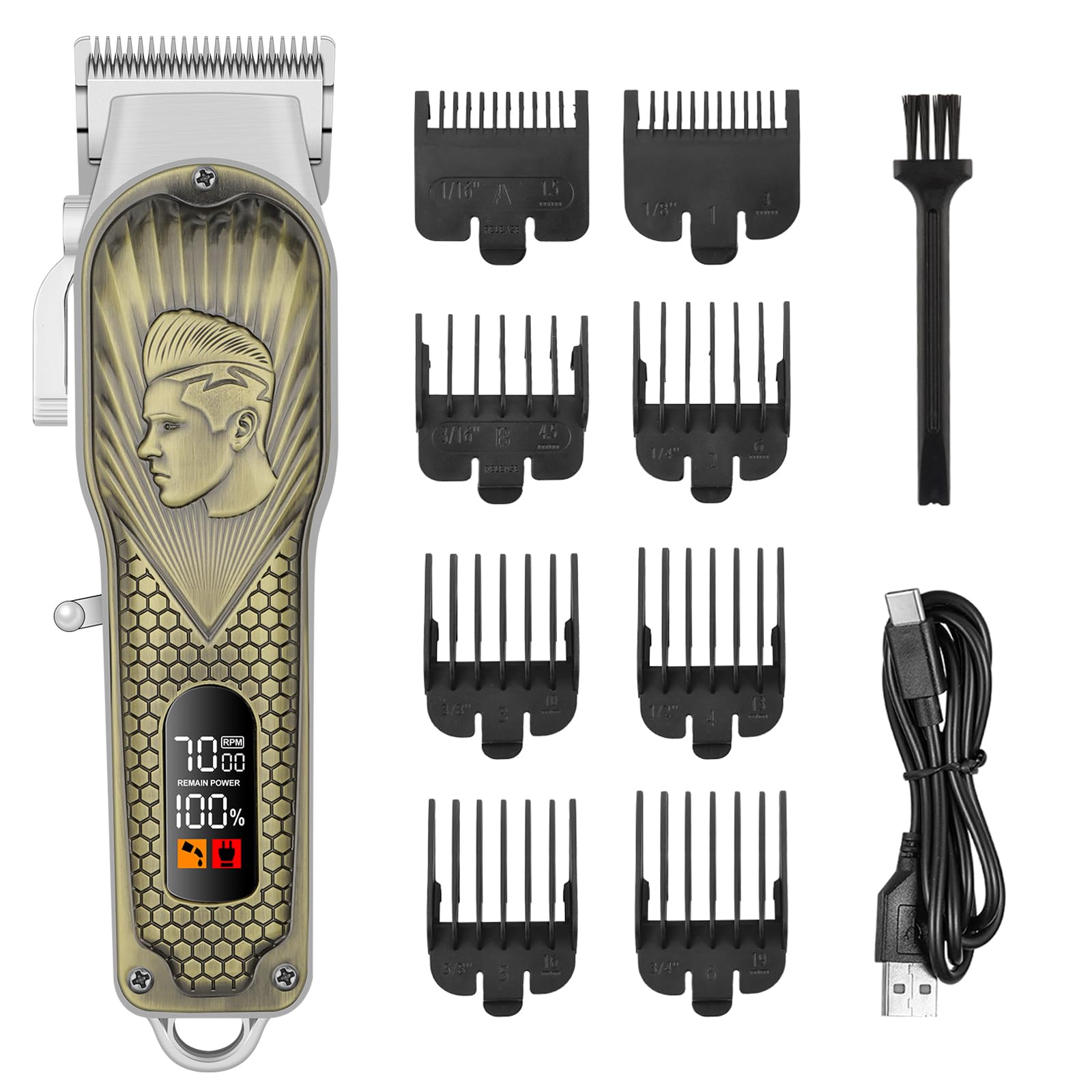
Image 1.1: HIENA PRO Professional Cordless Hair Clippers. This image shows the bronze-colored clipper with its sleek design and an LED display.
2. Safety Instructions
- Read all instructions before using this appliance.
- Keep the appliance away from water. Do not use it near bathtubs, showers, basins, or other vessels containing water.
- Do not immerse the appliance in water or any other liquid.
- Always unplug the appliance immediately after use and before cleaning.
- Do not use the appliance with a damaged cord or plug, or if it is not working properly.
- Keep the cord away from heated surfaces.
- This appliance is not intended for use by persons (including children) with reduced physical, sensory, or mental capabilities, or lack of experience and knowledge, unless they have been given supervision or instruction concerning use of the appliance by a person responsible for their safety.
- Children should be supervised to ensure that they do not play with the appliance.
- Use this appliance only for its intended use as described in this manual.
- Do not use attachments not recommended by the manufacturer.
- Never drop or insert any object into any opening.
- Do not operate where aerosol (spray) products are being used or where oxygen is being administered.
- Always store the appliance in a moisture-free area.
3. Package Contents
The HIENA PRO Professional Cordless Hair Clippers package includes the following items:
- 1 x Cordless Hair Clipper (Model HYN-273)
- 8 x Guide Combs (various widths)
- 1 x Cleaning Brush
- 1 x USB Charging Cable

Image 3.1: Illustration of the HIENA PRO clipper, guide combs, cleaning brush, and USB charging cable included in the package.
4. Product Overview
The HIENA PRO Cordless Hair Clipper features a robust design with key components for effective grooming:
- Adjustable Blades: Precision-engineered blades for sharp, smooth cuts and fades.
- LED Display: Shows battery life and motor speed. It also indicates when to charge or lubricate the blades.
- Power Button: Controls power on/off.
- USB-C Charging Port: For convenient charging.
- Guide Comb Attachment Points: For securing the various guide combs.

Image 4.1: Diagram highlighting the adjustable blades, LED display, power button, and USB-C charging port on the HIENA PRO clipper.
5. Charging the Clippers
The HIENA PRO Cordless Hair Clippers are equipped with a high-performance battery and a versatile USB-C charging port.
5.1 Initial Charge
Before first use, fully charge the clippers for approximately 3 hours.
5.2 Charging Procedure
- Ensure the clipper is turned off.
- Insert the USB-C charging cable into the charging port on the bottom of the clipper.
- Connect the other end of the USB charging cable to a compatible USB power adapter (not included) or a USB port on a computer.
- The LED display will indicate the charging status.
- A full charge provides up to 2.5 hours of continuous runtime.

Image 5.1: Close-up view of the USB-C charging port located at the base of the HIENA PRO clipper, with the charging cable inserted.
6. Setup
6.1 Attaching Guide Combs
The clipper comes with 8 different guide combs to achieve various hair lengths.
- Select the desired guide comb.
- Align the comb with the clipper blade and slide it firmly until it clicks into place.
- To remove, gently pull the comb away from the blade.

Image 6.1: A user demonstrating how to attach one of the guide combs to the HIENA PRO hair clipper.
6.2 Adjusting Blades
The clipper features adjustable blades for precise fades and closer cuts. Refer to the clipper's side lever or mechanism for adjustment. Ensure the clipper is off before making adjustments.
7. Operating the Clippers
7.1 General Hair Trimming
- Ensure hair is clean and dry.
- Attach the desired guide comb.
- Turn on the clipper using the power button.
- Start trimming from the bottom of the head, moving upwards against the direction of hair growth.
- Use smooth, overlapping strokes for an even cut.
7.2 Beard Trimming
- Ensure beard is clean and dry.
- Select a longer guide comb for initial trimming, then progressively shorter ones if desired.
- Trim in the direction of hair growth for a smoother finish, or against for a closer cut.
- Use the clipper without a guide comb for precise edging and detailing around the neckline and cheekbones.
8. Maintenance
Regular maintenance ensures the longevity and performance of your HIENA PRO clippers.
8.1 Cleaning the Blades
- Turn off and unplug the clipper.
- Remove any attached guide comb.
- Use the provided cleaning brush to remove loose hairs from the blades and the clipper body.
- For a more thorough clean, the blades can be carefully detached (refer to specific instructions if provided with the product for blade removal).

Image 8.1: A hand using the small cleaning brush to remove hair clippings from the clipper blades.
8.2 Lubrication
The LED display will indicate when lubrication is needed. Apply a few drops of clipper oil (not included) to the blades after every few uses or when the lubrication icon appears. Turn on the clipper for a few seconds to distribute the oil evenly.
9. Troubleshooting
| Problem | Possible Cause | Solution |
|---|---|---|
| Clipper does not turn on. | Battery is depleted. | Charge the clipper fully. |
| Poor cutting performance. | Blades are dull or clogged with hair. | Clean and lubricate the blades. Consider blade replacement if dull. |
| Clipper gets hot during use. | Extended use or lack of lubrication. | Allow the clipper to cool down. Lubricate blades. |
| Clipper not charging. | Faulty cable or power adapter. | Try a different USB-C cable or power adapter. Ensure connections are secure. |
10. Specifications
- Model: HYN-273
- Brand: HIENA PRO
- Color: Bronze
- Power Source: Battery Powered (1 x 12V battery included)
- Charging Port: USB-C
- Charging Time: Approximately 3 hours
- Runtime: Up to 2.5 hours (continuous)
- Material: Metal, Plastic
- Recommended Uses: Head (Hair, Beard, Mustache)
- Package Dimensions: 8.86 x 4.21 x 3.35 inches
- Weight: 1.57 Pounds
- Manufacturer: HIENA PRO
11. Warranty and Support
HIENA PRO products are manufactured to high-quality standards. For warranty information, please refer to the warranty card included with your purchase or contact HIENA PRO customer support. Keep your purchase receipt as proof of purchase.
For technical support or inquiries, please visit the official HIENA PRO website or contact their customer service department through the contact information provided with your product.
12. Official Product Videos
No relevant official seller videos were found for this product.