
Introduction
This manual provides detailed instructions for the assembly, operation, and maintenance of your Wemart Computer Desk. Please read all instructions carefully before beginning assembly and retain this manual for future reference.
Safety Information
Your safety is important. Please observe the following guidelines:
- Always assemble the desk according to the provided instructions.
- Do not exceed the maximum weight limit of 330 lbs (150 kg) to maintain stability and safety.
- Keep all small parts and packaging materials away from children.
- Use appropriate tools as specified in the assembly steps.
- Ensure all connections are secure and tightened before using the desk.
- Do not stand or climb on the desk.
Package Contents
Before assembly, verify that all components listed below are present and undamaged. If any parts are missing or damaged, please contact customer support.
- Desktop Panel
- Drawer Units (3)
- Desk Legs / Frame Components (U-shaped and plate frame)
- Storage Shelves
- Assembly Hardware (screws, cam locks, dowels, etc.)
- Assembly Tools (e.g., Allen wrench)
- Instruction Manual
Assembly Instructions
It is recommended to assemble the desk on a soft, clean surface to prevent scratches. Two people may be required for certain steps to ensure stability and ease of assembly.
- Unpack and Identify Parts: Carefully unpack all components and lay them out. Refer to the parts list to identify each piece.
- Assemble the Frame: Begin by attaching the U-shaped frame and plate frame components. Ensure all connections are secure to form a stable base.

Image: Double frame support for enhanced stability.
- Attach Storage Shelves: Secure the lower storage shelves to the assembled frame.

Image: Lower storage shelves providing additional space.
- Assemble Drawer Units: Construct the three drawer units according to the instructions provided for the drawer slides and panels.

Image: Assembled drawer units with integrated locks.
- Attach Desktop Panel: Carefully place the desktop panel onto the assembled frame and drawer units. Secure it using the provided hardware.
- Final Checks: Ensure all screws are tightened and the desk is stable and level before placing any items on it.
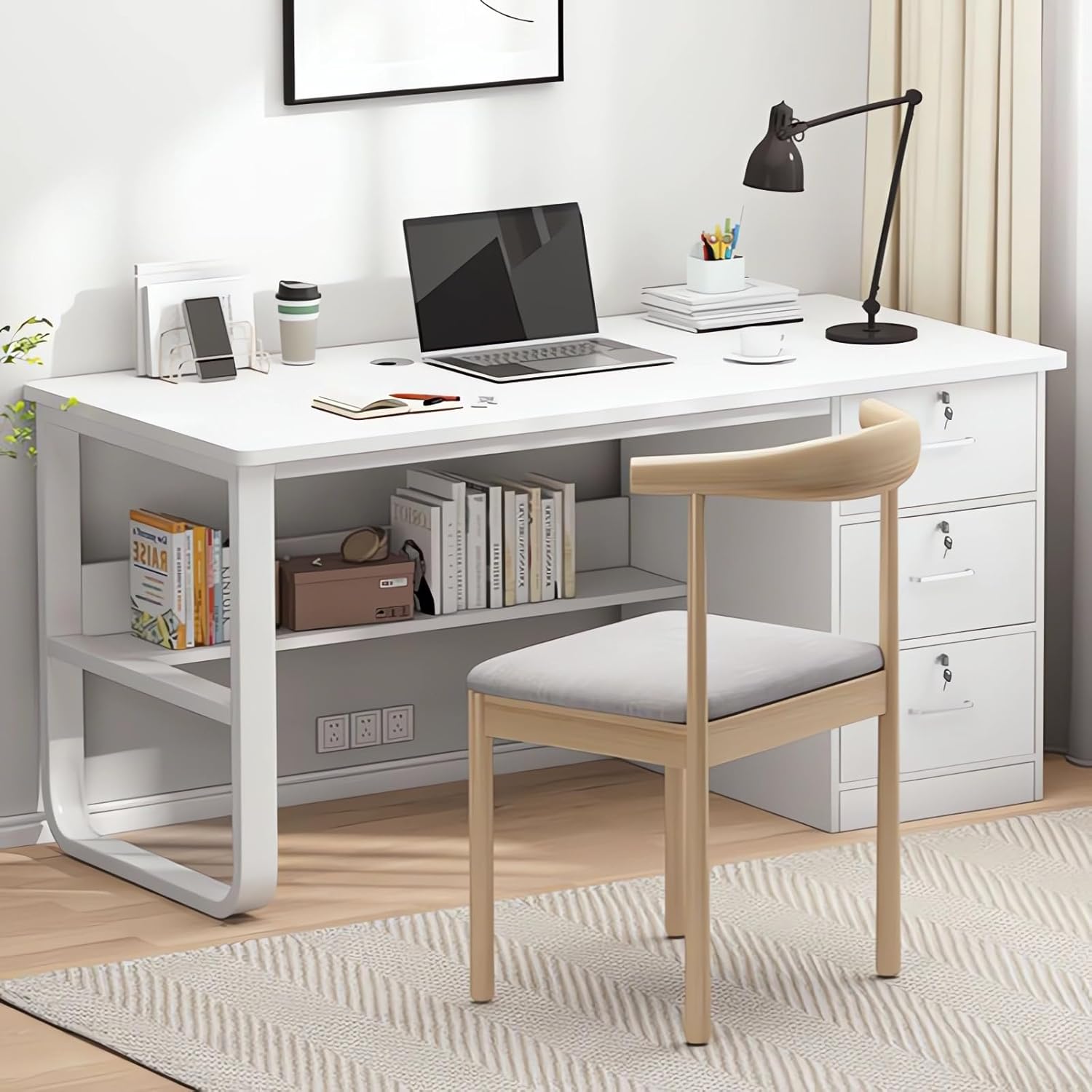
Image: Fully assembled Wemart Computer Desk.
Operating Instructions
Your Wemart Computer Desk is designed for efficient use in home office or study environments.
Desktop Usage
The 120x50cm desktop provides ample space for a computer, keyboard, mouse, and other work essentials. The integrated threading holes help manage cables for a tidy workspace.

Image: Spacious desktop for work and study.
Drawer Usage
The three drawers offer secure storage for documents, office supplies, and personal items. Each drawer is equipped with a lock for privacy. Insert the key and turn to lock or unlock.
Storage Shelves
Utilize the lower storage shelves for books, files, or small electronic devices, keeping your workspace organized and accessible.
Care and Maintenance
Proper care will extend the life and appearance of your desk.
- Cleaning: Wipe surfaces with a soft, slightly damp cloth. Avoid abrasive cleaners, harsh chemicals, or solvents, as these can damage the finish.
- Spills: Immediately wipe up any spills to prevent moisture damage or staining to the wood finish.
- Heat: Do not place hot items directly on the desktop. Always use coasters or protective pads.
- Weight Distribution: Distribute weight evenly across the desktop and shelves. Do not exceed the maximum weight capacity.
- Inspection: Periodically check all screws and connections to ensure they remain tight and secure. Retighten if necessary.
Troubleshooting Common Issues
Desk is Unstable or Wobbly
If the desk feels unstable, ensure all assembly screws are fully tightened. Check that the desk is placed on a level surface. If your floor is uneven, you may need to use shims or adjust any integrated leg levelers (if present).

Image: Comparison of stable double-frame support versus single U-shaped support.
Drawers Do Not Slide Smoothly
Check for any obstructions in the drawer slides. Ensure the drawer unit is assembled correctly and aligned within the desk frame. Verify that the drawer slides are properly installed and lubricated if necessary.
Missing Parts
Refer to the 'Package Contents' list. If parts are missing, please contact Wemart customer support with your purchase details.
Product Specifications
| Feature | Detail |
|---|---|
| Brand | Wemart |
| Model Number | CT-1027 |
| Color | White |
| Product Dimensions (W x D x H) | 120 cm x 50 cm x 75 cm |
| Material | Engineered Wood (Walnut Wood finish) |
| Item Weight | 16 Kilograms |
| Weight Capacity | Up to 330 lbs (150 kg) |
| Special Features | 3 Lockable Drawers, Cable Management Hole, Ergonomic Design, Double Frame Support |
Warranty and Customer Support
Wemart provides a 24-month warranty covering quality-related issues from the date of purchase. For warranty claims, replacements, or full refunds, please contact Wemart customer support with your purchase details.
For assistance, questions, or suggestions regarding your Wemart Computer Desk, please visit the Wemart Store on Amazon or contact our dedicated support team directly. We are committed to providing the best shopping experience for every customer.