
Introduction
Thank you for purchasing the Arulvmrn Vanity Desk. This manual provides detailed instructions for assembly, operation, maintenance, and troubleshooting to ensure safe and optimal use of your new vanity desk. Please read this manual thoroughly before assembly and retain it for future reference.

Figure 1: Arulvmrn Vanity Desk with Lighted Mirror and Charging Station.
Safety Instructions
- Always follow assembly instructions carefully. Incorrect assembly can lead to instability and injury.
- Do not overload drawers or shelves. Distribute weight evenly to prevent tipping.
- Keep all electrical components (mirror lights, charging station) away from water or excessive moisture.
- Ensure the power cord is not pinched or damaged during assembly or use.
- Unplug the vanity desk from the power outlet before cleaning or performing any maintenance.
- This product is intended for indoor use only.
- Keep small parts and packaging materials away from children to prevent choking hazards.
Package Contents
Before beginning assembly, verify that all parts listed in the included assembly guide are present and undamaged. If any parts are missing or damaged, please contact customer support.
- Vanity Desk Components (Engineered Wood Panels)
- HD Lighted Mirror
- 5 Drawer Units
- Storage Shelves and Side Cabinet
- Charging Station Unit (with 2 standard plug sockets and 2 USB ports)
- Metal Legs and Handles
- Assembly Hardware (screws, dowels, cam locks, etc.)
- Assembly Tools (usually an Allen wrench, screwdriver may be required)
- Instruction Manual
Assembly Instructions
Assembly is required for this product. It is recommended to have two people for assembly. Please follow the step-by-step instructions provided in the separate assembly guide included in your package. Ensure all components are correctly oriented before tightening screws.
- Unpack and Identify Parts: Carefully unpack all components and lay them out on a clean, soft surface to prevent scratches. Identify each part using the labels in the assembly guide.
- Assemble the Main Desk Frame: Begin by connecting the main desk panels according to the diagrams.
- Install Drawers and Sliding Rails: Attach the drawer slides to the desk frame and assemble the drawer boxes. Ensure smooth operation.
- Attach Legs: Securely fasten the metal legs to the desk base.
- Mount the Mirror and Storage Unit: Carefully attach the lighted mirror and the side storage cabinet/shelves to the main desk structure. Connect any necessary wiring for the mirror lights.
- Install Charging Station: Integrate the charging station unit into its designated slot and connect its power cord.
- Final Checks: Ensure all screws are tightened, and the desk is stable. Plug the vanity desk into a suitable power outlet.

Figure 2: Overview of vanity desk features for assembly reference.
Operating Instructions
LED Lighted Mirror
The vanity desk features a 29.53" HD mirror with integrated dimmable LED lighting, offering three color modes to suit various lighting conditions and preferences.
- Power On/Off: Touch the sensitive touch switch on the mirror surface to turn the lights on.
- Change Light Color: Short press the touch switch to cycle through the three LED lighting colors:
- Cool Light
- Warm Light
- Warm Yellow Light
- Adjust Brightness: Long press the touch switch to adjust the brightness level from 10% to 100%. Release when the desired brightness is reached.
- Turn Off Power Indicator Light: In the off mode, long press the switch button to turn off the power indicator light.

Figure 3: Mirror lighting modes and touch control.
Charging Station
The integrated charging station provides convenient power access for your electronic devices.
- Standard AC Outlets: Use the two 125V/12A standard plug sockets to power devices such as hair dryers, curling irons, or other small appliances.
- USB Ports: Use the 5V/2A USB output and 5V/20W Type-C output to charge smartphones, tablets, and other USB-powered devices.
- Ensure the vanity desk is plugged into a wall outlet for the charging station to function.

Figure 4: Charging station details.
Product Features
The Arulvmrn Vanity Desk is designed with several key features for durability, aesthetics, and functionality.
- Durable Construction: Made from scratch-resistant, moisture-resistant engineered wood (MDF boards) for longevity.
- Thick Backboard Design: Features a 0.47-inch thick back panel for enhanced stability and durability.
- Smooth Drawer Operation: Drawers are equipped with smooth sliding rails on ball bearings for effortless opening and closing.
- Elegant Hardware: Sturdy metal handles and golden decorative strips add to the modern aesthetic.
- Aesthetic Acrylic Elements: The side cabinet features aesthetic acrylic details.
- Tempered Glass Countertop: Provides clear visibility of items stored beneath, is durable, easy to clean, and enhances the modern style.

Figure 5: Thick Backboard Design.
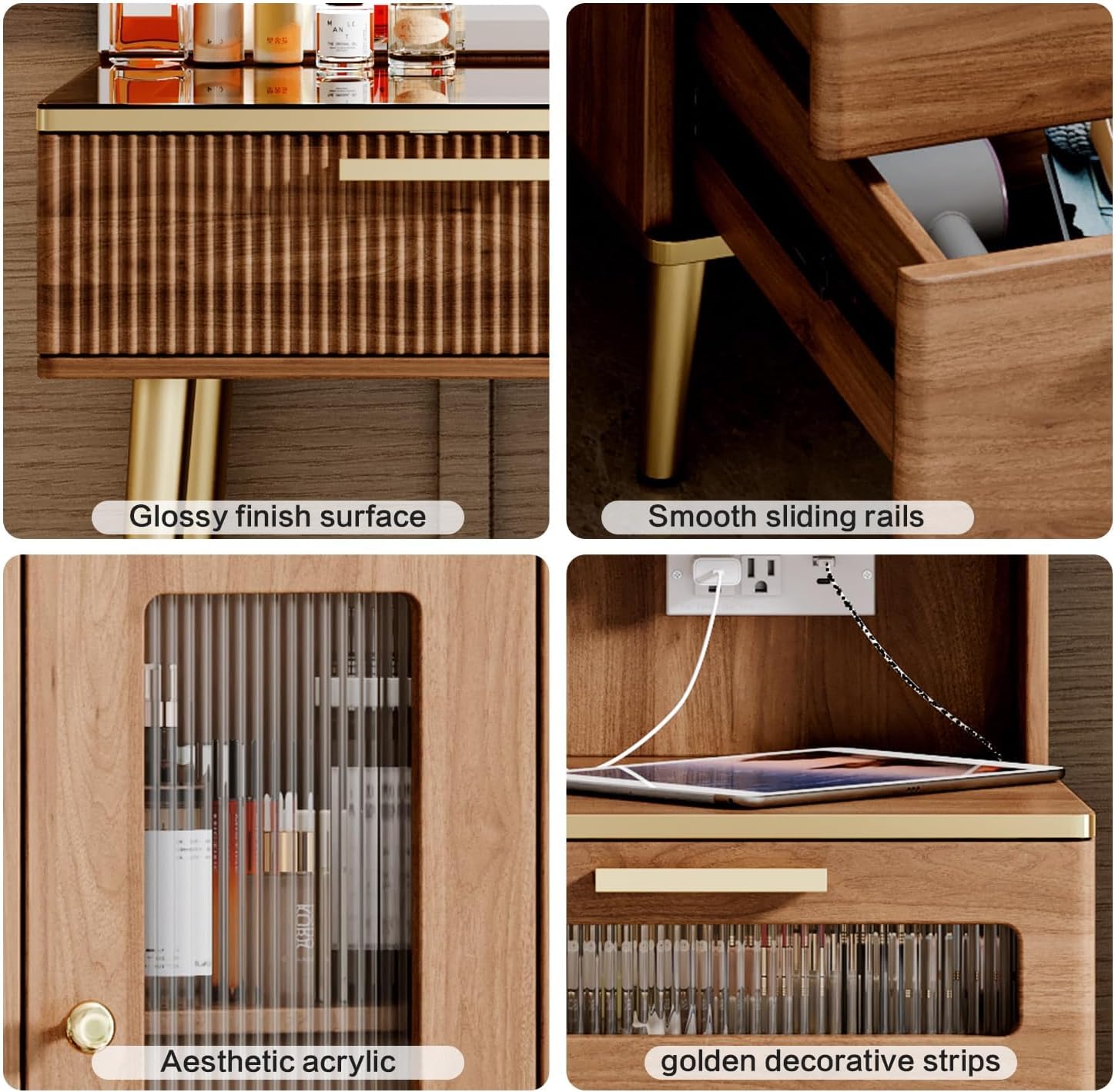
Figure 6: Quality details including glossy finish, smooth rails, and aesthetic acrylic.
Storage Features
The Arulvmrn Vanity Desk is designed with extensive storage to keep your cosmetics and accessories organized.
- 5 Drawers: The desk includes five spacious drawers for storing various items. The drawers feature smooth sliding rails for easy access.
- Detachable Dividers: Some drawers may include detachable dividers to customize storage compartments for smaller items.
- Open Shelves: Three open shelves provide easy access storage for frequently used items or decorative displays.
- Hidden Storage with Glass Door: A two-layer hidden storage shelf with a glass door offers discreet storage while protecting contents from dust.
- Spacious Desktop: The large desktop surface provides ample space for daily use.

Figure 7: Ample storage features.
Maintenance and Care
Proper care will extend the life and appearance of your vanity desk.
- Cleaning the Surface: Wipe the desk surfaces with a soft, damp cloth. Avoid harsh chemicals or abrasive cleaners that could damage the finish.
- Tempered Glass Top: The tempered glass countertop is scratch-resistant and wear-resistant. Clean with a glass cleaner and a soft cloth for a streak-free shine.
- Mirror Care: Clean the mirror surface with a non-abrasive glass cleaner. Do not spray cleaner directly onto the mirror to avoid liquid seeping into the electrical components. Spray onto a cloth first.
- Dusting: Regularly dust all surfaces with a dry, soft cloth.
- Avoid Direct Sunlight: Prolonged exposure to direct sunlight can cause fading or damage to the wood finish.
- Liquid Spills: Immediately wipe up any liquid spills to prevent staining or damage to the engineered wood.

Figure 8: Tempered glass countertop for easy maintenance.
Troubleshooting
If you encounter any issues with your vanity desk, please refer to the following common problems and solutions.
| Problem | Possible Cause | Solution |
|---|---|---|
| Mirror lights not turning on. |
|
|
| Charging station not working. |
|
|
| Drawers are stiff or not sliding smoothly. |
|
|
| Desk feels unstable. |
|
|
Specifications
| Feature | Detail |
|---|---|
| Model Number | B0FKMP6ZT1 |
| Color | Brown |
| Material | Engineered Wood |
| Product Dimensions (D x W x H) | 15.75"D x 47.24"W x 53.35"H |
| Item Weight | 52 Pounds |
| Number of Drawers | 5 |
| Mirror Size | 29.53" HD Lighted Mirror |
| LED Light Modes | 3 (Cool, Warm, Warm Yellow) with dimmable brightness |
| Charging Station | 2 Standard AC Outlets (125V/12A), 1 USB-A (5V/2A), 1 USB-C (5V/20W) |
| Power Cord Length | 6.56 feet |

Figure 9: Product Dimensions. Note: All sizes are manually measured; expect a 0.39-1.18 inch error.
Warranty and Support
Arulvmrn is committed to providing high-quality products and excellent customer service. If you encounter any product problems, including missing parts, damaged components, or issues during assembly or operation, please do not hesitate to contact our customer support team.
Please refer to your purchase documentation or the retailer's website for specific warranty details and contact information. Our team is ready to assist you with any questions or concerns.