Introduction
This manual provides essential instructions for the safe and efficient use, setup, operation, and maintenance of your NEWPET NP892 Cat Water Fountain Pump. Please read this manual thoroughly before using the product and retain it for future reference.
Setup Instructions
The NEWPET NP892 pump is designed for universal compatibility with most automatic pet water fountains. Follow these steps for initial setup:
- Unpack: Carefully remove the pump from its packaging.
- Inspect: Check the pump for any visible damage. Do not use if damaged.
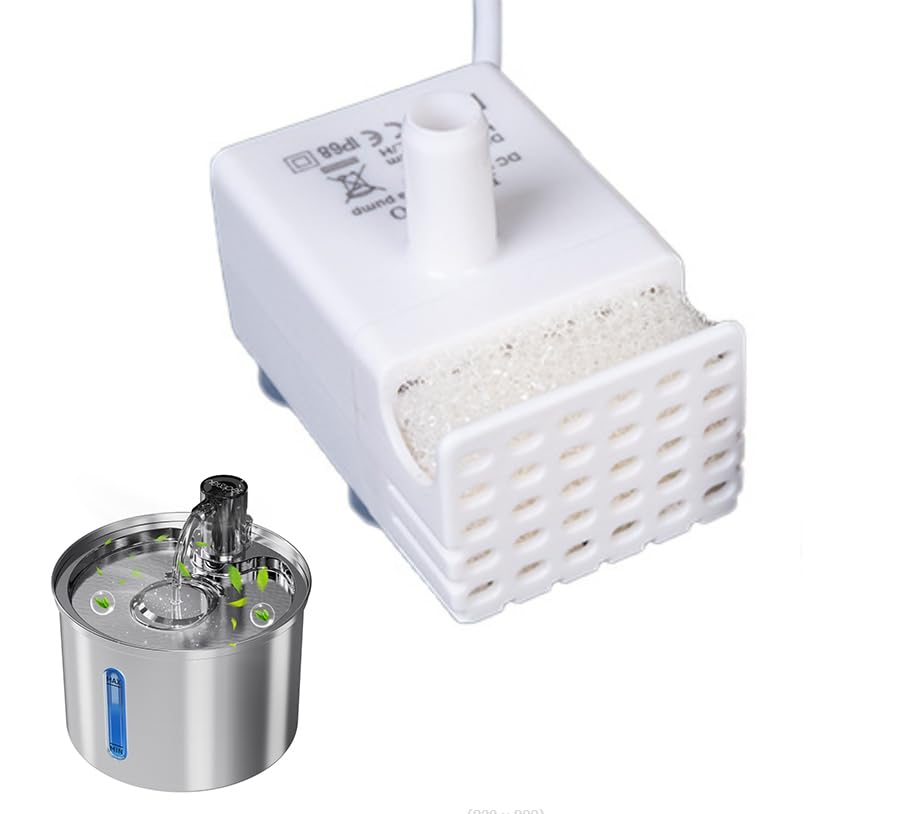
- Placement: Position the pump securely at the bottom of your pet water fountain's reservoir. Ensure the suction cups on the pump base adhere firmly to the fountain surface.
- Connect Tubing: Attach the fountain's water outlet tubing to the pump's nozzle.
- Fill Fountain: Fill the pet water fountain with clean water to the recommended level, ensuring the pump is fully submerged.
- Power Connection: Connect the USB power cable to a compatible DC 5V USB power adapter (not included).
- Power On: Plug the power adapter into an electrical outlet. The pump should begin operating, and the LED indicator will light up blue.
Operating Instructions
The NEWPET NP892 pump is designed for continuous, quiet operation, providing fresh water for your pets.
- Automatic Operation: Once powered on and submerged, the pump will continuously circulate water.
- LED Indicator:
- Blue Light: Indicates normal operation.
- Red Light: Indicates a low water level. The pump will automatically shut off to prevent dry running and damage. Refill the fountain with water immediately.
- Low Noise Design: The brushless motor operates at less than 40dB, ensuring a quiet environment that will not disturb your pet's sleep or your household.
Maintenance and Cleaning
Regular cleaning is crucial for the longevity and optimal performance of your pump, as well as for your pet's health. It is recommended to clean the pump every 2 weeks.
- Disconnect Power: Always unplug the fountain from the power outlet before performing any maintenance.
- Disassemble: Carefully remove the pump from the fountain. Disassemble the pump components, including the filter cover, impeller cover, and impeller.
- Clean Components: Rinse all parts under running water. Use a small brush (not included) to remove any hair, debris, or mineral deposits from the impeller, impeller housing, and filter. Ensure the impeller spins freely.
- Clean Fountain: Clean the entire water fountain according to its specific instructions.
- Reassemble: Reassemble the pump components in reverse order, ensuring all parts are securely in place.
- Reinstall: Place the cleaned pump back into the fountain, ensuring it is fully submerged before reconnecting power.
Troubleshooting
If you encounter issues with your NEWPET NP892 pump, refer to the following common problems and solutions:
| Problem | Possible Cause | Solution |
|---|---|---|
| Pump not working (no water flow, no light) |
|
|
| Pump making unusual noise or weak flow |
|
|
| Red LED indicator is on |
|
|
Specifications
| Feature | Detail |
|---|---|
| Model Number | NEWPET NP892 (DR-DC160) |
| Material | Plastic |
| Working Voltage | DC 5V |
| Load Current | 280mA |
| Load Power | 1.5 W |
| Max Lift Height | 50 cm |
| Max Flow Rate | 160 L/H |
| Outlet Diameter | 10.5 mm |
| Continuous Lifespan | > 10,000 hours |
| Noise Level | ≤ 40 dB |
| Waterproof Rating | IP68 |
| Working Temperature | 0-60 ℃ / 0-100 ℃ |
| LED Indicator | Red (low water/shutdown warning), Blue (normal operation) |
| Cable Length | 150 cm / 4.9 feet (with DC5.5 * 2.1 plug) |
| Product Size | 4.3 * 4.3 * 2.8 cm / 1.6 * 1.6 * 1.1 inch |
| Product Weight | 120 g / 4.2 oz |
Warranty and Support
For warranty information or technical support, please refer to the documentation provided with your original purchase or contact NEWPET customer service through the retailer where the product was purchased. Keep your purchase receipt as proof of purchase.
You can also visit the NEWPET store on Amazon for more information and contact options.