Introduction
This manual provides detailed instructions for the installation, operation, and maintenance of your Power Acoustik MICRO4-1500D 4-Channel Class D Car Amplifier. Please read this manual thoroughly before attempting installation or operation to ensure proper use and to prevent damage to the unit or your vehicle's audio system.
The Power Acoustik MICRO4-1500D is a compact, high-performance 4-channel Class D amplifier designed to deliver powerful and clear audio in a small footprint. Its versatile configuration allows for powering four speakers in full-range mode or bridging into two channels for subwoofers.
Safety Information
- Professional Installation Recommended: Installation of car audio components requires experience with electrical wiring and audio system configuration. If you are unsure about any part of the installation process, consult a qualified professional.
- Disconnect Battery: Always disconnect the vehicle's negative battery terminal before starting any electrical work to prevent short circuits and damage.
- Proper Wiring: Use appropriate gauge wiring for power, ground, and speaker connections as specified in this manual. Incorrect wiring can lead to overheating, fire, or component failure.
- Ventilation: Ensure the amplifier is mounted in a location that allows for adequate airflow to prevent overheating. Do not cover the amplifier with carpets or other materials.
- Avoid Moisture: Do not expose the amplifier to moisture or water.
- Secure Mounting: Mount the amplifier securely to prevent it from becoming a projectile in the event of a sudden stop or accident.
What's in the Box
Upon unpacking your Power Acoustik MICRO4-1500D amplifier, please verify that all items are present:
- 1 x Ultra-Compact 4-Channel Class D Amplifier (MICRO4-1500D)
- User Manual (this document)
- Mounting Hardware (screws, etc.)
Product Features
- Ultra-Compact Design: Engineered to fit in tight spaces, ideal for stealth installations, motorcycles, or vehicles with limited room.
- Flexible Configuration: Capable of powering four speakers in full-range mode or bridged into two powerful channels for subwoofers.
- Tuning Precision: Features built-in high-pass (HPF) and low-pass (LPF) crossovers for precise soundstage control.
- Military-Grade Build Quality: Constructed with a military-grade PCB and advanced internal components for durability in extreme conditions.
- Integrated Protection: Includes protection against thermal overload, short circuits, and power surges.
- Seamless Integration: Wide RCA input sensitivity (200mV–8V) allows connection to both factory and aftermarket head units.
Setup and Installation
Proper installation is crucial for optimal performance and safety. Follow these steps carefully.
1. Mounting Location
Choose a mounting location that provides adequate ventilation and is protected from moisture. Common locations include under seats, in the trunk, or behind panels. Ensure the amplifier is securely fastened to a solid surface.

Image: The compact Power Acoustik MICRO4-1500D amplifier installed in a vehicle, demonstrating its small footprint and ease of integration into various spaces.
2. Power Connections
- Power (+12V): Connect a heavy-gauge wire (e.g., 8 AWG or larger, depending on total system power) from the amplifier's +12V terminal to the positive terminal of the vehicle's battery. Install an appropriate fuse holder with a fuse (not included) within 18 inches of the battery.
- Ground (GND): Connect a heavy-gauge wire of the same size as the power wire from the amplifier's GND terminal to a clean, unpainted metal surface of the vehicle chassis. Ensure a good electrical connection.
- Remote Turn-On (REM): Connect a smaller gauge wire (e.g., 18 AWG) from the amplifier's REM terminal to the remote output of your head unit. This wire turns the amplifier on and off with your head unit.
3. Audio Input Connections
The MICRO4-1500D features RCA inputs for connecting to your head unit's pre-amp outputs.

Image: Detailed view of the amplifier's input side, highlighting the RCA inputs, gain adjustment knobs, and crossover frequency controls for both front and rear channels.
- Connect RCA cables from your head unit's front and rear pre-amp outputs to the corresponding FRONT and REAR RCA inputs on the amplifier.
- The amplifier supports input sensitivity from 200mV to 8V.
4. Speaker Output Connections
Connect your speakers to the amplifier's speaker output terminals. The amplifier can operate in 4-channel full-range mode or 2-channel bridged mode.
- 4-Channel Mode: Connect each speaker to its dedicated positive (+) and negative (-) terminal. Ensure correct polarity.
- 2-Channel Bridged Mode: For higher power output to subwoofers, bridge two channels. Refer to the diagram on the amplifier for specific bridged connections (typically using the positive terminal of one channel and the negative terminal of the adjacent channel). The minimum impedance for bridged operation is 4 ohms.
Operating and Adjustments
Once installed, you can fine-tune the amplifier's settings for optimal audio performance.
1. Gain Control
The GAIN control adjusts the input sensitivity of the amplifier to match the output level of your head unit. Start with the gain set to minimum (MIN). Gradually increase the gain until you hear distortion, then back off slightly. This is not a volume control; setting it too high can cause distortion and damage to speakers.
2. Crossover Settings (X-OVER)
The MICRO4-1500D features selectable high-pass (HP) and low-pass (LP) filters for each channel pair (FRONT and REAR).
- LPF (Low-Pass Filter): When selected, this filter allows only frequencies below the set frequency to pass through. This is typically used for subwoofers. Adjust the FREQ knob to set the desired cutoff frequency (e.g., 50Hz-500Hz).
- HPF (High-Pass Filter): When selected, this filter allows only frequencies above the set frequency to pass through. This is typically used for full-range speakers to prevent them from playing low bass frequencies they cannot reproduce effectively. Adjust the FREQ knob to set the desired cutoff frequency (e.g., 50Hz-500Hz).
- FULL (Full-Range): When neither HPF nor LPF is selected, the amplifier will pass the full audio frequency range.
Experiment with these settings to achieve the desired sound balance and protect your speakers.
Maintenance
The Power Acoustik MICRO4-1500D amplifier requires minimal maintenance to ensure long-lasting performance.
- Cleaning: Periodically wipe the amplifier's exterior with a soft, dry cloth. Do not use harsh chemicals or abrasive cleaners.
- Ventilation: Ensure that the amplifier's cooling fins are free from dust and debris to maintain proper heat dissipation.
- Connections: Occasionally check all power, ground, and speaker connections to ensure they are secure and free from corrosion.
Troubleshooting
If you experience problems with your amplifier, refer to the following common issues and solutions:
| Problem | Possible Cause | Solution |
|---|---|---|
| No Power / No Sound | Blown fuse; Loose power/ground/remote wire; Faulty head unit remote output. | Check and replace fuse; Verify all power, ground, and remote connections; Test head unit remote output. |
| Distorted Sound | Gain set too high; Improper crossover settings; Speaker impedance too low; Damaged speakers. | Reduce gain; Adjust crossover settings; Check speaker impedance (ensure it meets amplifier requirements); Inspect speakers for damage. |
| Amplifier Overheats | Insufficient ventilation; Speaker impedance too low; Prolonged high-power operation. | Ensure adequate airflow around amplifier; Check speaker impedance; Reduce volume or allow amplifier to cool. |
| No Sound from One Channel | Loose RCA or speaker connection; Faulty RCA cable; Damaged speaker. | Check all connections; Replace RCA cables; Test speaker with another amplifier. |
If these steps do not resolve your issue, please contact Power Acoustik customer support.
Specifications
The following are the technical specifications for the Power Acoustik MICRO4-1500D 4-Channel Car Amplifier:
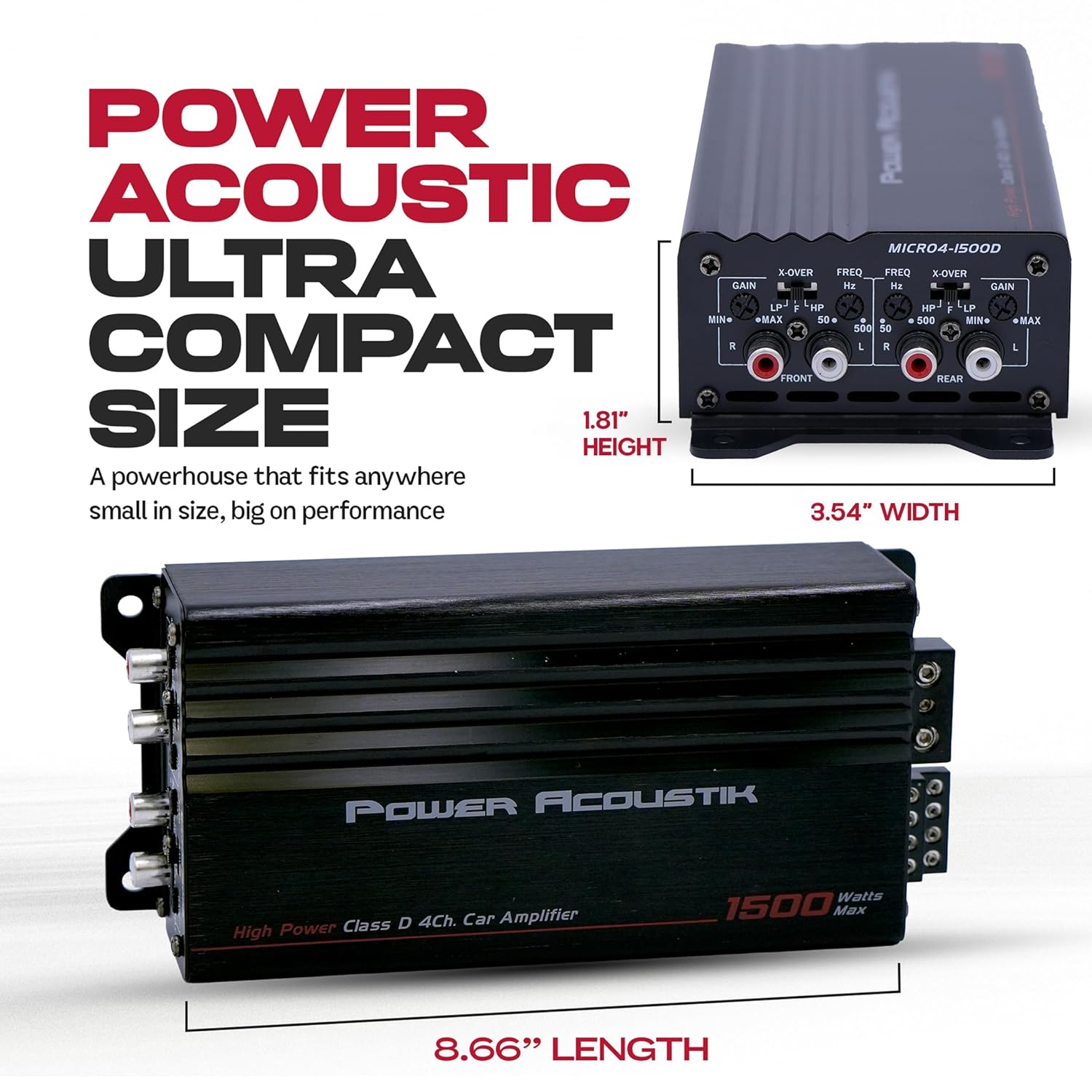
Image: Visual representation of the amplifier's compact dimensions, crucial for planning installation in confined spaces.
- Model Number: MICRO4-1500D
- Product Dimensions (L x W x H): 8.66 x 3.54 x 1.81 inches
- Item Weight: 2.79 pounds
- Max Power Output: 1500 Watts
- Amplifier Class: Class D
- Channels: 4-Channel (Bridgeable to 2-Channel)
- Input Sensitivity: 200mV – 8V (RCA)
- Crossovers: High-Pass Filter (HPF), Low-Pass Filter (LPF)
- UPC: 709483065840
Warranty and Support
Power Acoustik products are designed for reliability and performance. For specific warranty details, please refer to the warranty card included with your product or visit the official Power Acoustik website.
For technical assistance, troubleshooting beyond this manual, or warranty claims, please contact Power Acoustik customer support through their official channels. Keep your purchase receipt and product model number (MICRO4-1500D) handy when contacting support.
Manufacturer: Power Acoustik


