
FLANUR AT-SH74-WF
FLANUR 1500W PTC Ceramic Smart Space Heater (Model AT-SH74-WF) Instruction Manual
Brand: FLANUR
Model: AT-SH74-WF
Introduction
This manual provides essential information for the safe and efficient operation of your FLANUR 1500W PTC Ceramic Smart Space Heater. Please read all instructions carefully before use and retain this manual for future reference.
Key Features:
- Smart Control: Supports voice control via 'Havaworks' App (compatible with Alexa & Google Assistant) and remote control.
- Powerful Heating: Advanced 1500W PTC ceramic heating technology warms spaces up to 300 sq.ft. rapidly.
- 70° Oscillation: Distributes heat evenly across the room.
- Quiet Operation: Operates at a whisper-quiet 23-36 dB, ideal for bedrooms and offices.
- 12-Hour Timer: Customize operation duration for convenience.
- Safety Features: ETL-certified, V-0 flame-retardant materials, overheat protection, tip-over protection, optional 24-hour auto-shutoff, and child lock.
- Multiple Modes: Heat mode (H1-H3), ECO mode (5-35°C / 41-95°F), and Fan-Only mode for air circulation.
- Auto-Resume: Remembers last settings after a power outage.
- Portable Design: Ergonomic carry handle for easy movement.
Setup
1. Unboxing and Assembly
Carefully remove all components from the packaging. Ensure all parts are present before assembly.
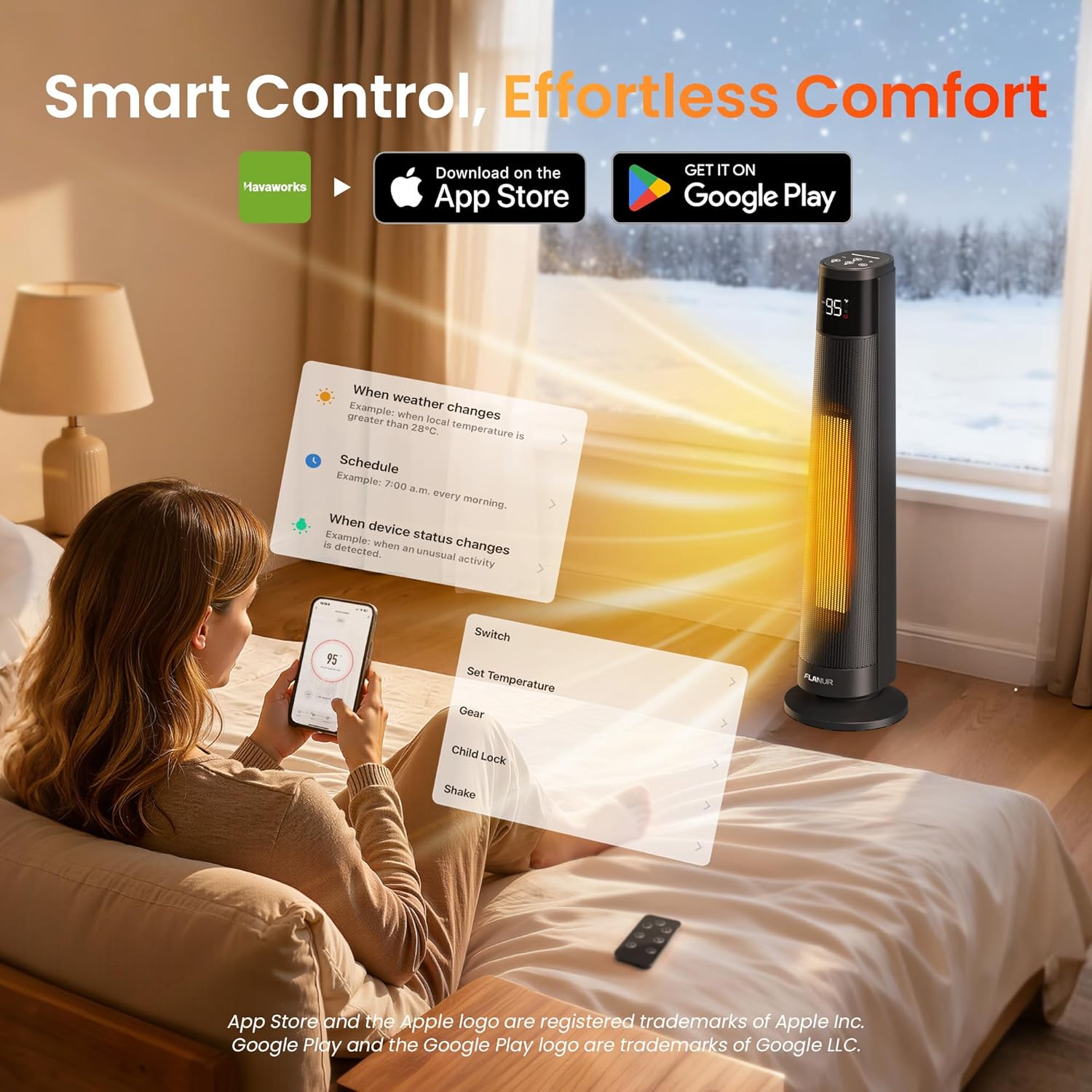
Figure 1: Unboxed components of the FLANUR Space Heater, including the main unit, base, remote, and manuals.
Base Installation: Align the holes on the heater base with the main unit. Securely attach the base to the heater. Ensure the power cord is properly routed through the designated channel in the base.
Video 1: Demonstration of unboxing and assembling the FLANUR Smart Space Heater, including attaching the base.
2. App Download and Connection (Havaworks App)
For smart control features, download the 'Havaworks' app on your smartphone. The app is available on both the App Store (iOS) and Google Play (Android).
- Scan the QR code provided in the 'APP Connection Quick Guide' or search for "Havaworks" in your app store.
- Open the Havaworks App, log in, or sign up for an account.
- To add your device, tap the '+' icon (top right) and select 'Scan'.
- Scan the QR code on the heater or in the quick guide.
- Follow the in-app instructions to confirm the device is in Wi-Fi setup mode (indicator blinking).
- Select your 2.4GHz Wi-Fi network and enter the password. (Note: The device does not support 5GHz networks).
- Upon successful connection, you will be able to manage your device via the app.
Video 2: A step-by-step guide on how to download the Havaworks app and connect your FLANUR Smart Space Heater to Wi-Fi.
3. Voice Assistant Integration (Alexa & Google Assistant)
To enable voice control, link your Havaworks account with Alexa or Google Assistant:
- In the Havaworks App, navigate to the "ME" tab (lower right corner).
- Select "Third-Party Voice Services" and choose "Alexa" or "Google Assistant".
- Follow the on-screen instructions to sign into your Amazon/Google account and authorize the connection between Havaworks and the respective voice service.
- Once linked, you can use voice commands like "Alexa, turn on the heater" or "Google, set heater to 72 degrees."
Operating Instructions
Control Panel and Remote Overview
The heater can be operated using the touch control panel on top of the unit, the included remote control, or the Havaworks app.

Figure 2: The FLANUR Smart Space Heater, its remote control, and the Havaworks app interface for smart control.
- Power Button: Press to turn the heater On/Off.
- +/- Buttons: Adjust temperature settings or timer hours.
- Mode Button (M): Cycles through heating modes (H1, H2, H3, ECO, Fan-Only). Hold for 3 seconds to mute/unmute button sounds.
- Oscillation Button: Starts or stops the 70° oscillation. Hold for 3 seconds to enter Wi-Fi pairing mode.
- Timer Button: Press to set the auto-shutoff timer (1-12 hours). Hold for 3 seconds to activate/deactivate Child Lock.
- LED Display: Shows current temperature, mode, timer, and Wi-Fi status.
Video 3: A quick overview of the control panel buttons and their functions on the FLANUR Smart Space Heater.
Modes of Operation
- Heat Modes (H1, H2, H3): Provide continuous heating at different power levels.
- ECO Mode: Automatically adjusts heating power to maintain a set temperature between 5-35°C (41-95°F), optimizing energy consumption.
- Fan-Only Mode: Circulates air without heating.
Temperature Adjustment
Use the '+' and '-' buttons on the control panel, remote, or app to set your desired temperature. The LED display will show the current and set temperatures.
Oscillation
Press the oscillation button to activate the 70° wide-angle oscillation feature, distributing warmth more broadly. Press again to stop oscillation.
Timer Function
Press the timer button to set an auto-shutoff timer from 1 to 12 hours. The heater will automatically turn off after the set duration.
Child Lock
To activate or deactivate the child lock, press and hold the timer button for 3 seconds. This prevents accidental changes to settings.
Maintenance
- Cleaning: Always unplug the heater and allow it to cool completely before cleaning. Use a soft, damp cloth to wipe the exterior. Do not use abrasive cleaners or allow water to drip into the heater.
- Storage: When not in use, store the heater in a cool, dry place.
- Air Intake/Outlet: Regularly check and clean the air intake and outlet grilles to ensure proper airflow and prevent overheating. Use a vacuum cleaner with a brush attachment to remove dust.
Troubleshooting
| Problem | Possible Cause | Solution |
|---|---|---|
| Heater does not turn on. | Not plugged in, power outage, tip-over switch activated, overheat protection activated. | Ensure the heater is securely plugged into a working outlet. Check circuit breaker. Place heater on a flat, stable surface. Allow heater to cool down if it overheated. |
| No heat output. | Fan-Only mode selected, temperature setting too low. | Switch to a heating mode (H1, H2, H3, or ECO). Increase the desired temperature setting. |
| Heater turns off unexpectedly. | Tip-over protection, overheat protection, timer expired, 24-hour auto-shutoff. | Check heater position. Allow to cool. Check timer settings. Disable 24-hour auto-shutoff if not desired. |
| Wi-Fi connection issues. | Incorrect Wi-Fi password, 5GHz network used, device too far from router. | Ensure correct 2.4GHz Wi-Fi network and password. Move heater closer to router. Re-enter pairing mode (hold oscillation button for 3s). |
Specifications
| Feature | Detail |
|---|---|
| Brand | FLANUR |
| Model Number | AT-SH74-WF |
| Power | 1500W |
| Heating Technology | PTC Ceramic |
| Heating Coverage | Up to 300 sq. ft. |
| Oscillation Angle | 70° |
| Timer | 0-12 Hours |
| Min Temperature Setting | 5°C (41°F) |
| Max Temperature Setting | 35°C (95°F) |
| Noise Level | 23-36 dB |
| Safety Features | ETL-certified, V-0 flame-retardant, Overheat Protection, Tip-Over Protection, Child Lock, 24H Auto-Shutoff (optional) |
| Product Dimensions | 7.84"D x 7.84"W x 29.2"H |
| Item Weight | 8.49 pounds |
Warranty and Support
For warranty information or technical support, please refer to the warranty card included in your product packaging or contact FLANUR customer service directly. Contact details can typically be found on the official FLANUR website or through your purchase platform.
Related Documents - AT-SH74-WF
 |
FLANUR AT-SH40-WF Space Heater User Manual: Operation, Safety & App Guide This user manual for the FLANUR AT-SH40-WF space heater provides comprehensive instructions on safe operation, features, cleaning, maintenance, troubleshooting, and app connectivity for optimal home comfort. |
 |
Mitsubishi Heavy Industries Air Conditioner User's Manual Comprehensive user manual for Mitsubishi Heavy Industries split-type air conditioners, covering operation, safety, maintenance, and troubleshooting for models like SRK63ZR-WF, SRK71ZR-WF, SRK80ZR-WF, and SRK100ZR-WF. |
 |
WFCO Electronics Warranty Request and Troubleshooting Guide This document outlines the warranty request process and troubleshooting procedures for WFCO Electronics products, including power centers, inverters, and transfer switches. It details the forms required, steps for submitting a claim, and specific testing procedures for various product series. |
 |
MORENTO SPCAE HEATER AT-SH40-WF User Manual Explore the MORENTO SPCAE HEATER (Model AT-SH40-WF) with this comprehensive user manual. It details safety precautions, operational guides, cleaning, maintenance, troubleshooting, and app connectivity for efficient home heating. |
 |
Morento Space Heater User Manual User manual for the Morento Space Heater, including setup, operation, app connection, cleaning, maintenance, troubleshooting, and warranty information. |