
Introduction
This manual provides essential information for the proper use and maintenance of your TKE Compatible Remote Control, Model RM-L999+3. This remote is designed to be compatible with a wide range of HUAYU and LG LED/LCD Smart Televisions, offering a direct replacement solution without complex programming.
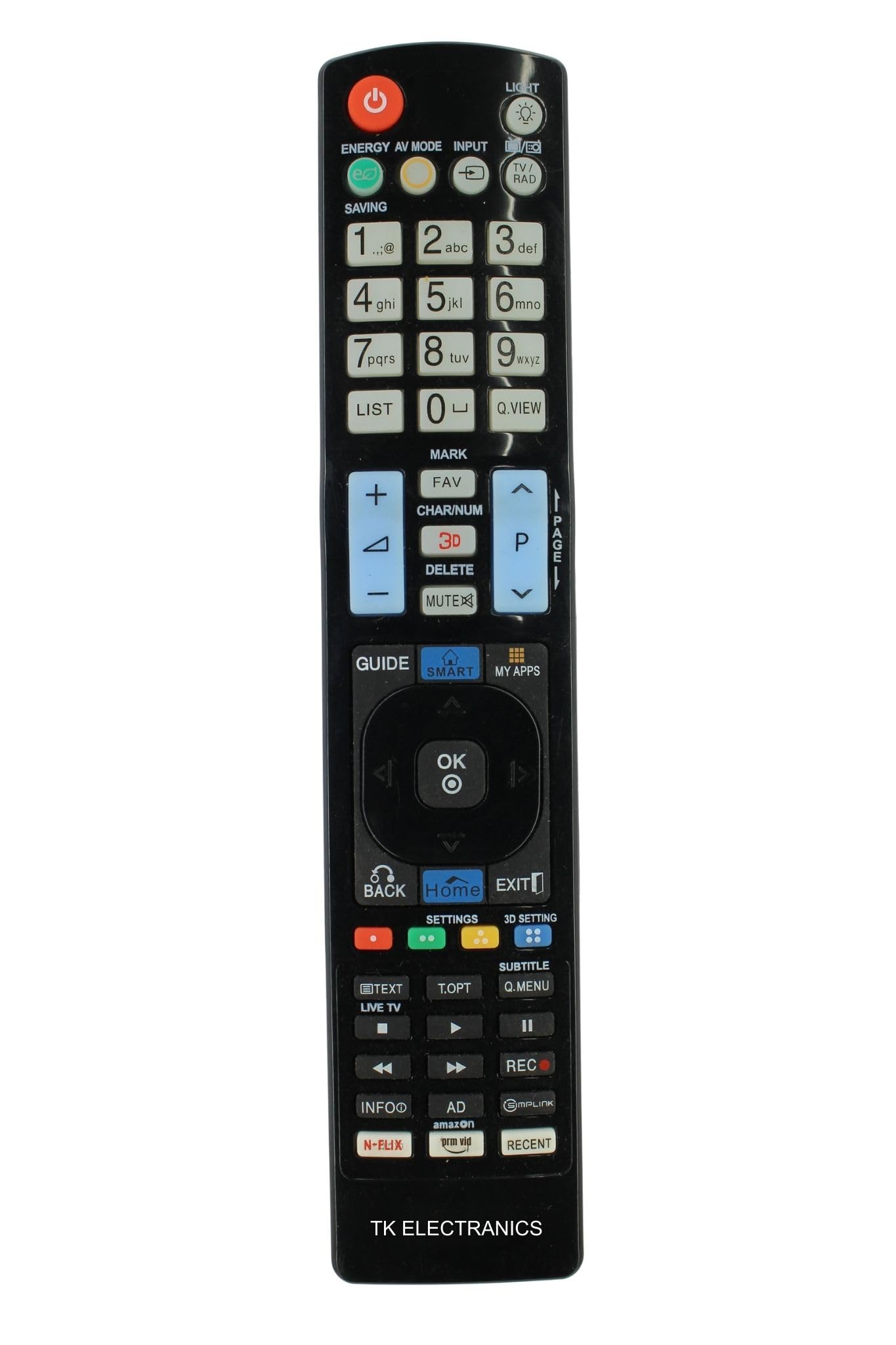
Image: Front view of the TKE Compatible Remote Control, Model RM-L999+3. This image displays the full layout of the remote's buttons and its ergonomic design.
Setup
1. Battery Installation
- Locate the battery compartment on the back of the remote control.
- Slide the battery cover downwards or press the latch and lift to open.
- Insert two (2) AAA alkaline batteries, ensuring the positive (+) and negative (-) terminals align correctly with the markings inside the compartment.
- Replace the battery cover by sliding it back into position until it clicks securely.

Image: Back view of the TKE Compatible Remote Control with the battery compartment open, illustrating the correct orientation for inserting two AAA batteries.
2. Initial Use and Compatibility
This remote control is pre-programmed and typically requires no additional setup for compatible HUAYU and LG TV models. Simply insert the batteries and point the remote towards your television to begin operation.
To ensure compatibility, compare the button layout and model number (RM-L999+3) with your original remote control or TV's specifications.
Operating Instructions
The TKE Compatible Remote Control provides full functionality for your compatible HUAYU or LG Smart TV. Below are common button functions:
- Power Button: Turns the television on or off.
- Number Buttons (0-9): Directly select channels.
- Volume Up/Down: Adjusts the audio volume.
- Channel Up/Down: Changes the television channel sequentially.
- Mute Button: Silences the television audio.
- Navigation Pad (Up/Down/Left/Right/OK): Used to navigate menus and confirm selections.
- Back/Exit Button: Returns to the previous menu or exits the current menu.
- Smart/Home Button: Accesses the TV's Smart Hub or Home screen.
- Hotkeys: Dedicated buttons for specific functions or streaming services such as 3D, My Apps, NETFLIX, and Prime Video (availability depends on TV model and remote version).
Maintenance
Battery Replacement
Replace batteries when the remote's response becomes sluggish or it ceases to function. Always use new AAA alkaline batteries for optimal performance and battery life. Do not mix old and new batteries, or different types of batteries.
Cleaning
To clean the remote control, gently wipe its surface with a soft, dry cloth. For stubborn dirt, slightly dampen the cloth with water. Avoid using harsh chemicals, abrasive cleaners, or excessive moisture, as these can damage the remote's electronics or finish.
Storage
Store the remote control in a cool, dry place away from direct sunlight, extreme temperatures, and high humidity. If the remote will not be used for an extended period, remove the batteries to prevent leakage and potential damage.
Troubleshooting
- Remote Not Responding:
- Check if the batteries are inserted correctly with the correct polarity.
- Replace old batteries with new AAA alkaline batteries.
- Ensure there are no obstructions between the remote and the TV's infrared sensor.
- Verify that the remote is pointed directly at the TV.
- Limited Range:
- Ensure batteries are fresh. Low battery power can reduce signal strength.
- Remove any objects that might be blocking the signal path.
- The maximum effective range is approximately 10 meters. Operating beyond this distance may result in inconsistent performance.
- Specific Buttons Not Working:
- Clean the remote's surface, especially around the non-functional buttons, to remove any dirt or debris that might be interfering with button presses.
- If only certain buttons are affected, and other troubleshooting steps fail, the remote may require replacement.
Specifications
| Feature | Detail |
|---|---|
| Brand | Generic |
| Model Name | HUAYU |
| Model Number | RM-L999+3 |
| Color | Black |
| Connectivity Technology | Infrared (IR) |
| Maximum Range | 10 meters |
| Compatible Devices | Television (HUAYU/LG LED/LCD Smart TVs) |
| Batteries Required | 2 x AAA Alkaline batteries (not included) |
| Item Dimensions (L x W x H) | 23.6 x 4.7 x 2.3 Centimeters |
| Item Weight | 97 Grams |
| Button Quantity | 55 |
Warranty Information
This product is covered by a 7-day replacement warranty from the date of purchase. Please retain your proof of purchase for any warranty claims. The warranty covers manufacturing defects but does not cover damage caused by misuse, accidents, or unauthorized repairs.
Support Information
For further assistance or inquiries regarding your TKE Compatible Remote Control, please contact the manufacturer:
- Manufacturer: TK ELECTRANICS
- Importer: TK ELECTRANICS
- Packer: TK ELECTRANICS
Please refer to your purchase documentation for specific contact details or customer service channels.