
1. Introduction
Thank you for purchasing the Coolhill USB Desk Fan, Model ZH27. This fan is designed to provide powerful yet quiet airflow with versatile placement options. Please read this manual thoroughly before use to ensure proper operation and maintenance.
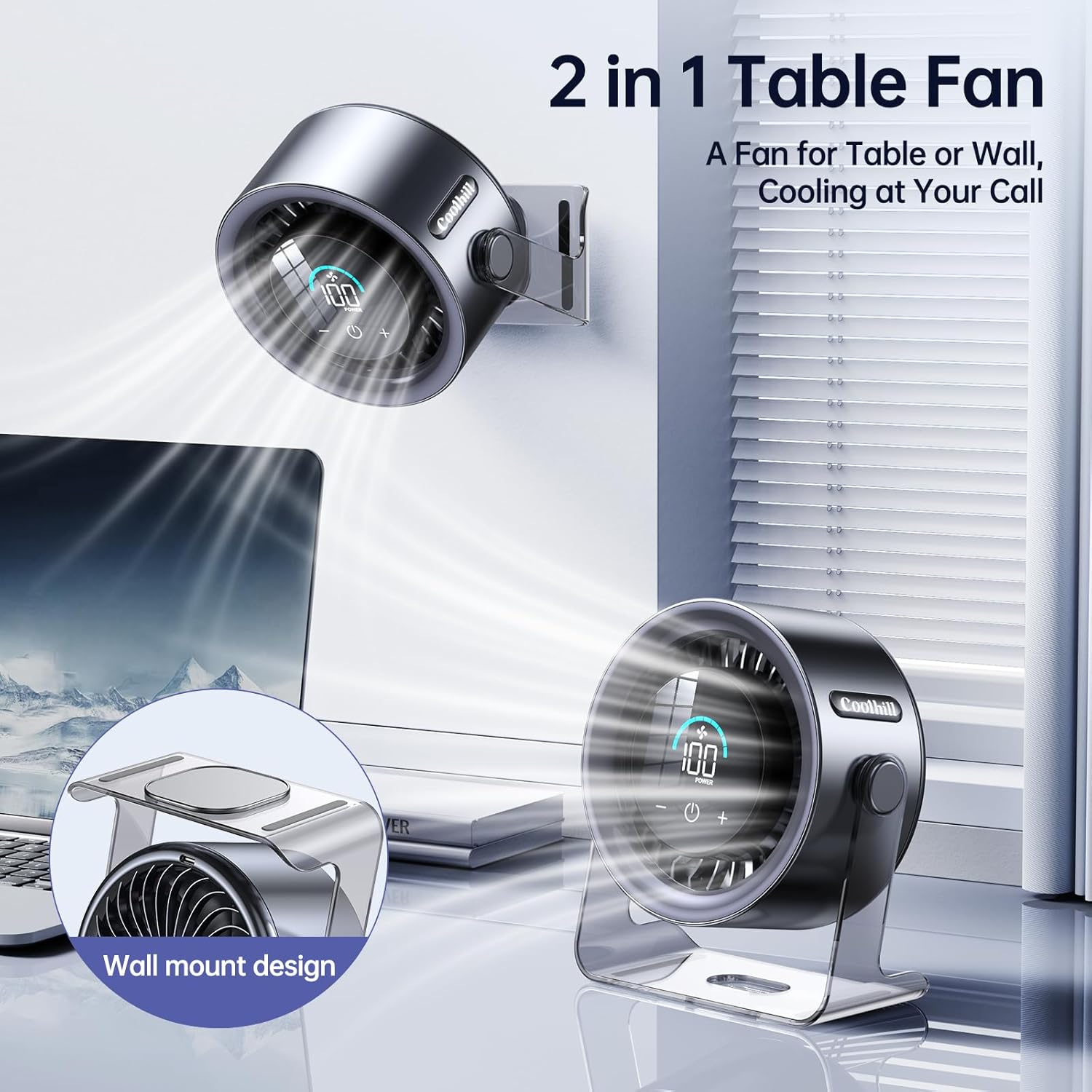
Image: The Coolhill USB Desk Fan shown in both desktop and wall-mounted setups, highlighting its dual functionality.
2. Safety Instructions
- Always place the fan on a stable, flat surface.
- Do not insert fingers or any objects into the fan grille when it is operating.
- Keep the fan away from water or other liquids to prevent electric shock.
- Do not use the fan in excessively humid or dusty environments.
- Unplug the fan before cleaning or when not in use for extended periods.
- Keep out of reach of children and pets.
- Use only the provided USB-C charging cable.
3. Package Contents
Verify that all items are present in your package:
- 1 x Coolhill USB Desk Fan (Model ZH27)
- 1 x USB-C Charging Cable
- 1 x Instruction Manual
- 1 x Wall Mount Hook

Image: A visual representation of the Coolhill USB Desk Fan's package contents, including the fan, USB-C cable, user manual, and wall mount hook.
4. Product Features
- 100 Adjustable Speeds: Fine-tune airflow from 1 to 100 levels for personalized comfort.
- Digital Display: Clear numeric screen shows current fan speed and battery level.
- Ultra-Quiet Operation: Advanced noise-reduction technology ensures a whisper-quiet experience (as low as 28dB).
- Powerful Turbo Airflow: Delivers strong, gentle airflow with a max speed of 6m/s.
- 120° Oscillation: Wide-angle oscillation for broader air distribution.
- Rechargeable Battery: Built-in 5500 mAh battery provides 3-10 hours of continuous operation.
- USB-C Powered: Convenient charging via USB-C port.
- Versatile Placement: Designed for both desktop and wall-mounted use.

Image: The fan's digital display clearly showing the battery level, indicating ease of monitoring power.
5. Setup
5.1 Desktop Placement
Place the fan on a flat, stable surface such as a desk, table, or nightstand. Ensure there is adequate space around the fan for optimal airflow.
5.2 Wall-Mounted Installation
- Select a suitable wall location, ensuring it is sturdy and free from obstructions.
- Use the provided wall mount hook. Securely attach the hook to the wall using appropriate fasteners (not included).
- Align the fan's base with the hook and slide it into place until it is securely mounted.

Image: A close-up view of the fan's wall mount design, illustrating how it can be securely attached to a wall.
5.3 Charging the Fan
Before first use, fully charge the fan. Connect the USB-C charging cable to the fan's charging port and the other end to a USB power adapter (e.g., phone charger, computer USB port, power bank). The digital display will indicate charging status. A full charge takes approximately 2.5 hours.

Image: The fan connected to a USB-C charging cable, demonstrating the fast charging capability.
6. Operating Instructions
6.1 Power On/Off
Press the power button (U) on the fan's control panel to turn the fan on or off.
6.2 Adjusting Fan Speed
- Short Press: Briefly press the speed adjustment buttons (+ or -) to cycle through preset speed levels (1, 20, 40, 60, 80, 100).
- Long Press: Press and hold the speed adjustment buttons (+ or -) to continuously increase or decrease the fan speed in single increments from 1 to 100.

Image: A user interacting with the fan's control panel to adjust its 100-speed settings.
6.3 Oscillation Function
Press the oscillation button (circular arrow icon) on the control panel to activate or deactivate the 120° oscillation feature.
6.4 Digital Display
The integrated digital display shows the current fan speed (1-100) and the remaining battery power. This allows for easy monitoring of the fan's status.
6.5 Video Demonstration
Video: An official demonstration of the Coolhill Desktop Fan, showcasing its features and operation in an office and bedroom setting.
7. Maintenance
7.1 Cleaning
- Ensure the fan is turned off and unplugged before cleaning.
- Wipe the exterior surfaces with a soft, damp cloth. Do not use abrasive cleaners or solvents.
- Use a soft brush or vacuum cleaner to gently remove dust from the fan grilles.
- Do not immerse the fan in water or any other liquid.
7.2 Storage
When not in use, store the fan in a cool, dry place, away from direct sunlight and extreme temperatures. It is recommended to store it in its original packaging to protect it from dust and damage.
8. Troubleshooting
| Problem | Possible Cause | Solution |
|---|---|---|
| Fan does not turn on. | Battery is depleted. Not plugged in. | Charge the fan using the USB-C cable. Ensure the cable is securely connected. |
| Weak airflow. | Fan speed is too low. Obstruction in front/back. | Increase the fan speed. Clear any obstructions from the fan grilles. |
| Fan makes unusual noise. | Dust accumulation. Loose parts. | Clean the fan grilles. If noise persists, contact customer support. |
| Battery drains quickly. | High fan speed usage. Aging battery. | Reduce fan speed for longer battery life. Battery performance may decrease over time. |
9. Specifications
| Feature | Detail |
|---|---|
| Brand | Coolhill |
| Model Name | ZH27 |
| Color | Black |
| Electric Fan Design | Table Fan |
| Power Source | Battery Powered |
| Battery Capacity | 5500 mAh |
| Charging Time | Approx. 2.5 hours |
| Operating Time | 3-10 hours (depending on speed) |
| Product Dimensions | 5.79"D x 6.73"W x 2.51"H |
| Number of Speeds | 100 |
| Noise Level | 28 dB |
| Oscillation | 120° |
| Material | Plastic |
| Control Method | Touch |
| Installation Type | Wall Mount |
10. Warranty and Support
Coolhill products come with a standard manufacturer's warranty. For detailed warranty information, product support, or to inquire about replacement parts, please visit the official Coolhill store or contact customer service.
Official Coolhill Store: Coolhill Store on Amazon
Please retain your proof of purchase for warranty claims.