
TerraVolt P2400
TerraVolt IEE P2400 Portable Solar Generator User Manual
1. Product Overview
The TerraVolt IEE P2400 is a portable solar generator designed to provide reliable power for various applications, including home backup, RV use, camping, and outdoor activities. It features a high-capacity LiFePO4 battery and multiple output ports to power a wide range of devices.

Image 1.1: The TerraVolt IEE P2400 Portable Solar Generator, showcasing its display and multiple power outlets.
Key Features
- 2400W Output, 2048WH Capacity: Powers up to 99% of common appliances.
- 1800W Fast AC Charging: Reaches 80% charge in approximately 55 minutes, full charge in 70 minutes.
- LiFePO4 Battery: High stability, over 3500 charge-discharge cycles, and an estimated 12-year lifespan.
- 5-8ms EPS Switch: Provides uninterrupted power for critical devices during outages.
- Smart App Control: Monitor and manage the power station remotely.
- Quiet Operation: Operates at below 30dB.
- Portability: Equipped with wheels and a telescoping handle for easy transport.
Video 1.1: An overview of the IEE P2400 Portable Power Station's features and applications.
2. Setup
2.1 Unboxing and Initial Inspection
Carefully remove all components from the packaging. Verify that all items listed in the packing list are present and undamaged. The package includes:
- 1 × P2400 Power Station
- 1 × AC Charging Cable
- 1 × Car Charging Cable
- 1 × Solar Charging Cable
- 1 × User Manual
- 1 × Warranty Card
- 1 × 4-in-1 Data Cable
2.2 Initial Charging
Before first use, fully charge the P2400 power station. Connect the AC charging cable to the AC input port on the unit and then to a wall outlet. The display will indicate charging status. A full charge via AC takes approximately 70 minutes.
2.3 App Installation and Connection
For smart control and monitoring, download the dedicated mobile application. Search for 'TerraVolt' or 'IEE Power' in your device's app store. Follow the in-app instructions to connect your P2400 via Bluetooth or Wi-Fi.
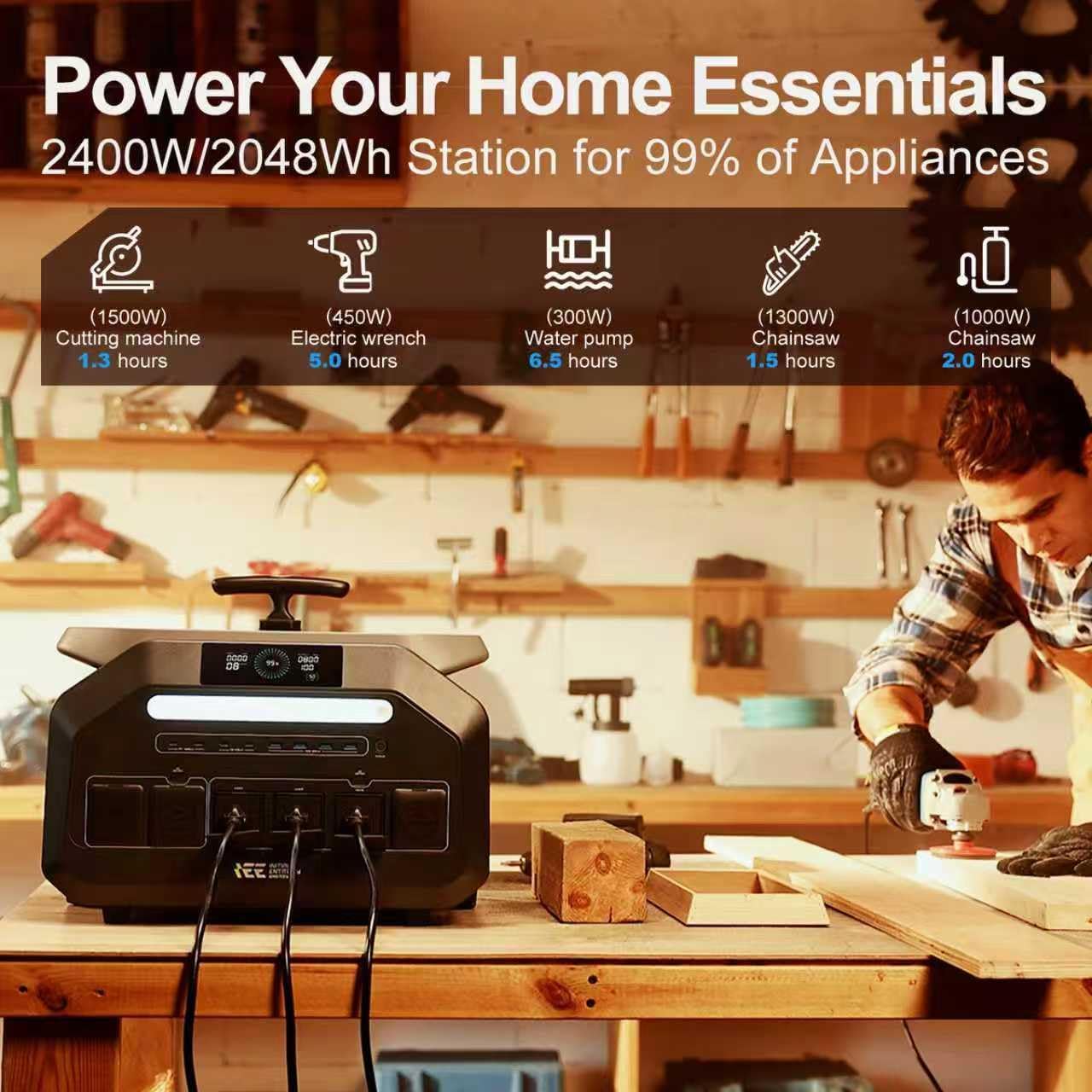
Image 2.1: The TerraVolt IEE P2400 being controlled and monitored via a mobile application, showing real-time status.
3. Operation
3.1 Powering On/Off
To power on the unit, press and hold the main power button until the display illuminates. To power off, press and hold the main power button again until the display turns off.
3.2 Connecting Devices
The P2400 offers 16 versatile output ports:
- 4 × AC Outlets (2400W continuous, 5000W peak)
- 4 × USB-A Ports (30W × 4)
- 4 × USB-C Ports (100W × 2, 30W × 2)
- 2 × Car Sockets
- 2 × DC5521 Ports
Connect your devices to the appropriate ports. Ensure that the total power consumption of connected devices does not exceed the P2400's rated output.
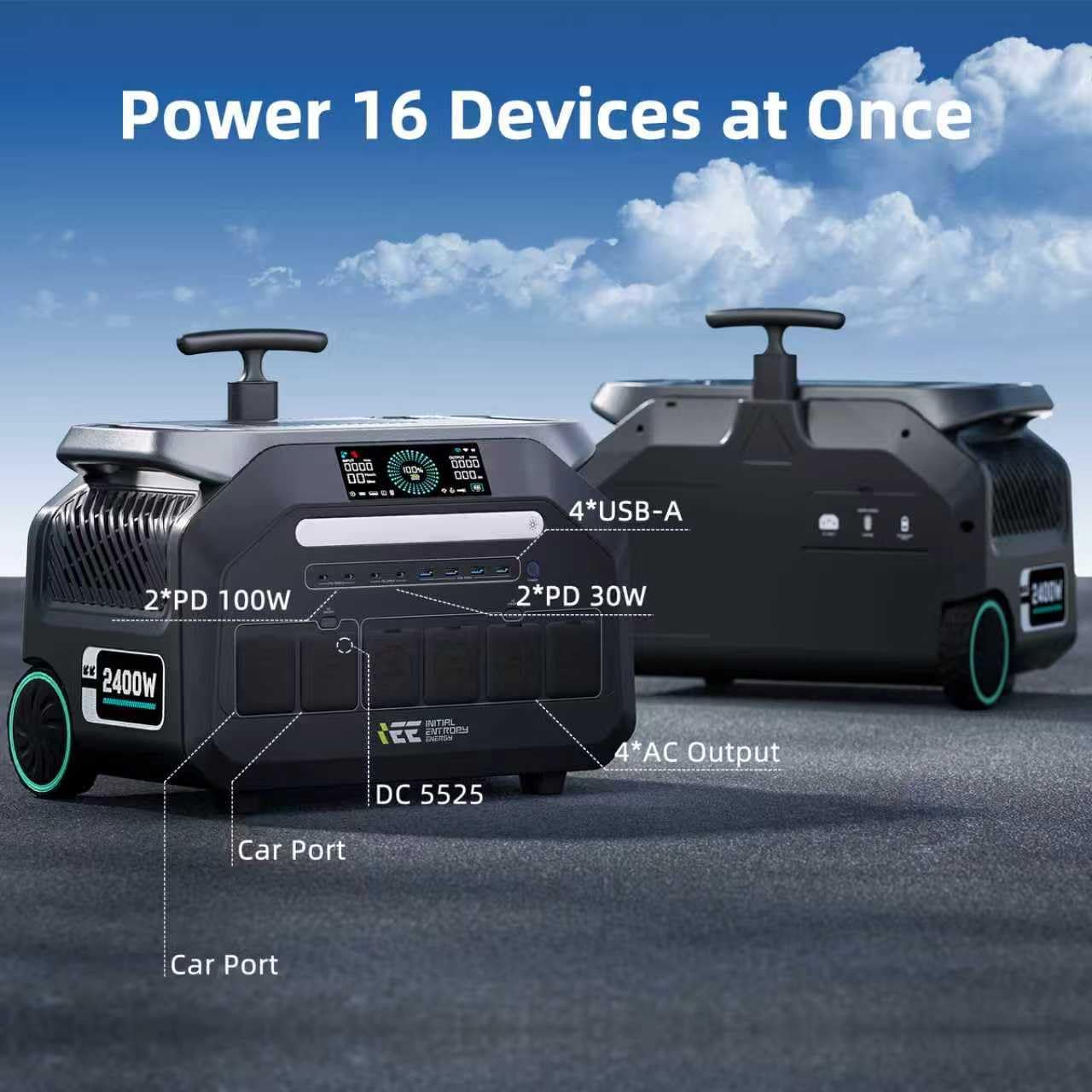
Image 3.1: Close-up view of the TerraVolt IEE P2400's front panel, detailing the various output ports including AC, USB, and car sockets.
3.3 Charging the P2400
The P2400 supports multiple charging methods:
- AC Wall Outlet: Use the provided AC charging cable for fast charging (1800W input).
- Solar Panels: Connect compatible solar panels (up to 1000W input) using the solar charging cable. Optimal charging requires direct sunlight.
- Car Charger: Use the car charging cable to charge from your vehicle's 12V outlet.
- AC + Solar Dual Charging: Combine AC and solar input for the fastest charging times, achieving a full charge in approximately 1 hour.

Image 3.2: The TerraVolt IEE P2400 connected for both AC wall charging and solar panel charging, illustrating its versatile input options.
3.4 Emergency Power Supply (EPS) Function
The P2400 features an EPS system that provides seamless power transfer in 5-8 milliseconds during a power outage. Connect critical devices to the AC outlets of the P2400, and it will automatically switch to battery power if the main grid fails, ensuring uninterrupted operation.
3.5 Usage Scenarios
The P2400 is suitable for various applications:
- Home Backup: Power essential home appliances during outages.
- Outdoor Activities: Ideal for camping, RV trips, and outdoor events.
- Work Sites: Power tools and equipment in remote locations.

Image 3.3: A collage showing the TerraVolt IEE P2400 in different environments, including a workshop, a home kitchen, and an outdoor camping setup, demonstrating its versatility.

Image 3.4: The TerraVolt IEE P2400 powering various appliances during an outdoor activity, including a coffee machine, electric oven, induction cooker, and air conditioner, with their respective wattages and estimated runtimes.
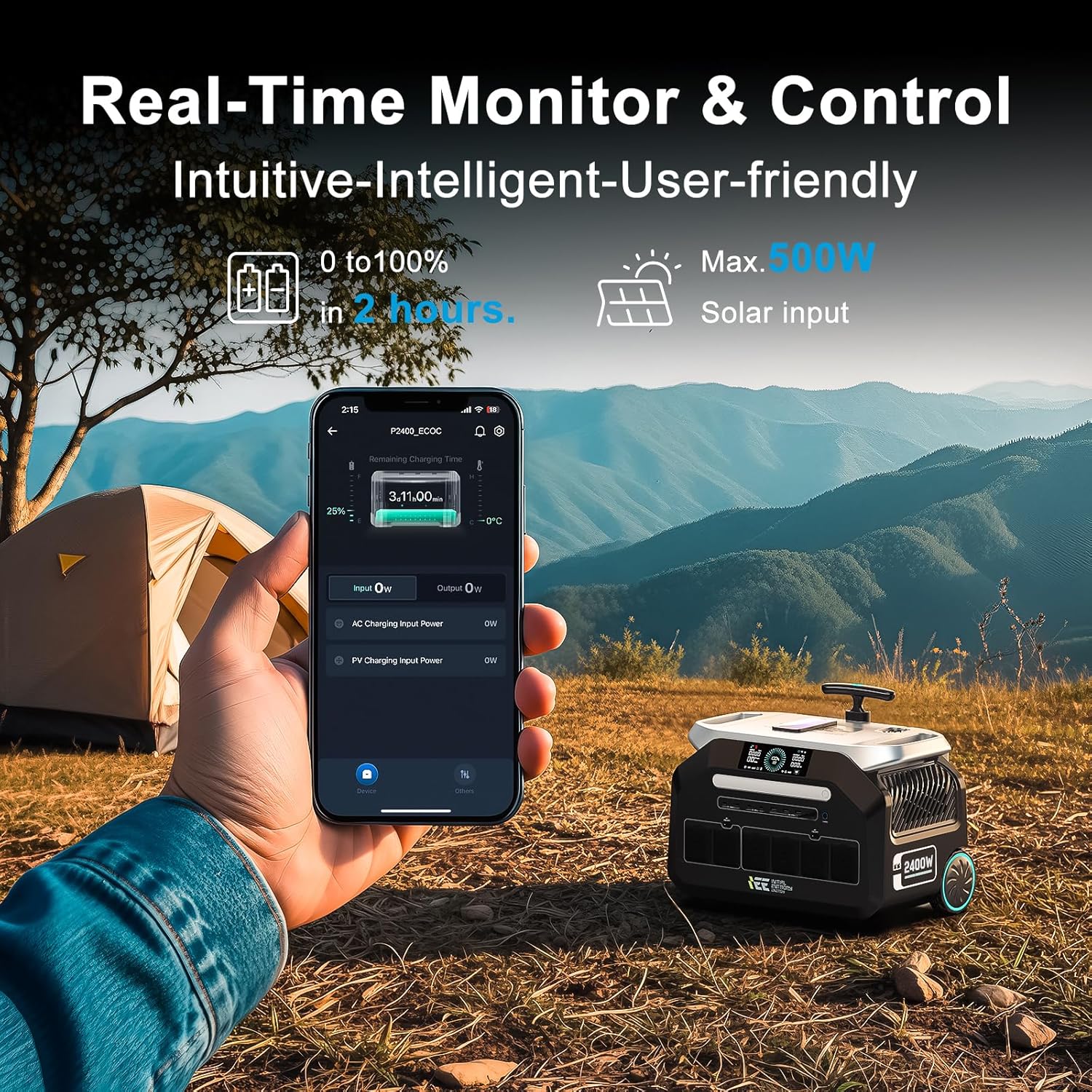
Image 3.5: The TerraVolt IEE P2400 providing power for various power tools in a workshop setting, such as a cutting machine, electric wrench, water pump, and chainsaw, along with their estimated runtimes.
4. Maintenance
4.1 Battery Care
The P2400 uses a durable LiFePO4 battery. To maximize its lifespan:
- Avoid fully discharging the battery frequently.
- Store the unit in a cool, dry place away from direct sunlight.
- If storing for extended periods, charge the unit to approximately 50-80% every 3-6 months.

Image 4.1: An internal view of the TerraVolt IEE P2400, highlighting its automotive-grade LiFePO4 battery cells and their 12-year lifespan.
4.2 Cleaning
Use a soft, dry cloth to clean the exterior of the power station. Do not use liquid cleaners or immerse the unit in water. Keep ventilation openings clear of dust and debris.
4.3 Storage
When not in use, store the P2400 in a stable, upright position. Ensure it is protected from extreme temperatures and moisture. The built-in wheels and handle facilitate easy movement for storage.

Image 4.2: A person effortlessly transporting the TerraVolt IEE P2400 using its integrated telescoping handle and dual wheels, emphasizing its portability.
5. Troubleshooting
5.1 No Power Output
- Ensure the power station is turned on.
- Check the battery level on the display. Recharge if the battery is low.
- Verify that the specific output port (AC, USB, DC) is activated. Some ports may have individual power buttons.
- Confirm that the connected device is functioning correctly and its power requirements do not exceed the port's capacity.
5.2 Slow Charging
- AC Charging: Ensure the AC cable is securely connected and the wall outlet is providing sufficient power.
- Solar Charging: Check solar panel orientation for maximum sunlight exposure. Ensure panels are clean and undamaged. Verify the solar charging cable connection.
- Car Charging: Ensure the vehicle's engine is running for optimal charging.
5.3 Overload Protection Activated
If the power station detects an overload, it will automatically shut down to protect itself. Disconnect some devices and restart the unit. Ensure the total wattage of connected devices is within the P2400's limits (2400W continuous, 5000W peak).
5.4 App Connection Issues
- Ensure Bluetooth or Wi-Fi is enabled on your mobile device.
- Restart the P2400 and your mobile device.
- Try re-pairing the device through the app.
- Ensure the app is updated to the latest version.
6. Specifications
| Feature | Specification |
|---|---|
| Brand | TerraVolt |
| Model Name | P2400 Portable Power Station |
| Wattage | 2400 watts (Running & Starting) |
| Output Wattage | 2400 |
| Peak Output Wattage | 5000 watts |
| Battery Type | LiFePO4 |
| Battery Capacity | 2048WH |
| Charging Time (AC) | 1.2 hours (80% in 55 minutes) |
| Max Solar Input | 1000W |
| Total Power Outlets | 16 |
| UPS Switching Time | 5-8ms |
| Noise Level | Below 30dB |
| Item Weight | 50 Pounds |
| Product Dimensions | 17.5"L x 11.7"W x 14.5"H |
| Material | Lithium Iron Phosphate |
| UPC | 664404869924 |
7. Warranty and Support
7.1 Warranty Information
The TerraVolt IEE P2400 Portable Solar Generator comes with a 5-year warranty. This warranty covers defects in materials and workmanship under normal use. Please retain your proof of purchase for warranty claims.
7.2 Customer Support
For technical assistance, troubleshooting, or warranty inquiries, please contact TerraVolt customer support. You can typically find contact information on the manufacturer's official website or through the retailer where you purchased the product. Support is available to respond to issues within 24 hours.
Ask a question about this manual
Ask about setup, troubleshooting, compatibility, parts, safety, or missing instructions. Manuals+ will review the question and use this page’s manual context to help answer it.