
1. Product Overview
The HANTECH H-PRO 12000 BTU Split Air Conditioner is designed to provide efficient and comfortable climate control for your living spaces. Featuring inverter technology, it offers both cooling and heating functions, quiet operation, and smart control options.

Image 1.1: HANTECH H-PRO Split Air Conditioner components.
Key Features:
- Powerful and Efficient: 12000 BTU (3.4 kW) capacity suitable for rooms up to 45m², with energy-saving inverter technology.
- Eco-Friendly Refrigerant: Utilizes R32 gas with a low Global Warming Potential (GWP) of 675, complying with European environmental regulations.
- Smart Control: Integrated Wi-Fi for control via a mobile app, compatible with Alexa and Google Home for voice commands.
- Silent Operation: Enjoy a quiet environment with a super silent mode operating from just 22dB(A) indoors.
- Versatile Functions: Includes cooling, heating, dehumidification, Eco mode, Sleep mode, and Timer functions.
- Gentle Wind Technology: Features 1422 micro-apertures for a soft, uniform airflow, avoiding direct cold drafts.
- iFeel Function: Measures ambient temperature directly from the remote control for precise comfort.
2. Safety Information
Please read all safety instructions carefully before installing and operating your air conditioner. Keep this manual for future reference.
- Installation must be performed by qualified personnel in accordance with local and national electrical codes.
- Do not operate the air conditioner with wet hands or when standing on wet surfaces.
- Ensure the power supply is disconnected before any maintenance or cleaning.
- Do not insert objects into the air outlet or inlet.
- Keep children away from the unit and remote control.
- The unit contains R32 refrigerant, which is mildly flammable. Ensure proper ventilation during installation and servicing.
3. Package Contents
Verify that all items listed below are present in your package:
- Indoor Unit
- Outdoor Unit
- Copper Pipe Set (3 meters)
- Wall Mounting Bracket for Outdoor Unit
- Remote Control
- Drainage Pipe
- Instruction Manual (this document)
- Other necessary installation accessories

Image 3.1: Illustrated package contents.
4. Installation Guide (Setup)
Important: Installation of this split air conditioner requires specialized knowledge and tools. It must be performed by a certified and qualified technician to ensure safety, proper operation, and warranty validity.
4.1. Site Selection
- Indoor Unit: Choose a location that allows for even air distribution, away from direct sunlight or heat sources. Ensure sufficient space around the unit for maintenance.
- Outdoor Unit: Select a well-ventilated area, free from obstructions, and with adequate clearance for airflow. Minimize the distance between indoor and outdoor units for optimal performance.
4.2. Installation Steps (Overview for Technician)
- Mount the indoor unit's back plate securely on the wall.
- Drill a hole through the wall for refrigerant pipes and drainage hose.
- Install the outdoor unit on its wall bracket or a stable base.
- Connect the refrigerant pipes between the indoor and outdoor units. Ensure proper flaring and tightening to prevent leaks.
- Connect the drainage hose from the indoor unit, ensuring a downward slope for proper water flow.
- Perform vacuuming of the refrigerant lines to remove air and moisture.
- Connect the electrical wiring according to the wiring diagram provided in the full technical manual.
- Check for refrigerant leaks using a leak detector.
- Insulate all pipes and connections.
- Test the unit's operation in all modes.

Image 4.1: Compact design and dimensions of H-PRO units.
5. Operating Instructions
Your HANTECH H-PRO air conditioner can be controlled via the included remote control or the Smart Life mobile application.
5.1. Remote Control Operation
The remote control allows you to access all functions of your air conditioner. Ensure the remote is pointed towards the indoor unit when sending commands.

Image 5.1: HANTECH H-PRO Remote Control and iFeel function.
Key Remote Control Buttons:
- Power Button: Turns the unit ON/OFF.
- Mode Button: Cycles through operating modes: Auto, Cool, Dry, Heat, Fan.
- Temperature Buttons (▲/▼): Adjusts the desired temperature.
- Fan Speed Button: Selects fan speed (Auto, Low, Medium, High).
- Swing Button: Controls the vertical airflow direction.
- iFeel Button: Activates the iFeel function, measuring temperature at the remote's location.
- ECO Button: Engages energy-saving Eco mode.
- Sleep Button: Optimizes temperature and fan speed for comfortable sleep.
- Timer Button: Sets ON/OFF timers.
- Gentle Wind Button: Activates the gentle airflow feature.
5.2. Smart Life App Control
The integrated Wi-Fi allows you to control your air conditioner from anywhere using the Smart Life mobile application on your smartphone or tablet.

Image 5.2: Smart Life App for remote control.
5.2.1. App Installation and Setup:
- Download the "Smart Life" app from your device's app store (available for Android and iOS).
- Register for a new account or log in if you already have one.
- Ensure your air conditioner is powered on and in pairing mode (refer to the full technical manual for specific pairing instructions).
- In the app, tap "Add Device" and select "Air Conditioner" or search for your specific model.
- Follow the on-screen instructions to connect your air conditioner to your home Wi-Fi network.
5.2.2. Voice Control (Alexa/Google Home):
Once connected to the Smart Life app, you can link your account to Amazon Alexa or Google Home for voice control. Refer to the respective voice assistant's app for linking instructions.
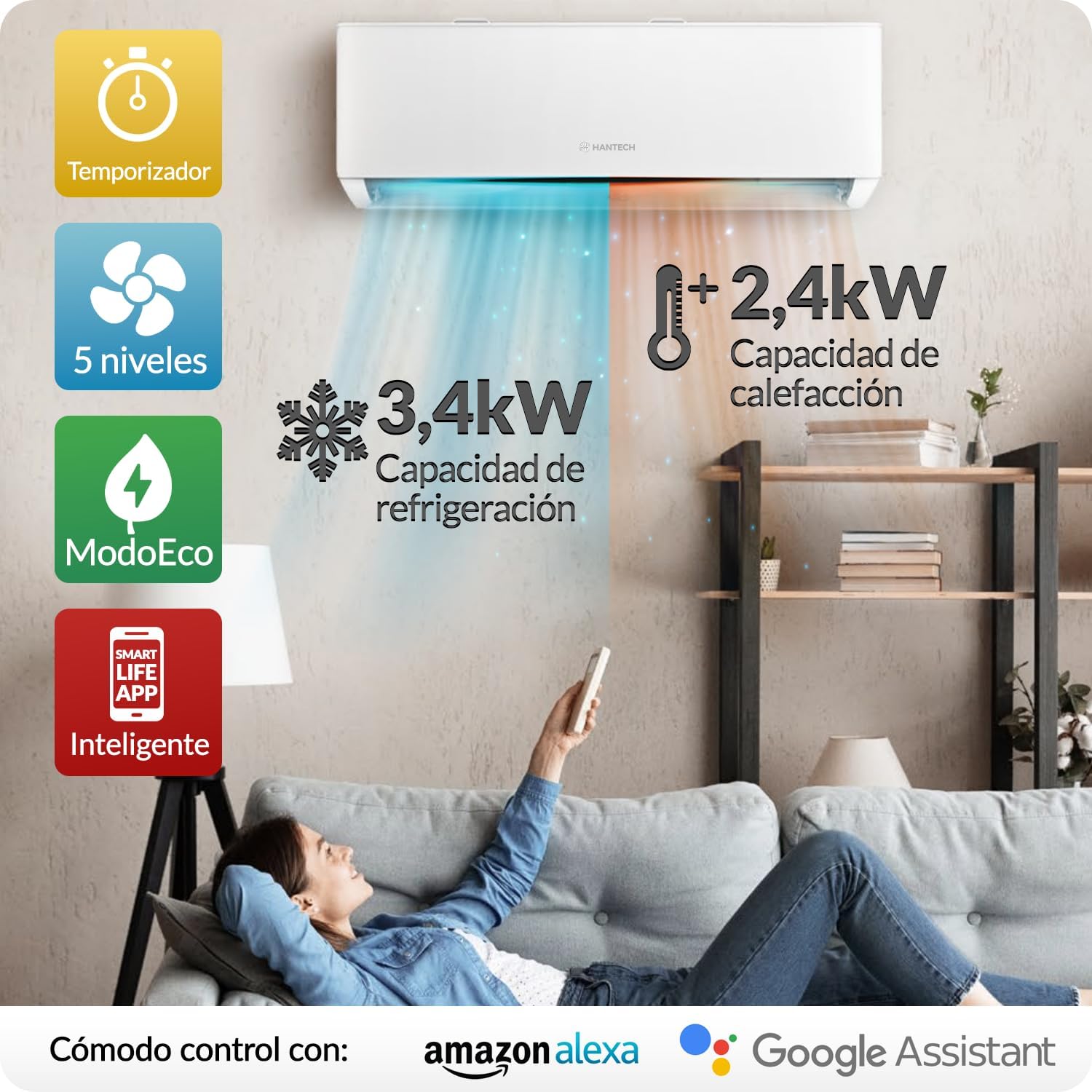
Image 5.3: Smart control with Alexa and Google Home.
6. Maintenance
Regular maintenance ensures optimal performance and longevity of your air conditioner. Always disconnect power before performing any maintenance.
6.1. Air Filter Cleaning
The air filters should be cleaned every two weeks or more frequently depending on usage and air quality.
- Open the front panel of the indoor unit.
- Remove the air filters.
- Clean the filters with a vacuum cleaner or wash them with lukewarm water and a mild detergent.
- Rinse thoroughly and allow them to dry completely in a shaded area before reinserting.
- Close the front panel.

Image 6.1: Integrated air filter for effective purification.
6.2. Self-Cleaning Function
The H-PRO features a self-cleaning function to maintain the cleanliness of the indoor unit's evaporator coil.

Image 6.2: Self-cleaning function steps.
- Step 1: Dirt and dust particles are frozen onto the evaporator.
- Step 2: Defrosting effectively dissolves the dirt and removes it.
- Step 3: The heat exchanger is prepared for sterilization.
- Step 4: Heating to 56°C for 30 minutes effectively eliminates bacteria.
Consult your remote control or app for instructions on how to activate the self-cleaning cycle.
6.3. Outdoor Unit Maintenance
Periodically check the outdoor unit for any obstructions (leaves, debris) around the fan and coils. Clean gently with a soft brush or cloth. Ensure the area around the outdoor unit remains clear for proper airflow.
7. Troubleshooting
If you encounter any issues with your air conditioner, refer to the following common problems and solutions before contacting customer support.
| Problem | Possible Cause | Solution |
|---|---|---|
| Unit does not turn on | No power, remote control batteries low, circuit breaker tripped. | Check power supply, replace remote batteries, reset circuit breaker. |
| Insufficient cooling/heating | Dirty air filters, blocked outdoor unit, wrong mode selected, temperature setting too high/low. | Clean air filters, clear obstructions from outdoor unit, select correct mode, adjust temperature. |
| Unusual noise | Loose parts, fan obstruction, refrigerant leak (hissing sound). | Check for loose parts, remove obstructions. If hissing, contact a technician. |
| Water leakage from indoor unit | Blocked drain hose, improper installation. | Check and clear drain hose. If issue persists, contact a technician. |
| Wi-Fi connection issues | Router issues, incorrect Wi-Fi password, unit too far from router. | Restart router, re-enter Wi-Fi password in app, ensure unit is within Wi-Fi range. |
For problems not listed here or if solutions do not resolve the issue, please contact HANTECH customer support.
8. Specifications
Technical specifications for the HANTECH H-PRO 12000 BTU Split Air Conditioner.
| Feature | Specification |
|---|---|
| Brand | HANTECH |
| Model Number | H-PRO |
| Cooling Capacity | 12000 BTU (3.4 kW) |
| Heating Capacity | 2.4 kW (estimated from image) |
| Recommended Room Size | Up to 45 m² |
| Refrigerant | R-32 |
| SEER (Seasonal Energy Efficiency Ratio) | 6.1 |
| Voltage | 220 Volts |
| Indoor Unit Noise Level (Silent Mode) | From 22 dB(A) |
| Outdoor Unit Noise Level (Max) | 65 dB |
| Indoor Unit Dimensions (L x W x H) | 71 x 19 x 46 cm (approx. from image) |
| Outdoor Unit Dimensions (L x W x H) | 71.2 x 45.9 x 27.6 cm (approx. from image) |
| Total Product Weight | 30 kg |
| Wi-Fi Connectivity | Yes (Smart Life App, Alexa, Google Home compatible) |
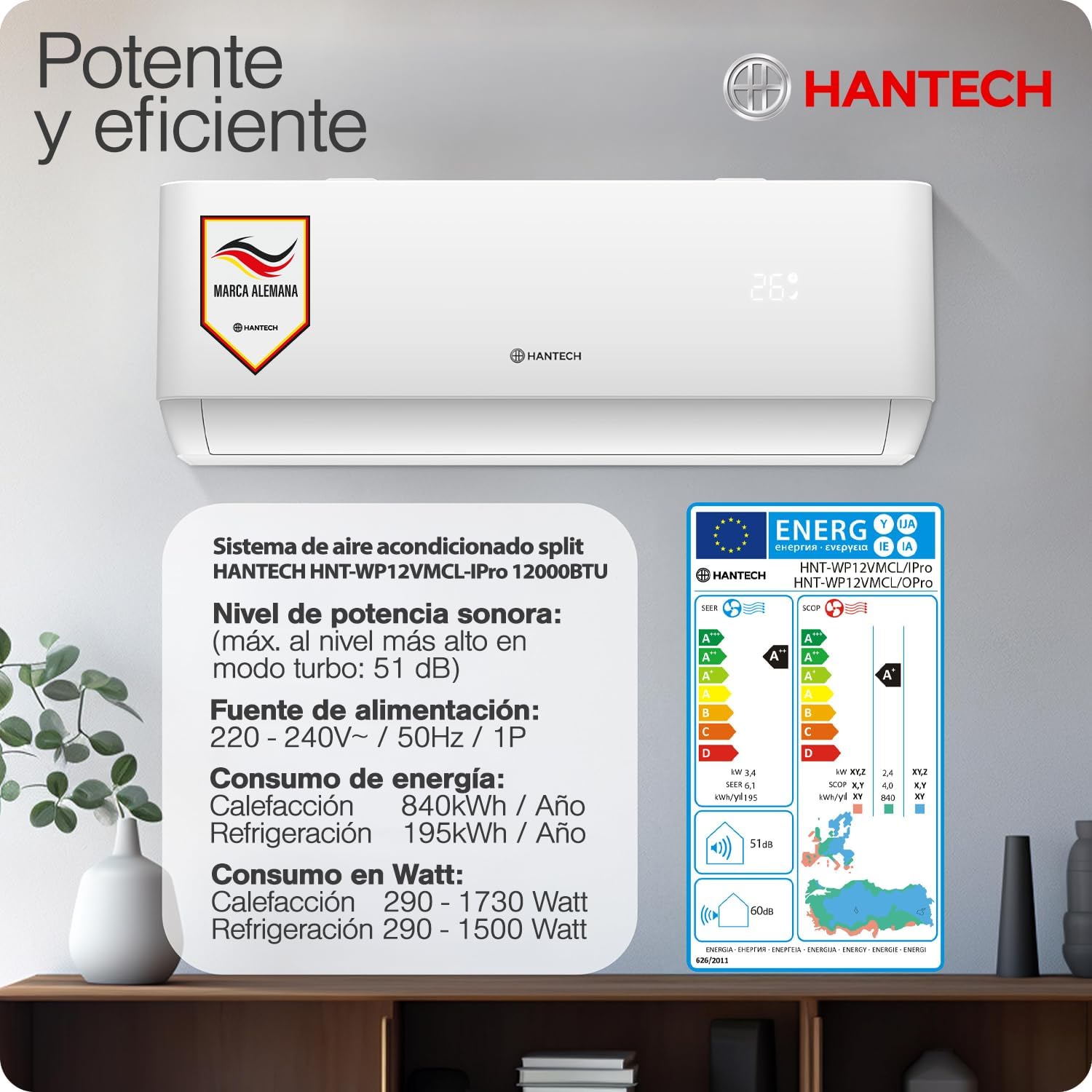
Image 8.1: Energy label and efficiency details.
9. Warranty and Support
HANTECH products are backed by a manufacturer's warranty. Please refer to your purchase documentation for specific warranty terms and conditions.
Customer Support:
For technical assistance, warranty claims, or any questions regarding your HANTECH H-PRO air conditioner, please contact HANTECH customer support. You can find contact information on the HANTECH website or through your retailer.
HANTECH is committed to providing comprehensive customer service even after purchase, including assistance with spare parts, suggestions, and further instructions.
Image 9.1: HANTECH customer support information.


