
Nine Sermoon S1
Sermoon S1 3D Scanner User Manual
Model: Sermoon S1 | Brand: Nine
1. Introduction
The Sermoon S1 is a high-precision 3D scanner designed for a wide range of applications, from small objects to large structures. It features advanced multi-laser and infrared fusion technology, delivering exceptional accuracy and speed for detailed 3D model acquisition. This manual provides essential information for setting up, operating, and maintaining your Sermoon S1 3D Scanner.
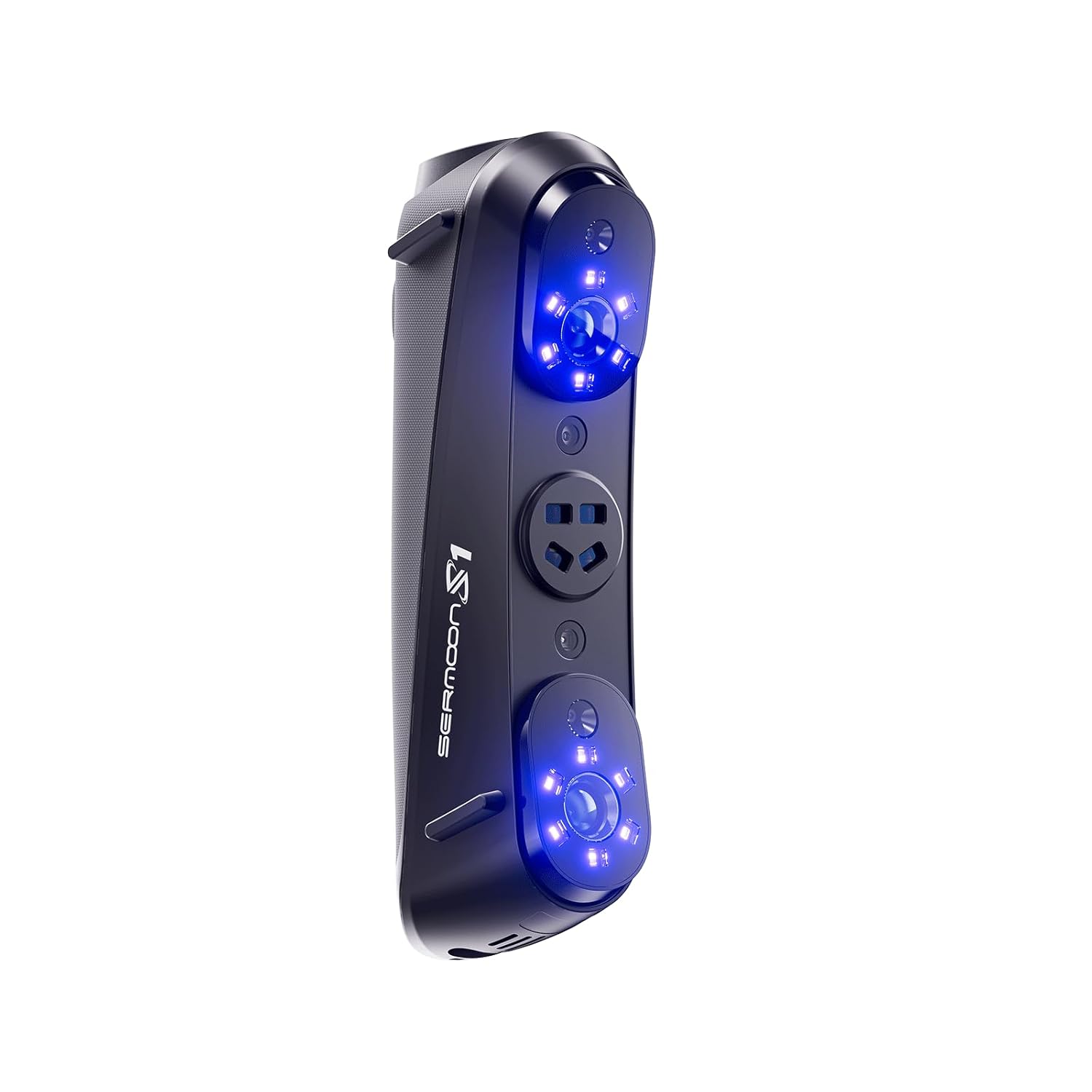
Figure 1: The Sermoon S1 3D Scanner, showcasing its sleek design and blue laser emitters.
2. Key Features
- Multi-Laser & Infrared Fusion: Combines blue single-line laser (0.1mm precision for deep holes), 34-line cross laser (fast large-object scanning), 7-line parallel laser (complex surfaces), and infrared structured light (marker-free scanning of humans/large items).
- Lab-Grade 0.02mm Accuracy: Captures sharp edges and rich details with industry-leading precision (0.02mm + 0.08mm/m volumetric accuracy).
- 90FPS Ultra-Speed & 4.6M Points/Sec: Enables smooth scanning of moving objects with high data acquisition rates.
- All-Size & All-Material Adaptability: Scans objects from 5mm to 4000mm without spray powder, handling black, shiny surfaces, hair, and multi-color items.
- System Compatibility: Supports Windows and macOS operating systems, with AI thermal compensation for stable long-term use.

Figure 2: Illustration of the Sermoon S1's multi-laser and infrared fusion technology, showing different laser lines for various scanning needs.

Figure 3: Close-up view demonstrating the scanner's ability to reveal deep holes, narrow gaps, and recessed areas with 0.1mm accuracy.
3. Setup Guide
3.1 System Requirements
Before connecting your Sermoon S1, ensure your computer meets the following minimum specifications for optimal performance:
- Operating System: Windows or macOS
- CPU: Cores ≥ 8, Threads ≥ 16, Base Frequency ≥ 2.4GHz
3.2 Connecting the Scanner
- Unpack the Sermoon S1 scanner and all included accessories.
- Connect the scanner to your computer using the provided USB cable. Ensure the connection is secure.
- Install the necessary scanning software. Refer to the software installation guide for detailed instructions.
- Once the software is installed, launch it and follow the on-screen prompts to calibrate the scanner if required.
4. Operating Instructions
4.1 Preparing for Scanning
- Ensure the object to be scanned is stable and well-lit.
- For optimal results, avoid direct sunlight or strong reflections on the object.
- The Sermoon S1 can scan objects from 5mm to 4000mm. Position the scanner at an appropriate distance from the object.
4.2 Scanning Process
- Open the scanning software on your computer.
- Select the desired scanning mode (e.g., single-line, cross-line, parallel-line, or infrared) based on the object's characteristics and required detail.
- Initiate the scan within the software.
- Move the scanner smoothly around the object, ensuring consistent coverage. The software will provide real-time feedback on scan quality and progress.
- The scanner's 90FPS ultra-speed and 4.6 million points/sec acquisition rate allow for efficient capture of data, even for moving objects.
- The AI thermal compensation function ensures stable operation during extended scanning sessions.
- Once the scan is complete, stop the process in the software and save the acquired 3D data.

Figure 4: A visual representation of the Sermoon S1's high accuracy, showing a detailed 3D scan of an engine block with 0.02mm + 0.08mm/m volume accuracy.

Figure 5: The scanner in use, demonstrating its high efficiency with 90FPS ultra-high speed scanning of a motorcycle.

Figure 6: A user scanning a large object using the infrared structured light feature, which allows for quick scanning without the need for marked points.

Figure 7: The Sermoon S1 scanning a black engine component, illustrating its capability to scan black and metal objects without the need for spray powders.
5. Maintenance
Proper maintenance ensures the longevity and optimal performance of your Sermoon S1 3D Scanner.
- Cleaning: Gently wipe the scanner's exterior with a soft, dry, lint-free cloth. Do not use abrasive cleaners or solvents. Ensure the optical lenses are clean and free of dust or smudges.
- Storage: Store the scanner in a cool, dry place, away from direct sunlight and extreme temperatures. Use the original packaging or a protective case when not in use.
- Software Updates: Regularly check for and install software updates to ensure compatibility and access to the latest features and performance improvements.
6. Troubleshooting
This section addresses common issues you might encounter with your Sermoon S1 3D Scanner.
| Problem | Possible Cause | Solution |
|---|---|---|
| Scanner not recognized by computer. | Loose USB connection, driver issue, insufficient system resources. |
|
| Poor scan quality or incomplete data. | Improper lighting, object movement, incorrect scanning mode, dirty lenses. |
|
| Software crashes or freezes. | Outdated software, insufficient system resources, conflicting applications. |
|
7. Specifications
| Feature | Detail |
|---|---|
| Model Number | Sermoon S1 |
| Manufacturer | Nine |
| Accuracy | 0.02mm + 0.08mm/m (volumetric) |
| Deep Hole Detection Accuracy | 0.1mm (single-line blue laser) |
| Scanning Speed | 90 FPS (frames per second) |
| Data Acquisition Rate | 4.6 million points/sec |
| Scan Object Size Range | 5mm to 4000mm |
| Supported Materials | Handles black/shiny surfaces, hair, multi-color items without spray powder. |
| System Compatibility | Windows, macOS |
| CPU Requirements | Cores ≥ 8, Threads ≥ 16, Base Frequency ≥ 2.4GHz |
| What's in the Box | 3D Scanner Sermoon S1 |

Figure 8: Examples of applications for the Sermoon S1 3D Scanner, including automotive, reverse engineering, manufacturing, art & antique, and inspection.
8. Warranty and Support
For warranty information, technical support, or service inquiries, please refer to the documentation provided with your purchase or visit the official Nine product support website. Keep your purchase receipt as proof of purchase for warranty claims.
Ask a question about this manual
Ask about setup, troubleshooting, compatibility, parts, safety, or missing instructions. Manuals+ will review the question and use this page’s manual context to help answer it.