
1. Introduction
Thank you for choosing the Nipow 40W 4-Port USB C Charger. This device is designed to provide efficient and safe charging for multiple electronic devices simultaneously. Please read this manual thoroughly before use to ensure optimal performance and safety.
2. Product Overview
The Nipow 40W 4-Port USB C Charger features a compact design with multiple charging ports to accommodate various devices. It includes Power Delivery (PD) and Quick Charge 3.0 (QC3.0) technologies for rapid charging.
2.1 Port Configuration
- 1 x USB-C Port: Supports Power Delivery (PD) with up to 25W output.
- 1 x USB-A Port: Supports Quick Charge 3.0 (QC3.0) with up to 18W output (3A/5V).
- 2 x USB-A Ports: Standard 5V/3.1A output each.

Image: Diagram illustrating the different charging ports (PD 25W USB-C, QC3.0 USB-A, 2x 3.1A USB-A) and their respective power outputs on the Nipow charger.
3. Setup
- Unpack: Carefully remove the charger from its packaging.
- Plug In: Insert the charger's plug into a standard wall outlet (AC 100-240V). A blue indicator light will illuminate, confirming the charger is powered on.
- Connect Devices: Use appropriate USB charging cables (not included) to connect your devices to the charger's available ports.

Image: The Nipow 40W 4-Port USB C Charger with its plug extended, ready to be inserted into a wall socket.
4. Operating Instructions
Once connected, your devices will begin charging automatically. The charger's intelligent circuit distributes power efficiently across all ports to ensure optimal charging speed for each connected device.
- For fastest charging, use the USB-C PD port for compatible devices (e.g., iPhone 15/16 series, iPad).
- Use the QC3.0 USB-A port for Quick Charge compatible Android devices.
- The two standard USB-A ports are suitable for a wide range of devices that do not require fast charging protocols.
- You can charge up to four devices simultaneously.
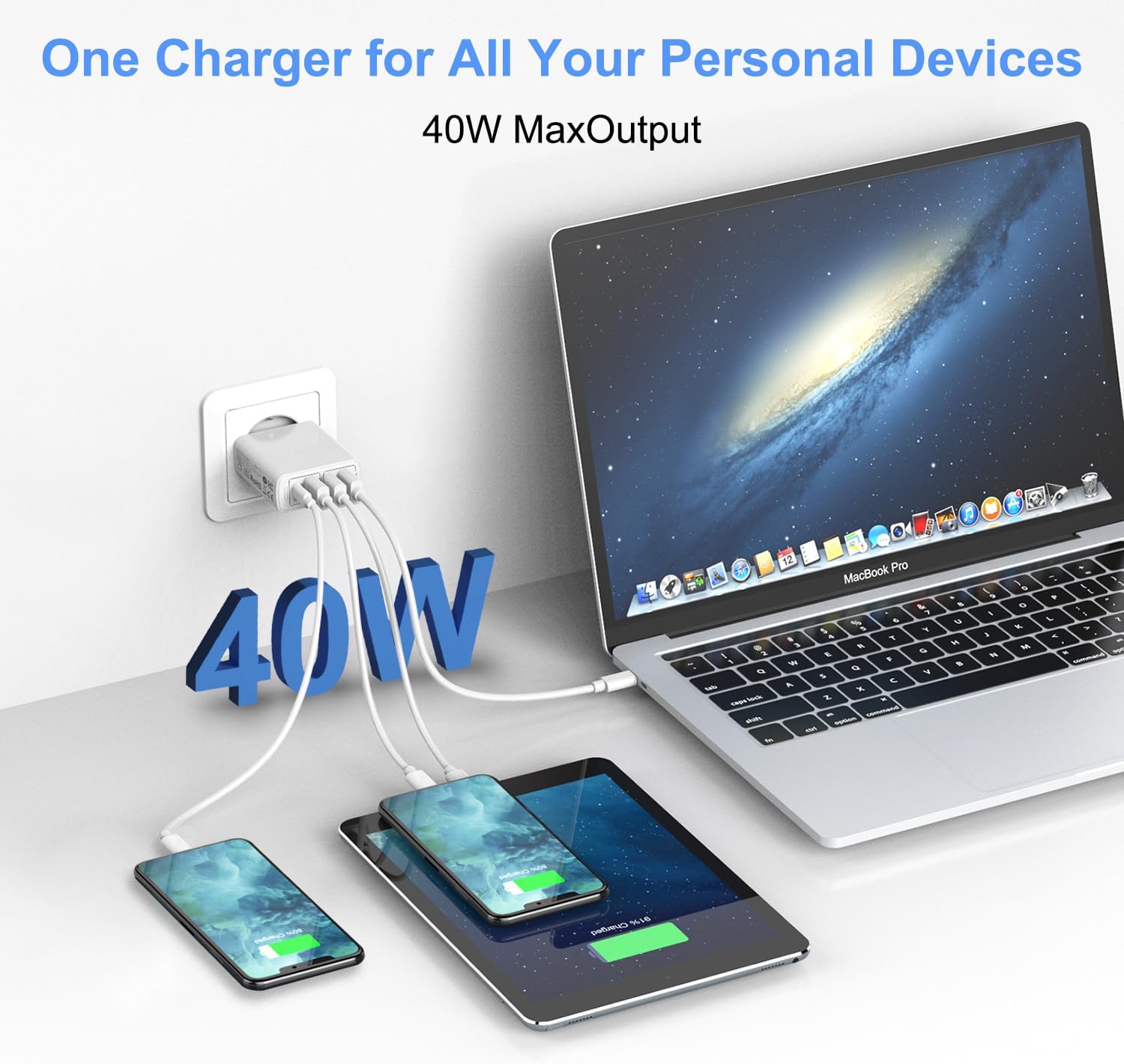
Image: The Nipow 40W charger plugged into a wall, simultaneously charging a laptop, a tablet, and two smartphones, demonstrating its multi-device capability.
5. Safety Information
The Nipow 40W 4-Port USB C Charger is built with multiple safety protections to ensure the safety of your devices and yourself. These include:
- Overload Protection: Prevents damage from excessive current.
- Overvoltage Protection: Safeguards against voltage spikes.
- Overcurrent Protection: Protects devices from drawing too much current.
- Overheating Protection: Monitors and regulates internal temperature.
- Short-Circuit Protection: Automatically cuts power in case of a short circuit.
Important Safety Precautions:
- Do not expose the charger to water or excessive moisture.
- Do not disassemble or attempt to repair the charger.
- Avoid extreme temperatures.
- Keep out of reach of children.
- Ensure proper ventilation when in use.

Image: The Nipow charger accompanied by icons representing its safety features: temperature control, overvoltage protection, short-circuit prevention, and surge protection.
6. Compatibility
This charger is universally compatible with a wide range of smartphones, tablets, and other USB-powered devices. Compatible models include, but are not limited to:
- iPhone: iPhone 17/17 Pro/17 Pro Max, iPhone 16/16 Plus/16 Pro/16 Pro Max, iPhone 15/15 Plus/15 Pro/15 Pro Max, iPhone 14/14 Plus/14 Pro/14 Pro Max, iPhone 13/13 Pro/13 Mini/13 Pro Max, iPhone 12 Mini/12 Pro/12 Pro Max, iPhone 11/11 Pro/11 Pro Max, iPhone XS Max/XR/X/XS/8/7/6/6s/8Plus/7Plus/6s Plus/SE.
- Samsung: Samsung S25/S25 Ultra/S25+, S24 Ultra/S24/S24+, S23/S22/S22+/S22 Ultra, S21/S21+/S21 Ultra, S20 FE 5G/S20/S10/S9, Note 20/10, Samsung A series, Samsung Z Fold/Flip series, Samsung Tablets.
- Google Pixel: Pixel 6/6 Pro/5/3a/4/4a.
- Huawei: P40/P30/P20/P20 Pro/P10/P9.
- Other: Sony Xperia XZ/Xa1, Xiaomi Mi 9/8, and various other smartphones, tablets, and USB-powered accessories.

Image: The Nipow charger displayed alongside various compatible devices, including different iPhone models, Samsung phones, and other brands, highlighting its broad compatibility.
7. Specifications
| Feature | Specification |
|---|---|
| Brand | Nipow |
| Model Number | YH-1C3ANEW |
| Total Power Output | 40W |
| USB-C Output (PD) | 25W Max |
| USB-A Output (QC3.0) | 18W Max (3A/5V) |
| USB-A Output (Standard) | 2 x 5V/3.1A |
| Input Voltage | 100-240 Volts AC |
| Special Features | Travel-friendly, Multi-protection safety system |
| Dimensions (Approx.) | 9.6cm x 5.4cm x 2.36cm (based on product image) |
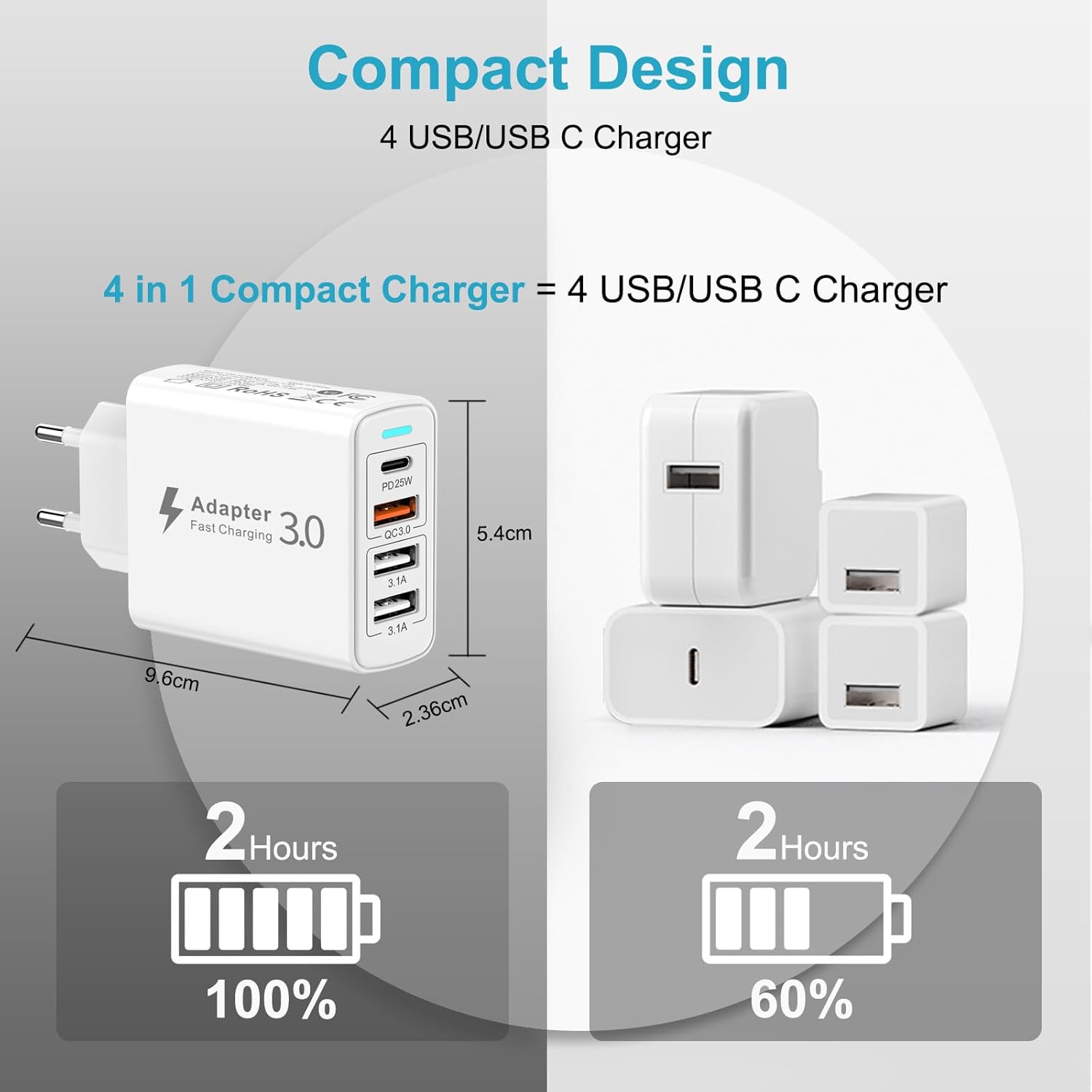
Image: The Nipow charger with its compact dimensions (length, width, thickness) clearly labeled, illustrating its portable design.
8. Troubleshooting
- Device not charging:
- Ensure the charger is securely plugged into a live wall outlet.
- Check if the blue indicator light on the charger is on.
- Verify that the charging cable is properly connected to both the charger and your device.
- Try a different charging cable or port.
- Ensure your device is compatible with the charger's output specifications.
- Slow charging:
- Ensure you are using a high-quality cable that supports fast charging (PD or QC3.0).
- For PD-compatible devices, use the USB-C PD port. For QC3.0-compatible devices, use the QC3.0 USB-A port.
- Charging multiple devices simultaneously may distribute the total 40W, potentially reducing individual port speeds if all devices demand high power.
- Charger feels warm:
- It is normal for the charger to become warm during operation, especially when charging multiple devices or fast charging. If it becomes excessively hot, disconnect it immediately and contact support.
9. Maintenance
- Cleaning: Disconnect the charger from the power outlet before cleaning. Use a soft, dry cloth to wipe the surface. Do not use liquid cleaners or aerosols.
- Storage: Store the charger in a cool, dry place away from direct sunlight and extreme temperatures when not in use.
- Cable Care: Avoid bending or twisting charging cables excessively, as this can damage them and affect charging performance.
10. Warranty and Support
The Nipow 40W 4-Port USB C Charger comes with a 1-year manufacturer's warranty.
If you encounter any issues or have questions regarding the use of this product, please contact Nipow customer support. Refer to the contact information provided with your purchase or visit the official Nipow website for assistance.
We are committed to providing a satisfactory response as soon as possible.


