
Introduction
This manual provides detailed instructions for the setup, operation, maintenance, and troubleshooting of your DOEL Automatic Cat Feeder with Water Fountain. Please read this manual thoroughly before using the product to ensure proper function and longevity.
Product Overview
The DOEL Automatic Cat Feeder with Water Fountain is a 2-in-1 device designed to provide scheduled meals and fresh water for your pets. It features a 6-liter food tank and a 2.5-liter water tank, ensuring your pet's needs are met even when you are away.

Image: The DOEL Automatic Cat Feeder and Water Fountain. This image highlights key features such as scheduling up to 10 meals per day, up to 12 portions per meal, a 6-liter food tank, and a 2.5-liter water tank.
Key Features:
- Scheduled Feeding: Program up to 10 meals per day with up to 12 portions per meal.
- Personalized Feeding Call: Record a custom voice message (up to 10 seconds) to call your pet for meals.
- Dual Power Supply: Operates via a 5V power adapter or 3 D-cell batteries (not included) for uninterrupted feeding during power outages.
- Anti-Jamming Mechanism: Equipped with a reversible motor and infrared detection to prevent food blockages.
- Water Filtration System: Includes a water filter cartridge for clean drinking water.
- Water Level Display: Allows easy monitoring of water levels.
- Dry-Run Protection: Water pump is protected against running dry.
- Durable Materials: Features a 304 stainless steel food bowl.

Image: Close-up of the DOEL Automatic Cat Feeder demonstrating the personalized pet feeding call feature. A speech bubble indicates a recorded message, "Hey baby, it's mealtime!"

Image: Illustration of the DOEL Automatic Cat Feeder's dual power supply. It shows the option to use a 5V power adapter or 3 D-cell batteries (not included) for backup power.

Image: Diagram showing the internal components of the water fountain, including the water filter cartridge, water level display, and dry-run protection water pump.

Image: Detailed view of the DOEL Automatic Cat Feeder's food dispensing mechanism, highlighting the reversible motor, infrared detection function, and 304 stainless steel food bowl to prevent food jamming.
Setup Instructions
- Unpack Components: Carefully remove all components from the packaging. Ensure you have the feeder unit, water fountain unit, power adapter, desiccant, and plastic food bowl.
- Assemble the Feeder:
- Place the main feeder unit on a flat, stable surface.
- Attach the food bowl to the designated slot at the base of the feeder. Note: The food bowl is designed to sit under the dispenser and is not permanently attached to allow for easy cleaning.
- Insert the desiccant packet into its compartment in the food tank lid to keep food fresh.
- Assemble the Water Fountain:
- Connect the water fountain unit to the side of the main feeder unit using the snap and lock design.
- Install the water filter cartridge into the fountain.
- Fill the water tank with clean water up to the maximum fill line.
- Power Connection:
- Connect the 5V power adapter to the feeder and plug it into a wall outlet.
- For backup power, install 3 D-cell batteries (not included) into the battery compartment at the bottom of the feeder.
- Fill Food Tank: Open the lid of the food tank and pour dry pet food into the reservoir. Ensure the lid is securely closed after filling.
- App Installation and Wi-Fi Connection:
- Download the companion app from your smartphone's app store (search for "DOEL Pet Feeder" or refer to the QR code in the included user manual).
- Follow the in-app instructions to connect the feeder to your home Wi-Fi network. Ensure your Wi-Fi is 2.4GHz.

Image: Four-panel illustration demonstrating the easy installation and uninstallation process of the DOEL Automatic Cat Feeder, showing how components snap together and detach.
Operating Instructions
- Setting Feeding Schedules:
- Open the DOEL app on your smartphone.
- Navigate to the feeding schedule section.
- Set desired meal times (up to 10 per day) and the number of portions for each meal (up to 12 portions).
- Save your settings. The feeder will automatically dispense food at the programmed times.
- Recording a Personalized Feeding Call:
- In the app, find the voice recording feature.
- Record a short message (up to 10 seconds) to play during meal times.
- You can set the recording to play up to 10 times per feeding.
- Manual Feeding:
- To dispense food manually, use the corresponding button on the feeder unit or the manual feed option within the app.
- This will dispense one portion of food immediately.
- Water Fountain Operation:
- The water fountain operates continuously when powered, providing fresh, circulating water.
- The app will notify you if the water level is low, prompting a refill.
Maintenance and Cleaning
Regular cleaning ensures the hygiene and proper functioning of your pet feeder and water fountain.
- Disassembly for Cleaning:
- Unplug the feeder from the power source and remove any backup batteries.
- Separate the water fountain unit from the main feeder.
- Remove the food tank, food bowl, and water filter.
- All parts, except the main unit (which contains electronics), are removable for cleaning.
- Cleaning Instructions:
- Food Tank and Bowl: Hand wash these components with mild soap and water. Rinse thoroughly and dry completely before reassembly. Do not wash in a dishwasher.
- Water Fountain Components: Hand wash the water tank, pump, and filter housing with mild soap and water. Rinse thoroughly.
- Main Unit: Wipe the exterior of the main feeder unit with a damp cloth. Do not submerge the main unit in water.
- Water Filter Replacement: Replace the water filter cartridge every 2-4 weeks, or as needed, depending on water quality and pet usage.
- Desiccant Replacement: Replace the desiccant packet every 1-2 months to maintain food freshness.
- Reassembly: Ensure all parts are dry before reassembling the feeder and water fountain.

Image: Exploded view of the DOEL Automatic Cat Feeder and Water Fountain, illustrating how all parts except the main electronic unit can be easily disassembled for thorough cleaning.
Troubleshooting
| Problem | Possible Cause | Solution |
|---|---|---|
| Food not dispensing as scheduled. |
|
|
| Water fountain not flowing. |
|
|
| App connectivity issues or update failures. |
|
|
| Food bowl is pushed away by pet. |
|
|
Specifications
| Feature | Detail |
|---|---|
| Model Number | DSPH-6L-2.5LV1P |
| Brand | DOEL |
| Material | Stainless Steel (bowl), Plastic |
| Target Species | Cats, Dogs (all sizes) |
| Special Features | Automatic, Wi-Fi Connectivity, Voice Recording, Dual Power |
| Color | White and Gray |
| Included Components | Feeder unit, Water fountain unit, Power adapter, Desiccant, Plastic food bowl, User manual |
| Batteries Required | No (for primary operation), Yes (3 x D-cell for backup, not included) |
| Power Source | Wired Electric (5V adapter) |
| Food Capacity | 6 Liters |
| Water Capacity | 2.5 Liters |
| Dimensions (L x W x H) | 38.3 cm x 32.6 cm x 35.2 cm (approx. 15.08" x 12.83" x 13.86") |
| Item Weight | 5.07 Pounds (approx. 2.3 kg) |
| Care Instructions | Hand wash only (removable parts) |
| Dishwasher Safe | No |
| Connectivity | Wi-Fi (2.4GHz) |
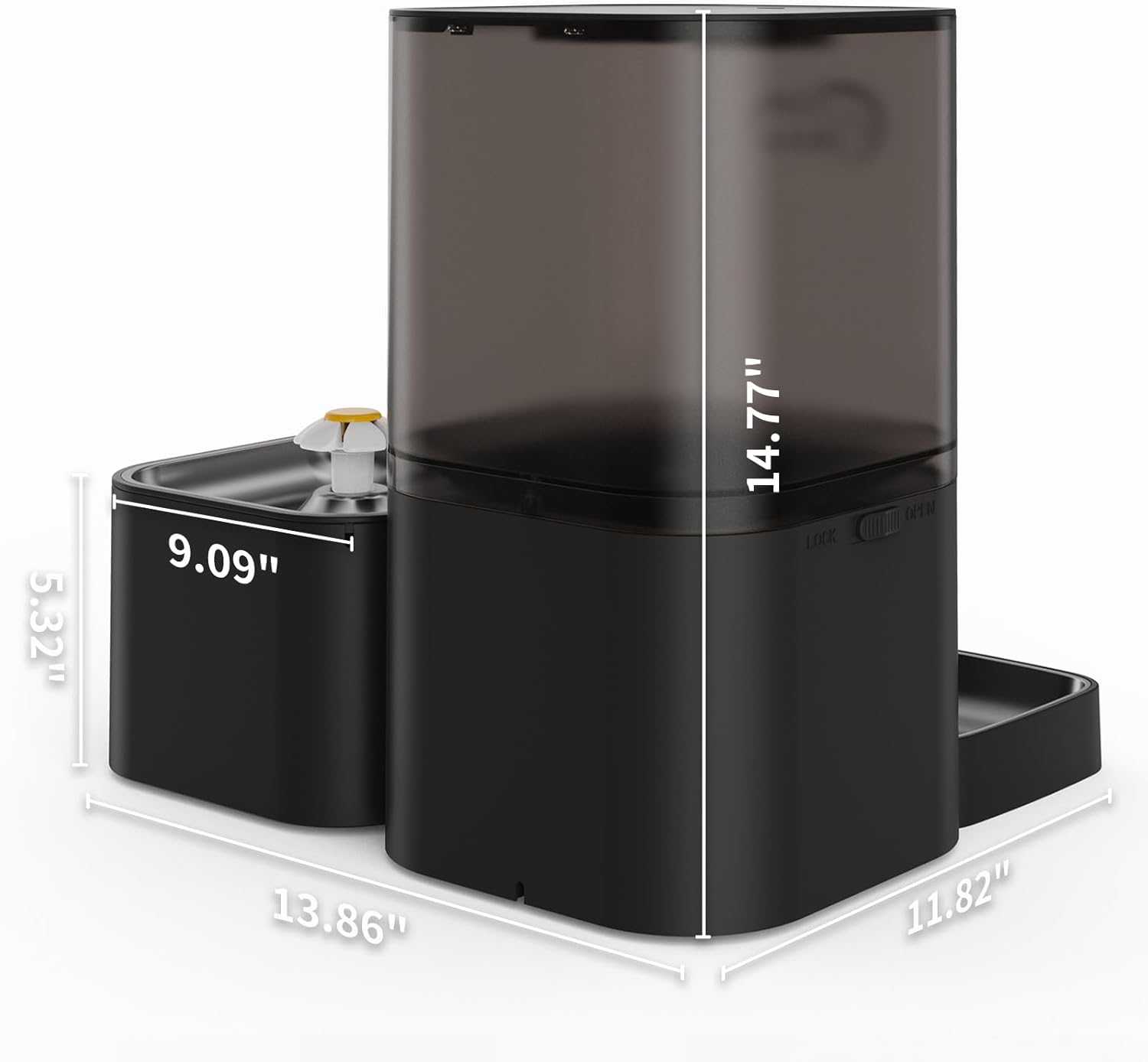
Image: Diagram showing the dimensions of the DOEL Automatic Cat Feeder and Water Fountain. The combined unit measures approximately 13.86 inches in total length, with the feeder unit being 11.82 inches wide and 14.77 inches high, and the water fountain unit being 5.32 inches wide and 9.09 inches high.
Warranty and Support
For warranty information or technical support, please refer to the contact details provided in the original product packaging or contact DOEL customer service directly. Keep your purchase receipt for warranty claims.