
1. Introduction
Thank you for purchasing the BEWEAI 9-Channel 2.4Ghz RC Bulldozer Toy. This remote-controlled construction vehicle is designed to provide a realistic and engaging play experience with its detailed features, metal blade, and multi-directional control. Please read this manual thoroughly before operating the toy to ensure safe and optimal performance.
2. Safety Information
Warning: Not suitable for children under 3 years due to small parts.
- Adult supervision is recommended during operation, especially for younger users.
- Keep hands, hair, and loose clothing away from moving parts, such as tracks and the blade.
- Do not operate the toy near people, pets, or obstacles to prevent accidents.
- Avoid operating in wet conditions or near water to prevent damage to electronic components.
- Use only the specified batteries and charging cable. Improper use can lead to fire, explosion, or injury.
- Remove batteries from the toy and remote control when not in use for extended periods.
- Do not attempt to modify or disassemble the toy or its components.
3. Package Contents
Verify that all items are present in the package:
- 1 × Remote Control Bulldozer
- 1 × Remote Control
- 2 × 500mAh Rechargeable Lithium Batteries (3.7V)
- 1 × USB Charging Cable
- 1 × Screwdriver
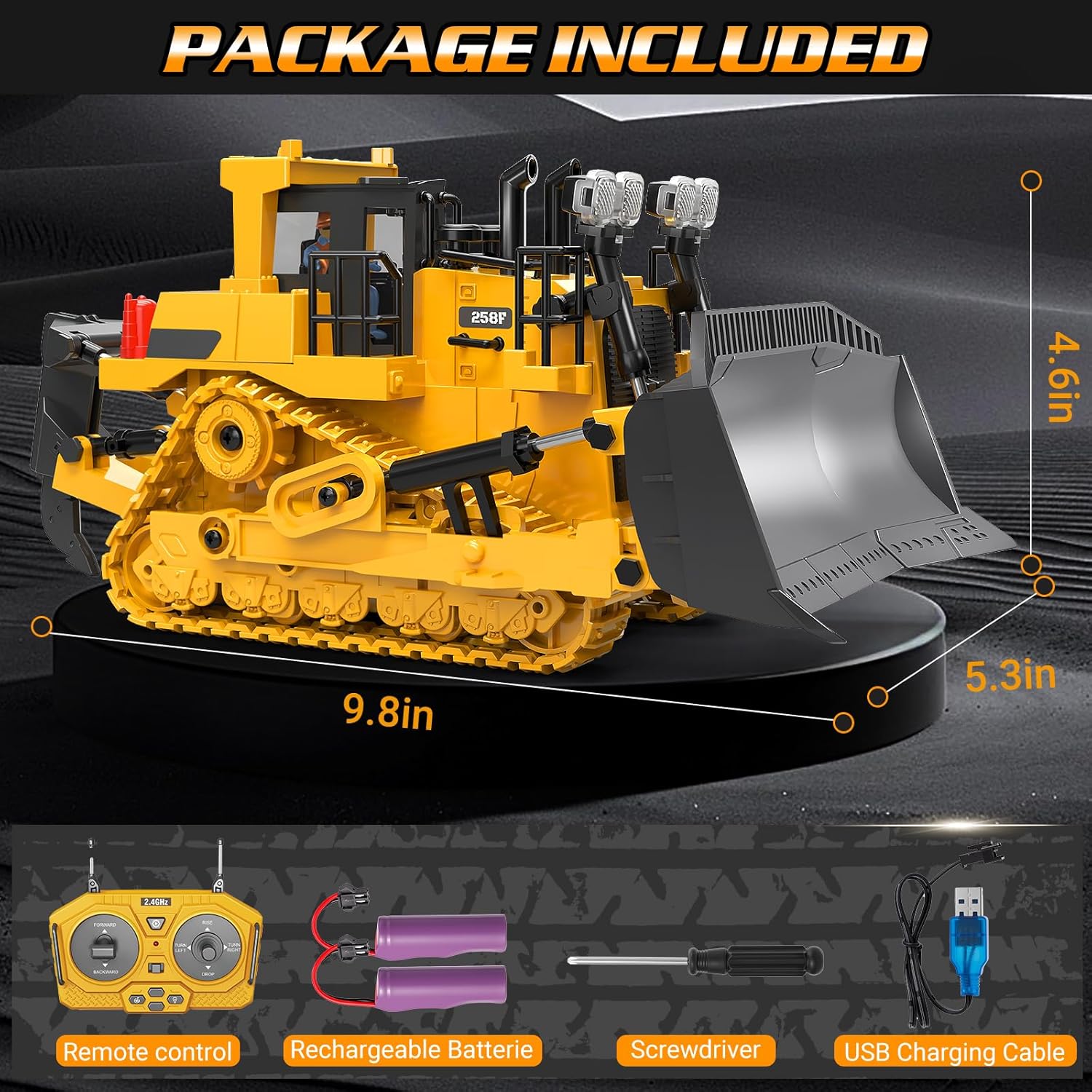
Image: All items included in the BEWEAI RC Bulldozer Toy package.
4. Setup
4.1. Battery Installation
- Bulldozer Battery:
- Locate the battery compartment on the underside of the bulldozer.
- Use the provided screwdriver to open the battery compartment cover.
- Connect one of the 3.7V/500mAh lithium batteries to the bulldozer's power connector.
- Carefully place the battery inside the compartment and close the cover, securing it with the screw.
- Remote Control Batteries:
- Locate the battery compartment on the back of the remote control.
- Open the cover and insert two 1.5V 'AA' batteries (not included), ensuring correct polarity (+/-).
- Close the battery compartment cover.
4.2. Charging the Bulldozer Battery
- Connect the USB charging cable to the bulldozer battery.
- Plug the other end of the USB cable into a standard USB power adapter (e.g., phone charger, computer USB port).
- The indicator light on the USB cable will illuminate during charging and turn off when fully charged.
- Charging typically takes 2-3 hours. Do not overcharge.
4.3. Pairing the Remote Control
- Ensure both the bulldozer and the remote control have fresh or fully charged batteries installed.
- Turn on the bulldozer using the power switch located on the vehicle.
- Turn on the remote control. The indicator light on the remote will flash.
- Move the left joystick (forward/backward control) up and then down. The remote control indicator light will stop flashing and remain solid, indicating successful pairing.
- The bulldozer is now ready for operation.

Image: The RC Bulldozer, remote control, and rechargeable batteries, ready for setup.
5. Operating Instructions
The BEWEAI RC Bulldozer features a 9-channel remote control, allowing for precise and versatile movements. Familiarize yourself with the remote control layout and functions:

Image: Key features of the BEWEAI RC Bulldozer.
5.1. Remote Control Functions
| Control | Function |
|---|---|
| Left Joystick (Up/Down) | Forward / Backward Movement |
| Left Joystick (Left/Right) | Left Track Forward / Right Track Forward (for turning) |
| Right Joystick (Up/Down) | Blade Up / Blade Down |
| Right Joystick (Left/Right) | 360° Rotation (Left/Right) |
| Light Button | Turns Headlights On/Off |
| Sound Button | Turns Engine Sounds On/Off |
| Demo Button | Activates One-Click Automatic Demonstration Mode |
5.2. Basic Operation
- Driving: Use the left joystick to move the bulldozer forward or backward. Push both joysticks in the same direction for straight movement.
- Turning: To turn, push one joystick forward and the other backward, or push one joystick forward while the other is neutral. The bulldozer can perform 360-degree rotations using the right joystick's left/right movement.
- Blade Control: Use the right joystick's up/down movement to raise or lower the front blade for digging or pushing materials.
- Lights and Sounds: Press the dedicated buttons on the remote to activate or deactivate the realistic headlights and engine sounds.
- Demo Mode: Press the 'Demo' button to see the bulldozer perform a pre-programmed sequence of movements. Press any control to exit demo mode.

Image: The bulldozer performing a 360-degree rotation.

Image: The bulldozer is suitable for operation on various terrains.
6. Maintenance
6.1. Cleaning
- After use, especially in dusty or sandy environments, gently wipe the bulldozer with a soft, dry cloth to remove dirt and debris.
- Do not use water or chemical cleaners, as they can damage electronic components.
- Periodically check the tracks for any trapped debris and carefully remove it.
6.2. Battery Care and Storage
- Always remove batteries from both the bulldozer and the remote control when storing the toy for extended periods.
- Store batteries in a cool, dry place, away from direct sunlight and extreme temperatures.
- Do not dispose of batteries in fire; they may explode. Dispose of used batteries responsibly according to local regulations.
- If the bulldozer will not be used for a long time, fully charge the lithium batteries before storage and recharge them every 3 months to maintain battery health.
7. Troubleshooting
| Problem | Possible Cause | Solution |
|---|---|---|
| Bulldozer does not move or respond. |
|
|
| Short operating time. |
|
|
| Remote control indicator light flashes continuously. | Not paired with bulldozer. | Perform pairing procedure (Section 4.3). |
| Interference during operation. | Other 2.4Ghz devices nearby. | Move to an area with less wireless interference. |
8. Specifications
| Feature | Detail |
|---|---|
| Model Number | BC1045 |
| Product Dimensions | 9.5 x 4.2 x 5.1 inches (approximately 24.1 x 10.7 x 13 cm) |
| Item Weight | 1.65 pounds (approximately 0.75 kg) |
| Control Channels | 9 Channels |
| Frequency | 2.4Ghz |
| Bulldozer Battery | 2 x 3.7V/500mAh Lithium Ion (included) |
| Remote Control Battery | 2 x 1.5V 'AA' (not included) |
| Recommended Age | 6 years and up |
| Material | Plastic, Metal (blade, ripper) |
9. Warranty and Support
For warranty information or technical support, please refer to the contact details provided with your purchase or contact the seller directly through the platform where the product was acquired. Keep your purchase receipt as proof of purchase.