
1. Product Overview
The Hodozzy 4G+128G Android Car Stereo is designed for Peugeot 208/2008 models from 2012-2018. It features 4GB RAM and 128GB ROM, providing ample memory and storage for smooth operation and application management. The integrated 10-inch InCell touch screen offers a 1280x720 resolution, delivering high-definition visuals and wide viewing angles. InCell technology combines the touch layer with the LCD, minimizing air gaps for enhanced touch responsiveness. This unit supports seamless multitasking and quick startup, making your in-car experience more efficient.
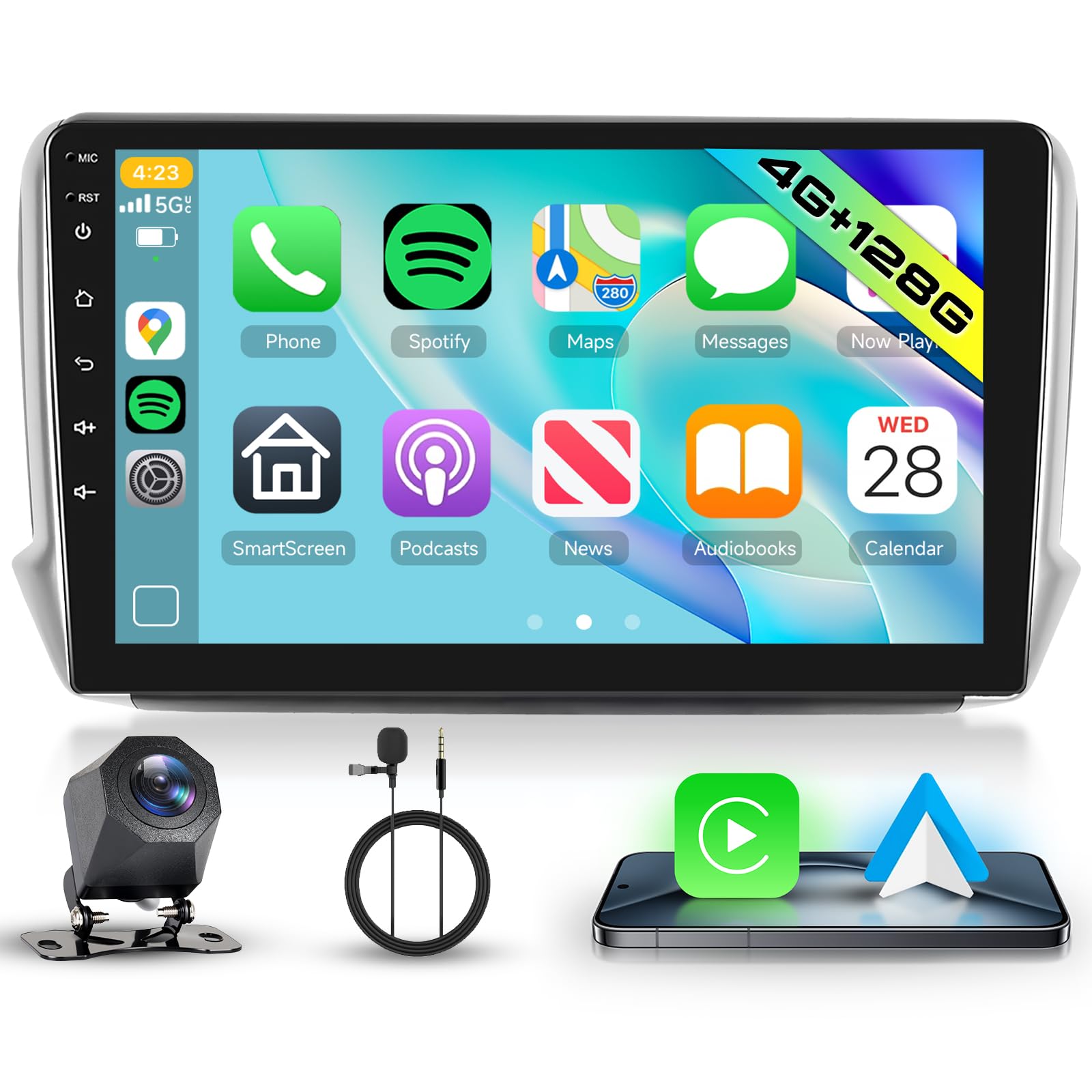
2. Setup and Installation
2.1 Package Contents
Before beginning installation, verify that all components are present in the package:
- Hodozzy Android Car Stereo Unit
- Rear View Camera
- GPS Antenna
- RCA Cable
- Installation Tool
- User Manual
- USB Cables
- Microphone (MIC)
- Rear Camera Input Cable
- Power Cables
- Radio Antenna
- Canbus Decoder
- Mounting Accessories

2.2 Pre-Installation Checks
Ensure your vehicle is compatible with the unit (Peugeot 208/2008, 2012-2018). Disconnect the vehicle's battery before starting any electrical work to prevent damage.
2.3 Wiring Instructions
Carefully follow the wiring diagram to connect the power, audio, video, and peripheral cables. Incorrect wiring can damage the unit or vehicle electronics.


2.4 Installation Steps
- Remove the original car stereo unit and trim panel.
- Connect the Hodozzy unit's wiring harness to the vehicle's harness, following the wiring diagram.
- Install the GPS antenna in a location with a clear view of the sky.
- Connect the rear view camera cable and route it to the camera's mounting location.
- Mount the Hodozzy unit into the dashboard opening and secure it.
- Reinstall the trim panel and reconnect the vehicle's battery.
- Test all functions before finalizing the installation.

3. Operating Instructions
3.1 Basic Operation
- Power On/Off: Press and hold the power button to turn the unit on or off. A short press typically mutes/unmutes audio.
- Volume Control: Adjust volume using the on-screen controls or steering wheel buttons.
- Touchscreen Interface: Navigate through menus and applications by tapping, swiping, and pinching on the 10-inch InCell touch screen.
3.2 Wireless CarPlay and Android Auto
Connect your smartphone wirelessly via Bluetooth or USB to access Apple CarPlay or Android Auto. This allows for seamless integration of navigation, music, messages, and calls directly on the car stereo display.

3.3 GPS Navigation and WiFi
The unit comes with pre-installed offline maps for navigation without data. Connect to a Wi-Fi hotspot to receive real-time traffic information, speed camera alerts, and access online maps like Waze. You can also download additional applications from the app store. The split-screen function allows navigation while streaming other content.

3.4 Audio Features (DSP, Bluetooth, FM/RDS Radio)
- DSP Equalizer: Utilize the 36-band DSP equalizer and dedicated bass control to customize your audio experience.
- Bluetooth: Connect your phone via Bluetooth for hands-free calling and A2DP music streaming.
- FM/RDS Radio: The FM/RDS tuner provides clear reception and supports multi-language scrolling display of song titles.

3.5 Steering Wheel Control
The unit integrates with your vehicle's steering wheel controls, allowing you to manage audio, calls, and other functions without taking your hands off the wheel.
3.6 Rear View Camera
The system automatically switches to the rear view camera display when the vehicle is in reverse, providing parking assistance.
3.7 User Interface Customization
Choose from 15 UI themes, customize your home screen with drag-and-drop functionality, and switch between day and night modes for optimal visibility.

4. Maintenance
4.1 Screen Cleaning
To clean the touchscreen, power off the unit and gently wipe the screen with a soft, lint-free cloth. Avoid using harsh chemicals or abrasive materials that could damage the display.
4.2 Software Updates
The unit supports Over-The-Air (OTA) updates. Periodically check for available software updates in the system settings to ensure optimal performance and access to new features.
5. Troubleshooting
If you encounter issues with your Hodozzy car stereo, refer to the following common problems and solutions:
| Problem | Possible Cause | Solution |
|---|---|---|
| Unit does not power on | Incorrect wiring, blown fuse, vehicle battery issue | Check power connections, inspect vehicle fuses, ensure battery is charged. |
| System resets or time resets | Power interruption, software glitch | Ensure stable power supply. Perform a system restart. Check for software updates. |
| Automatic display brightness not working | Sensor obstruction, software setting | Check if the light sensor is clear. Verify automatic brightness settings in the display menu. |
| No sound output | Speaker wiring issue, volume muted, audio settings | Check speaker connections. Ensure volume is not muted. Verify audio output settings. |
| GPS signal loss or inaccuracy | GPS antenna placement, environmental interference | Ensure GPS antenna has a clear view of the sky. Avoid areas with high buildings or tunnels. |
| Bluetooth connection issues | Device not discoverable, interference, incorrect pairing | Ensure Bluetooth is enabled on both devices. Delete previous pairings and re-pair. Move closer to the unit. |
If problems persist, consult the Hodozzy support resources or contact customer service.
6. Technical Specifications
| Feature | Specification |
|---|---|
| Brand | Hodozzy |
| Model Number | 4G+128G |
| RAM | 4GB |
| ROM | 128GB |
| Screen Size | 10 Inches |
| Screen Type | InCell Touch Screen |
| Resolution | 1280x720 |
| Connectivity Technology | Bluetooth, USB, Wi-Fi |
| Special Features | Android Auto, Apple CarPlay, Built-in Bluetooth, GPS Navigation, DSP |
| Compatible Devices | Smartphone |
| Audio Output Mode | Stereo, Surround |
| Surround Sound Channel Configuration | 5.1 |
| Output Power | 4x45 Watt |
| Video Encoding | H.264, H.265/HEVC |
| Supported Formats | AVI, WAV, WMA |
| Country of Origin | China |
7. Warranty and Support
7.1 Product Warranty
This Hodozzy car stereo unit comes with a 2-year warranty from the date of purchase. The warranty covers manufacturing defects and malfunctions under normal use. Please retain your proof of purchase for warranty claims.
7.2 Customer Support
For technical assistance, troubleshooting not covered in this manual, or warranty inquiries, please contact Hodozzy customer support through the retailer where the product was purchased. Provide your model number and a detailed description of the issue for efficient service.
