
1. Product Overview
The GISNPA 7-in-1 Digital Water Quality Tester (Model C-600A) is a versatile instrument designed for accurate measurement of various water parameters. This device integrates seven functions: pH, Total Dissolved Solids (TDS), Electrical Conductivity (EC), Salinity, Temperature, Oxidation-Reduction Potential (ORP), and Specific Gravity (S.G.). It is suitable for a wide range of applications, including testing drinking water, swimming pools, hydroponics, aquariums, and more.

The GISNPA 7-in-1 Digital Water Quality Tester, a handheld device with a green and white body, featuring an LCD screen displaying readings and control buttons. The protective cap is removed, revealing the testing probe.
2. Product Components
The GISNPA 7-in-1 Water Quality Tester is engineered with high-precision components to ensure reliable and accurate measurements. Key components include:
- High-Sensitivity Probe: Designed for quick and accurate readings across all parameters.
- Large LCD Screen Display: Provides clear, backlit readings for easy visibility.
- On/Off Button: For powering the device.
- Data Hold/Temperature Switch: To freeze readings or switch between temperature units.
- Mode/Calibration Key: For switching between measurement modes and initiating calibration.
- Protective Cover: Shields the probe when not in use.
- Battery Compartment: Houses 3 x 1.5V (LR44) batteries.

An exploded view diagram of the water quality tester, clearly labeling its main components: the protective cover, high-sensitivity probe, On/Off button, data hold/temperature switch, mode/calibration key, large LCD screen, and battery compartment (housing 3 x 1.5V LR44 batteries).

A detailed view of the tester's probe, emphasizing its high-accuracy design, upgraded internal chips, and sponge protection for the sensor.
3. Setup and Basic Operation
Follow these steps for initial setup and basic water testing:
- Remove Protective Cover: Gently slide off the protective cover from the probe end of the tester.
- Power On: Press the On/Off button to turn on the device.
- Select Mode: Short press the MODE/CAL button to cycle through the seven measurement modes (pH, TDS, EC, Salinity, Temperature, ORP, S.G.) until the desired mode is displayed.
- Immerse Probe: Place the high-precision probe into the water sample to be tested. Ensure the probe is fully submerged.
- Read Measurement: Wait for the reading on the LCD screen to stabilize. The device will automatically compensate for temperature.
- Hold Reading (Optional): Press the HOLD/TEMP button to freeze the current reading on the screen. Press again to release.
- Clean and Store: After testing, rinse the probe thoroughly with clean water and gently dry it. Replace the protective cover before storing the device.
Note: The device is factory calibrated. The included calibration solutions are for recalibration when necessary. When instructions refer to 'solution', they mean your water sample, not the bottled calibration solutions, unless specifically stated for calibration procedures.

A visual guide demonstrating the basic usage steps: 1. Remove the protective cover. 2. Place the high-precision probe into the water to be tested. 3. Clean and dry the high-precision probe. 4. Close the protective cover. Also shows the labeled components.
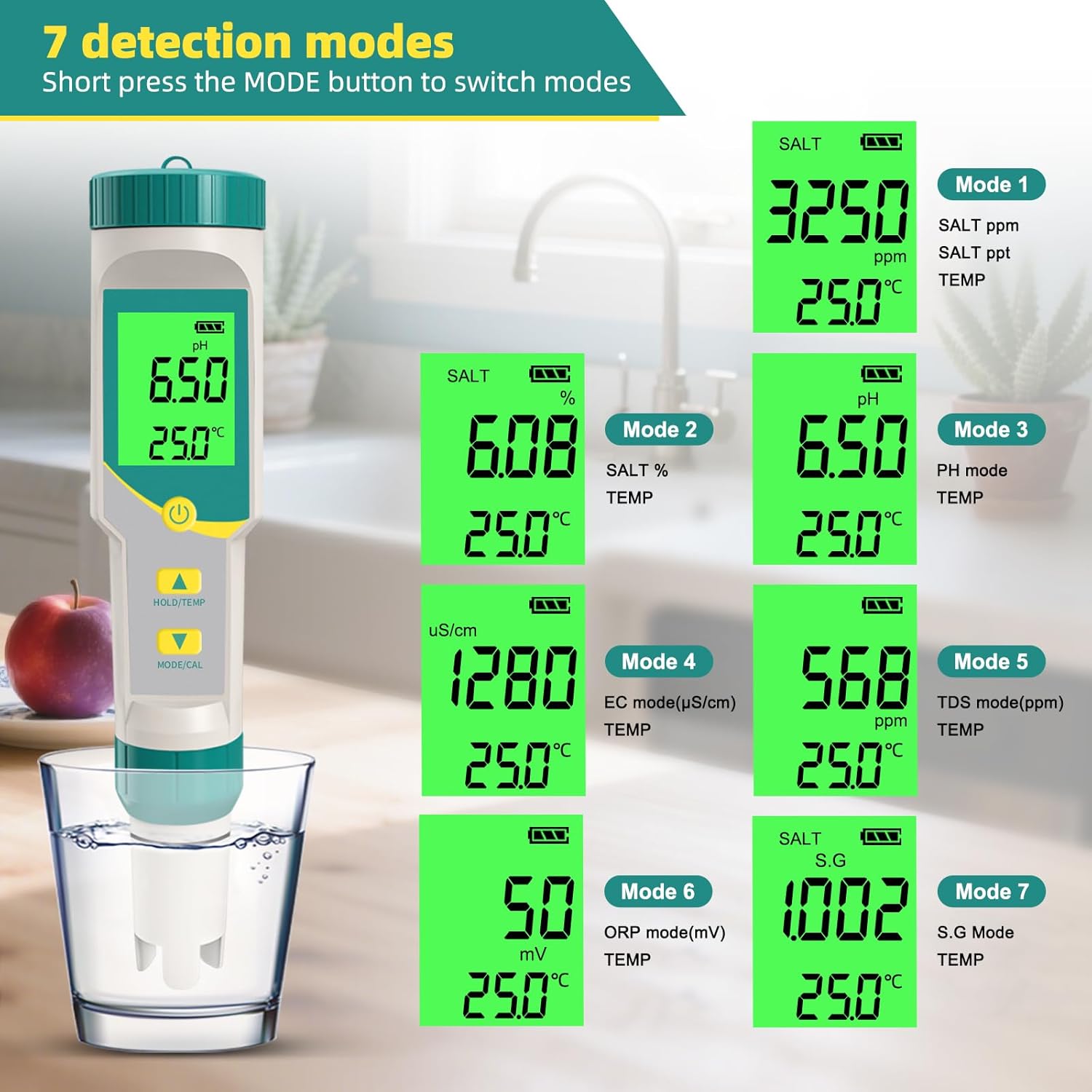
This image illustrates the seven distinct detection modes of the water quality tester, showing the device's screen for each mode: Salt (ppm), Salt (%), pH, EC (µS/cm), TDS (ppm), ORP (mV), and Specific Gravity (S.G.).
4. Calibration Procedures
Regular calibration ensures the accuracy and reliability of your GISNPA 7-in-1 Water Quality Tester. The device supports 3-point pH calibration and specific calibration for EC/TDS/Salt and ORP.
4.1 pH Calibration
The pH water tester uses a 3-point calibration method with pH 4.00, pH 6.86, and pH 9.18 solutions.
- Rinse the pH meter probe with clean water and gently dry it.
- Turn on the pH meter and adjust it to pH mode (if another mode is displayed, press the MODE/CAL button to switch to pH).
- Prioritize testing the pH 6.86 solution. Place the probe into the pH 6.86 solution cup and wait approximately 30 seconds until the reading stabilizes. Then press and hold the CAL button for 5 seconds. The screen will display "CAL," and the pH 6.86 value will flash three times. The calibration is complete for pH 6.86.
- Repeat the above steps to test the pH 4.00 and pH 9.18 solutions.
- After calibration, rinse the probe thoroughly, dry it, and calibrate it every 2-3 weeks for regular use.

Detailed steps for pH calibration: rinse, turn on, adjust to pH mode, calibrate with pH 6.86 solution, then repeat for pH 4.00 and 9.18 solutions. Emphasizes regular calibration.
4.2 EC/TDS/SALT Calibration
- Press the MODE/CAL button to set the EC mode; the word "uS/cm" will be displayed at the top left of the screen.
- Put the probe into 1413uS/cm calibration solution and shake it gently.
- Wait until the reading is stable, then long press MODE/CAL for 5 seconds and release; "CAL" is displayed on the screen, then a value will flash.
- Press MODE/CAL three times (if the flashing value is higher than 1413uS/cm) or HOLD/TEMP button (if the flashing value is lower than 1413uS/cm) to adjust the displayed value to 1413uS/cm.
- After adjusting the displaying value to 1413uS/cm, release the button, waiting the reading stop flashing. The calibration is finished, rinse off the probe with pure water and replace the protective cap.
- Repeat the process for the 12.88mS/cm solution, following the same steps. This straightforward calibration ensures your EC meter delivers precise value for various applications.
- After both solutions have been calibrated, it indicates that EC/TDS/SALT calibration is complete.

Step-by-step guide for EC/TDS/SALT calibration: press MODE/CAL to EC mode, use 1413uS/cm solution, hold MODE/CAL to calibrate, adjust value if needed, then repeat for 12.88mS/cm solution.
4.3 ORP Calibration
- Press the ON/OFF button to turn on the instrument, remove the protective cover, rinse the probe with distilled water, and dry it thoroughly.
- Press the MODE/CAL button to set the ORP mode; the screen will display "mV" in the top-right corner. Place the probe into the 256 mV calibration solution and gently shake it.
- Wait for the reading to stabilize, then hold down the MODE/CAL button for 5 seconds and release; the screen will display "CAL," followed by a value flashing three times. When the value begins to flash, press the MODE/CAL button (if the flashing value is higher than 256 mV) or the HOLD/TEMP button (if the flashing value is below 256mV).
- Adjust the displayed value to 256mV, release the button, and wait for the reading to stop flashing. Calibration is complete. Rinse the probe with clean water and replace the protective cap.

Guide for ORP calibration: turn on, rinse probe, press MODE/CAL to ORP mode, use 256 mV calibration solution, hold MODE/CAL to calibrate, adjust value if needed.
4.4 Calibration Videos
This video demonstrates the calibration process for the GISNPA pH water quality test pen, providing a visual guide to ensure accurate readings.
5. Applications and Usage Scenarios
The GISNPA 7-in-1 Digital Water Quality Tester is designed for diverse applications, ensuring water quality for various needs.
- Drinking Water: Monitor the quality of tap water, filtered water, and bottled water.
- Swimming Pools & Spas: Maintain ideal pH, ORP, and salinity levels for safe and comfortable swimming.
- Aquariums & Aquaculture: Ensure optimal water parameters for the health of aquatic life in freshwater, saltwater, and coral tanks.
- Hydroponics & Agriculture: Guide nutrient fertilization by monitoring EC and TDS levels for healthy plant growth.
- Wine-making & Brewing: Essential for controlling pH during fermentation processes.
- Laboratories: Provides quick and accurate measurements for various scientific and educational purposes.
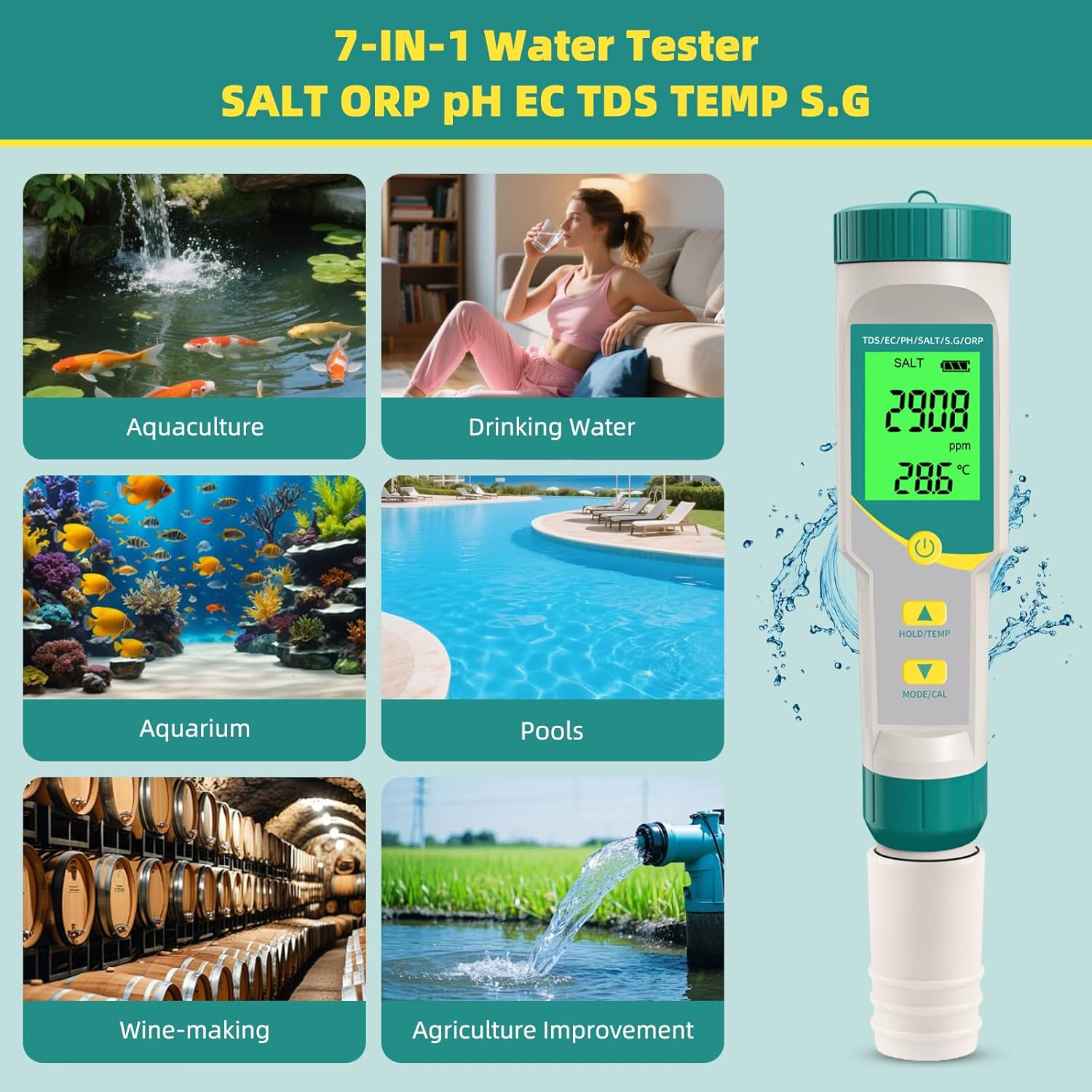
An infographic showcasing the versatility of the 7-in-1 water tester across multiple applications, including aquaculture, drinking water, aquariums, swimming pools, wine-making, and agricultural water testing.

A visual representation of the tester's broad utility, demonstrating its application in diverse settings such as aquariums, agriculture, drinking water, swimming pools, beer brewing, and spas, with examples of different measurement modes.
5.1 Ideal Ranges for Aquariums
Maintaining specific water parameters is crucial for aquatic environments:

This image displays a table outlining recommended pH, temperature, salt, and ORP ranges for different aquarium types (freshwater, saltwater, coral). Below the table, the tester is shown measuring water in each of these environments.
| Parameters | Freshwater Tank | Saltwater Tank | Coral Tank |
|---|---|---|---|
| pH | 6.5-7.5 | 8.1-8.4 | 8.2-8.4 |
| Temperature | 22-26°C | 24-27°C | 24-26°C |
| Salt | 0 ppt | 30-35 ppt | 33-36 ppt |
| ORP | 200-400 mV | 300-450 mV | 350-500 mV |
5.2 Swimming Pool Parameters
For swimming pools, maintaining correct salt, pH, and ORP levels is vital for hygiene and safety.

A visual guide for swimming pool salt levels, categorizing them as below 2700 ppm (affects disinfection), 2700-3400 ppm (ideal), 3400-4500 ppm (not recommended), and above 4500 ppm (may cause skin irritation/equipment damage). The tester displays a reading of 2800 ppm, indicating an ideal level.

This image presents two graphs: one illustrating the effect of pH on chlorine efficacy (ideal pH 7.2-7.8) and another showing ideal ORP levels (650-750 mV). The water tester is shown in a pool, displaying pH 7.58 and temperature 77.7°F.
5.3 Hydroponics and Crop Fertilization
For agriculture and horticulture, EC and TDS are important indicators for guiding nutrient testing.

A table detailing optimal EC (µS/cm) and TDS (PPM) values for various crop types (leafy vegetables, fruits and vegetables, flower) across different growth stages in hydroponic systems.
| Crop Type | Growth Stage | EC (µS/cm) | TDS (PPM) |
|---|---|---|---|
| Leafy vegetables (lettuce, leafy vegetables) | Seedling stage | 800-1300 | 400-650 |
| Growth stage | 1000-1600 | 500-800 | |
| Fruits and vegetables (tomatoes, cucumbers) | Seedling stage | 1200-2000 | 600-1000 |
| Growth stage | 2000-3500 | 1000-1750 | |
| Flowering and fruiting stage | 2500-3500 | 1250-1750 | |
| Flower (Rose) | Growth stage | 1500-2500 | 750-1250 |
This video illustrates various scenarios where the GISNPA 7-in-1 Water Quality Test Pen can be effectively used, showcasing its versatility.
6. Maintenance
Proper maintenance extends the life and accuracy of your water quality tester:
- Clean the Probe: Always rinse the probe with clean water after each use to prevent residue buildup. Gently dry with a soft cloth.
- Regular Calibration: Calibrate the device every 2-3 weeks, or more frequently if used often or if readings appear inconsistent.
- Storage: Store the tester with the protective cap securely in place. Ensure the probe remains moist if recommended by the manufacturer (e.g., in a small amount of storage solution or distilled water, if applicable for the specific probe type).
- Battery Replacement: Replace batteries when the low battery indicator appears on the screen. The device uses 3 x 1.5V (LR44) batteries.
7. Troubleshooting
If you encounter issues with your GISNPA 7-in-1 Digital Water Quality Tester, consider the following:
- Inaccurate Readings: This is often due to an uncalibrated or dirty probe. Perform a full calibration as described in Section 4 and ensure the probe is clean.
- No Display/Power Issues: Check if the batteries are correctly installed and have sufficient charge. Replace batteries if necessary.
- Slow Response: A slow response time can indicate a dry or contaminated probe. Clean the probe and re-calibrate.
- Confusion with Calibration Solutions: Remember that when general instructions mention 'solution', they refer to your water sample. Only use the specific buffer powders/solutions for the calibration process.
If problems persist after following these steps, please contact customer support.
8. Specifications
| Feature | Detail |
|---|---|
| Product Dimensions | 7 x 1.3 x 1.3 inches |
| Item Model Number | C-600A |
| Weight | 3.04 ounces |
| Manufacturer | GISNPA |
| Power Source | 3 x 1.5V (LR44) batteries |
| Measurement Parameters | pH, TDS, EC, Salinity, Temperature, ORP, Specific Gravity |
9. What's in the Box
Your GISNPA 7-in-1 Digital Water Quality Tester package includes:
- GISNPA 7-in-1 Digital Water Quality Tester (Model C-600A)
- pH 4.00, 6.86, and 9.18 Calibration Powders
- Instruction Manual
10. Warranty and Support
For information regarding product warranty, technical support, or service inquiries, please refer to the contact details provided with your purchase documentation or visit the official GISNPA website. Specific warranty terms and conditions may vary.