
1. Introduction
Thank you for choosing the AMERLIFE CNS173 Vintage Farmhouse Nightstand. This manual provides essential information for the safe and proper setup, operation, and maintenance of your new nightstand. Please read these instructions thoroughly before use and retain them for future reference.
2. Safety Information
Important: To prevent serious injury, including tip-over incidents, it is crucial to install the included anti-tip device. Always follow the assembly instructions carefully for proper installation and stability.
Ensure the nightstand is placed on a level and stable surface. Do not overload drawers or the tabletop beyond the specified weight capacities.
3. Package Contents
Verify that all components are present before beginning assembly:
- 1 x AMERLIFE CNS173 Nightstand (fully assembled body)
- 4 x Solid Wood Legs
- 1 x Anti-Tip Kit (includes strap, screws, and wall anchors)
- 1 x Assembly Guide (this document)
4. Setup and Assembly Instructions
Your AMERLIFE CNS173 Nightstand arrives largely pre-assembled. The only assembly required is attaching the legs and installing the anti-tip device.
4.1 Attaching the Legs
- Carefully unbox the nightstand and place it upside down on a soft, clean surface to prevent scratching.
- Locate the four pre-drilled holes on the bottom corners of the nightstand.
- Screw each solid wood leg into the corresponding hole by hand until securely tightened. Do not overtighten.
- With assistance, carefully turn the nightstand upright and place it in its desired location.

4.2 Installing the Anti-Tip Device
The anti-tip device is essential for safety. Follow these steps:
- Position the nightstand in its final desired location.
- Attach one end of the anti-tip strap to the back of the nightstand using the provided screw, ensuring it is securely fastened to a solid wood section.
- Mark the wall where the other end of the strap will reach, ensuring the strap is taut.
- Drill a pilot hole at the marked spot on the wall. Insert a wall anchor if drilling into drywall.
- Attach the other end of the strap to the wall using the remaining screw.
- Confirm the strap is securely installed and prevents the nightstand from tipping forward.
5. Operating Instructions
5.1 Using the USB Charging Ports
The nightstand is equipped with two built-in USB ports for convenient charging of electronic devices.
- Locate the power cord extending from the back of the nightstand.
- Plug the power cord into a standard wall outlet.
- Connect your USB charging cables to the USB ports on the nightstand.
- Plug your devices (e.g., phones, tablets) into your USB charging cables.

5.2 Drawer Storage
The nightstand features three drawers for organized storage:
- Top Drawer: A shallow drawer with a soft felt lining, ideal for storing delicate items like jewelry or small valuables.
- Middle and Bottom Drawers: Two larger drawers suitable for books, electronics, or other bedside essentials.
The drawers are designed with smooth-gliding rails for easy opening and closing.

6. Maintenance and Care
- Cleaning: Wipe the nightstand with a soft, damp cloth. Avoid using harsh chemicals, abrasive cleaners, or polishes that may damage the finish.
- Spills: Immediately wipe up any spills to prevent staining, especially on the wood veneer top.
- Protection: Use coasters under drinks and protective pads under hot items to prevent damage to the surface.
- Sunlight: Avoid prolonged exposure to direct sunlight, which can cause fading or discoloration of the wood finish.
- Humidity: Maintain a stable humidity level in the room to prevent wood from warping or cracking.
7. Troubleshooting
- Drawers sticking or not closing smoothly: Check if any objects are obstructing the drawer slides. Ensure the nightstand is on a level surface. If issues persist, inspect the drawer slides for misalignment and gently adjust if necessary.
- USB ports not charging: Verify that the nightstand's power cord is securely plugged into a working wall outlet. Test with a different USB cable and device to rule out cable or device issues.
- Nightstand feels unstable: Confirm that all legs are securely tightened. Re-check the installation of the anti-tip device to ensure it is properly anchored to both the nightstand and the wall.
8. Specifications
| Feature | Detail |
|---|---|
| Brand | AMERLIFE |
| Model Name | CNS173 |
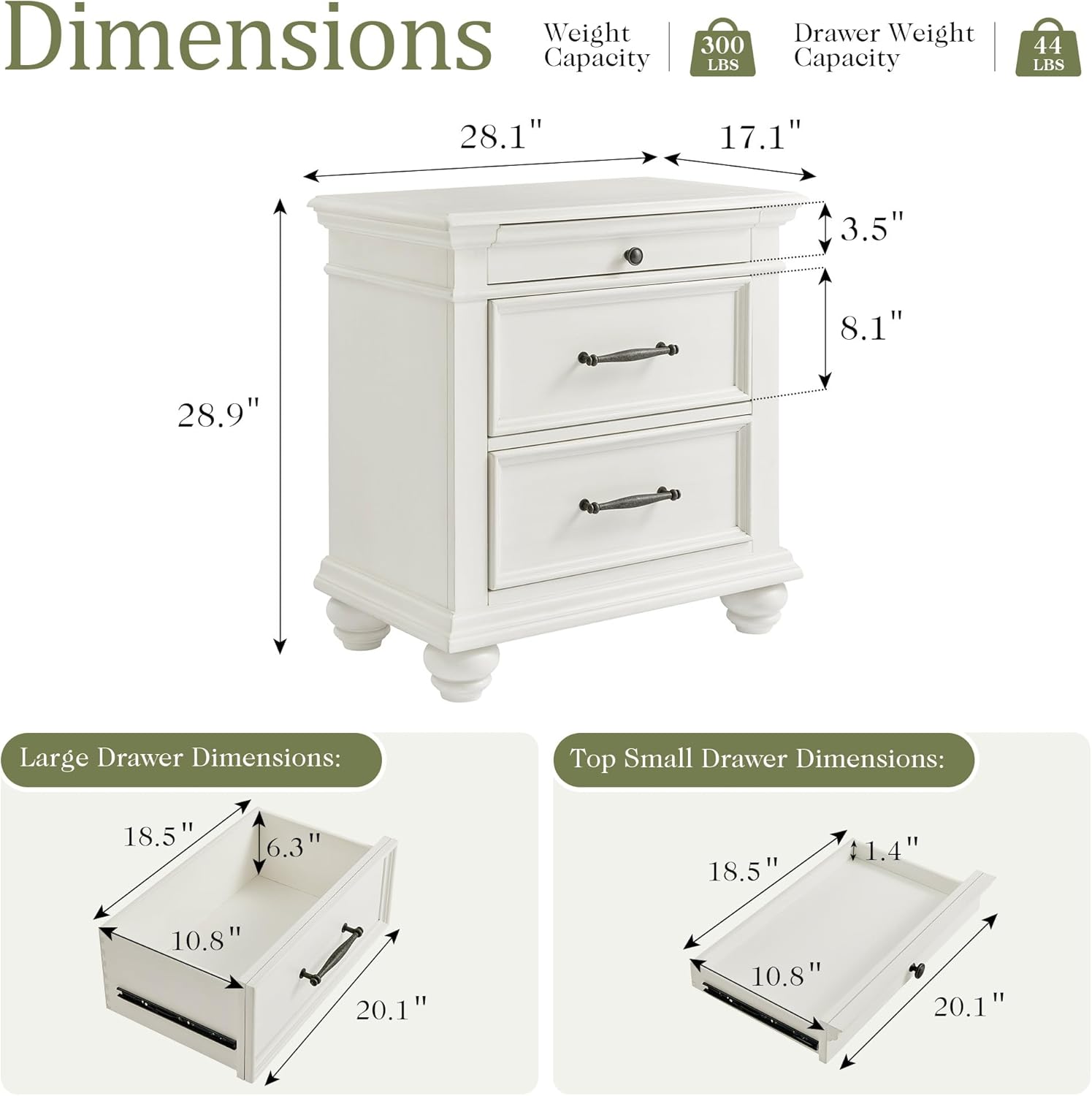
| Product Dimensions (D x W x H) | 17.1" x 28.1" x 28.9" |
| Material | Solid Rubber Wood, MDF with Natural Wood Veneer |
| Color | Antique White |
| Maximum Weight Recommendation (Tabletop) | 300 Pounds |
| Drawer Weight Capacity | 44 Pounds |
| Number of Drawers | 3 |
| USB Ports | 2 (5V/2A) |
| Power Cord Length | 4.9 ft |
| Assembly Required | Minimal (Attach legs, install anti-tip kit) |
9. Warranty and Support
For warranty information or customer support, please refer to the purchase documentation or contact AMERLIFE customer service directly. Keep your proof of purchase for any warranty claims.