
1. Introduction
This manual provides detailed instructions for the safe and effective use of your Niitawm DT-129 Wireless Smart Bluetooth Meat Thermometer. This device is designed to help you achieve precise cooking temperatures for various meats, ensuring optimal results every time. Please read this manual thoroughly before operating the device.
2. Safety Information
- Do not expose the probes directly to open flames for extended periods.
- Always handle probes with care as they can be sharp.
- Keep the device and probes out of reach of children.
- Ensure the probes are inserted past the temperature threshold line to prevent damage to the internal sensor.
- The main unit is not designed for direct exposure to high heat or water immersion, despite the probes being IP67 waterproof.
- Use only the provided charging cable or a compatible USB Type-C cable for charging.
3. Package Contents
Verify that all items are present in your package:
- Niitawm DT-129 Main Unit (Charging Base)
- 2 x Wireless Probes (White and Black)
- USB Type-C Charging Cable
- Instruction Manual (this document)
4. Product Overview
The Niitawm DT-129 features a main unit that serves as a charging base and display, along with two wireless probes for monitoring internal and ambient temperatures.

Figure 4.1: Niitawm DT-129 Main Unit, Probes, and App Interface.
This image displays the main unit (charging base) with its LCD screen showing temperature readings, two wireless probes (one with a white cap, one with a black cap), and a smartphone screen illustrating the accompanying application interface with temperature monitoring.
4.1 Main Unit (Charging Base)
- LCD Display: Shows real-time internal and ambient temperatures for both probes.
- Power Button: Turns the unit on/off.
- Charging Ports: Two slots for charging the wireless probes.
- USB Type-C Port: For charging the main unit.
4.2 Wireless Probes
- Dual Sensors: Each probe contains an internal temperature sensor (for food) and an ambient temperature sensor (for oven/grill).
- Temperature Threshold Line: Indicates the minimum insertion depth for accurate internal temperature readings.
- IP67 Waterproof: Designed for easy cleaning and durability.
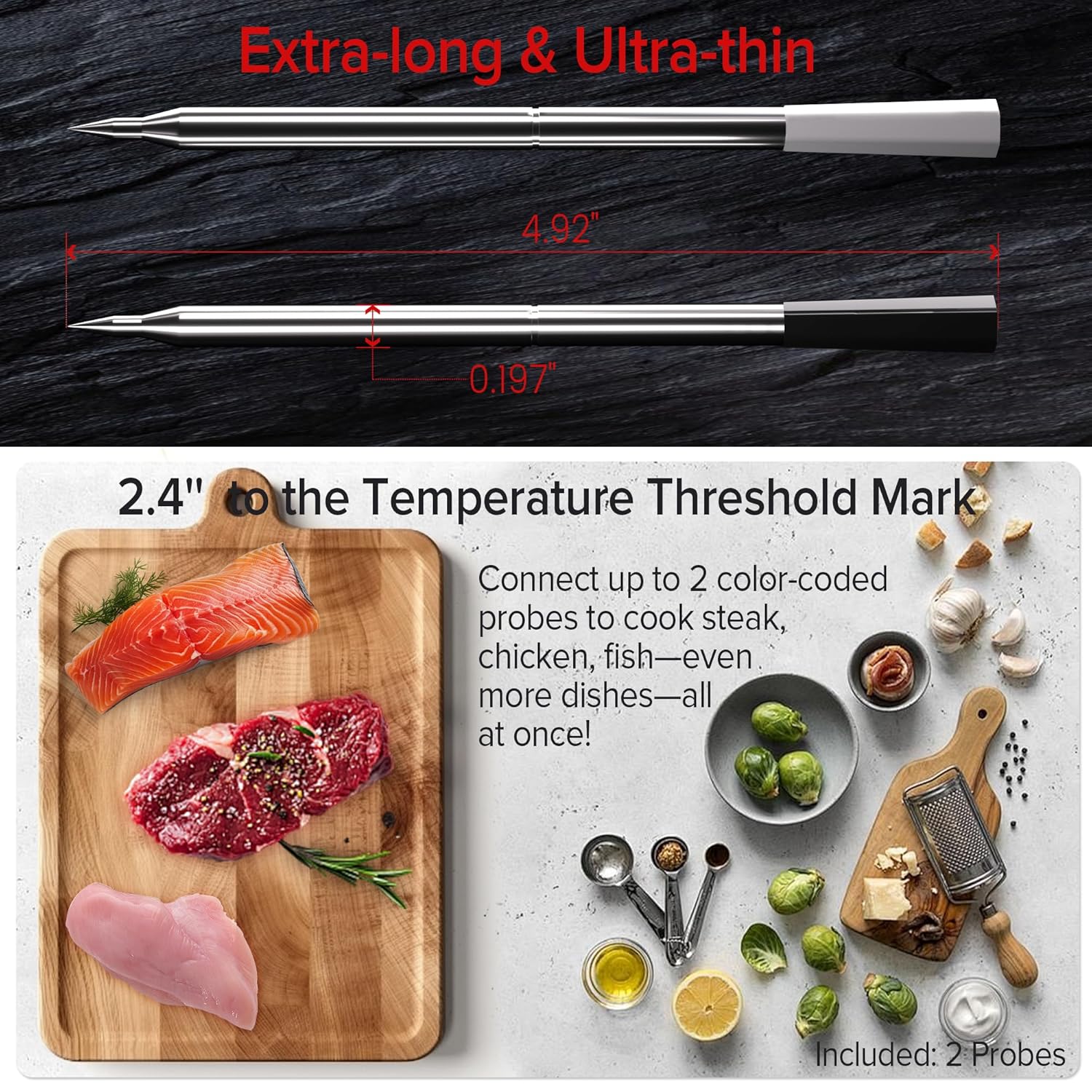
Figure 4.2: Probe Sensor Locations and Temperature Ranges.
This diagram illustrates a single probe inserted into a piece of meat, highlighting the locations of the internal temperature sensor (14°F to 212°F) and the ambient temperature sensor (14°F to 572°F), along with the temperature threshold line for proper insertion.
5. Setup
5.1 Charging the Device
- Charge the Main Unit: Connect the provided USB Type-C cable to the main unit's charging port and a suitable USB power adapter (not included). The battery indicator on the LCD will show charging status.
- Charge the Probes: Place the wireless probes into their respective slots in the main unit. The probes will begin charging automatically. A full charge takes approximately 30 minutes and provides up to 48 hours of continuous use.

Figure 5.1: Charging the Main Unit via USB Type-C.
This image shows the Niitawm DT-129 main unit plugged into a wall adapter using a USB Type-C cable for charging. The display on the unit shows a battery icon indicating charging.
5.2 App Download and Connection
- Download the App: Scan the QR code provided in the quick start guide or search for the "Niitawm" app in your smartphone's app store (iOS/Android).
- Enable Bluetooth: Ensure Bluetooth is enabled on your smartphone.
- Connect to Device: Open the Niitawm app. The app will automatically detect and connect to your DT-129 main unit via Bluetooth 5.3. No account login is required.
6. Operating Instructions
6.1 Inserting the Probes
- Carefully remove the desired probe(s) from the main unit.
- Insert the probe into the thickest part of the meat, avoiding bones. Ensure the probe is inserted past the temperature threshold line (approximately 2.4 inches from the tip) to accurately measure internal temperature. The ambient sensor should remain outside the food.
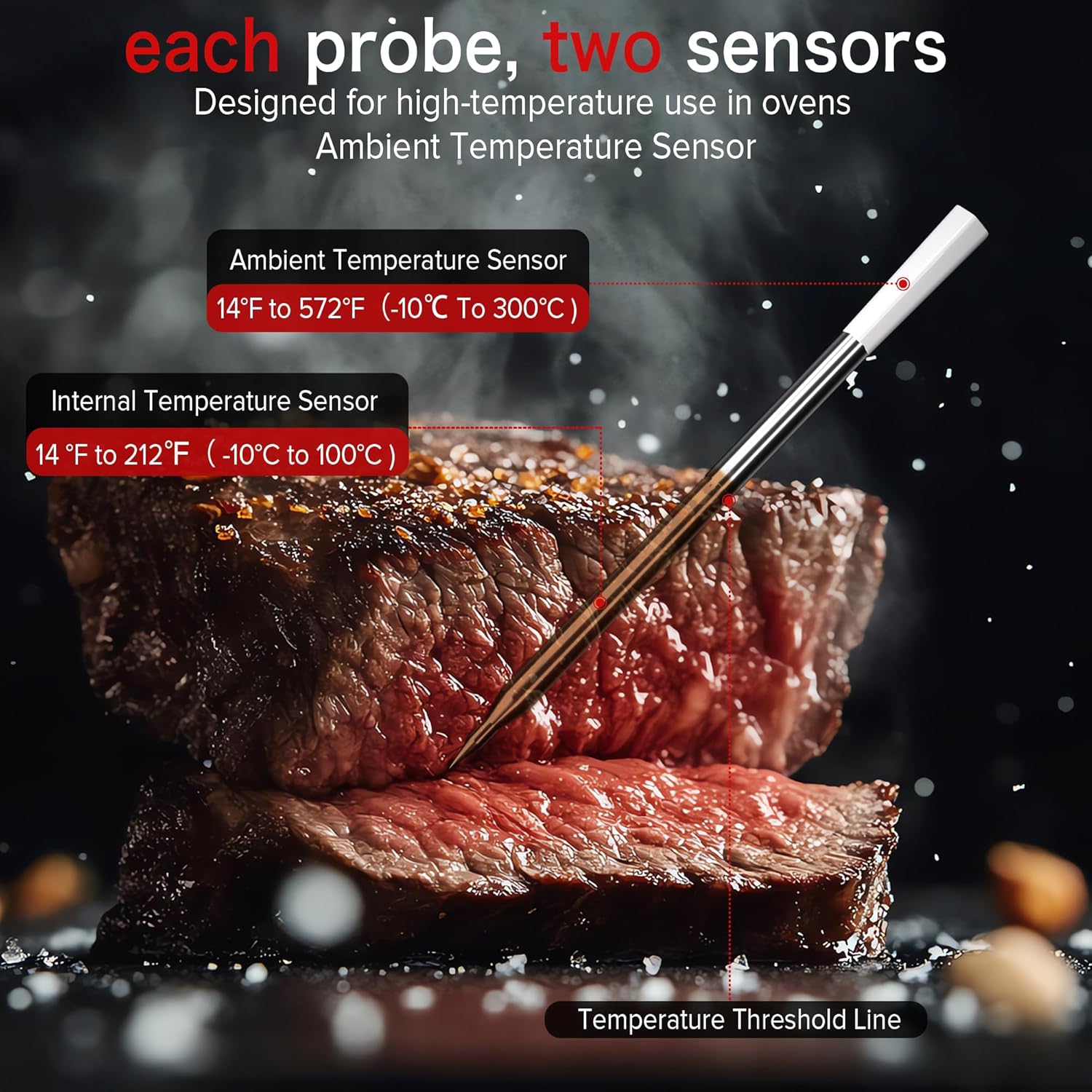
Figure 6.1: Probe Dimensions and Proper Insertion.
This image shows two probes with their dimensions (4.92 inches total length, 0.197 inches diameter) and highlights the 2.4-inch temperature threshold mark. Below, a cutting board displays various foods like steak, chicken, and salmon, indicating the versatility of the dual probes for different cooking needs.
6.2 Using the App for Monitoring
- Select Food Type: In the app, choose the type of meat you are cooking (e.g., beef, chicken, pork, lamb, turkey).
- Set Doneness Level: Select your desired doneness level (e.g., rare, medium-rare, well-done). The app provides USDA-recommended temperatures.
- Monitor Temperatures: The app will display real-time internal and ambient temperatures for each probe. You can monitor cooking progress from up to 820 feet (unobstructed) away.
- Alarms: The dual alarm system (app and main unit) will notify you when the target temperature is reached.
- Temperature Graph: The app also provides a temperature graph to visualize the cooking process over time.
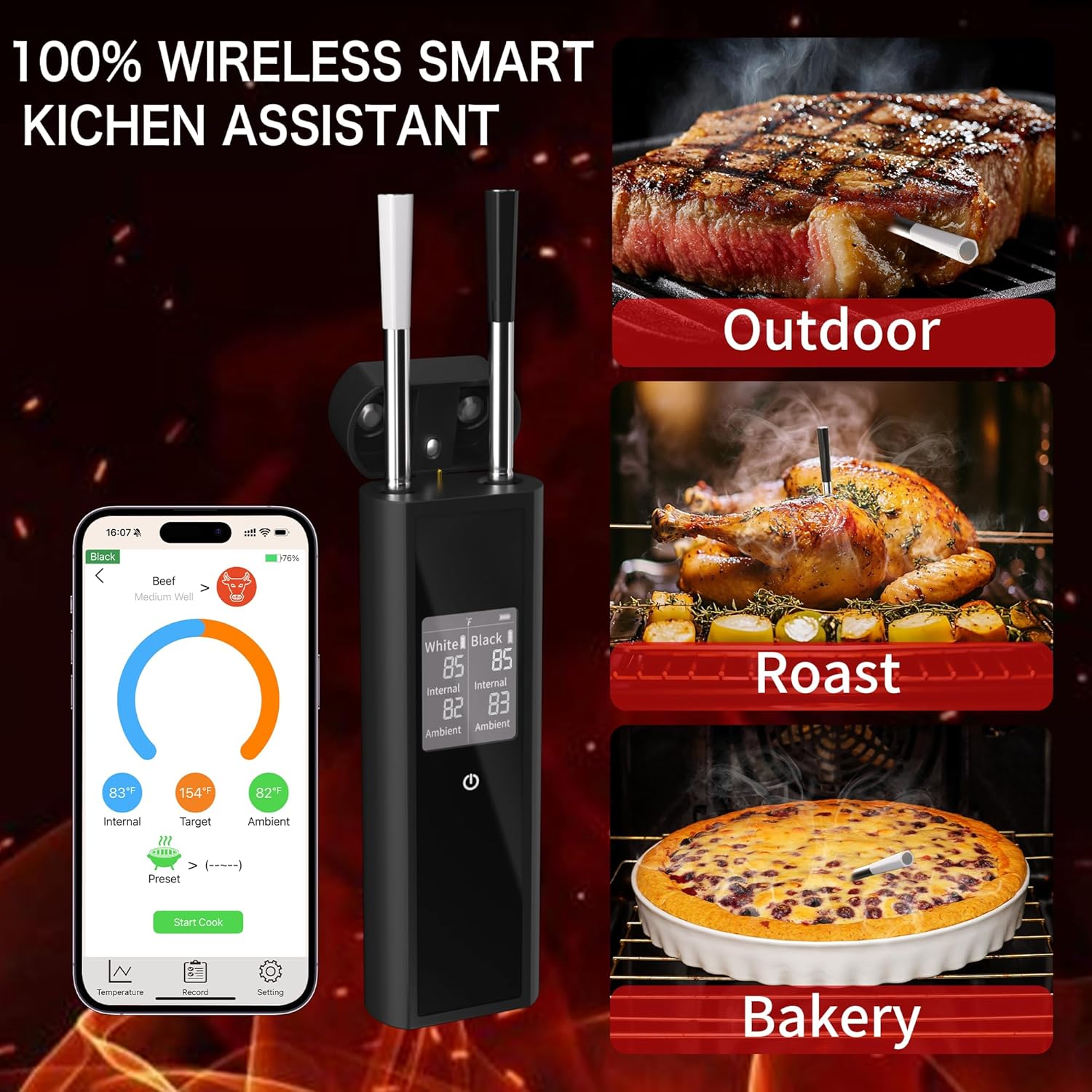
Figure 6.2: Smartphone App Interface for Cooking Monitoring.
This image shows a smartphone screen displaying the Niitawm app. The app interface shows current internal and ambient temperatures, a target temperature, and a circular progress indicator for a beef cooking session, along with options for temperature settings and recording.
6.3 Using the Main Unit Display
Even without the app, the main unit's LCD screen provides real-time internal and ambient temperature readings for both probes. This allows for quick checks without needing your smartphone.

Figure 6.3: Main Unit Display in Use.
The image features the Niitawm DT-129 main unit on a kitchen counter, displaying temperature readings on its LCD screen. Two probes are visible, one inserted into a large cut of cooked meat, and the other resting nearby. This illustrates the device's use in a kitchen setting for monitoring cooking temperatures.
7. Maintenance
7.1 Cleaning
- Probes: The probes are IP67 waterproof and can be cleaned under running water or in a dishwasher. Ensure they are thoroughly dry before returning them to the main unit.
- Main Unit: Wipe the main unit with a soft, damp cloth. Do not immerse the main unit in water.

Figure 7.1: Cleaning the Waterproof Probe.
This image shows a wireless probe being rinsed under a kitchen faucet, demonstrating its IP67 waterproof feature and ease of cleaning by hand. The text "IP67 Waterproof" and "Hand washing" are visible, reinforcing the cleaning instructions.
7.2 Storage
Store the main unit with probes inserted in a cool, dry place when not in use. Keeping the probes in the main unit ensures they remain charged and ready for the next use.
8. Troubleshooting
| Problem | Possible Cause | Solution |
|---|---|---|
| No Power / Device Not Turning On | Low battery on main unit. | Charge the main unit using the USB Type-C cable. |
| Probes Not Charging | Probes not correctly seated in the charging slots. | Ensure probes are fully inserted into their designated slots in the main unit. |
| App Not Connecting to Device | Bluetooth is off on smartphone; device is out of range; app issue. |
|
| Inaccurate Temperature Readings | Probe not inserted deep enough; probe damaged. |
|
| Probe Beeping When Not in Use | Probe removed from main unit but not in use, or connection lost. | If not in use, return the probe to the main unit. If in use, ensure it's within Bluetooth range. |
9. Specifications
| Feature | Detail |
|---|---|
| Model Name | DT-129 |
| Brand | Niitawm |
| Product Dimensions | 0.9 x 1.85 x 5.91 inches; 6.74 ounces |
| Internal Probe Accuracy | ±1.8°F |
| External Probe Accuracy | ±5.4°F |
| Internal Temperature Range | 14°F to 212°F (-10°C to 100°C) |
| Ambient Temperature Range | 14°F to 572°F (-10°C to 300°C) |
| Connectivity | Bluetooth 5.3 |
| Wireless Range | Up to 820 feet (unobstructed) |
| Probe Battery Life | Up to 48 hours (continuous use) |
| Probe Charging Time | Approx. 30 minutes |
| Waterproof Rating | IP67 (Probes only) |
| Display Type | Digital LCD |
| Material | Acrylonitrile Butadiene Styrene (ABS) |
| Manufacturer | Shenzhen chuangxinlian Electronics Co.,Ltd |
10. Warranty and Support
For warranty information and customer support, please refer to the warranty card included with your product or visit the official Niitawm website. If you encounter any issues not covered in this manual, please contact Niitawm customer service for assistance.
Niitawm Official Store: Visit Store


