
UBPET F10
UBPET F10 Automatic Refrigerated Wet Food Cat Feeder
Model: F10
Introduction
This manual provides comprehensive instructions for the setup, operation, and maintenance of your UBPET F10 Automatic Refrigerated Wet Food Cat Feeder. Designed to keep your pet's wet food fresh for extended periods, this feeder ensures a balanced and timely diet for cats and small dogs. Please read this manual thoroughly before using the device to ensure proper function and safety.
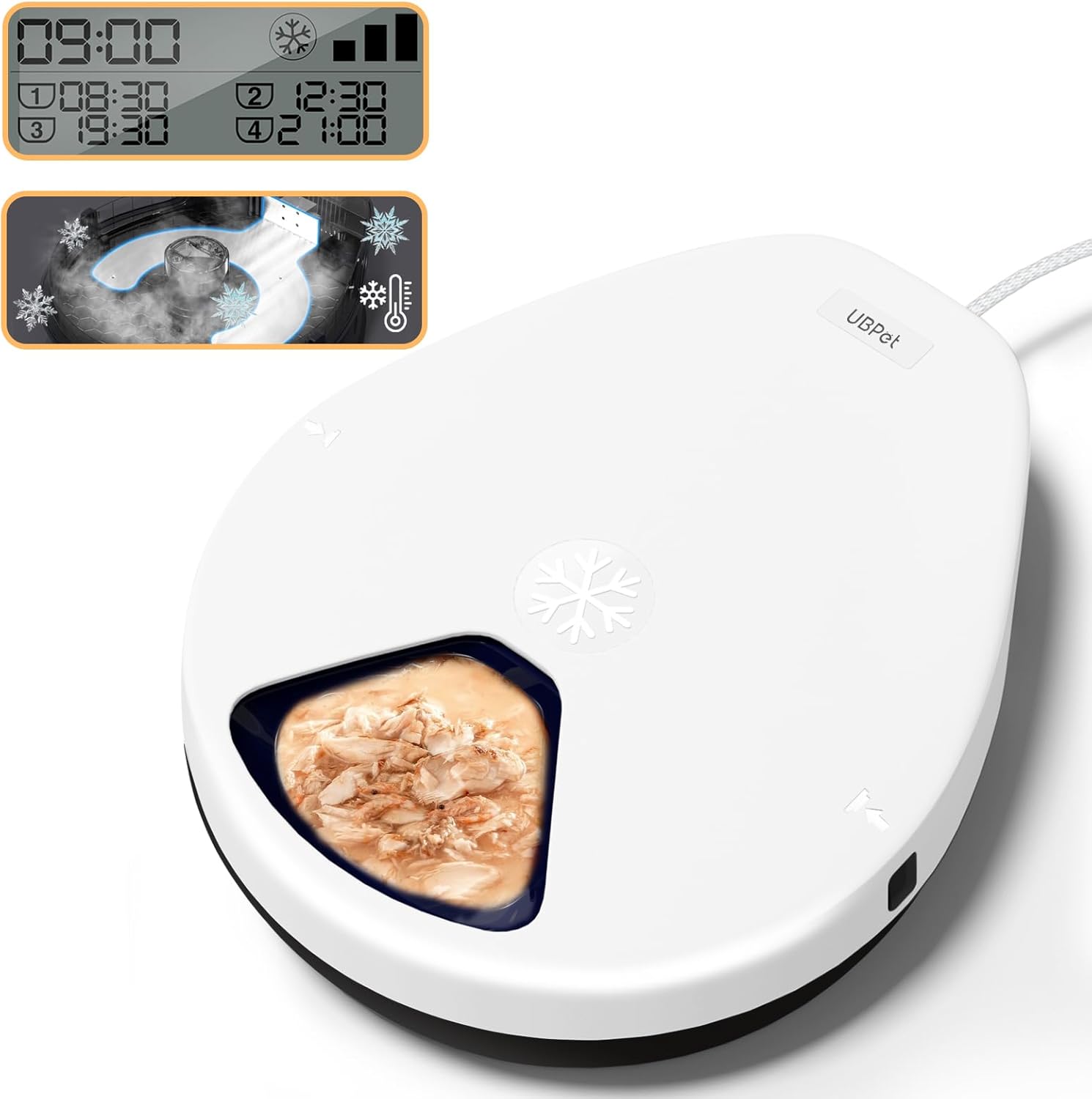
Image: The UBPET F10 Automatic Refrigerated Wet Food Cat Feeder, showing its sleek white design and digital display.
Product Features
- Advanced Semiconductor Cooling: Utilizes semiconductor technology to maintain food freshness at 50-59°F (10-15°C) for 1 to 4 days, eliminating the need for ice packs. Features 3 adjustable cooling temperature settings.
- Smart Feeding Schedules: Allows for 1 instant feeding and up to 4 scheduled feedings per day. Customize feeding times and frequencies to establish healthy eating habits for your pet.
- Five Meal Capacity: Equipped with five individual trays, each with a capacity of 11.64 oz (approximately 330g), suitable for wet food, dry food, semi-moist food, fresh food, and milk. The automatic turntable design rotates to present the next meal.
- Pet-Safe Materials: Constructed from food-grade, BPA-free ABS material to ensure the safety and health of your pet.
- User-Friendly Operation: Features a clear LCD display and touch panel for easy programming. Hidden buttons prevent accidental changes by pets. Operates silently to avoid startling sensitive animals.

Image: The feeder's internal tray filled with different types of pet food, including wet food, dry kibble, and treats, demonstrating its versatility.
Setup
- Unpack: Carefully remove all components from the packaging. Verify that all included components are present: 1x Automatic Cat Feeder, 1x Adapter, 1x Power cord.
- Placement: Place the feeder on a stable, level surface away from direct sunlight or heat sources. Ensure adequate ventilation around the unit.
- Connect Power: Connect the power cord to the feeder and then plug the adapter into a standard electrical outlet. The LCD display should illuminate.
- Initial Cleaning: Before first use, disassemble the food tray and wash it with mild soap and water. Rinse thoroughly and dry completely.
- Assemble: Place the clean, dry food tray back into the feeder base.
Operating Instructions
Setting Feeding Schedules
The feeder allows you to program up to 4 scheduled meals. The LCD display and touch panel facilitate easy setup.
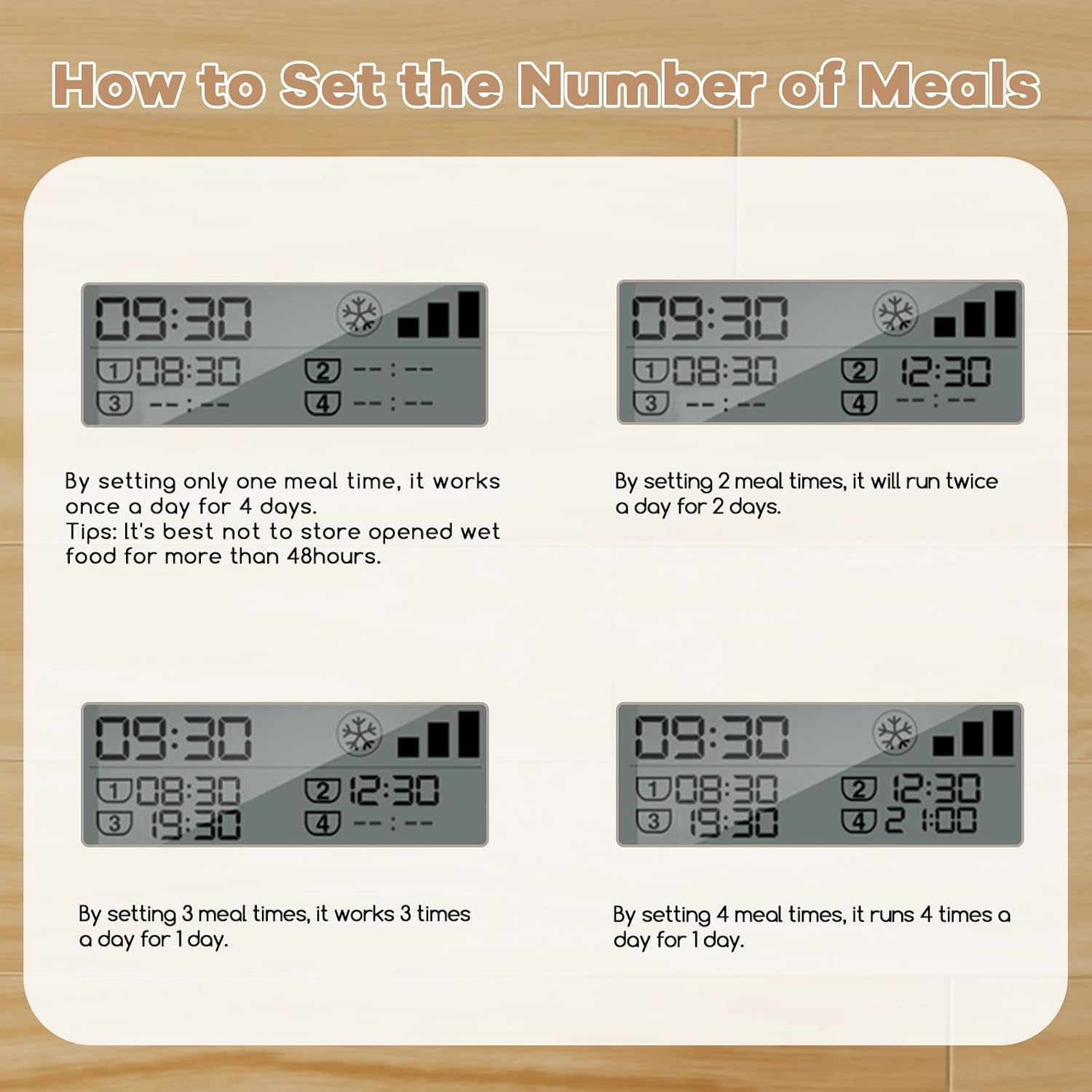
Image: The feeder's LCD display illustrating different meal time configurations for 1, 2, 3, or 4 daily feedings.
- Access Settings: Press the 'Set' button on the touch panel to enter programming mode.
- Set Current Time: Adjust the current hour and minute using the arrow buttons. Confirm with 'Set'.
- Program Meal Times: For each meal (1-4), set the desired feeding time. The feeder will rotate to the next available meal tray at the programmed time.
- Instant Feeding: To dispense a meal immediately, press the 'Feed' button. The feeder will rotate to the next tray.
- Hidden Buttons: The buttons are designed to be less accessible to pets, preventing accidental changes to the schedule.
Adjusting Cooling Modes
The feeder offers 3 cooling modes to adapt to different environmental temperatures and maintain optimal food freshness.

Image: A diagram illustrating the three cooling mode settings with their respective target temperatures (Level 1: 73.4°F, Level 2: 62.6°F, Level 3: 55.4°F).
- Select Cooling Mode: Refer to the display or specific button (if available, otherwise consult the full product manual for exact button functions) to cycle through the cooling modes.
- Temperature Ranges:
- Level 1: Approximately 73.4°F (23°C)
- Level 2: Approximately 62.6°F (17°C)
- Level 3: Approximately 55.4°F (13°C)
- Choose Appropriately: Select the cooling level based on the ambient room temperature and the desired freshness duration for the food. Higher levels provide more cooling.

Image: A cat sitting beside the UBPET feeder, with a graphic indicating 24 hours of freshness provided by the smart refrigeration chip.
Maintenance
Cleaning Instructions
Regular cleaning is essential to maintain hygiene and ensure the longevity of your feeder. The detachable design allows for thorough cleaning.

Image: The detachable food tray being rinsed under running water, demonstrating its easy-to-clean design.
- Disconnect Power: Always unplug the feeder from the power outlet before cleaning.
- Disassemble: Carefully remove the top cover and the food tray from the base unit.
- Wash Tray: Wash the food tray with warm water and a mild, pet-safe dish soap. Rinse thoroughly to remove all soap residue. The tray is also dishwasher-safe.
- Clean Base: Wipe the exterior of the base unit with a damp cloth. Do not submerge the base unit in water, as it contains electronic components.
- Dry Completely: Ensure all parts are completely dry before reassembling the feeder.
- Reassemble: Place the dry food tray back into the base, ensuring it is properly seated, then replace the top cover.
Troubleshooting
If you encounter issues with your UBPET F10 feeder, please refer to the following common solutions:
| Problem | Possible Cause | Solution |
|---|---|---|
| Feeder not powering on | Power cord not connected; outlet malfunction | Ensure power cord is securely plugged into the feeder and a working electrical outlet. Try a different outlet. |
| Food not dispensing at scheduled times | Incorrect schedule settings; food tray jammed | Verify programmed meal times. Check for any obstructions in the food tray rotation mechanism. |
| Food not staying cool | Cooling mode set too low; ambient temperature too high; ventilation blocked | Adjust to a higher cooling mode. Ensure the feeder is not in direct sunlight or a hot environment. Check that ventilation openings are clear. |
| LCD display not working or showing errors | Temporary electronic glitch | Unplug the feeder for 30 seconds, then plug it back in to reset. If the issue persists, contact customer support. |
If these solutions do not resolve the issue, please contact UBPET customer support for further assistance.
Specifications
| Feature | Detail |
|---|---|
| Model Name | F10 |
| Brand | UBPET (kubvici) |
| Dimensions (LxWxH) | 13.8 x 12.2 x 4 inches (35.05 x 30.99 x 10.16 cm) |
| Item Weight | 3.98 pounds (1.81 kg) |
| Material | Food Grade ABS |
| Color | White |
| Number of Meals | 5 (individual trays) |
| Tray Capacity (each) | 11.64 oz (approx. 330g) |
| Cooling Technology | Semiconductor Cooling |
| Cooling Temperature Range | 50-59°F (10-15°C) with 3 settings |
| Recommended Uses | Balanced diet, Refrigerate wet food, Regular feeding schedules |
| Target Species | Cats, Small Dogs |
| Included Components | 1x Automatic Cat Feeder, 1x Adapter, 1x Power cord |
Safety Information
- Always use the provided power adapter and cord.
- Do not immerse the main feeder base in water or any other liquid.
- Keep the feeder out of reach of children and pets when not in use or during cleaning.
- Ensure the feeder is placed on a stable, level surface to prevent tipping.
- Regularly inspect the power cord for any damage. Discontinue use if damaged.
- Only use the feeder for its intended purpose of dispensing pet food.
Warranty and Support
Your UBPET F10 Automatic Refrigerated Wet Food Cat Feeder comes with a manufacturer's warranty. For specific warranty details, claims, or technical support, please refer to the warranty card included in your product packaging or contact UBPET customer service directly. Please have your model number (F10) and purchase information ready when contacting support.
Related documentsF10


Ask a question about this manual
Ask about setup, troubleshooting, compatibility, parts, safety, or missing instructions. Manuals+ will review the question and use this page’s manual context to help answer it.