
1. Introduction
The KSUN ZL65 is a versatile 4G network radio designed for global communication. Functioning as a smart Push-to-Talk (PTT) device, it operates on Android 9.0, allowing for the installation of various applications. This device combines the functionality of a walkie-talkie with smartphone capabilities, supporting both private and group calls over 3G/4G networks or Wi-Fi. Its design facilitates long-range communication without traditional distance limitations, making it suitable for diverse communication needs.

Image 1.1: Front view of the KSUN ZL65 4G Network Radio, showcasing its compact design and touch screen interface.
2. Product Overview
2.1 Components Included
- KSUN ZL65 4G Network Radio Unit
- Antenna
- Battery (12V, 4800mAh)
- Type-C Charging Cable
2.2 Device Features
- Operating System: Android 9.0, supporting various app downloads.
- Display: 2.4-inch HD LCD touch screen for intuitive control.
- Connectivity: 4G LTE for global communication, Wi-Fi, Bluetooth, and GPS interworking.
- Communication: Push-to-Talk (PTT) functionality, compatible with Zello, Walkiefleet, and Core PTT platforms. Supports private and group calls.
- Battery: 4800mAh high-capacity battery with Type-C fast charging, offering extended usage.
- Memory: 4GB RAM + 16GB ROM, expandable via TF card.
- Audio: Large dynamic speaker for clear and powerful sound transmission.
- Design: Compact and ergonomic for comfortable handling.

Image 2.1: Labeled diagram illustrating the functional components of the KSUN ZL65, including antenna, indicator light, speaker, PTT key, side keys, OK key, alarm key, headphone jack, Type-C port, screen, return key, and battery.

Image 2.2: The KSUN ZL65 device emphasizing its 4G LTE global communication capabilities, 2.4-inch HD LCD touch display, and support for Wi-Fi, Bluetooth, and GPS interworking.
3. Setup
3.1 Battery and SIM Card Installation
- Open Battery Cover: Locate the battery cover on the rear of the device and carefully remove it.
- Insert Battery: Place the provided 4800mAh battery into the battery compartment, ensuring the contacts align correctly.
- Insert SIM Card(s): The device supports up to two SIM cards. Insert your 3G/4G SIM card(s) into the designated slots. Ensure they are correctly oriented.
- Insert TF Card (Optional): If expanding memory, insert a TF card into its slot.
- Close Battery Cover: Securely reattach the battery cover.
3.2 Initial Charging
Before first use, fully charge the device. Connect the provided Type-C charging cable to the device's Type-C port and a compatible power adapter. The indicator light will show charging status.

Image 3.1: Illustration of the KSUN ZL65 being charged via its Type-C port, highlighting its fast charging capability for the 5000mAh battery.
4. Operating Instructions
4.1 Power On/Off
To power on the device, rotate the volume knob clockwise until the screen illuminates. To power off, rotate the volume knob counter-clockwise until the device shuts down, or use the power option from the Android interface.
4.2 Basic Navigation
The ZL65 features a 2.4-inch touch screen. Navigate the Android 9.0 interface by tapping, swiping, and using the on-screen buttons. Physical navigation buttons (e.g., back, home) are located below the screen.

Image 4.1: A hand interacting with the 2.4-inch touch screen of the KSUN ZL65, illustrating its intuitive controls for clearer and faster communication.
4.3 Push-to-Talk (PTT) Functionality
The device supports various PTT applications such as Zello, Walkiefleet, and Core PTT. After installing and configuring your preferred PTT app, press the dedicated PTT key on the side of the device to initiate voice communication. Release the key to listen.

Image 4.2: The KSUN ZL65 highlighting its global compatibility and default support for Zello, along with Walkiefleet and Core PTT platforms.
4.4 Making Calls and Sending Texts
With an active SIM card, the ZL65 can function as a mobile phone. Use the phone application to make and receive calls, and the messaging application to send and receive text messages. These functions meet diverse communication needs and enable convenient communication.

Image 4.3: The KSUN ZL65 demonstrating its capability to make/answer calls and send/receive texts, powered by Android 9.0.
4.5 Wi-Fi and Bluetooth Connectivity
Access Wi-Fi settings to connect to available networks for internet access and extended communication range. Use Bluetooth settings to pair with compatible devices such as headsets or other accessories for hands-free operation.

Image 4.4: The KSUN ZL65 illustrating its built-in Bluetooth and Wi-Fi modules, enabling smart connectivity for multi-scene communication needs.
5. Maintenance
5.1 Battery Care
- To maximize battery life, avoid fully discharging the battery frequently.
- Charge the device using the provided Type-C cable and a compatible power adapter.
- The 4800mAh battery typically provides 3-6 days of standby time or 2-3 days of continuous use.
5.2 Cleaning
Use a soft, dry cloth to clean the device's exterior. Avoid using harsh chemicals or abrasive materials. Ensure the Type-C port and headphone jack are free from dust and debris.
5.3 Water Resistance
Important: This device is NOT water resistant. Avoid exposure to water, rain, or high humidity to prevent damage.
6. Troubleshooting
- Device not powering on: Ensure the battery is correctly installed and sufficiently charged. Rotate the volume knob to power on, as the red button on the face is not the power button.
- No network connectivity: Check if the SIM card is properly inserted and activated. Verify that you are within 3G/4G coverage or connected to a stable Wi-Fi network.
- PTT app issues: Ensure the PTT application is correctly installed and configured. If updating an app like Zello, it may be necessary to uninstall the old version before installing the new one.
- Poor audio quality: Check the volume settings. Ensure the speaker is not obstructed.
- Battery draining quickly: Reduce screen brightness, close unused applications, and disable Wi-Fi/Bluetooth when not in use.
7. Specifications
| Feature | Specification |
|---|---|
| Model Number | ZL65 |
| Operating System | Android 9.0 |
| Display | 2.4-inch Touch Screen |
| Network Support | 4G LTE, WCDMA, CDMA, GSM |
| Connectivity | Wi-Fi, Bluetooth, GPS |
| Memory | 4GB RAM + 16GB ROM (Expandable via TF card) |
| Battery Capacity | 4800mAh (12V) |
| Charging | Type-C Fast Charging |
| Dimensions (H x W x D) | 4.29 x 2.17 x 1.22 inches (109 x 55 x 31 mm) |
| Weight | 8 ounces (Approximately 225g) |
| Maximum Talking Range | 50 Kilometers (Network dependent) |
| Water Resistance | Not Water Resistant |
| Included Components | Antenna, Battery |
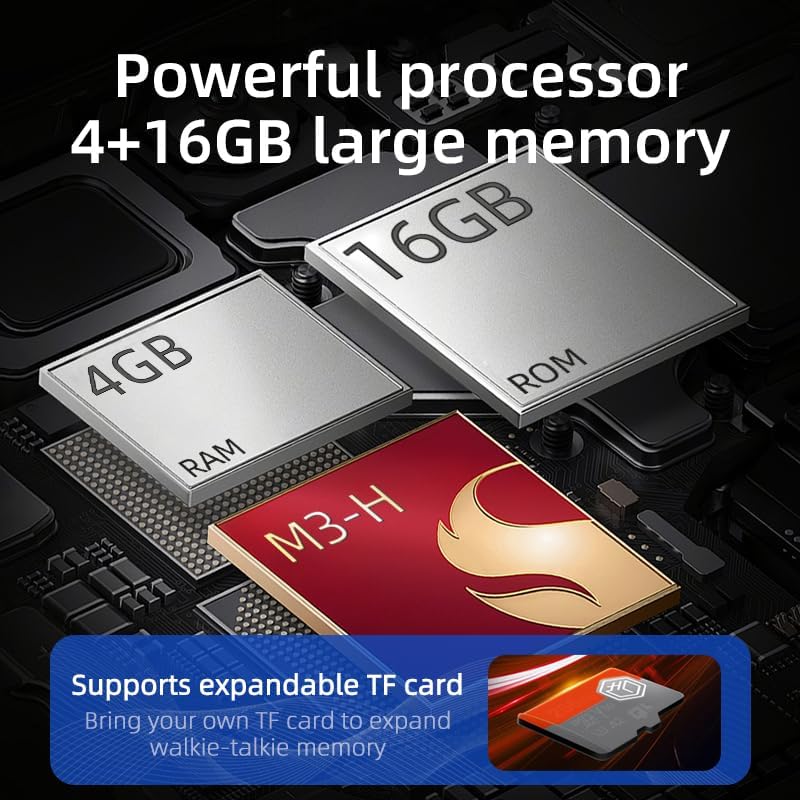
Image 7.1: Visual representation of the KSUN ZL65's internal components, highlighting its 4GB RAM and 16GB ROM, with support for expandable TF card memory.
8. Warranty and Support
8.1 Warranty Information
For specific warranty terms and conditions, please refer to the documentation provided with your purchase or contact the seller/manufacturer directly. Warranty coverage typically addresses manufacturing defects and may vary by region.
8.2 Customer Support
For technical assistance, troubleshooting beyond this manual, or inquiries regarding your device, please contact KSUN customer support through their official website or the contact information provided at the point of purchase. KSUN has a history of over 50 years in creating communication technologies.


