
FiiO K15
FiiO K15 HiFi DAC and Headphone Amplifier User Manual
Model: K15
Introduction
The FiiO K15 is a high-performance Full Balance HiFi DAC and Headphone Amplifier designed to deliver exceptional audio quality. It features dual AK4497SVQ DACs, a discrete Class-AB amplifier, and supports various high-resolution audio formats including DSD512 and PCM768kHz. With versatile connectivity options and an intuitive touchscreen interface, the K15 serves as a comprehensive audio hub for discerning listeners.
This manual provides detailed instructions for setting up, operating, and maintaining your FiiO K15 to ensure optimal performance and longevity.
Package Contents
Before proceeding with setup, please verify that all items are present in the package:
- FiiO K15 Unit
- AC power cord
- USB data cable
- Headphone plug adapter
- Remote control
- XLR4 decorative plug
- User Manual (this document)
Product Overview
The FiiO K15 integrates multiple audio functionalities into a single desktop unit. Key components include:
- Front Panel: Features a 3.93-inch touchscreen display, volume knob, menu navigation, input/output selectors, gain switch, and headphone outputs (3.5mm, 4.4mm balanced, XLR4 balanced).
- Rear Panel: Includes various input and output ports for versatile connectivity.
- Internal Architecture: Utilizes dual AK4497SVQ DACs, a discrete Class-AB amplifier, and dual femtosecond crystal oscillators for precise audio processing.

Figure 1: Front view of the FiiO K15, showing the display, control knobs, and headphone outputs.

Figure 2: Angled view of the FiiO K15, highlighting its compact design and ventilation.
Setup
Follow these steps to set up your FiiO K15:
- Placement: Place the K15 on a stable, flat surface with adequate ventilation. Ensure it is away from direct sunlight, heat sources, and excessive moisture.
- Power Connection: Connect the supplied AC power cord to the K15's power input and then to a wall outlet.
- Input Source Connection:
- USB DAC Mode: Connect the K15 to your computer (Windows/macOS) using the provided USB data cable. Install necessary drivers if prompted (for Windows).
- Optical/Coaxial Input: Connect your digital audio source (e.g., CD player, TV) to the K15's optical or coaxial input ports.
- Bluetooth Input: Power on the K15 and enable Bluetooth pairing mode. Search for "FiiO K15" on your mobile device or computer and connect.
- Analog Line Input: Connect analog sources to the K15's line-in ports.
- Output Connection:
- Headphones: Plug your headphones into the appropriate output jack (3.5mm single-ended, 4.4mm balanced, or XLR4 balanced) on the front panel. Use the headphone plug adapter if needed.
- Line Out: Connect the K15's line output to an external amplifier or active speakers.
- Power On: Press the power button on the front panel to turn on the K15.

Figure 3: The FiiO K15 supports a wide variety of usage scenarios, acting as a central audio hub for different sources and setups.
Operating Instructions
The FiiO K15 offers multiple control methods for ease of use.
Front Panel Controls
- Touchscreen Display: Navigate menus, view playback information, and adjust settings directly on the 3.93-inch touchscreen.
- Volume Knob: Rotate to adjust the output volume. Press to mute/unmute.
- Menu Knob: Rotate to navigate through menu options. Press to select.
- Input Selector: Switch between USB, Optical, Coaxial, Bluetooth, and Line-in inputs.
- Gain Switch: Select between Low, Medium, High, and Ultra-High gain settings to match your headphones' impedance and sensitivity.
- Output Mode Switch: Toggle between Headphone Out (PO), Pre-Out (PRE), and Line Out (LO) modes.
Remote Control
The included infrared remote control allows for convenient operation from a distance. Functions include power on/off, volume adjustment, input switching, and menu navigation.
FiiO Control App
Download the FiiO Control App on your smartphone or tablet for advanced control and settings customization via Bluetooth.
Key Features and Functionality
- High-Resolution Audio Playback: Supports DSD512 and PCM768kHz via USB input.
- Bluetooth 5.1 with LDAC/aptX Adaptive: Enjoy high-quality wireless audio streaming.
- Roon Ready/AirPlay Streaming: Seamless integration with network audio systems.
- Local Playback: Connect USB storage devices for direct audio file playback.
- 10-Band High-Precision PEQ: Customize your sound profile with the parametric equalizer, accessible via the FiiO Control App or web interface.

Figure 4: The 10-band high-precision PEQ allows for detailed sound customization.
Internal Architecture Highlights
The FiiO K15 incorporates advanced internal components for superior audio performance:
- Dual AK4497SVQ DACs: These upgraded DAC chips from AKM provide ultra-low distortion, wide dynamic range, and extended frequency response for authentic Hi-Res sound.
- Discrete Class-AB Amplifier: Engineered with ON Semiconductor MJE243G/253G pairs, this amplifier delivers 3000mW x2 of balanced output power, capable of driving a wide range of headphones.
- Dual Accusilicon Femtosecond Clocks: Two AS318-B ultra-low-phase-noise oscillators minimize timing errors, ensuring pristine signal accuracy.
- Physically Separated Boards: Internal power supply, digital, and analog sections are on separate physical boards to prevent crosstalk and ensure signal integrity.
- High-Quality Components: Features ruby film capacitors, wafer resistors, and Beryl capacitors for stable power delivery and low noise.

Figure 5: Dual AK4497SVQ DAC chips, central to the K15's high-fidelity audio processing.

Figure 6: The discrete Class-AB amplifier circuit, designed for powerful and clean output.
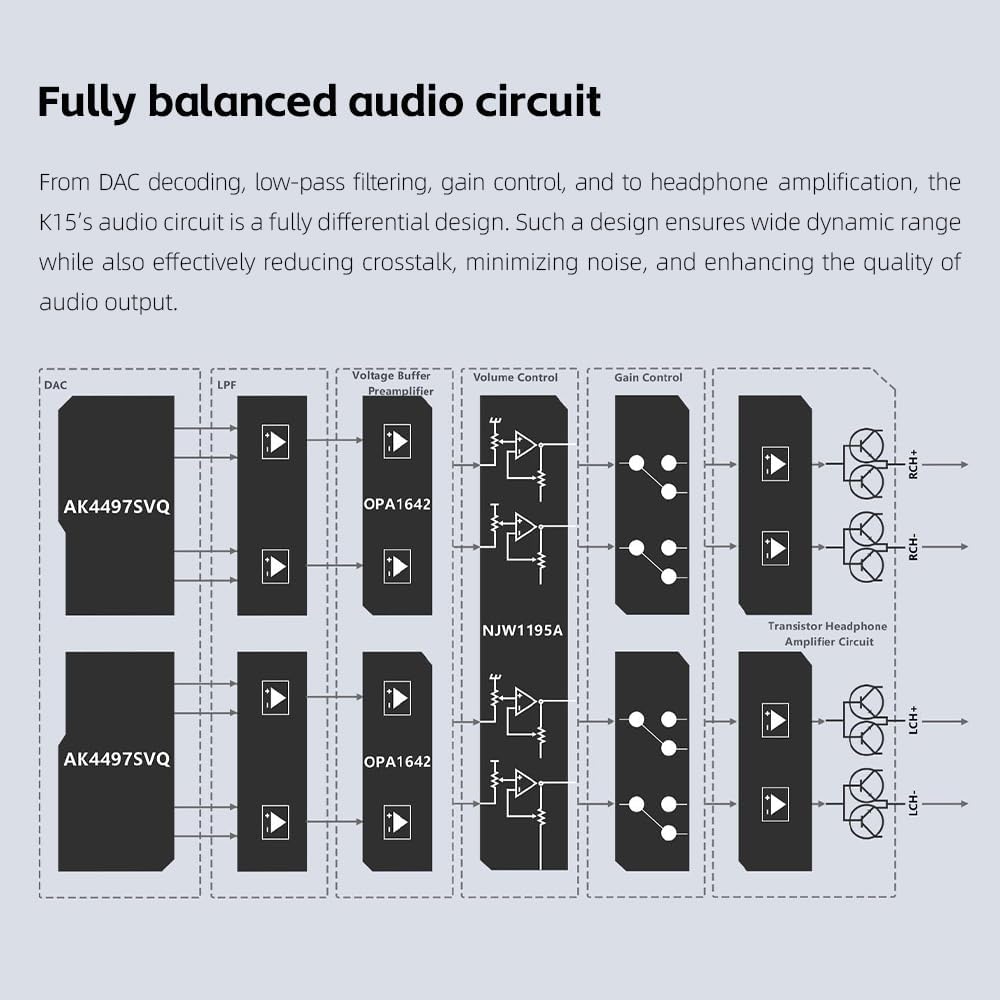
Figure 7: Block diagram of the fully balanced audio circuit, ensuring wide dynamic range and minimal noise.
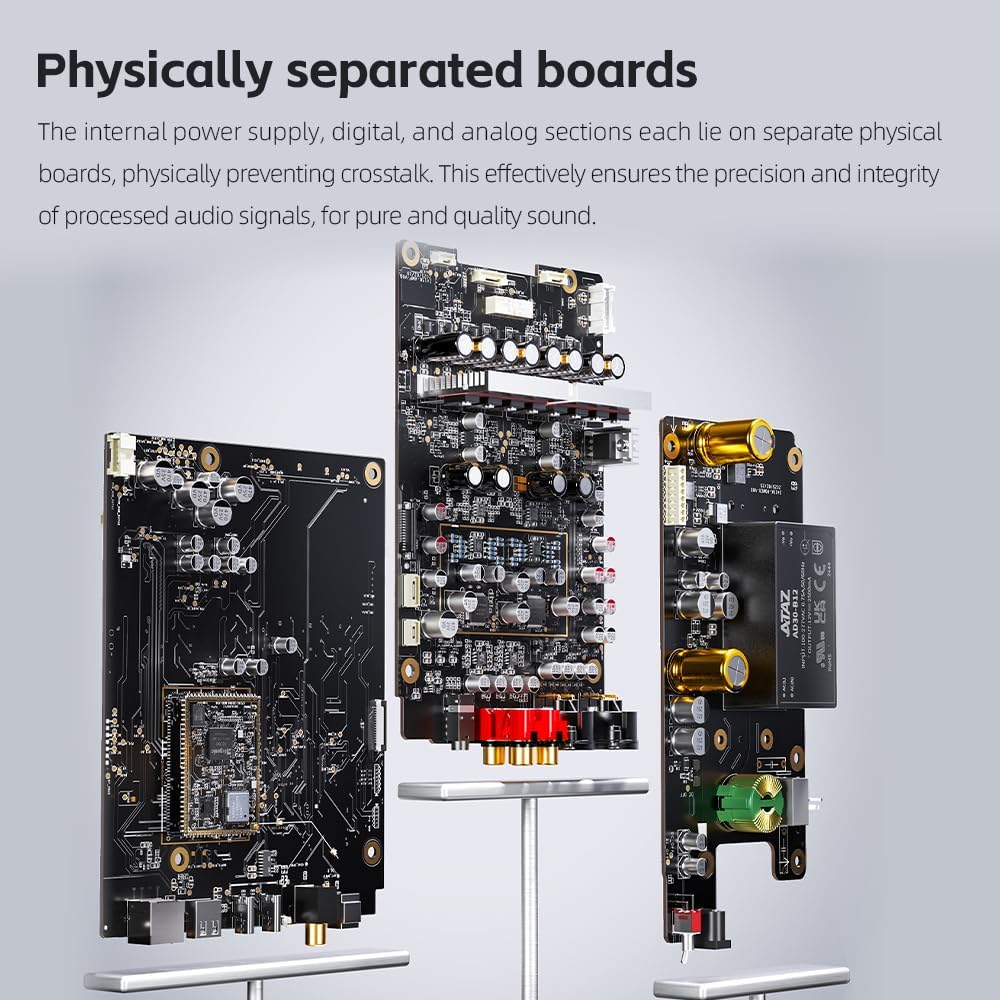
Figure 8: Physically separated boards prevent interference between different sections of the circuit.
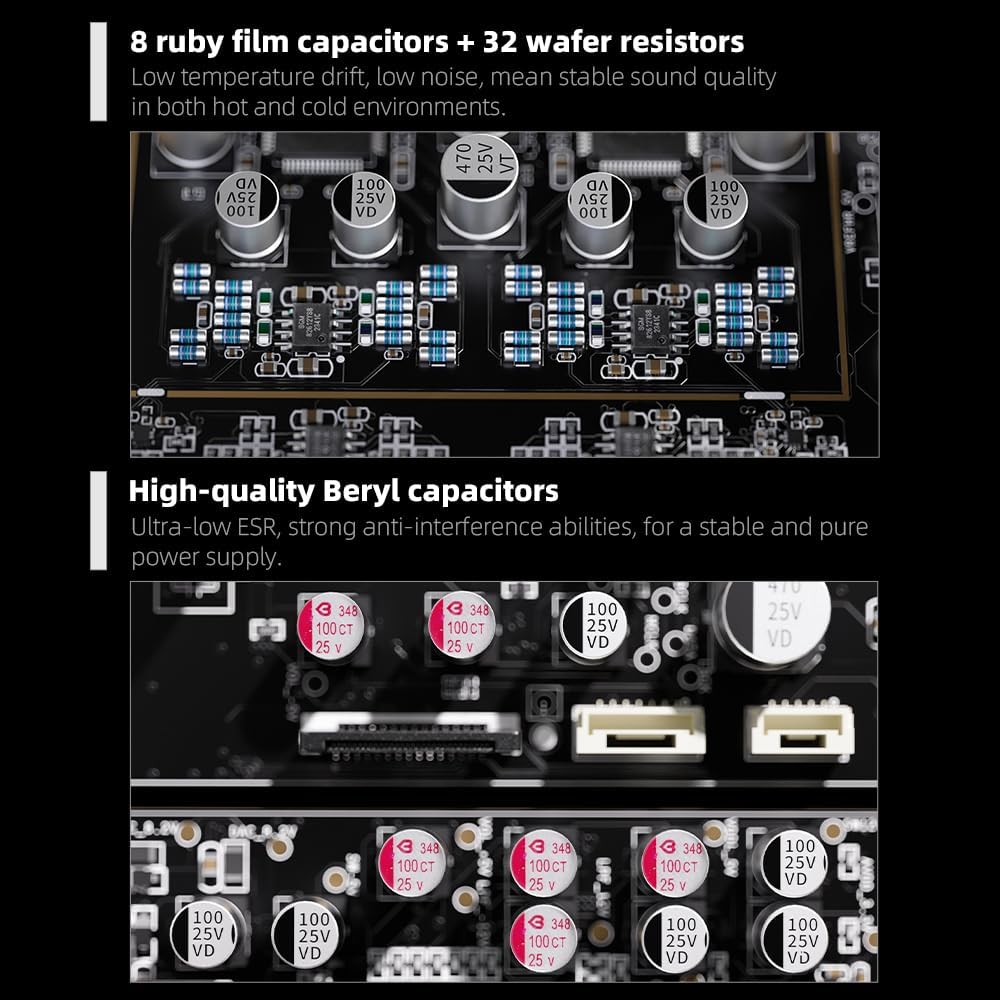
Figure 9: High-quality capacitors and resistors contribute to stable and pure power delivery.

Figure 10: Dual master cores (Ingenic X2000 and ESP32-S3) ensure stable and smooth operation.
Maintenance
Proper maintenance ensures the longevity and optimal performance of your FiiO K15.
- Cleaning: Use a soft, dry cloth to wipe the exterior of the unit. Do not use liquid cleaners or abrasive materials.
- Ventilation: Ensure that the ventilation slots are not obstructed to prevent overheating.
- Storage: When not in use for extended periods, store the K15 in a cool, dry place, away from dust and extreme temperatures.
- Cable Management: Avoid bending or crimping cables excessively, especially near connectors, to prevent damage.
Troubleshooting
If you encounter issues with your FiiO K15, refer to the following common problems and solutions:
| Problem | Possible Cause | Solution |
|---|---|---|
| No sound output |
|
|
| Device not recognized by computer |
|
|
| Bluetooth connection issues |
|
|
| Distorted or poor sound quality |
|
|
If the problem persists, please contact FiiO customer support for further assistance.
Specifications
| Feature | Detail |
|---|---|
| Model Name | K15 |
| DAC Chip | Dual AK4497SVQ |
| Amplifier Circuit | Discrete Class-AB |
| Output Power | 3000mW x2 (Balanced) |
| USB DAC Support | DSD512, PCM768kHz/32-bit, MQA |
| Bluetooth Version | 5.1 |
| Bluetooth Codecs | LDAC, aptX Adaptive (and others) |
| Display | 3.93-inch Touchscreen |
| Connectivity Technology | Bluetooth, Wired (USB, Optical, Coaxial, Analog Line-in) |
| Headphone Outputs | 3.5mm, 4.4mm Balanced, XLR4 Balanced |
| Frequency Range | 20 Hz - 20,000 Hz |
| Control Method | Touchscreen, Physical Knobs, Remote Control, FiiO Control App |
| Dimensions (Package) | 15.35 x 12.6 x 5.51 inches |
| Item Weight | 6.95 pounds |
Warranty and Support
FiiO products come with a limited warranty. Please refer to the warranty card included in your package or visit the official FiiO website for detailed warranty terms and conditions specific to your region.
For technical support, driver downloads, firmware updates, or service inquiries, please visit the FiiO official support page or contact their customer service directly. Keep your purchase receipt as proof of purchase for warranty claims.
Official FiiO Website: www.fiio.com
Ask a question about this manual
Ask about setup, troubleshooting, compatibility, parts, safety, or missing instructions. Manuals+ will review the question and use this page’s manual context to help answer it.