
1. Product Overview
This manual provides essential information for the S156 RC Drone Battery Spare Part and Propeller Blades & Maple Leaf Wing Replacement. These components are designed as direct replacements for the S156 RC Quadcopter, ensuring continued optimal performance.
- S156 RC Drone Battery Spare Part with Propeller Blades & Maple Leaf Wing Replacement
- RC Quadcopter Accessories
- Designed for long-term use as a replacement part
2. Components Included
The replacement kit includes the following essential components:
- S156 RC Drone Battery
- Propeller Blades (Maple Leaf Wing design)
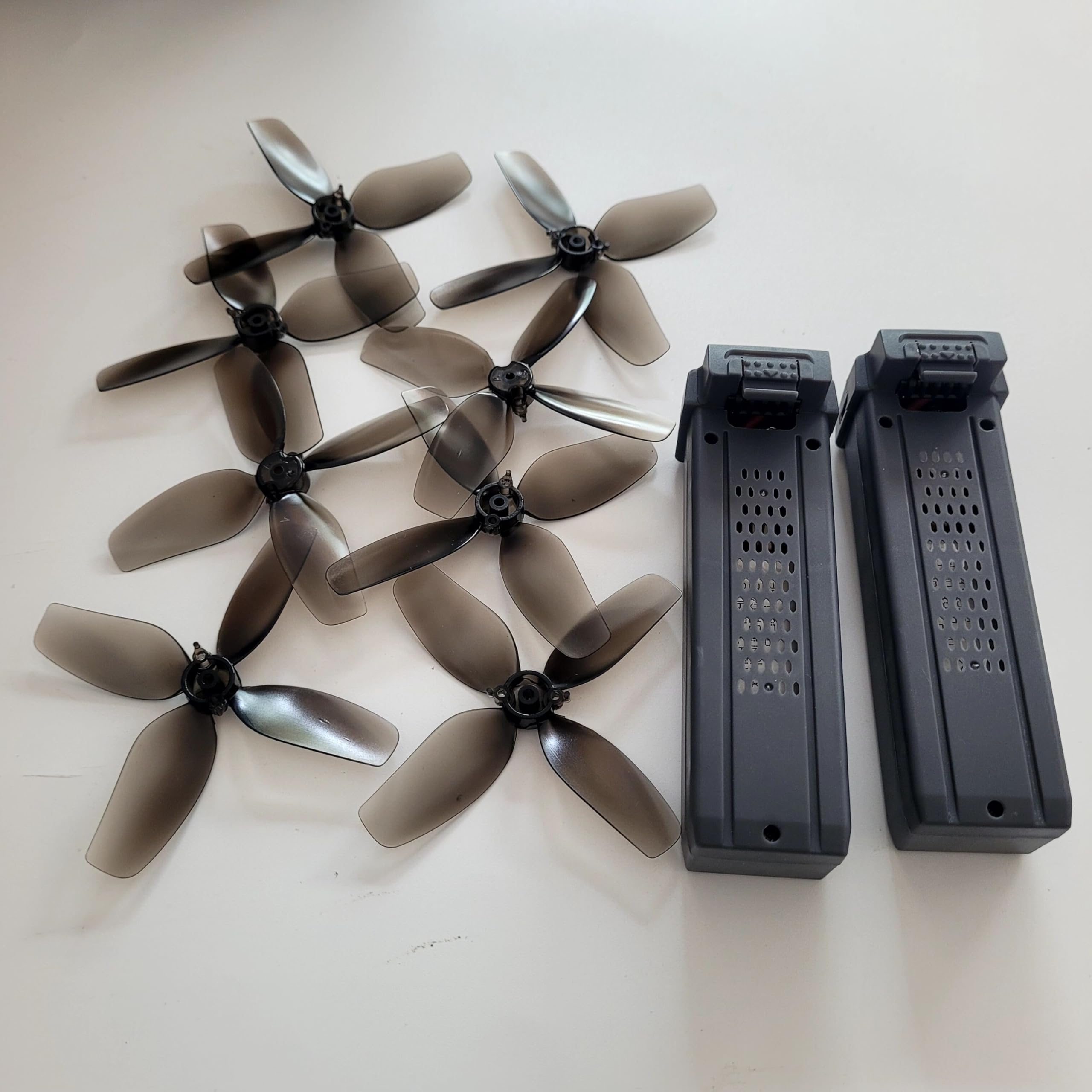
Image 2.1: Overview of S156 RC Drone Battery and Propeller Blades. The image displays two drone batteries and multiple propeller blades, all in a dark grey or black color, laid out on a white surface. The batteries are rectangular with textured surfaces, and the propellers are four-bladed with a slightly translucent appearance.
3. Setup and Installation
3.1 Battery Replacement
- Ensure the drone is powered off and disconnected from any power source.
- Locate the battery compartment on your S156 RC Quadcopter. This is typically on the underside or rear of the drone.
- Carefully open the battery compartment cover.
- Disconnect the old battery from the drone's power connector. Gently pull the connector, do not pull the wires.
- Remove the old battery from the compartment.
- Insert the new S156 RC Drone Battery into the compartment, ensuring proper orientation.
- Connect the new battery to the drone's power connector, ensuring a secure fit.
- Close the battery compartment cover securely.
3.2 Propeller Blade Replacement
- Ensure the drone is powered off and the battery is removed for safety.
- Identify the damaged propeller blade. Note the direction of rotation (indicated by markings on the propeller or drone arm, if present) and the type of propeller (e.g., A or B, clockwise or counter-clockwise).
- Carefully remove the screw(s) securing the old propeller blade to the motor shaft. Some drones may have a quick-release mechanism; consult your drone's specific manual if unsure.
- Gently lift and remove the old propeller blade.
- Align the new propeller blade with the motor shaft, ensuring it is the correct type and orientation for that motor. The Maple Leaf Wing design should match the original.
- Secure the new propeller blade with the screw(s), tightening them just enough to hold the propeller firmly without overtightening, which can damage the motor or propeller hub.
- Repeat for any other damaged propeller blades.
Note: Always replace propellers in pairs or sets if recommended by your drone's manufacturer to maintain balance and flight stability. Ensure the correct propeller type (A/B or CW/CCW) is installed on the corresponding motor.
4. Operating Considerations
Once the replacement parts are installed, the drone should function as intended. Ensure the battery is fully charged before flight. Always perform a pre-flight check to confirm propellers are securely attached and rotate freely without obstruction. Refer to your S156 RC Quadcopter's main instruction manual for detailed operating procedures.
5. Maintenance
5.1 Battery Maintenance
- Charging: Use only the charger specified for the S156 drone battery. Do not overcharge or deep discharge the battery.
- Storage: Store batteries in a cool, dry place away from direct sunlight and extreme temperatures. For long-term storage, charge the battery to approximately 50-60% capacity.
- Inspection: Regularly inspect the battery for any signs of swelling, leakage, or damage. Discontinue use immediately if any damage is observed.
5.2 Propeller Maintenance
- Cleaning: Keep propeller blades clean from dust, dirt, and debris. Use a soft, dry cloth.
- Inspection: Before each flight, inspect propellers for cracks, bends, chips, or any other damage. Even minor damage can affect flight performance and safety.
- Replacement: Replace damaged propellers immediately. Do not attempt to repair them.
6. Troubleshooting
| Problem | Possible Cause | Solution |
|---|---|---|
| Drone does not power on after battery replacement. | Battery not fully charged; Battery not securely connected; Battery faulty. | Ensure battery is fully charged. Reconnect battery securely. Test with another known good battery if available. |
| Drone unstable or vibrates during flight after propeller replacement. | Incorrect propeller installed; Propeller not securely fastened; Propeller damaged (even new ones can be faulty); Propeller imbalance. | Verify correct propeller type (A/B, CW/CCW) for each motor. Ensure screws are tightened. Inspect new propellers for defects. Consider balancing propellers if issue persists. |
| Battery drains quickly. | Battery not fully charged; Old battery capacity degradation; Extreme temperatures during operation. | Ensure full charge. If battery is old, its capacity may have naturally decreased. Operate drone within recommended temperature ranges. |
7. Specifications
| Feature | Detail |
|---|---|
| Brand | TYXTTGY |
| Model Name | TYXTTGY |
| Compatible Drone Model | S156 RC Quadcopter |
| Item Weight | Approximately 50 Grams (1.76 ounces) |
| Product Dimensions | 1"L x 1"W x 1"H (approximate for individual components) |
| Color | One Color (as shown in product images) |
| Manufacturer | TYXTTGY |
8. Warranty and Support
For any questions regarding the S156 RC Drone Battery Spare Part or Propeller Blades, please contact the manufacturer or seller directly. Your feedback is valuable for continuous product improvement.
Please refer to your purchase documentation for specific warranty terms and conditions, if applicable.