
1. Introduction
Thank you for choosing the AIFEN A9E Soldering Station. This manual provides essential information for the safe and efficient operation, setup, and maintenance of your new soldering station. Please read this manual thoroughly before using the product and retain it for future reference.
2. Safety Information
WARNING: Improper use of soldering equipment can cause serious injury or damage. Always follow these safety guidelines.
- Eye Protection: Always wear safety glasses or goggles to protect your eyes from solder splashes and fumes.
- Ventilation: Use the soldering station in a well-ventilated area or with a fume extractor to avoid inhaling harmful solder fumes.
- Burn Hazard: The soldering iron tip and surrounding components reach very high temperatures. Do not touch hot surfaces. Allow the iron to cool completely before handling or storing.
- Electrical Safety: Ensure the power supply matches the specified voltage (AC110-220V). Do not operate with damaged cords or plugs. Disconnect power before performing any maintenance or when not in use.
- Work Area: Keep your work area clean and free of flammable materials. Use a heat-resistant mat.
- Children and Pets: Keep the soldering station out of reach of children and pets.
- Proper Use: Use the soldering station only for its intended purpose of soldering electronic components.
3. Package Contents
Please check the package contents upon unpacking. If any items are missing or damaged, contact your retailer.
- AIFEN A9E Soldering Station Unit
- Soldering Iron Handle (compatible with C115/C210/C245/C470 tips)
- Soldering Tips (3x T115 type)
- Cleaning Sponge
- Copper Wire Cleaning Ball
- Power Cord

Figure 3.1: AIFEN A9E Soldering Station with included accessories.
4. Product Overview and Components
Familiarize yourself with the various parts of your AIFEN A9E Soldering Station.

Figure 4.1: Key components of the AIFEN A9E Soldering Station.
- HUB: Connection point for the soldering iron handle.
- Temperature Unit Display: Shows the current temperature unit (e.g., °C).
- Setting Key (SET): Used to enter settings mode or confirm selections.
- Soldering Iron Tip Pull-out Box: Storage or access point for soldering tips.
- Actual Temperature Display: Shows the current temperature of the soldering iron tip.
- Power Progress Bar: Indicates the heating status or power output.
- Save Buttons (CH1, CH2, CH3): Used to save and recall preset temperature settings.
- Temperature Adjustment Buttons (TEMP +/-): Used to increase or decrease the target temperature.
- Aluminum Bracket: Provides a secure resting place for the hot soldering iron.
- Copper Wire Cleaning Ball: Used for dry cleaning of the soldering iron tip.
- Cleaning Sponge: Used for wet cleaning of the soldering iron tip.
- Handle: The soldering iron handle, where the tips are inserted.
5. Setup
- Placement: Place the soldering station on a stable, heat-resistant, and non-flammable surface. Ensure adequate ventilation around the unit.
- Connect Handle: Insert the soldering iron handle's connector firmly into the HUB port on the soldering station.
- Insert Tip: Select the desired soldering tip (e.g., one of the T115 tips) and carefully insert it into the end of the soldering iron handle until it is securely seated.
- Prepare Cleaning Tools:
- Place the copper wire cleaning ball in its designated holder on the station.
- Lightly dampen the cleaning sponge with water and place it in its holder. Ensure it is damp, not soaking wet.
- Power Connection: Connect the power cord to the soldering station and then plug it into a suitable AC110-220V, 50/60Hz power outlet.
6. Operating Instructions
6.1 Powering On/Off
To power on the station, press the power button (if available, otherwise it powers on when plugged in). The display will illuminate, showing the current temperature and settings. To power off, disconnect the power cord or use the power button if present.
6.2 Temperature Adjustment
The AIFEN A9E supports a temperature range of 100℃ to 450℃.
- Use the TEMP + button to increase the target temperature.
- Use the TEMP - button to decrease the target temperature.
- The display will show the target temperature, and the actual temperature will quickly rise to meet it. The power progress bar indicates heating activity.

Figure 6.1: Temperature display and controls.
6.3 Using Memory Storage Keys (CH1, CH2, CH3)
The station features three memory channels to store frequently used temperature settings.
- To Save a Temperature:
- Adjust the temperature to your desired value using the TEMP +/- buttons.
- Press and hold the desired channel button (CH1, CH2, or CH3) for a few seconds until the display indicates the temperature has been saved.
- To Recall a Temperature:
- Simply press the desired channel button (CH1, CH2, or CH3) once. The station will automatically adjust to the saved temperature.
6.4 Soldering Iron Tip Replacement
The AIFEN A9E is compatible with C115, C210, C245, and C470 series soldering iron tips/handles, offering versatility for various soldering tasks.
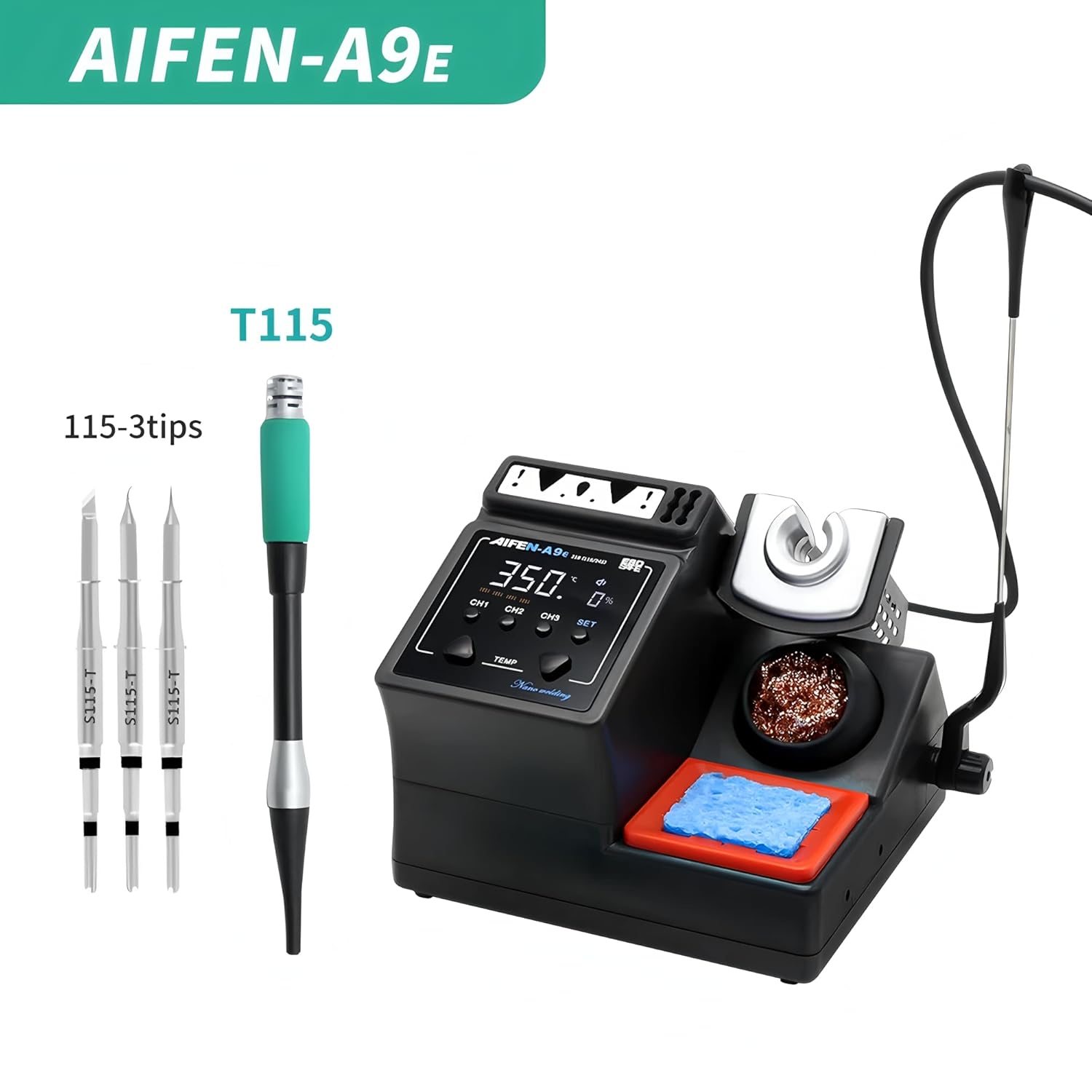
Figure 6.2: Example of T115 soldering tips.
- Ensure the soldering iron is cool before attempting to change tips.
- Gently pull the existing tip straight out from the handle.
- Insert the new tip firmly into the handle until it clicks into place.
- Always ensure the tip is fully seated for proper heating and temperature sensing.
6.5 Fast Heating and Temperature Return
The AIFEN A9E is designed for rapid heating, reaching operating temperature in approximately 2 seconds. It also boasts a fast temperature return, recovering quickly after soldering joints to maintain consistent heat.

Figure 6.3: Fast heating and temperature recovery features.
7. Maintenance
Regular maintenance ensures optimal performance and extends the lifespan of your soldering station.
7.1 Soldering Tip Cleaning
- Copper Wire Cleaning Ball: Use the copper wire cleaning ball for dry cleaning of the tip. Gently rub the hot tip against the ball to remove excess solder and oxidation. This method helps preserve the tip's plating.
- Damp Sponge: Use the damp sponge to wipe the tip clean. Ensure the sponge is only damp, not wet, to avoid thermal shock to the tip.
- Tinning the Tip: Always tin the tip with a fresh layer of solder before putting the iron back in its stand and before turning off the station. This protects the tip from oxidation.
7.2 General Cleaning
- Ensure the unit is unplugged and cool before cleaning.
- Wipe the exterior of the soldering station with a soft, damp cloth. Do not use abrasive cleaners or solvents.
- Keep the ventilation openings clear of dust and debris.
8. Troubleshooting
If you encounter issues with your AIFEN A9E Soldering Station, refer to the following common problems and solutions.
| Problem | Possible Cause | Solution |
|---|---|---|
| Station does not power on. | No power supply; loose power cord. | Check if the power cord is securely plugged into the station and the wall outlet. Test the outlet with another device. |
| Soldering iron not heating up. | Tip not properly inserted; faulty heating element/handle. | Ensure the soldering tip is fully inserted into the handle. Check if the handle connector is firmly seated in the HUB. If the problem persists, the handle or heating element may be faulty; contact support. |
| Temperature display is erratic. | Loose tip connection; sensor issue. | Re-seat the soldering tip. Ensure the handle connection is secure. If the issue continues, contact support. |
| Solder does not adhere to tip. | Tip oxidation; insufficient temperature. | Clean the tip thoroughly using the copper wire ball and damp sponge. Re-tin the tip immediately. Increase the temperature if necessary. |
If the problem persists after attempting these solutions, please contact customer support for further assistance.
9. Specifications
| Model Number | YQ-AIFEN A9E 115+3tips |
| Manufacturer | AIFEN/SUGON |
| Power | 160W (Max) |
| Input Voltage | AC110-220V, 50/60Hz |
| Temperature Range | 100℃ - 450℃ (212°F - 842°F) |
| Compatible Tips/Handles | C115, C210, C245, C470 series |
| Host Dimensions (L x W x H) | Approx. 140mm x 135mm x 120mm |
| Host Weight | Approx. 0.87 KG |

Figure 9.1: AIFEN A9E Soldering Station dimensions.
10. Warranty and Support
This product is covered by a manufacturer's warranty. For specific warranty terms and conditions, please refer to the documentation provided with your purchase or contact the seller/manufacturer directly. For technical support, troubleshooting assistance beyond this manual, or warranty claims, please contact your point of purchase or the manufacturer, AIFEN/SUGON.
Please have your model number (YQ-AIFEN A9E 115+3tips) and purchase date ready when contacting support.