
1. Introduction
Thank you for choosing the JVD Fortress Plus Digital Safe Locker. This manual provides essential information for the safe and efficient operation of your new safe. Please read these instructions carefully before installation and use, and retain them for future reference. This safe is designed to secure valuables such as cash, jewelry, documents, and electronics.
2. Safety Information
- Do not store the emergency override keys inside the safe. Keep them in a secure, separate location.
- Ensure the safe is mounted securely to prevent unauthorized removal.
- Keep the digital keypad dry and clean.
- Replace batteries promptly when the low-battery indicator appears to avoid being locked out.
- Do not attempt to force the safe open if the digital code fails. Use the override key.
3. Package Contents
Verify that all items are present in the package:
- JVD Fortress Plus Digital Safe Locker
- Emergency Override Keys (2 pcs)
- Instruction Manual
- Mounting Hardware (bolts)
- AA Batteries (4 pcs)
4. Setup
4.1 Battery Installation
- Locate the battery compartment on the inside of the safe door.
- Open the battery cover.
- Insert four (4) AA batteries, ensuring correct polarity (+/-).
- Close the battery cover. The safe will emit a beep, indicating successful installation.
4.2 Initial Opening and Code Setting
Upon first use, the safe must be opened with the emergency override key to install batteries and set the initial code.
- Insert the emergency override key into the keyhole, usually located behind a small cover on the keypad panel.
- Turn the key clockwise and simultaneously turn the handle to open the safe door.
- With the door open, locate the red reset button on the inside of the door, near the hinge.
- Press the reset button. The safe will beep, and the indicator light on the keypad will flash.
- On the keypad, enter a new 3-8 digit personal code.
- Press the '#' or 'ENTER' button to confirm. The safe will beep again, confirming the new code is set.
- Test the new code with the door open before closing it.
4.3 Mounting the Safe
The JVD Fortress Plus safe is designed for floor mounting to enhance security.
- Choose a suitable location for mounting, ensuring it is a flat, stable surface.
- Open the safe door and locate the pre-drilled mounting holes on the bottom or back panel.
- Position the safe and mark the drilling points on the floor using the holes as a template.
- Drill pilot holes into the floor at the marked positions.
- Align the safe with the drilled holes and secure it using the provided mounting bolts. Tighten firmly.

Image: JVD Fortress Plus Digital Safe Locker with its door open, revealing the interior compartment and the digital keypad on the door. This view illustrates the internal space for storing items.
5. Operating Instructions
5.1 Opening the Safe with Digital Code
- Enter your 3-8 digit personal code on the keypad.
- Press the '#' or 'ENTER' button.
- If the code is correct, the green indicator light will illuminate, and you will hear a beep.
- Within 5 seconds, turn the handle clockwise to open the safe door.
5.2 Closing and Locking the Safe
- Close the safe door.
- Turn the handle counter-clockwise to engage the locking bolts. The safe is now locked.
5.3 Changing the User Code
- Open the safe door using your current code.
- Locate and press the red reset button on the inside of the door. The safe will beep, and the indicator light will flash.
- Enter your new 3-8 digit personal code on the keypad.
- Press the '#' or 'ENTER' button to confirm. The safe will beep again.
- Test the new code with the door open before closing it.
5.4 Using the Emergency Override Key
In case of forgotten code or battery failure, the safe can be opened using the emergency override key.
- Remove the small cover on the keypad panel to expose the keyhole.
- Insert the emergency override key into the keyhole.
- Turn the key clockwise and simultaneously turn the handle to open the safe door.
- Once open, you can replace batteries or reset the code as needed.
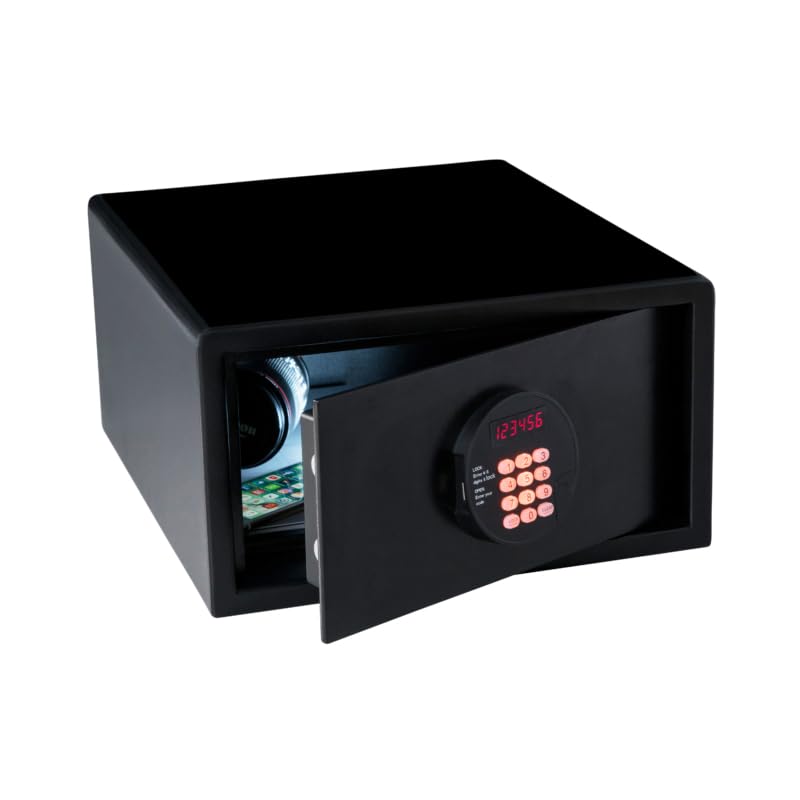
Image: The JVD Fortress Plus Digital Safe Locker with its door open, revealing a smartphone and other small items stored securely inside. The digital keypad is visible on the open door.
6. Maintenance
6.1 Battery Replacement
The safe is equipped with a low-battery indicator. When the batteries are low, the red indicator light will flash, or the safe may emit a warning sound during operation. Replace all four AA batteries promptly to ensure continuous functionality.
- Open the safe door.
- Locate the battery compartment on the inside of the door.
- Remove the old batteries and dispose of them responsibly.
- Insert four new AA batteries, observing correct polarity.
- Close the battery cover.
6.2 Cleaning
Clean the exterior of the safe with a soft, damp cloth. Do not use abrasive cleaners or solvents, as these can damage the finish or the electronic components. Ensure the keypad remains dry.
7. Troubleshooting
- Safe does not open with digital code:
a. Ensure batteries are not low. Replace if necessary.
b. Re-enter the code carefully. If forgotten, use the emergency override key.
c. Ensure you press '#' or 'ENTER' after the code. - Low battery indicator:
a. Replace all four AA batteries immediately. - Keypad is unresponsive:
a. Check battery connection and charge. Replace batteries.
b. If still unresponsive, use the emergency override key to open the safe. - Door does not close properly:
a. Ensure no obstructions are preventing the door from closing fully.
b. Check if the locking bolts are aligned correctly.

Image: The JVD Fortress Plus Digital Safe Locker positioned on a surface in a room, with its door ajar, revealing a camera stored within. This demonstrates the safe's capacity for securing electronic devices.
8. Specifications
| Brand | JVD |
| Model Number | AHJVD-FTS PLUS 205-SLPT-BK-TN37 |
| Lock Type | Electronic Combination Lock |
| Material | Stainless Steel |
| Mounting Type | Floor Mount |
| Product Dimensions | 50D x 43.5W x 20.5H Centimeters |
| Item Weight | 5 kg |
| Power Source | AA Batteries |
| Country of Origin | France |
9. Warranty Information
Warranty terms and conditions for the JVD Fortress Plus Digital Safe Locker are typically provided at the point of purchase or within separate documentation. Please refer to your purchase receipt or contact the retailer for specific warranty details. Extended warranty options may be available from third-party providers.
10. Support
For technical assistance, troubleshooting beyond this manual, or inquiries regarding your JVD Fortress Plus Digital Safe Locker, please contact your retailer or the manufacturer's customer support. Refer to the product packaging or the JVD official website for contact information.