
1. Introduction
The ALAIAL Digital Torque Adapter converts any standard ratchet wrench into a precise digital torque wrench. This device offers accurate torque measurement, multiple unit options, and convenient features like preset values and data storage, making it an essential tool for automotive, motorcycle, and general mechanical maintenance tasks. This manual provides detailed instructions for its setup, operation, and care.
2. Package Contents
Upon opening the package, verify that all components are present:
- 1x ALAIAL Digital Torque Adapter (1/2" drive)
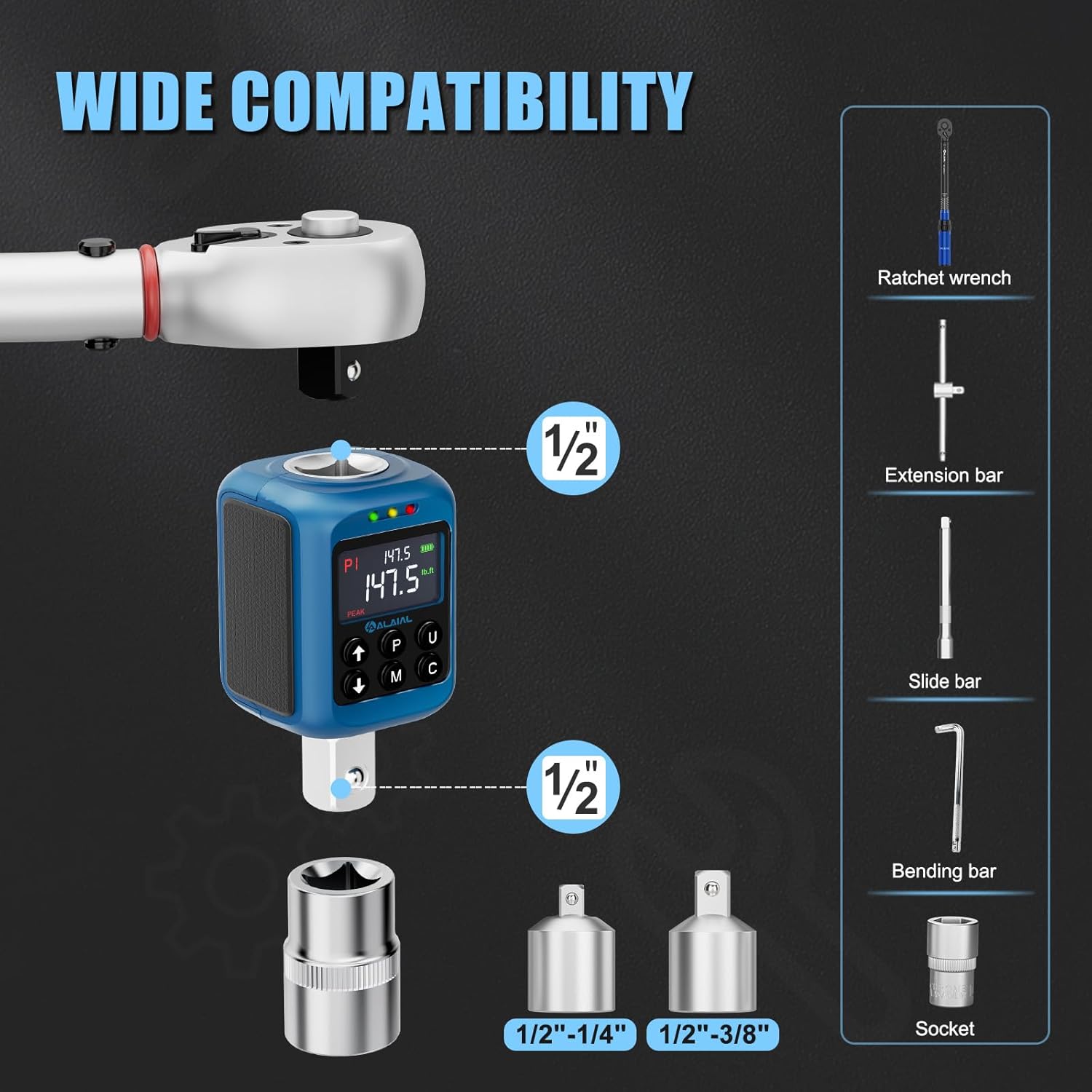
- 1x 1/2" to 3/8" Adapter
- 1x 1/2" to 1/4" Adapter
- 1x Screwdriver
- 2x AAA Batteries
- 1x Storage Case
- 1x Instruction Manual (this document)

3. Product Overview
The digital torque adapter features a clear LCD screen, intuitive control buttons, and a robust 1/2-inch square drive. It is designed for durability and ease of use in various applications.

4. Setup
4.1 Battery Installation
The digital torque adapter requires two AAA batteries for operation. Use the included screwdriver to open the battery compartment located on the back of the device. Insert the batteries according to the polarity markings, then securely close the compartment.
For a visual guide on battery installation and initial setup, please refer to the video below:
4.2 Attaching to a Ratchet Wrench
The digital torque adapter has a 1/2" square drive. To use it, simply attach it to a 1/2" drive ratchet wrench. If your ratchet wrench has a different drive size (e.g., 3/8" or 1/4"), use the appropriate adapter included in the package to ensure a secure fit.
5. Operating Instructions
5.1 Power On/Off
- To power on the device, press the C button.
- To power off the device, press and hold the C button. The device also features an auto-shutdown function after 120 seconds of inactivity to conserve battery life.
5.2 Mode Selection (Peak/Trace)
The adapter offers two operating modes:
- Peak Mode (P): Records and displays the maximum torque value achieved during an application. This is the most commonly used mode for ensuring a specific torque is met.
- Trace Mode (T): Provides real-time torque readings as force is applied, allowing for continuous monitoring.
Press the M button to switch between Peak and Trace modes.

5.3 Unit Selection
The adapter supports four common torque units:
- Newton-meters (Nm)
- Foot-pounds (lb.ft)
- Inch-pounds (lb.in)
- Kilogram-centimeters (kg.cm)
Press the U button to cycle through the available units.
5.4 Setting Torque Values
To set a target torque value:
- Ensure the device is in the desired mode (Peak or Trace).
- Use the Up (↑) and Down (↓) arrow buttons to adjust the target torque value.
- Press the C button to confirm the setting.
5.5 Buzzer and LED Indicator
The adapter provides audible and visual alerts to guide you to the target torque:
- At 85% of the target torque: A green LED light illuminates, accompanied by an intermittent buzzer alert.
- At 95% of the target torque: A yellow LED light illuminates, accompanied by a quicker buzzer alert.
- At 100% of the target torque: A red LED light illuminates, accompanied by a constant buzzer alert, signaling to stop applying force to prevent over-tightening.

5.6 Preset Values and Data Storage
The device allows you to store and recall up to 10 preset torque values (P0-P9) for frequently used settings. It also stores up to 500 torque measurements, which can be reviewed later.
- To switch between preset values (P0-P9), press the P button.
- To activate torque query and browse stored data, press and hold the U button, then use the Up (↑) and Down (↓) arrows.

6. Applications
The ALAIAL Digital Torque Adapter is suitable for a wide range of applications requiring precise torque control, including:
- Automotive repair and maintenance (e.g., engine components, wheel lugs)
- Motorcycle maintenance
- Bicycle assembly and repair
- General mechanical assembly

See the adapter in action in the following video:
7. Maintenance
Proper maintenance ensures the longevity and accuracy of your digital torque adapter:
- Cleaning: Wipe the device with a soft, dry cloth after each use. Avoid using harsh chemicals or abrasive cleaners.
- Storage: Store the adapter in its protective case in a dry, cool place, away from direct sunlight and extreme temperatures. Remove batteries if the device will not be used for an extended period.
- Calibration: Digital torque devices require periodic calibration to maintain accuracy. It is recommended to have the adapter checked and recalibrated annually by a qualified service center.
8. Troubleshooting
If you encounter issues with your ALAIAL Digital Torque Adapter, refer to the following common troubleshooting steps:
- Device does not power on: Check if the AAA batteries are correctly installed and have sufficient charge. Replace batteries if necessary.
- Inaccurate readings: Ensure the adapter is securely attached to the ratchet wrench and the fastener. Verify that the correct unit is selected. Consider recalibration if accuracy issues persist.
- Buzzer/LED not working: Check battery level. If the issue continues, contact customer support.
- Display issues: Ensure the screen is clean and free from obstructions. If the display is faulty, contact customer support.
For further assistance, please contact ALAIAL customer support.
9. Specifications
| Feature | Specification |
|---|---|
| Brand | ALAIAL |
| Model | 2.2-147.5Ft-lb/3-200Nm |
| Drive Size | 1/2 inch |
| Torque Range | 2.2-147.5 Ft-lb / 3-200 Nm |
| Accuracy | ±2% |
| Units | Nm, lb.ft, lb.in, kg.cm |
| Modes | Peak, Trace |
| Indicators | Buzzer and LED (Green, Yellow, Red) |
| Preset Values | 10 (P0-P9) |
| Data Storage | Up to 500 measurements |
| Power Source | 2x AAA Batteries |
| Material | Metal |
| Item Weight | 15.8 ounces |
| Package Dimensions | 6.14 x 3.46 x 2.2 inches |
10. Warranty and Support
For warranty information, please refer to the documentation included with your purchase or visit the official ALAIAL website. If you require technical support, have questions about product operation, or need assistance with troubleshooting, please contact ALAIAL customer service through the contact information provided on the product packaging or the official website.