
Introduction
This manual provides detailed instructions for the installation, operation, and maintenance of your Boolegon Linen Fabric Cordless Zebra Blinds. Please read these instructions carefully before proceeding with installation or use to ensure proper function and longevity of your product.
The Boolegon Linen Fabric Cordless Zebra Blinds offer a blend of elegance and functionality, featuring UV-blocking thermal linen fabric for light filtering and room darkening capabilities. The cordless design ensures ease of use and safety.

Image: Boolegon Linen Fabric Cordless Zebra Blinds in Grey, showcasing the layered fabric design.
Setup and Installation
Included Components
Before beginning installation, verify that all components are present:
- 1 x Stylish Zebra Blind
- 2 x Brackets
- 1 x Handle
- 4 x Screws
Measuring for Installation
Accurate measurement is crucial for proper blind fit. Determine whether you will use an Inside Mount or Outside Mount.
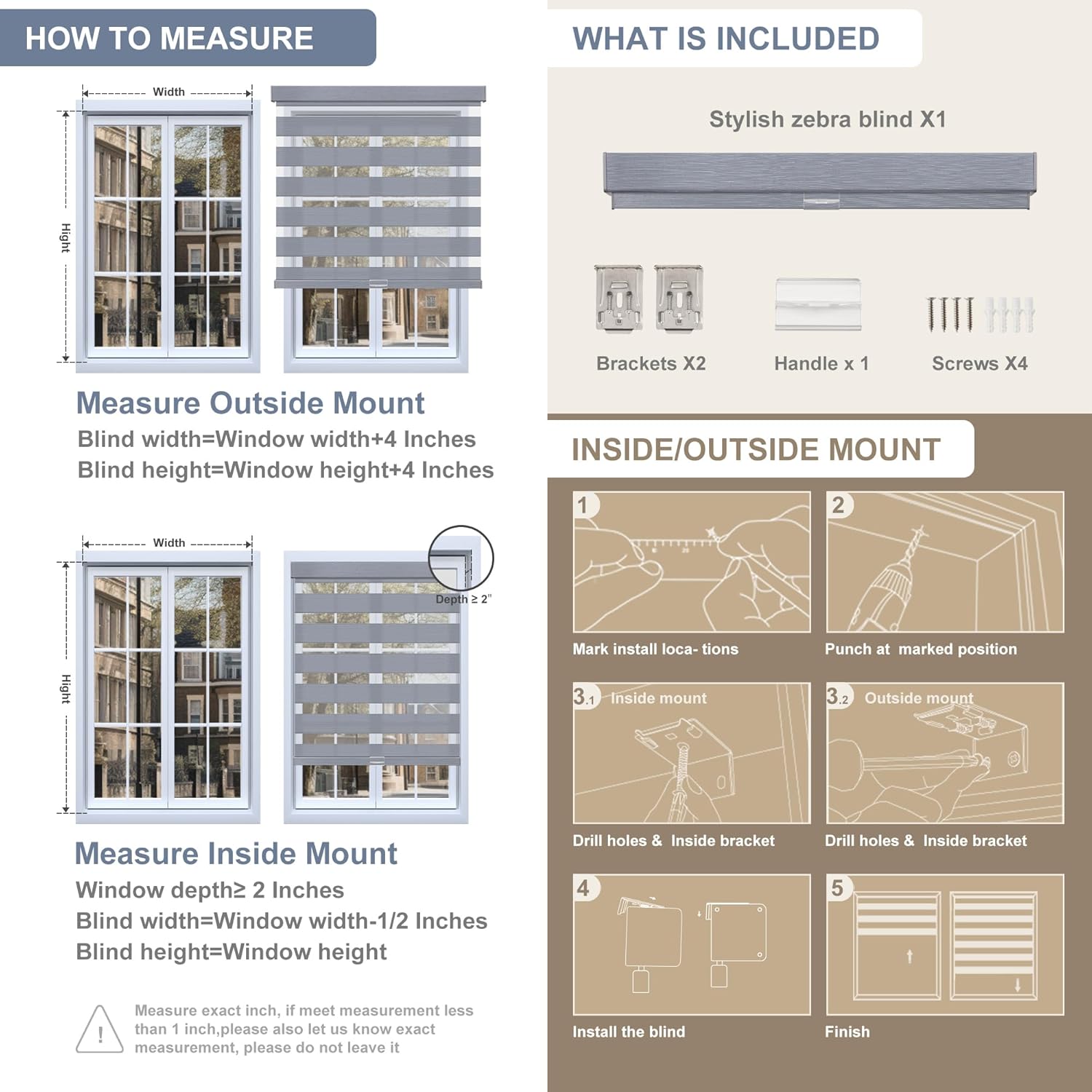
Image: Detailed diagram illustrating how to measure for both inside and outside window mounts, along with a visual list of included installation hardware.
Measure Outside Mount:
- Blind Width: Window width + 4 inches
- Blind Height: Window height + 4 inches
Measure Inside Mount:
- Window Depth: Must be ≥ 2 inches
- Blind Width: Window width - 1/2 inch
- Blind Height: Window height
Important: Measure exact inch. If measurement is less than 1 inch, please do not leave it.
Installation Steps (Inside/Outside Mount)
- Mark Installation Locations: Hold the blind in the desired position and mark the spots where the brackets will be installed. Ensure marks are level.
- Punch Marked Position: Use a punch or awl to create pilot holes at the marked positions.
- Drill Holes & Install Brackets:
- Inside Mount: Drill holes inside the window frame and secure the brackets with screws.
- Outside Mount: Drill holes outside the window frame and secure the brackets with screws.
- Install the Blind: Carefully align the blind headrail with the installed brackets and snap it into place. Ensure it is securely fastened.
- Finish: Test the blind operation to ensure smooth movement.
Operating Instructions
Your Boolegon Zebra Blinds feature a cordless design for easy and safe operation. The unique layered fabric allows for flexible light and privacy control.
Cordless Operation
To adjust the blind height, simply grasp the bottom rail of the blind and gently push up or pull down to the desired position. The blind will stay in place once released.
Day & Night Light Control
The double-layered fabric consists of alternating sheer and solid stripes. By adjusting the position of these layers, you can control the amount of light entering the room and your level of privacy.
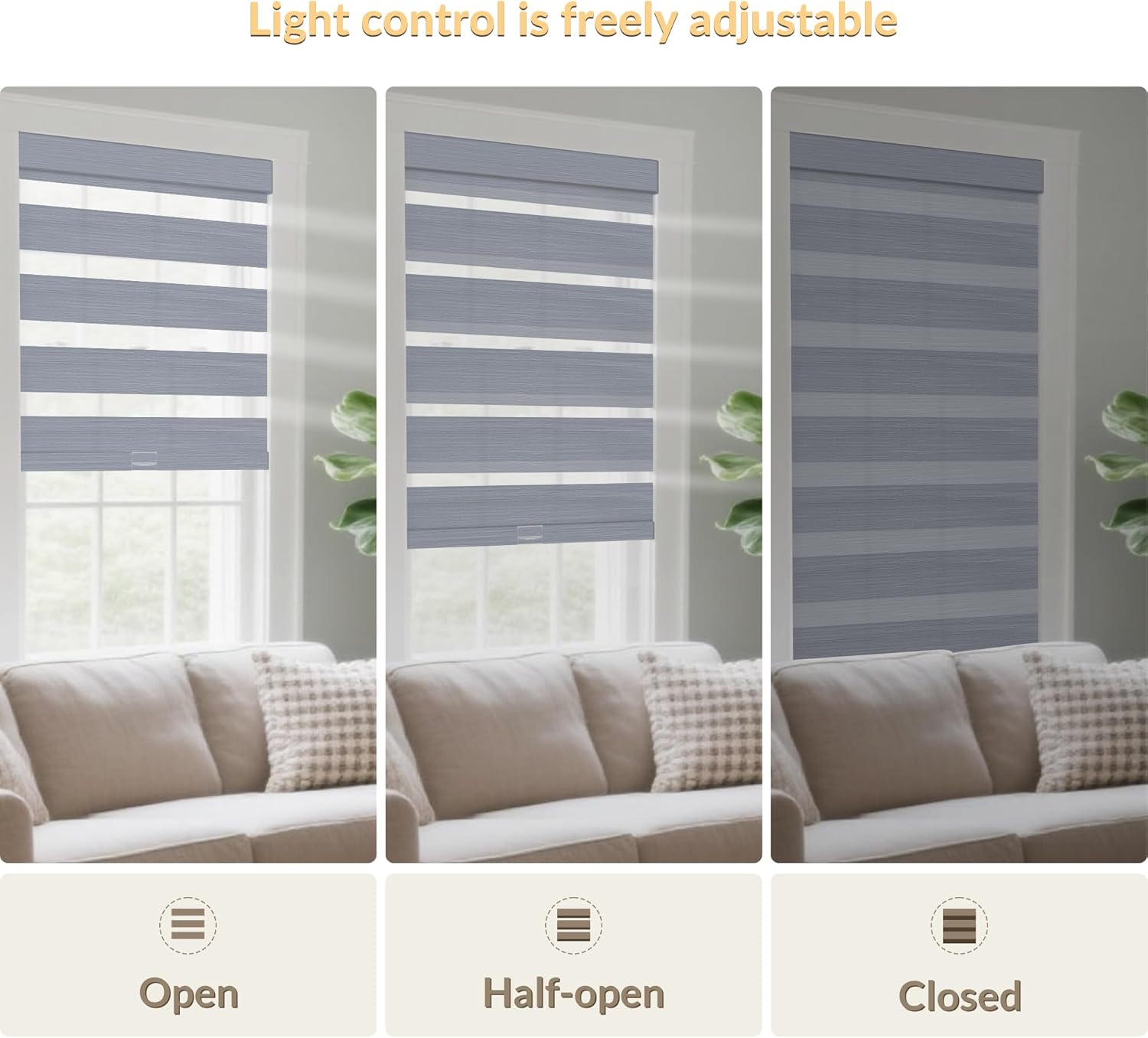
Image: Visual representation of the blinds in 'Open' (sheer and solid stripes aligned for maximum light), 'Half-open' (partially aligned for filtered light), and 'Closed' (solid stripes aligned for privacy and room darkening) positions.
- Open Position: Align the sheer stripes to allow maximum light and visibility.
- Half-Open Position: Partially overlap the sheer and solid stripes for filtered light and moderate privacy.
- Closed Position: Align the solid stripes to block light and ensure full privacy.
Maintenance
Regular cleaning and proper care will extend the life and appearance of your zebra blinds.
Cleaning Instructions
- Dusting: Use a soft brush attachment on a vacuum cleaner or a feather duster to gently remove dust from the fabric.
- Spot Cleaning: For small spots, use a damp cloth with mild soap and water. Blot the stained area gently; do not rub vigorously. Allow to air dry completely.
- Avoid Harsh Chemicals: Do not use abrasive cleaners, solvents, or strong detergents, as these can damage the fabric and color.
- Do Not Submerge: Do not immerse the blinds in water.
Troubleshooting
Here are solutions to common issues you might encounter with your zebra blinds.
- Blind Does Not Stay Up/Down: This may indicate an issue with the cordless mechanism. Ensure the blind is installed correctly and not obstructed. If the issue persists, contact customer support.
- Uneven Movement: Check if the brackets are installed level. Uneven installation can cause the blind to move unevenly. Re-leveling the brackets may resolve this.
- Fabric Fraying/Damage: Avoid pulling the fabric directly. Always use the bottom rail to operate the blinds. If damage occurs, contact customer support for repair options.
- Light Gaps: Ensure your measurements were accurate for your chosen mount type. For inside mounts, small light gaps on the sides are normal. For outside mounts, ensure the blind width extends sufficiently beyond the window frame.
Specifications
| Feature | Detail |
|---|---|
| Brand | Boolegon |
| Model | 53" W x 88" H |
| Material | Aluminum, Polyester |
| Color | Grey |
| Product Dimensions | 88"L x 53"W |
| Mounting Type | Inside Mount; Outside Mount |
| Special Features | Blackout, Cordless, Light Filtering |
Warranty Information
Boolegon products are manufactured to high-quality standards. For specific warranty details regarding your Linen Fabric Cordless Zebra Blinds, please refer to the warranty card included with your purchase or visit the official Boolegon website. Typically, manufacturing defects are covered for a limited period from the date of purchase.
Customer Support
If you have any questions, require assistance with installation, or need to report an issue, please contact Boolegon customer support:
- Online: Visit the official Boolegon website for FAQs and support contact forms.
- Email: Refer to your product packaging or the Boolegon website for the customer service email address.
Please have your product model number (53W x 88H) and purchase date ready when contacting support.