
Introduction
This manual provides detailed instructions for setting up, operating, maintaining, and troubleshooting your NiPoGi Hyper H1 Mini PC. Designed for powerful performance and compact convenience, the Hyper H1 features an AMD Ryzen 7 6800H processor, 16GB DDR5 RAM, and a 512GB M.2 NVMe SSD, offering excellent capabilities for business, personal use, and entertainment.

Image: Front and rear view of the NiPoGi Hyper H1 Mini PC, showcasing its compact design and various ports.
What's in the Box
Upon unboxing your NiPoGi Hyper H1 Mini PC, please ensure all the following items are present:
- 1 x H1 Mini PC
- 1 x HDMI Cable
- 1 x VESA Mount
- 1 x Instruction Manual
- 1 x Power Adapter
Setup Guide
1. Connecting Peripherals
Connect your monitor(s), keyboard, and mouse to the appropriate ports on the Mini PC. The Hyper H1 supports triple 4K display output via HDMI 2.0, DP 2.0, and USB3.2 Gen2 Type-C ports.

Image: Detailed view of the front and back ports of the Mini PC, including USB, HDMI, DP, LAN, and audio jacks.
2. Powering On
Connect the power adapter to the DC IN port on the back of the Mini PC, then plug it into a power outlet. Press the power button located on the front of the device to turn it on. The LED indicator will illuminate.
3. Initial System Setup
Follow the on-screen instructions to complete the initial Windows 11 Pro setup, including language selection, network connection (Wi-Fi 6 or Ethernet), and user account creation.
4. VESA Mounting (Optional)
The NiPoGi Hyper H1 supports VESA mounting, allowing you to attach it to the back of a compatible monitor or to a wall mount for a clutter-free workspace. Use the included VESA mount and screws for installation.
Operating Instructions
Multi-Display Setup
Leverage the triple 4K display support for enhanced productivity or immersive entertainment. Connect up to three monitors simultaneously using the HDMI 2.0, DP 2.0, and USB3.2 Gen2 Type-C ports.
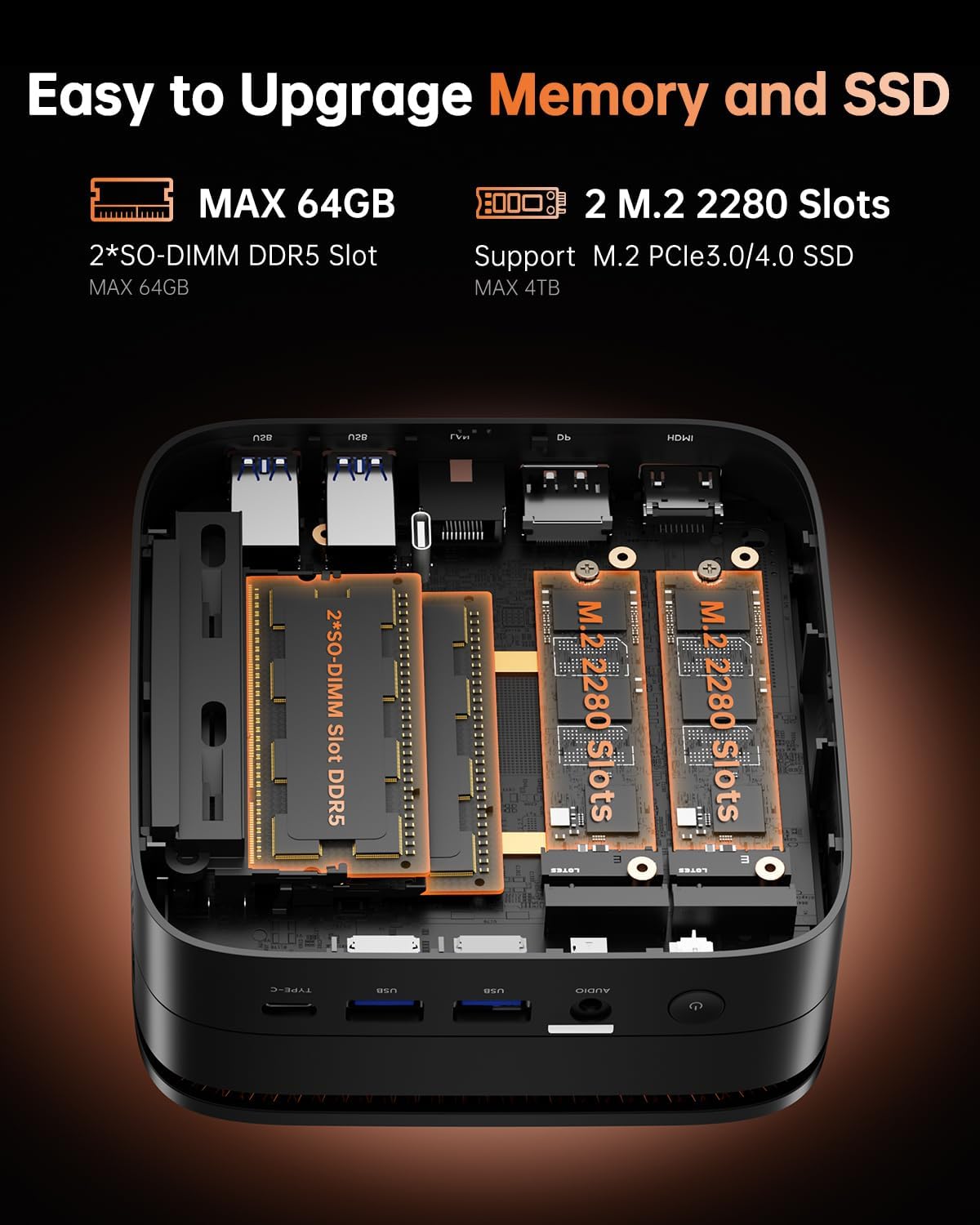
Image: A workstation setup demonstrating the NiPoGi Hyper H1 Mini PC connected to three 4K displays.
Connectivity
The Mini PC is equipped with Wi-Fi 6 for faster and more stable wireless internet connections, and Bluetooth 5.2 for connecting wireless peripherals such as keyboards, mice, and audio devices.

Image: Visual representation highlighting the Wi-Fi 6 and Bluetooth 5.2 capabilities, showing improved upload and download speeds compared to Wi-Fi 5.
Storage and Memory Expansion
The Hyper H1 comes with 16GB DDR5 RAM and a 512GB M.2 NVMe SSD. For increased performance or storage capacity, you can expand the RAM up to 64GB via two SO-DIMM slots and the ROM up to 4TB via two M.2 2280 slots (supporting M.2 NVMe PCIe3.0 or 4.0 SSDs).

Image: An internal view of the Mini PC, illustrating the accessible SO-DIMM DDR5 RAM slots and M.2 2280 NVMe SSD slots for easy upgrades.
Maintenance
General Care
To ensure the longevity of your Mini PC, keep it in a clean, dust-free environment. Avoid exposing it to extreme temperatures or direct sunlight. Use a soft, dry cloth for cleaning the exterior.
Efficient Cooling System
The NiPoGi Hyper H1 is designed with an efficient cooling system to maintain optimal performance and quiet operation. Ensure proper airflow around the device by not obstructing its vents.

Image: Diagram illustrating the efficient heat dissipation mechanism within the NiPoGi Hyper H1 Mini PC, designed for silent and high-performance computing.
Troubleshooting
No Display Output
- Ensure all display cables (HDMI, DP, Type-C) are securely connected to both the Mini PC and the monitor.
- Verify the monitor input source is correctly selected.
- Try connecting to a different monitor or using a different cable to rule out external issues.
System Slowdown or Freezing
- Close unnecessary applications running in the background.
- Check Task Manager (Ctrl+Shift+Esc) for high CPU or RAM usage.
- Ensure the Mini PC has adequate ventilation to prevent overheating.
- Consider upgrading RAM if frequently running multiple demanding applications.
Peripheral Not Recognized
- Try connecting the peripheral to a different USB port.
- Ensure drivers for the peripheral are installed and up to date.
- For Bluetooth devices, ensure Bluetooth is enabled on the Mini PC and the device is in pairing mode.
Fan Noise
While designed for quiet operation, some fan noise may occur under heavy load. Ensure vents are clear of obstructions. If noise is excessive or constant, contact support.
Specifications
| Feature | Detail |
|---|---|
| Brand | NiPoGi |
| Model | H1 |
| Processor | AMD Ryzen 7 6800H (8 Cores, 16 Threads, Max 4.7GHz) |
| Graphics | AMD Radeon 680M (Integrated, 12 CUs, up to 2200MHz) |
| RAM | 16GB DDR5 4800MHz (Expandable up to 64GB) |
| Storage | 512GB M.2 NVMe SSD (Expandable up to 4TB via 2 M.2 2280 slots) |
| Operating System | Windows 11 Pro, Compatible with Linux |
| Wireless Connectivity | Wi-Fi 6 (802.11ax), Bluetooth 5.2 |
| Ports | 1x HDMI 2.0, 1x DP 2.0, 1x USB3.2 Gen2 Type-C, 1x LAN (RJ45), 2x USB 3.2 Gen2, 4x USB 3.2 Gen1, 1x Audio Interface, 1x DC Port |
| Display Output | Triple 4K Display (3840x2160) |
| Dimensions | 12.9 x 12.9 x 5.1 cm |
| Weight | 1.2 kg |
Warranty and Support
NiPoGi is committed to providing excellent customer service and technical support for your Mini PC. We offer:
- 24-hour after-sales service.
- Lifetime technical support.
- Maintenance and repair services during the warranty period.
Contact Information:
For any questions or support needs, please reach out to us:
- Email: support@nipogi.com
- Phone: +44 808 175 2348 (Mon-Fri 9am-5pm EST)
- Amazon Support: Log in to Amazon > Your Account > Your Orders > Ask Product Question.

Image: Information on NiPoGi's comprehensive support, including contact details for assistance.