1. Introduction
This manual provides detailed instructions for the proper setup, operation, and maintenance of your GKKUIDY RCH-RSY2-0 remote control, designed for use with Hisense air conditioners. Please read this manual thoroughly before using the remote control to ensure optimal performance and longevity.
2. Product Overview
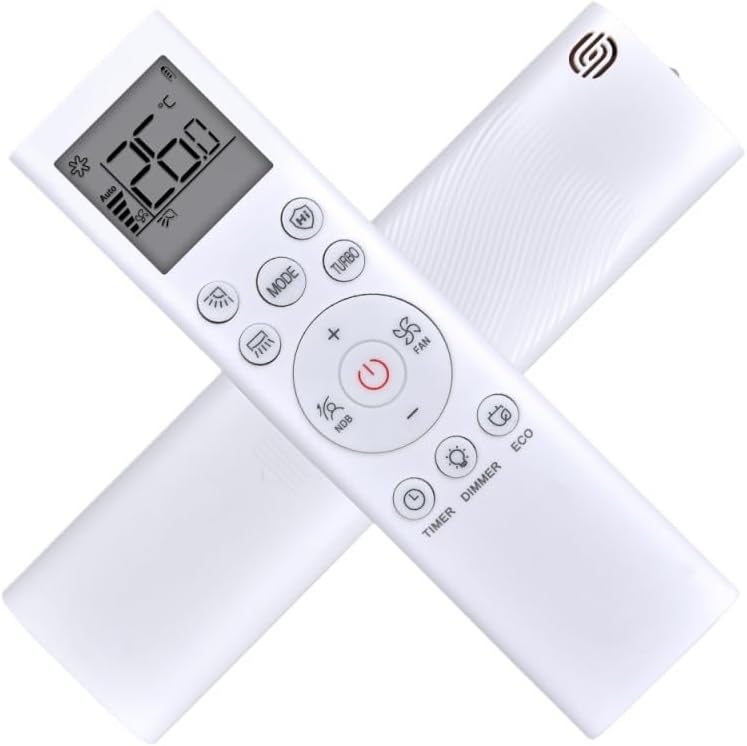
The GKKUIDY RCH-RSY2-0 remote control is a dedicated replacement or supplementary unit for compatible Hisense air conditioner models. It operates on a 433 MHz frequency and is designed for ease of use with clearly labeled buttons and an intuitive display.

3. Setup
3.1 Battery Installation
- Locate the battery compartment cover on the back of the remote control.
- Slide the cover downwards or press the latch and lift to open the compartment.
- Insert two AAA batteries (not included), ensuring the positive (+) and negative (-) terminals align correctly with the markings inside the compartment.
- Replace the battery compartment cover by sliding it back into place until it clicks securely.
Note: Always use new batteries and replace both batteries at the same time. Do not mix old and new batteries or different types of batteries.
4. Operating Instructions
Point the remote control directly at the air conditioner's receiver when operating. Ensure there are no obstructions between the remote and the unit.
4.1 Button Functions
- Power Button (Ⓜ): Turns the air conditioner ON or OFF.
- MODE: Cycles through operating modes: Auto, Cool (Snowflake), Dry (Droplet), Fan (Fan icon), Heat (Sun).
- + / -: Adjusts the temperature setting up or down.
- FAN: Adjusts the fan speed (Auto, Low, Medium, High).
- TURBO: Activates rapid cooling or heating for a short period.
- TIMER: Sets the ON/OFF timer for the air conditioner. Refer to your air conditioner's manual for specific timer programming.
- DIMMER: Adjusts the brightness of the air conditioner's display panel.
- ECO: Activates energy-saving mode, optimizing performance for reduced power consumption.
- NDB: (Night Display / Sleep Mode) Activates or deactivates sleep mode, which adjusts temperature and fan speed for comfortable sleep and energy saving.
- Light Icon: Controls the display light on the air conditioner unit.
- Swing/Louver Icon: Controls the horizontal or vertical swing of the air conditioner's louvers.
- HI: (High Power) May activate a high-power setting for quick temperature changes.
5. Maintenance
5.1 Cleaning
Wipe the remote control with a soft, dry cloth. Do not use liquid cleaners, abrasive materials, or chemical solvents, as these can damage the remote's surface or internal components.
5.2 Battery Replacement
Replace batteries when the remote's range decreases or if the display becomes dim. Follow the battery installation steps in Section 3.1. Remove batteries if the remote will not be used for an extended period to prevent leakage.
6. Troubleshooting
- Remote not responding:
- Check if the batteries are inserted correctly and have sufficient charge. Replace if necessary.
- Ensure there are no obstructions between the remote control and the air conditioner's receiver.
- Verify that the remote is pointed directly at the air conditioner.
- Limited operating range:
- Replace the batteries with new ones.
- Ensure the remote is within the recommended operating distance (typically up to 8 meters) and line of sight.
7. Specifications
| Model Number | RCH-RSY2-0 |
| Brand | GKKUIDY |
| Compatibility | Hisense Air Conditioners (RCH-RSY2-0 compatible models) |
| Frequency | 433 MHz |
| Power Source | 2 x AAA Batteries (not included) |
| Approximate Weight | 100 Grams |
| Approximate Dimensions | 1 x 1 x 1 cm (L x W x H) |
8. Warranty and Support
Warranty information for this product is typically provided by the seller or manufacturer at the time of purchase. Please refer to your purchase documentation or contact the seller directly for details regarding warranty coverage and support services.
For further assistance or inquiries, please contact the retailer or manufacturer of your GKKUIDY remote control.