
Introduction
Thank you for choosing the Sweetcrispy Electric Standing Desk. This manual provides essential information for the safe assembly, operation, and maintenance of your new adjustable height desk. Designed for versatility, this desk allows you to effortlessly switch between sitting and standing positions, promoting a healthier and more dynamic work environment. Please read these instructions thoroughly before assembly and use.
Safety Information
- Always ensure the desk is properly assembled and anchored.
- Do not exceed the maximum weight limit of 176 lbs (80 kg) to maintain stability and prevent accidents.
- Keep children and pets away from the desk during operation.
- Ensure no obstacles are in the path of the desk's movement during height adjustments.
- Do not sit or stand on the desk.
- Disconnect power before cleaning or maintenance.
Package Contents
Verify all components are present before beginning assembly:
- Desktop (2 spliced panels)
- Desk Legs (2)
- Crossbar/Support Frame
- Control Panel with LED Display
- Power Adapter and Cable
- Headphone Hooks (2)
- Cable Management Holes/Grommets (2)
- Assembly Tools (Allen wrench, screwdriver)
- Instruction Manual
- All necessary screws and fasteners
Setup and Assembly
Assembly is designed to be straightforward and can typically be completed in under 30 minutes. Follow these steps carefully:
- Prepare the Frame: Lay the main crossbar on a soft, clean surface. Attach the two desk legs to the crossbar using the provided screws and tools. Ensure all connections are secure.
- Connect the Drive Rod: Insert the drive rod into the designated slots on both legs, ensuring it connects properly to the motor mechanism.
- Attach the Feet: Secure the wide T-legs (feet) to the bottom of each desk leg using the appropriate screws.
- Assemble the Desktop: Place the two spliced desktop panels upside down on a soft surface. Insert the dowels into the pre-drilled holes on one panel, then align and press the second panel onto the dowels to join them. Secure the panels together using the metal brackets and screws provided.
- Mount the Desktop: Carefully place the assembled desktop onto the desk frame, aligning the pre-drilled holes on the desktop with the mounting points on the frame. Secure the desktop to the frame using the provided screws.
- Install Control Panel and Hooks: Attach the control panel to the underside of the desktop in the desired location. Install the headphone hooks on either side of the desk.
- Cable Management: Insert the cable grommets into the desktop holes. Route all necessary cables (power, monitor, etc.) through these holes for a tidy workspace.
- Connect Power: Connect the power adapter to the control panel and then plug it into a power outlet.

Image: The Sweetcrispy Electric Standing Desk in a home office, highlighting its adjustable height capabilities.
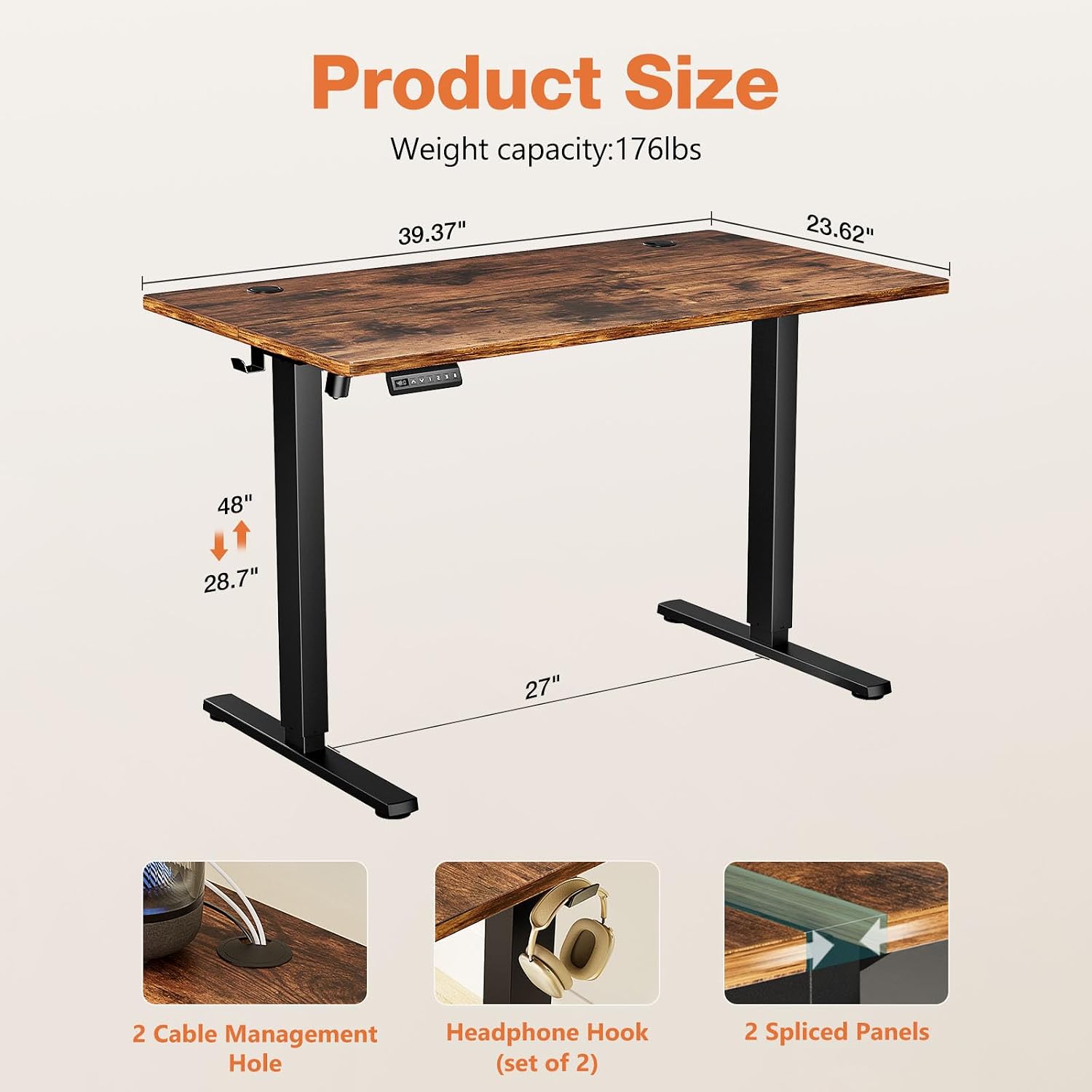
Image: Detailed product dimensions and features, including cable management holes, headphone hooks, and the two-panel desktop design.
Operating Instructions
Control Panel Functions

Image: The LED control panel with buttons for up/down adjustment and three memory presets.
- LED Display: Shows the current height of the desk.
- Up/Down Arrows (▲ / ▼): Press and hold to manually adjust the desk height. Release to stop at the desired level.
- Memory Presets (1, 2, 3): To save a height setting: Adjust the desk to your desired height using the up/down arrows. Press the 'S' (Save) button, then press one of the number buttons (1, 2, or 3) until the display flashes or beeps, indicating the height is saved. To recall a saved height: Simply press the corresponding number button (1, 2, or 3), and the desk will automatically move to that height.
Height Adjustment
The desk offers a smooth and quiet height adjustment range from 28.7 inches to 46.5 inches. The motor operates at under 55 dB, ensuring minimal disruption in any environment.

Image: Visual representation of the desk's height adjustment capabilities, showing both sitting and standing positions.

Image: A side profile of the desk, demonstrating its robust construction and the range of motion for height adjustment.
Features
- Expansive Workspace: A spacious 40" x 24" dual-panel desktop provides ample room for monitors, laptops, and accessories.
- Silent & Seamless Height Adjustments: Near-silent motor (under 55 dB) allows smooth adjustment from 28.7" to 46.5".
- Smart Memory Presets: Three programmable height settings for instant comfort and personalized workspace.
- Rock-Solid Stability: Reinforced steel frame and wide T-legs support up to 176 lbs, tested for 50,000+ lifts.
- Cable Management: Two integrated cable management holes help keep your workspace tidy and organized.
- Headphone Hooks: Convenient hooks on either side for hanging headphones or bags.

Image: Detail showing the integrated cable management holes and a headphone hook for an organized setup.

Image: A detailed view of the two spliced desktop boards, demonstrating their sturdy and durable seamless connection.
Maintenance
To ensure the longevity and optimal performance of your Sweetcrispy Electric Standing Desk, follow these simple maintenance guidelines:
- Cleaning: Wipe the desktop and frame with a dry cloth. Avoid abrasive cleaners or harsh chemicals that could damage the finish.
- Regular Checks: Periodically check all screws and fasteners to ensure they remain tight. Tighten if necessary.
- Cable Inspection: Inspect power cables and connections for any signs of wear or damage. Replace if compromised.
- Weight Distribution: Distribute weight evenly across the desktop to prevent strain on the motor and frame.
Specifications
| Feature | Detail |
|---|---|
| Brand | Sweetcrispy |
| Model Number | A-SWELT40RT |
| Product Dimensions | 23.6"D x 40"W x 46.5"H |
| Desktop Size | 40x24 inch |
| Color | Rustic |
| Minimum Height | 28.7 Inches |
| Maximum Height | 46.5 Inches |
| Maximum Weight Recommendation | 176 Pounds |
| Base Material | Stainless Steel |
| Top Material Type | Wood |
| Noise Level | Under 55 dB |
| Number of Height Positions | 3 (Memory Presets) |
| Assembly Required | Yes |
Warranty and Support
This Sweetcrispy Electric Standing Desk comes with a Limited Warranty. For specific details regarding warranty coverage, terms, and conditions, please refer to the warranty information included in your product packaging or contact Sweetcrispy customer support. For any questions, troubleshooting, or assistance, please reach out to the manufacturer's customer service channels.


