
Introduction
Welcome to the user manual for your SaiFfe Air Quality Monitor. This device is designed to accurately measure various air quality parameters, including particulate matter (PM2.5, PM10), temperature, and humidity. It is suitable for monitoring air quality in homes, offices, hotels, and vehicles. Please read this manual thoroughly before operating the device to ensure proper use and optimal performance.
Product Overview
Components and Display
The SaiFfe Air Quality Monitor features a clear TFT color screen and intuitive buttons for easy operation.

This image shows the front view of the SaiFfe TC-8100 Air Quality Monitor, highlighting its display screen and control buttons. The screen typically shows real-time readings for particulate matter (PM2.5, PM10), temperature, and humidity.
Package Contents
- 1 x Dust Particle Counter
- 1 x USB Cable
- 1 x Tripod
- 1 x User Manual (English)

This image displays the SaiFfe TC-8100 Air Quality Monitor alongside its standard accessories, including a mini tripod for stable placement, a USB charging cable, and a protective carrying case.
Device Features
- 3.2" TFT Color Screen with adjustable backlight for enhanced readability.
- Real-time date and time display.
- Automatic shutdown feature to conserve battery life.
- Intuitive operating buttons for ease of use.
- Data Record function with 999 groups and a convenient curve graph display.
- Dual Power Supply: Rechargeable 2200mAh lithium battery or USB cable power.
- PM2.5 Alarm function with adjustable alarm value.
- TC-8100: 3-channel particle size detection (0.3µm, 2.5µm, 10µm).
- TC-8200: 6-channel particle size detection (0.3µm, 0.5µm, 1.0µm, 2.5µm, 5.0µm, 10µm).
Setup
Initial Setup
Charging the Device
Before first use, fully charge the device using the provided USB cable. Connect the USB cable to the device's charging port and a compatible 5V USB power adapter. The charging indicator will show the charging status.
Powering On/Off
To power on the device, press and hold the power button (usually marked with a power symbol) until the screen illuminates. To power off, press and hold the power button again until the screen turns off.
Attaching the Tripod
For stable, hands-free operation, screw the included mini tripod into the threaded mount at the bottom of the device.
Operating Instructions
Using Your Air Quality Monitor
Understanding the Display
The 3.2" TFT color screen displays various parameters simultaneously.

This image provides a detailed view of the monitor's screen, illustrating how different particle sizes (0.3µm, 0.5µm, 1.0µm, 2.5µm, 5.0µm, 10µm), temperature, and humidity are displayed. The screen also shows the current date, time, and data record information.
Key Display Elements:
- Date & Time: Real-time display.
- Particulate Matter (PM): Readings for PM2.5 and PM10 concentrations (µg/m³). TC-8200 also shows individual particle counts for 0.3µm, 0.5µm, 1.0µm, 2.5µm, 5.0µm, and 10µm.
- Temperature: Current ambient temperature (°C or °F).
- Humidity: Current relative humidity (%).
- REC: Indicates the current data record group and interval.
Navigation and Settings
Use the directional buttons (up, down, left, right) and the "ENTER" button to navigate through menus and confirm selections.
Temperature Unit Switching
Press the "°C/°F" button to toggle between Celsius and Fahrenheit temperature units.
Data Record and Curve Graph
The device can store up to 999 groups of data records. To view historical data as a curve graph, press the "GRAPH" button.
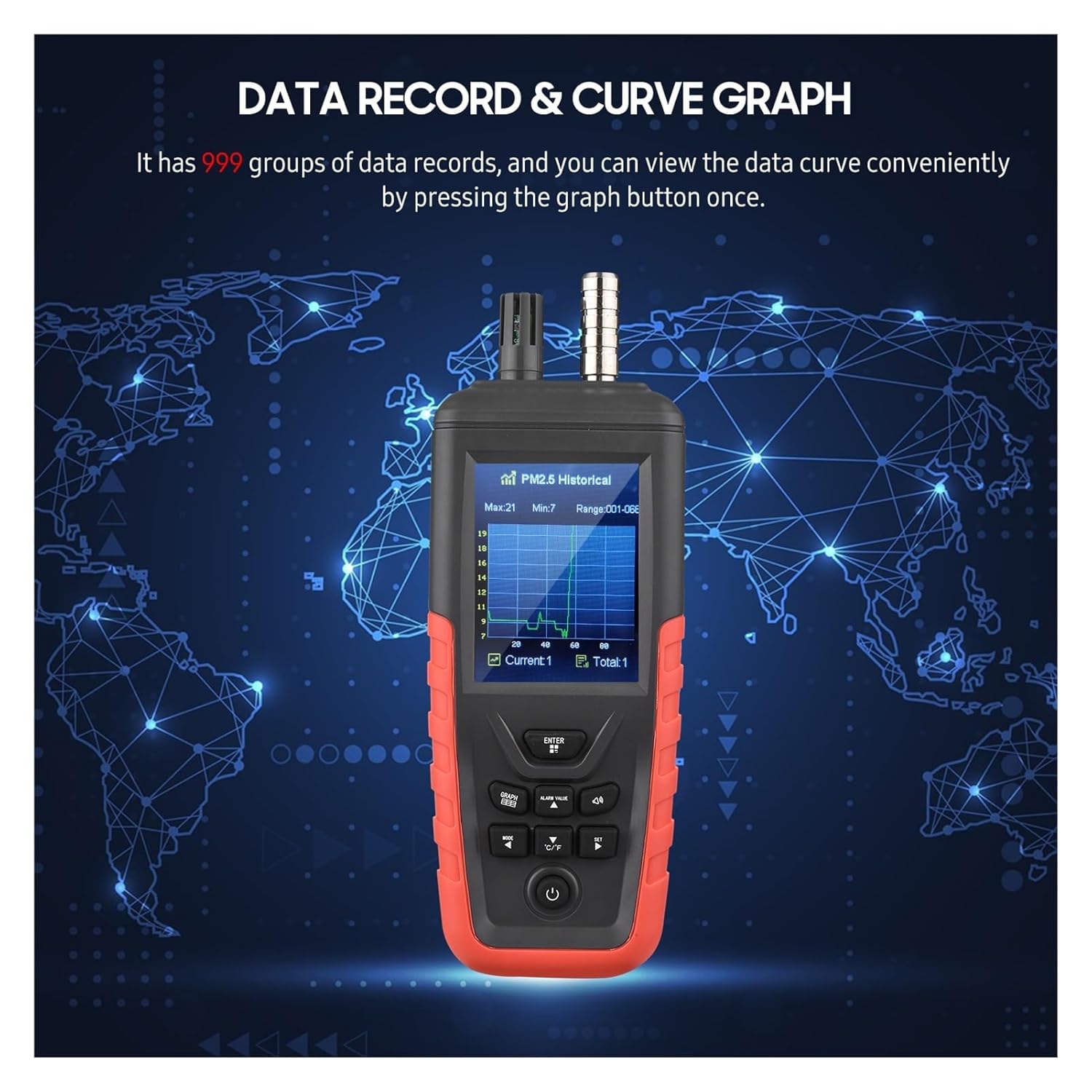
This image shows the monitor's screen in graph mode, illustrating how historical PM2.5 data is presented as a curve over time, along with maximum, minimum, and current values.
PM2.5 Alarm Function
The device features a PM2.5 alarm. You can turn the alarm buzzer on or off and set the alarm threshold value. When the PM2.5 concentration exceeds the set value, the alarm will activate.

This image highlights the PM2.5 alarm feature, showing a visual alert on the screen when the particulate matter level exceeds a predefined limit.
Maintenance
Care and Storage
Cleaning
Gently wipe the device's exterior with a soft, dry cloth. Do not use abrasive cleaners or solvents, as these can damage the casing or screen. Ensure no liquids enter the sensor openings.
Battery
The device is equipped with a built-in 3.7V 2200mAh lithium battery. If battery replacement is ever necessary, the battery cover is designed for easy removal and installation. Use only compatible replacement batteries.
Storage
When not in use for extended periods, store the device in a cool, dry place, away from direct sunlight and extreme temperatures. It is recommended to fully charge the battery before long-term storage.
Troubleshooting
Common Issues and Solutions
Device Does Not Power On
- Ensure the battery is sufficiently charged. Connect the device to a power source using the USB cable and try again.
- Check the USB cable and power adapter for damage.
Inaccurate Readings
- Ensure the device is placed in an area with good air circulation, away from direct drafts or heat sources.
- Allow the device to stabilize for approximately 10 seconds after powering on before taking readings.
- Avoid operating the device in extremely dusty or humid environments that exceed its specified operating range.
Screen Not Responding
- Try restarting the device by powering it off and then on again.
- If the issue persists, contact customer support.
Specifications
Technical Specifications
| Parameter | TC-8100 | TC-8200 |
|---|---|---|
| Material | ABS | |
| Concentration Resolution | 1 µg/m³ | |
| Flow Rate | 1 liter/min | |
| Response Time | Approx. 1 second | |
| Boot Stabilization Time | Approx. 10 seconds | |
| Temperature Measurement Range | -10~60 °C | |
| Temperature Accuracy | ±2 °C | |
| Temperature Resolution | 0.01 °C | |
| Humidity Measurement Range | 0~100% RH | |
| Humidity Accuracy | ±3% RH | |
| Humidity Resolution | 0.01% RH | |
| Built-in Battery | 3.7V 2200mAh Lithium Battery | |
| Charging | 5V/USB | |
| Item Size | 222 * 80 * 46mm | |
| Item Weight | 311g | |
| Particle Size Channels | 0.3µm, 2.5µm, 10µm (3-channel) | 0.3µm, 0.5µm, 1.0µm, 2.5µm, 5.0µm, 10µm (6-channel) |
| PM2.5 Range | 0~1000 µg/m³ | |
| PM2.5 Precision (TC-8100) | ±12 µg/m³ | N/A |
| PM2.5 Precision (TC-8200) | N/A | ±10 µg/m³ (0~100 µg/m³), ±10% (100~1000 µg/m³) |
| Number of Particles Output Range | N/A | 2,000,000 Granule/L |
| Cleanliness Standard (TC-8200) | N/A | Meets ISO 14644-1 ISO5 Level-ISO9 Level |
Warranty Information
Product Warranty
This SaiFfe product is covered by a standard manufacturer's warranty against defects in materials and workmanship. The specific terms and duration of the warranty may vary by region. Please retain your proof of purchase for warranty claims. For detailed warranty information, please refer to the documentation included with your purchase or contact customer support.
Support
Customer Support
If you encounter any issues or have questions regarding your SaiFfe Air Quality Monitor that are not addressed in this manual, please contact our customer support team.
For the most up-to-date support contact information, please visit the official SaiFfe website or refer to your purchase documentation.