
Introduction
This manual provides detailed instructions for the assembly, operation, maintenance, and troubleshooting of your CollaredEagle Vanity Desk with Mirror. Please read this manual thoroughly before beginning assembly or use to ensure proper function and longevity of your product. Keep this manual for future reference.

Image: The CollaredEagle Vanity Desk with Mirror, featuring a large mirror with Hollywood-style lights, a transparent tabletop, and multiple drawers, accompanied by a cushioned stool.
Setup and Assembly
The CollaredEagle Vanity Desk requires assembly. It is recommended to have at least two people for assembly. Ensure all parts are present before starting. Refer to the included assembly guide for step-by-step instructions and part identification.
Required Tools (Not Included):
- Phillips head screwdriver
- Hammer (for back panel nails, if applicable)
Assembly Tips:
- Lay out all components on a soft, clean surface to prevent scratches.
- Identify each part by its corresponding number or letter as per the assembly guide.
- Do not overtighten screws to avoid damaging the engineered wood.
- Pay close attention to the orientation of drawer slides and other directional components.

Image: Detailed dimensions of the vanity desk, mirror, and stool, indicating overall height of 53.5 inches, desk width of 43.3 inches, and depth of 15.8 inches.
Placement Considerations:
- Place the vanity on a flat, stable surface.
- Avoid direct sunlight or extreme temperature changes to prevent material warping.
- Ensure adequate space around the vanity for comfortable use and drawer access.
Operating Instructions
Mirror Lighting System:
The vanity mirror is equipped with 11 Hollywood-style light bulbs offering three adjustable lighting modes and brightness control.
- Power On/Off: Locate the touch switch on the mirror. Tap once to turn the lights on or off.
- Change Lighting Mode: With the lights on, short press the touch switch to cycle through the three lighting modes:
- Cold Light: Bright, cool white illumination, ideal for detailed makeup application.
- Natural Light: Balanced, daylight-like illumination, suitable for everyday use.
- Warm Light: Soft, warm illumination, perfect for evening makeup or ambient lighting.
- Adjust Brightness: To adjust the brightness within any lighting mode, long press the touch switch. The brightness will gradually increase or decrease. Release the switch when the desired brightness is achieved.
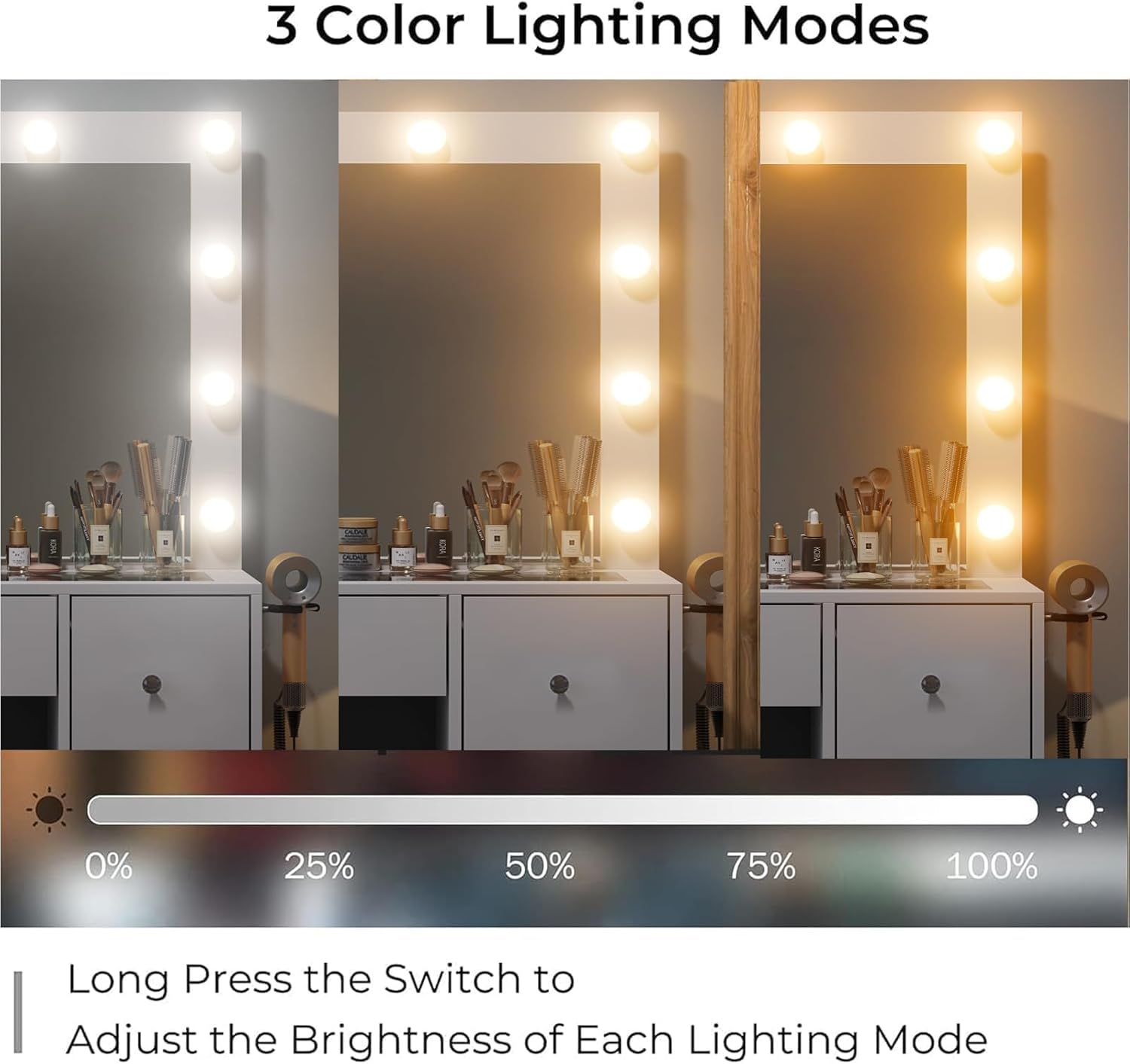
Image: Illustration showing the three distinct lighting modes (cold, natural, warm) available on the vanity mirror, with a brightness adjustment bar.
Built-in Power Outlet:
The vanity includes a built-in charging station for convenience.
- The charging station features two standard AC plug sockets, one USB port, and one Type-C port.
- Connect your hair dryer, curling iron, phone, tablet, or other electronic devices directly to the vanity for easy access during use.
- Ensure the vanity is properly plugged into a wall outlet for the power station to function.

Image: Close-up view of the integrated power outlet on the side of the vanity, showing two AC sockets, a USB port, and a Type-C port, alongside a mounted hair dryer holder.
Drawer and Storage Use:
The vanity desk features a transparent tabletop and multiple drawers for organized storage.
- Transparent Tabletop: The tempered glass tabletop allows for a clear view of items stored directly beneath it, making it easy to locate frequently used cosmetics or accessories.
- Drawers: The vanity includes 7 drawers (specific to this model) of various sizes, providing ample space for skincare products, makeup, jewelry, and other personal items.
- Cushioned Stool: The included stool features a soft, double-layered sponge cushion with PU fabric for comfort. It can be neatly tucked under the vanity when not in use to save space.

Image: The vanity desk with several drawers pulled open, showcasing the ample storage capacity for various items like cosmetics, brushes, and personal accessories.
Maintenance and Care
Cleaning Instructions:
- Surfaces (Engineered Wood & Glass): Wipe with a soft, damp cloth. For stubborn marks, use a mild, non-abrasive cleaner. Avoid harsh chemicals or abrasive materials that could damage the finish.
- Mirror: Use a glass cleaner and a lint-free cloth. Spray cleaner onto the cloth, not directly onto the mirror, to prevent liquid from seeping into the edges.
- Stool Cushion: Spot clean with a damp cloth and mild soap. Do not saturate the fabric.
General Care:
- Avoid placing hot items directly on the surface without protection.
- Do not overload drawers to ensure smooth operation and prevent damage to the slides.
- Regularly check and tighten any loose screws to maintain stability.
- Keep the vanity away from excessive moisture or humidity.
Troubleshooting
If you encounter any issues with your vanity desk, refer to the following common problems and solutions:
| Problem | Possible Cause | Solution |
|---|---|---|
| Lights not turning on or flickering. | Loose connection; power outage; faulty bulb. | Ensure the vanity is properly plugged in. Check the power outlet. If a bulb is faulty, contact customer support for replacement. |
| Power outlets not working. | Vanity not plugged in; circuit breaker tripped; internal wiring issue. | Verify the main power cord is securely plugged into a working wall outlet. Check your household circuit breaker. If the issue persists, discontinue use and contact customer support. |
| Drawers are difficult to open/close or are crooked. | Improper assembly of drawer slides; overloaded drawer; debris in slides. | Review assembly instructions for drawer slide installation. Reduce drawer contents if overloaded. Clean drawer slides of any dust or debris. Ensure all screws on slides are tightened. |
| Vanity feels unstable or wobbly. | Loose assembly screws; uneven floor. | Check and tighten all assembly screws. Place the vanity on a level surface or use shims if necessary. |
If you experience a problem not listed here, or if the suggested solutions do not resolve the issue, please contact CollaredEagle customer support.
Specifications
| Feature | Detail |
|---|---|
| Model Number | VD003-WH |
| Color | White |
| Size | 7 Drawers |
| Frame Material | Engineered Wood |
| Furniture Finish | Polish |
| Product Dimensions (D x W x H) | 15.8" x 43.3" x 53.5" (40.1 cm x 109.9 cm x 135.9 cm) |
| Item Weight | 100 pounds (45.36 kg) |
| Lighting Modes | 3 (Cold, Natural, Warm) |
| Power Outlet | 2 Standard AC, 1 USB, 1 Type-C |
Warranty and Support
Warranty Information:
CollaredEagle products are designed for quality and durability. For specific warranty terms and conditions, please refer to the warranty card included with your product or visit the official CollaredEagle website. Typically, the warranty covers manufacturing defects under normal use.
Customer Support:
If you have any questions, require assistance with assembly, or need to report a missing/damaged part, please contact CollaredEagle customer support. Have your model number (VD003-WH) and purchase information ready when contacting support.
Contact Information: Please refer to the contact details provided on the product packaging or the CollaredEagle brand store on Amazon for the most up-to-date support channels.


