
1. Introduction
Thank you for choosing the BINBINNIAO F431B Underwater Fishing Camera. This manual provides detailed instructions for the proper setup, operation, and maintenance of your device. Please read this manual thoroughly before use to ensure optimal performance and longevity of your camera system. Keep this manual for future reference.
2. Package Contents
Please verify that all items listed below are included in your package:
- 1x F431B Display Monitor
- 1x Underwater Camera with 15m Cable
- 1x Winding Reel
- 1x USB Charging Cable
- 1x Camera Mounting Bracket (Horizontal/Vertical Hook)
- 1x User Manual

Image 2.1: The BINBINNIAO F431B Underwater Fishing Camera system, including the display monitor, underwater camera, and various accessories. This image illustrates the complete set of components typically found in the product package.
3. Product Overview
Familiarize yourself with the main components and controls of your F431B Underwater Fishing Camera system.
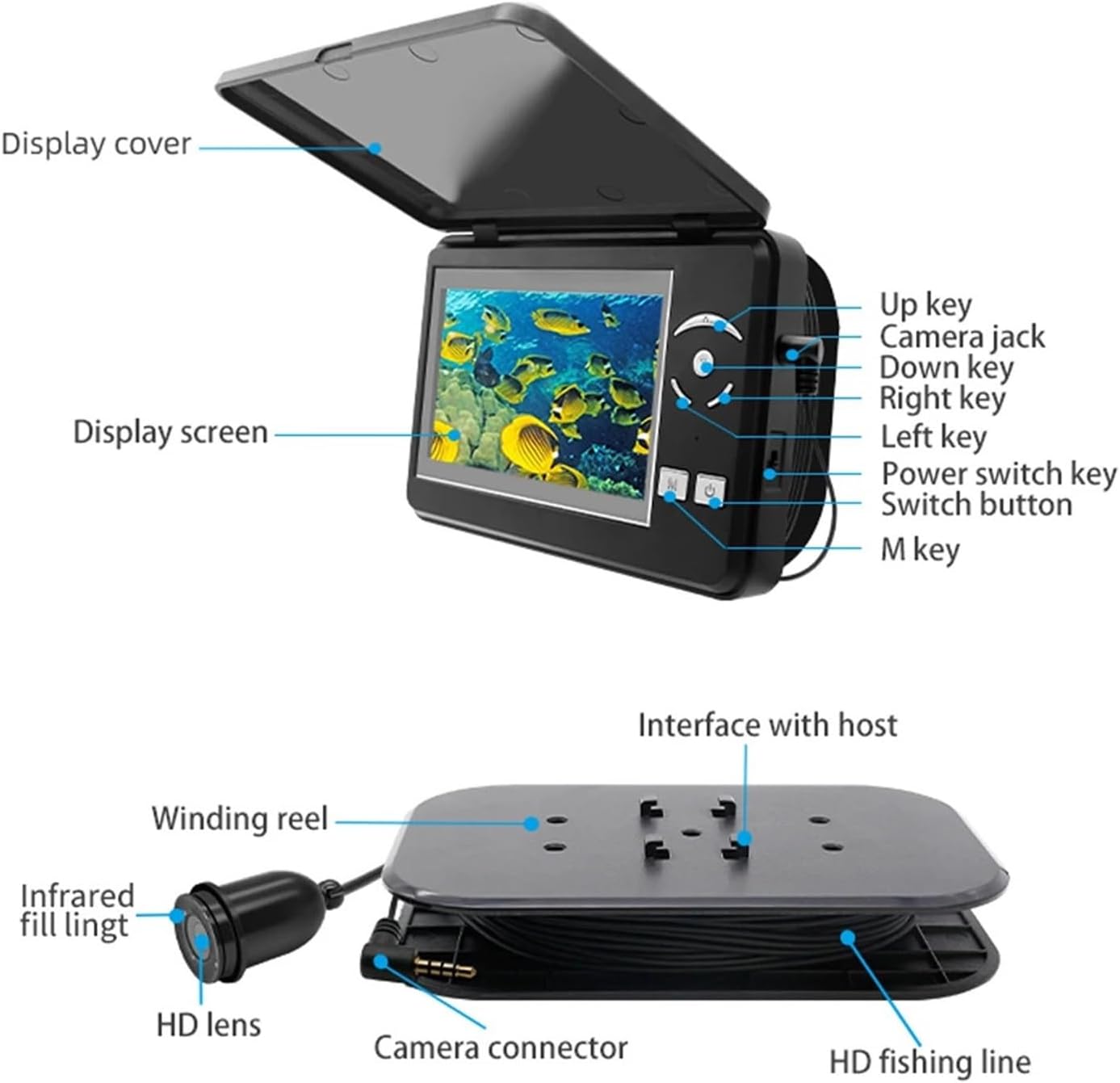
Image 3.1: A detailed diagram illustrating the various parts of the F431B display unit and the underwater camera system. Key components such as the display screen, control buttons, camera jack, winding reel, HD lens, and camera connector are clearly labeled for easy identification.
3.1 Display Unit Components
- Display Cover: Protects the screen when not in use.
- Display Screen: 4.3-inch IPS-LCD color monitor for viewing underwater footage.
- Up/Down/Left/Right Keys: Navigation and adjustment buttons.
- Camera Jack: Port for connecting the underwater camera cable.
- Power Switch Key: Turns the device on or off.
- Switch Button: Used for various function selections.
- M Key: Menu access or mode selection.
3.2 Camera and Cable Components
- HD Lens: High-definition camera lens for clear underwater imaging.
- Infrared Fill Light: Provides illumination in low-light conditions.
- Camera Connector: Connects the camera cable to the display unit.
- Winding Reel: Manages the 15-meter camera cable.
4. Specifications
Detailed technical specifications for the F431B Underwater Fishing Camera system:
| Feature | Specification |
|---|---|
| Display Type | 4.3" IPS-LCD Color Monitor |
| Display Resolution | 640 x 480 pixels |
| Display Power Supply | 3.7V |
| OSD Language | Chinese, English, Japanese, Russian |
| Battery Capacity | 4000mAh Lithium Battery |
| Battery Working Time | 5-8 hours (approx.) |
| Camera DPI | 1000 TVL pixels |
| Waterproof Level | IP68 |
| Cable Length | 15 meters |
| Camera Working Temperature | -20°C to 60°C (-4°F to 140°F) |
| Display Working Temperature | -30°C to 60°C (-22°F to 140°F) |
| Display Dimensions | 123mm × 80mm × 20mm |
| Item Weight | 2000 Grams (approx. 4.41 lbs) |
5. Setup
5.1 Charging the Device
Before initial use, fully charge the built-in 4000mAh lithium battery. Connect the USB charging cable to the display unit's charging port and to a standard USB power adapter (not included). The charging indicator will show the charging status. A full charge typically takes several hours.
5.2 Connecting the Camera
Carefully connect the camera cable connector to the camera jack on the display unit. Ensure the connection is secure to maintain waterproof integrity.
5.3 Mounting the Camera
The camera unit includes a mounting bracket designed for both horizontal and vertical positioning. Attach the camera to the desired fishing line or pole using the provided bracket. Ensure the camera is securely fastened to prevent loss underwater.

Image 5.1: This image displays the aluminum alloy fish camera with its horizontal and vertical hook options, demonstrating how the camera can be positioned for optimal underwater viewing.
5.4 Cable Management
Use the winding reel to manage the 15-meter camera cable. This helps prevent tangles and allows for easy deployment and retrieval of the camera to the desired depth.
6. Operation
6.1 Powering On/Off
Press and hold the Power Switch Key on the display unit to turn the device on or off. The display screen will illuminate upon activation.
6.2 Display Settings
Use the M Key to access the menu. Navigate through the options using the Up/Down/Left/Right Keys. You can adjust settings such as OSD language (Chinese, English, Japanese, Russian) and display brightness.
6.3 Digital Zoom
The F431B features a 4x digital zoom function. Use the designated zoom buttons (often integrated with Up/Down keys) to magnify the underwater view. This allows for closer inspection of fish or underwater structures.
6.4 Lighting Modes (Backlight and Infrared)
The camera offers two primary lighting modes to adapt to various underwater conditions:
- Backlight On: Provides general illumination for clearer color images in moderately lit water.
- Red Light On (Infrared): Activates infrared LEDs for enhanced visibility in very dark or murky water, often resulting in monochrome images.
Use the Switch Button or specific menu options to toggle between these modes and adjust their brightness using the dedicated brightness adjustment controls on the display unit.

Image 6.1: This image demonstrates the two camera lighting modes: Backlight On for color viewing and Red Light On (Infrared) for low-light conditions. It also highlights the physical controls on the display unit for adjusting both backlight and red light brightness.

Image 6.2: The display monitor showing live underwater footage, demonstrating the camera's capability to provide clear views of fish and the aquatic environment, particularly useful in ice fishing scenarios.
7. Maintenance
7.1 Cleaning
After each use, gently wipe the camera lens and display screen with a soft, clean cloth to remove any water spots, dirt, or debris. For stubborn marks, use a slightly damp cloth. Do not use abrasive cleaners or solvents.
7.2 Battery Care
- Avoid fully discharging the battery frequently.
- Charge the battery regularly, even if not in use, to maintain its health.
- Store the device in a cool, dry place when not in use, ideally with the battery charged to about 50-70%.
7.3 Storage
Store the camera system in its original packaging or a protective case to prevent damage. Ensure the cable is neatly wound on the reel. Avoid exposing the device to extreme temperatures or direct sunlight for prolonged periods.
7.4 Waterproof Integrity
The camera unit is IP68 waterproof. However, always ensure the camera connector is clean and dry before connecting it to the display unit. Do not submerge the display unit in water.
8. Troubleshooting
If you encounter issues with your F431B camera, refer to the following common problems and solutions:
- No Image on Display:
- Ensure the camera cable is securely connected to the display unit.
- Check if the display unit is powered on and has sufficient battery charge.
- Verify the camera lens is not obstructed.
- Poor Image Quality:
- Clean the camera lens and display screen.
- Adjust the backlight or infrared settings to suit ambient light conditions.
- Water clarity can significantly affect image quality.
- Battery Not Charging:
- Ensure the USB charging cable is properly connected to both the device and the power source.
- Try a different USB power adapter or charging cable.
- Check the charging port for any debris.
- Device Not Powering On:
- Ensure the battery is charged.
- Press and hold the power button for a few seconds.
If the problem persists after trying these solutions, please contact customer support.
9. Safety Information
- Do not attempt to open or repair the device yourself. This may void the warranty and cause damage.
- Keep the device away from extreme heat sources, open flames, and corrosive materials.
- Ensure the display unit does not come into contact with water.
- Dispose of the battery and device according to local regulations. Do not dispose of in household waste.
- Keep out of reach of children.
10. Warranty and Support
The BINBINNIAO F431B Underwater Fishing Camera comes with a standard manufacturer's warranty. Please refer to the warranty card included with your purchase or visit the official BINBINNIAO website for detailed warranty terms and conditions.
For technical support, troubleshooting assistance, or warranty claims, please contact BINBINNIAO customer service through the contact information provided at the point of purchase or on the official brand website.