
1. Welcome
Thank you for choosing the AreShark Executive Office Chair LC02. This manual provides essential information for the proper assembly, operation, and maintenance of your new office chair. Please read these instructions carefully before use and retain them for future reference.

Figure 1: The AreShark Executive Office Chair LC02. This image displays the chair's overall design, featuring a high back, padded armrests, and a five-star base with casters, positioned in a typical home office environment.
2. Setup and Assembly
Your AreShark Executive Office Chair LC02 is designed for straightforward assembly. A detailed instruction guide and all necessary tools are included in the packaging. Please follow the step-by-step instructions provided with your chair for a smooth assembly process, typically completed within 25 minutes.
2.1. Pre-Assembly Considerations
- Ensure all components are present before beginning assembly. Refer to the parts list in the included assembly guide.
- Assemble the chair on a soft, clean surface to prevent scratches.
- Review the chair's dimensions to ensure it fits your intended workspace.

Figure 2: Chair Dimensions. This graphic illustrates the key measurements of the chair, including height, width, and depth, along with the maximum load capacity of 400 lbs. These dimensions are crucial for planning placement and ensuring user compatibility.
2.2. Key Components for Assembly
Familiarize yourself with the main structural components that contribute to the chair's stability and functionality.

Figure 3: Structural Components. This image highlights the SGS Gas Lift for height adjustment, Silent-Slide Casters for smooth mobility, and the Reinforced Base for stability, all essential for the chair's robust construction.
3. Operating Your Chair
The AreShark Executive Office Chair LC02 offers multiple adjustment features to customize your seating experience for optimal comfort and ergonomic support.
3.1. Ergonomic Support System
The chair is designed with a 7-point support system to promote proper posture and reduce fatigue during extended use.
- Enhanced Cervical Bolster: Provides support for the neck.
- Weight-Distributing Backrest: Conforms to the natural curve of your spine.
- Fixed Lumbar Curve: Offers consistent lower back support.
- Pressure-Dispersing Groove: Reduces pressure points on the seat.
- Feet Equilibrium Base: Ensures overall stability.

Figure 4: Ergonomic Design. This image illustrates the various ergonomic support points of the chair, including the enhanced cervical bolster, weight-distributing backrest, fixed lumbar curve, pressure-dispersing groove, and feet equilibrium base, all contributing to user comfort.
3.2. Recline and Tilt Function
Adjust the chair's recline to suit your activity, from focused work to relaxation.
- 90° Upright: Ideal for focused work and maintaining an active posture.
- 105° Leisure: A slightly reclined position for comfortable reading or light tasks.
- 120° Rest: A relaxed recline for short breaks or unwinding.
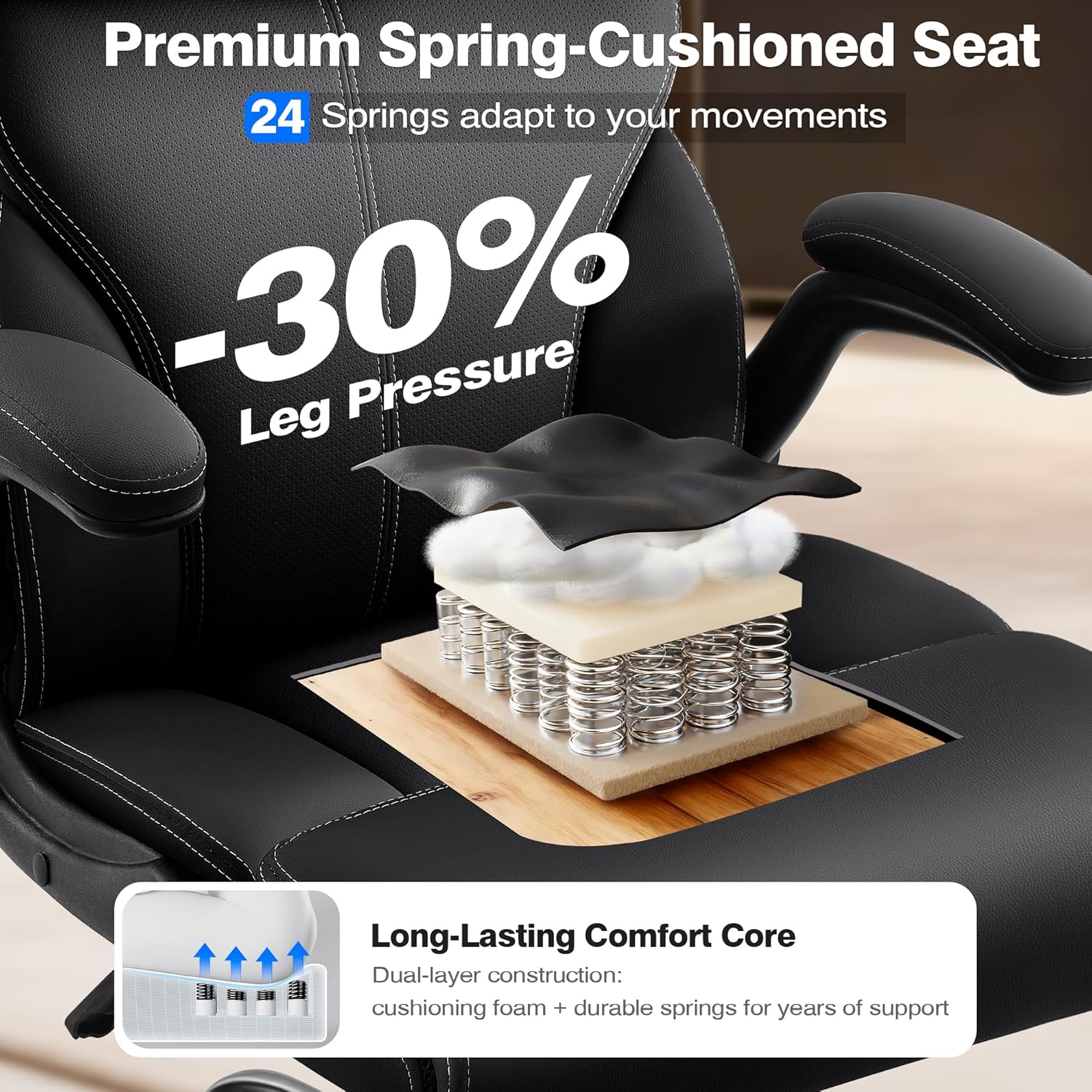
Figure 5: Recline Positions. This image demonstrates the chair's 3-gear recline system, showing the 90° upright, 105° leisure, and 120° rest positions, indicating its adaptability for various activities.
3.3. Armrest Adjustment
The chair features soft padded 90° flip-up armrests, allowing you to easily move them out of the way when not needed or to fit the chair under a desk for space-saving.

Figure 6: Dynamic Armrests. This close-up view highlights the chair's dynamic armrests, which are padded and designed to disperse pressure, enhancing comfort and adaptability for different tasks.
3.4. Seat Cushioning
The extra-wide seat incorporates premium cushioning with PP cotton and high-density sponge, supported by 24 silent spring packs to ensure comfort and prevent deformation.

Figure 7: Premium Seat Cushioning. This image provides a cutaway view of the seat, revealing the multi-layer construction with cushioning foam and durable springs, designed to reduce leg pressure by 30% and provide long-lasting support.
4. Maintenance and Care
Proper care and maintenance will extend the lifespan and preserve the appearance of your AreShark Executive Office Chair LC02.
4.1. Cleaning Instructions
The chair is crafted with perforation PU leather, which is stain-resistant and easy to clean.
- For general cleaning, wipe the surface with a damp cloth.
- Avoid using harsh chemicals or abrasive cleaners, as these can damage the leather.
- Promptly clean spills to prevent staining.

Figure 8: Effortless Maintenance. This image demonstrates the ease of cleaning the chair's luxury PU punched leather surface with just a damp cloth, highlighting its stain-resistant and breathable properties.
4.2. General Care
- Regularly check all bolts and screws to ensure they are tight. Retighten if necessary.
- Avoid exposing the chair to direct sunlight or extreme temperatures for prolonged periods.
- Ensure the casters are free of debris to maintain smooth rolling.
5. Troubleshooting
This section addresses common issues you might encounter with your office chair.
5.1. Common Issues and Solutions
- Chair feels wobbly: Check all assembly bolts and screws. Ensure they are securely tightened.
- Casters not rolling smoothly: Inspect casters for trapped hair or debris. Clean as needed. Ensure the floor surface is suitable for rolling chairs.
- Height adjustment not working: Verify the gas lift lever is fully engaged. If the issue persists, contact customer support.
- Recline function not engaging/disengaging: Ensure the recline lock mechanism is properly operated.
If you experience any issues not covered here, or if troubleshooting steps do not resolve the problem, please refer to the 'Warranty and Support' section for assistance.
6. Specifications
| Feature | Detail |
|---|---|
| Brand | AreShark |
| Model Number | LC02 |
| Color | Black |
| Size | 90-120 ° Tilt Chair |
| Pattern | Solid |
| Tilting | Yes |
| UPC | 717621258191 |
| Product Dimensions | 27.6 x 27.6 x 47.01 inches |
| Item Weight | 22 pounds |
| Maximum Weight Recommendation | 400 Pounds |

Figure 9: Endurance-Engineered Foundation. This image emphasizes the chair's robust construction, featuring a Commercial 3-Grade Lift System, Library-Quiet Mobility casters, and an Architectural-Grade Base, all contributing to its 400 lbs capacity and long-term reliability.
7. Warranty and Support
AreShark is committed to providing high-quality products and excellent customer service.
- Service: Enjoy 5-year service for your AreShark Executive Office Chair LC02.
- Customer Support: Our dedicated 24/7 customer service team is available to assist you with any questions regarding assembly, operation, or other inquiries.
For assistance, please contact us through the retailer's platform or visit our official website for contact information.


