
Introduction
This manual provides essential instructions for the safe and efficient operation, assembly, and maintenance of your HULALA HOME RCAL1374 Power Nursery Glider Recliner. Please read this manual thoroughly before using the product and retain it for future reference.

Image: The HULALA HOME RCAL1374 Power Nursery Glider Recliner, showcasing its design and white fabric in a nursery environment.
Safety Instructions
- Ensure all components are securely fastened before use.
- Do not allow children to play on or around the recliner unsupervised.
- Keep hands and feet clear of moving parts during operation.
- Avoid placing heavy objects on the recliner's footrest or backrest when extended.
- Only use the provided power adapter.
- Do not expose the recliner to excessive moisture or direct sunlight.
- Maximum weight capacity: 300 lbs (136 kg).
Package Contents
Verify that all parts are present before beginning assembly:
- Recliner Base
- Backrest
- Lumbar Pillow
- Power Adapter
- Instruction Manual
Setup and Assembly
The HULALA HOME RCAL1374 recliner is designed for tool-free assembly, typically taking approximately five minutes.
- Carefully unpack all components from the packaging.
- Place the recliner base in the desired location, ensuring sufficient clearance for reclining (approximately 12.5 inches from a wall).
- Align the backrest with the mounting brackets on the recliner base and slide it down until it clicks securely into place.
- Connect the power adapter to the recliner's power input and then plug it into a standard electrical outlet.
- Position the lumbar pillow for comfort.
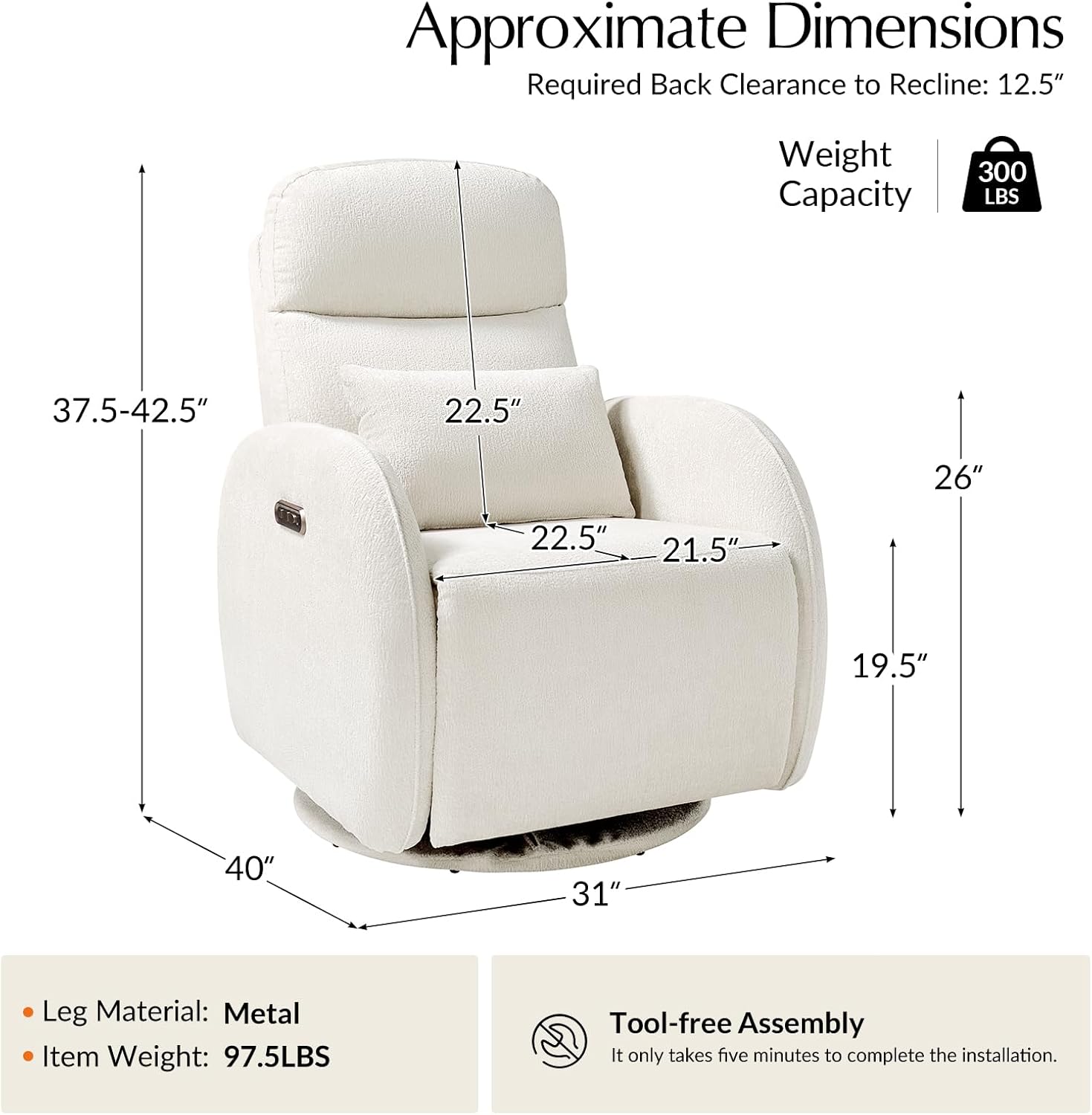
Image: Approximate dimensions and a note on tool-free assembly for the recliner.
Operating Instructions
Control Panel Overview
The control panel is located on the side of the recliner and features buttons for rocking, reclining, and integrated USB/Type-C charging ports.

Image: Close-up of the control panel with labels for rocking control, recline control, and USB/Type-C ports.
Electric Rocking Mode
The recliner offers a gentle auto-rocking function with two speed settings. The rocking motion has a 1.5° shaking angle and operates quietly.
- Press 1: Activates Gentle Mode (approximately 12 swivels per minute).
- Press 2: Activates Quick Mode (approximately 16 swivels per minute).
- Press 3: Stops the rocking motion.
Note: The rocking function automatically stops after 20 minutes to prevent overstimulation.
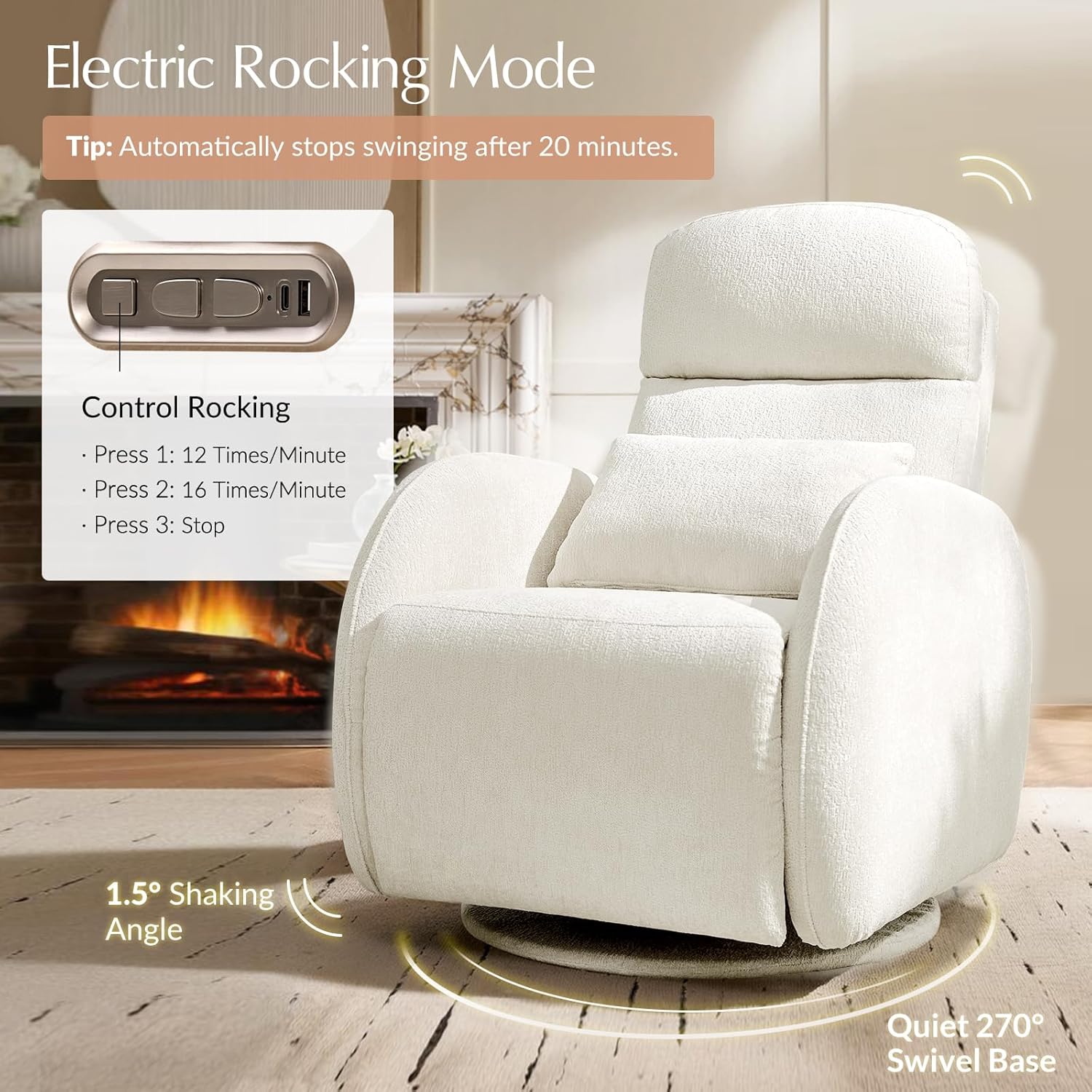
Image: The recliner in electric rocking mode, highlighting the 1.5° shaking angle and quiet 270° swivel base.
Reclining Function
The recliner allows for effortless adjustment from an upright position (105°) to a fully reclined position (137°).
- Press 1 (Recline Control): Initiates one-touch recline.
- Press 2 (Recline Control): Pauses the recline at any desired position.
- Press 1 (Recline Control, second button): Initiates one-touch reset to the upright position.
- Press 2 (Recline Control, second button): Pauses the return to upright at any desired position.

Image: Demonstration of the recliner's recline function, showing various angles for rocking, nursing, and relaxing.
Adjustable Headrest
The flip-top headrest can be manually adjusted to provide optimal neck and head support in any position.

Image: Details of the recliner's features, including the adjustable headrest, comfortable fabric, soft lumbar pillow, and thick cushioning.
Night Ambient Light
A gentle ambient light is integrated into the base of the recliner, providing subtle illumination for nighttime use without disturbing sleep.
- Hold the light button for 3 seconds: Turns the ambient light On/Off.

Image: The recliner with its night ambient light activated, showing its gentle illumination.
USB & Type-C Charging Ports
The integrated USB and Type-C ports allow for convenient charging of electronic devices while using the recliner.
- Connect your device's charging cable to the appropriate USB or Type-C port.
- Ensure the recliner is plugged into a power outlet for charging functionality.
Maintenance and Care
- Cleaning: For general cleaning, gently wipe the fabric with a soft, damp cloth. For spills, blot immediately with a clean, dry cloth. Avoid harsh chemicals or abrasive cleaners.
- Fabric Care: The recliner features comfortable fabric. Refer to the care tag for specific fabric cleaning instructions if available.
- Moving the Recliner: When moving the recliner, lift it rather than dragging to prevent damage to the base or flooring.
- Power Cord: Regularly inspect the power cord for any signs of damage. If damaged, discontinue use and contact customer support.
Troubleshooting
| Problem | Possible Cause | Solution |
|---|---|---|
| Recliner does not power on. | Power cord not connected; outlet not functioning; power adapter faulty. | Ensure power cord is securely plugged into the recliner and a working outlet. Test the outlet with another device. |
| Rocking function is not working. | Not powered on; button not pressed correctly. | Ensure the recliner is powered. Press the rocking control button firmly. |
| Reclining function is not working. | Not powered on; obstruction; button not pressed correctly. | Ensure the recliner is powered. Check for any obstructions around the footrest or backrest. Press the recline control button firmly. |
| USB/Type-C ports are not charging devices. | Recliner not powered; device cable faulty; device not compatible. | Ensure the recliner is plugged in. Try a different charging cable or device. |
| Nightlight is not turning on. | Button not held for 3 seconds; power issue. | Ensure the recliner is powered. Hold the light button for at least 3 seconds. |
Specifications
| Brand | HULALA HOME |
| Model Name | Nursery Recliner |
| Item Model Number | RCAL1374 |
| Color | White |
| Product Dimensions (D x W x H) | 40"D x 31"W x 42.5"H |
| Item Weight | 97.5 pounds |
| Maximum Weight Recommendation | 300 Pounds |
| Special Features | Adjustable Backrest, Foot Rest, Night Ambient Light, Power Recliner, Swivel and Rocking Function, USB & Type-C Ports |
| Fill Material | Foam |
| Seat Height | 19.5 Inches |
| Seat Depth | 22.5 inches |
| Seat Length | 21.5 Inches |
| Arm Height | 26 Inches |
Warranty and Support
For warranty information or technical support, please contact HULALA HOME customer service. Details can typically be found on the product packaging or the official HULALA HOME website.
Please have your model number (RCAL1374) and purchase date available when contacting support.