1. Introduction
Thank you for choosing the boglvr LIBRA Smart Dehumidifier. This manual provides essential information for the safe and efficient operation of your new appliance. Please read it thoroughly before use and keep it for future reference.
This high-efficiency dehumidifier is designed to remove up to 80 pints of moisture per day (52 pints/day DOE standard) from areas up to 4,500 square feet, making it ideal for basements, homes, bedrooms, bathrooms, and garages. It features smart WiFi control, an intelligent humidistat, and is Energy Star certified for reduced energy consumption.
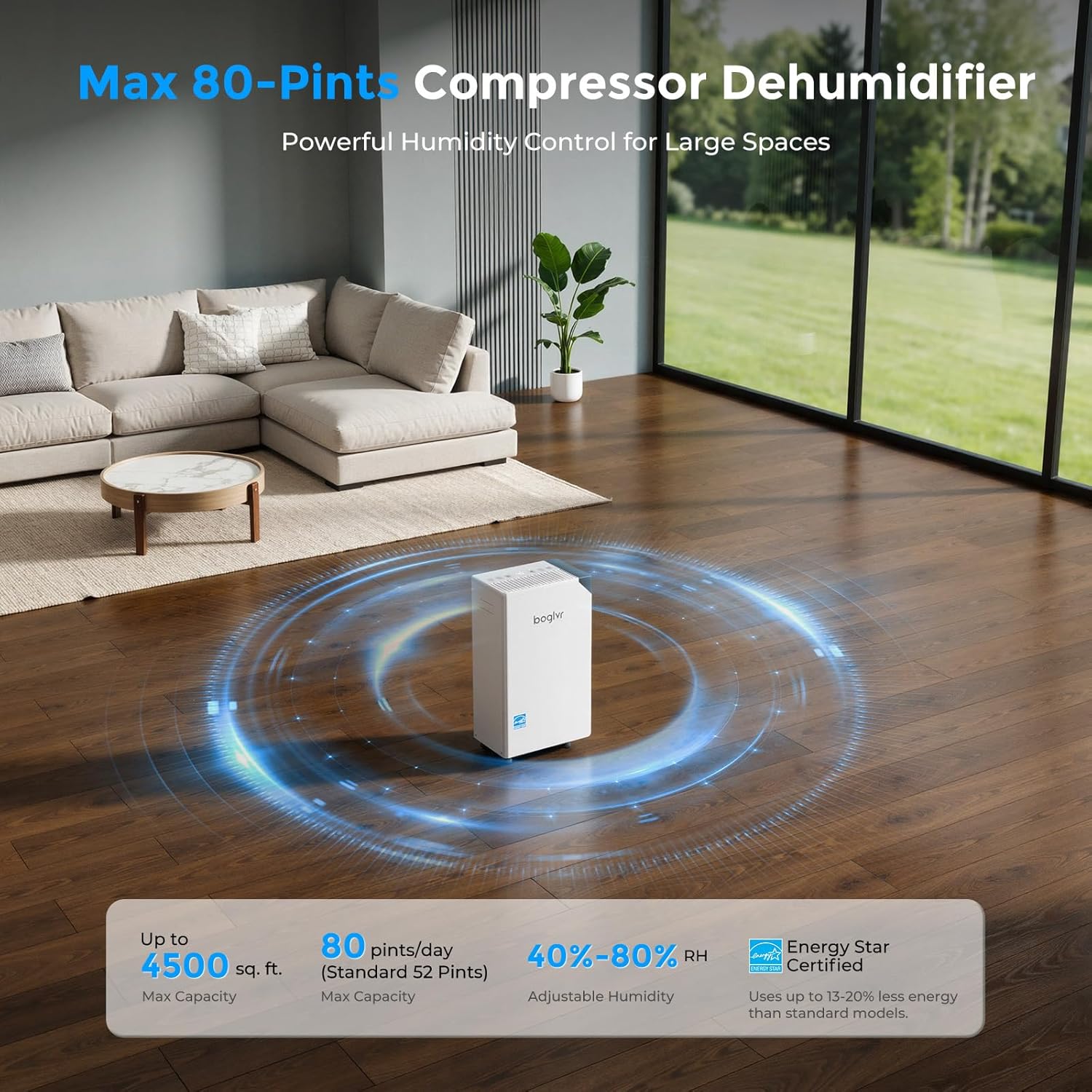
Figure 1: boglvr LIBRA 80 Pint Smart Dehumidifier in a living room setting, illustrating its wide coverage area.
2. Safety Information
To prevent injury to the user or others and property damage, the following instructions must be followed. Incorrect operation due to ignoring instructions may cause harm or damage.
- Always plug into a grounded 120V, 60Hz outlet.
- Do not operate the dehumidifier with a damaged power cord or plug.
- Do not block the air intake or exhaust vents.
- Keep the appliance away from heat sources and direct sunlight.
- Ensure the water tank is correctly installed before operation.
- Do not use in areas where flammable gases or liquids are stored.
- Unplug the unit before cleaning or performing any maintenance.
- This appliance is not intended for use by persons (including children) with reduced physical, sensory or mental capabilities, or lack of experience and knowledge, unless they have been given supervision or instruction concerning use of the appliance by a person responsible for their safety.
3. Package Contents
- 1 x boglvr LIBRA Dehumidifier
- 1 x Drain Hose
- 1 x Instruction Manual
4. Product Overview
The boglvr LIBRA dehumidifier is designed for efficient moisture removal and user convenience. Key components include the control panel, air intake/exhaust, water tank, and continuous drain port.
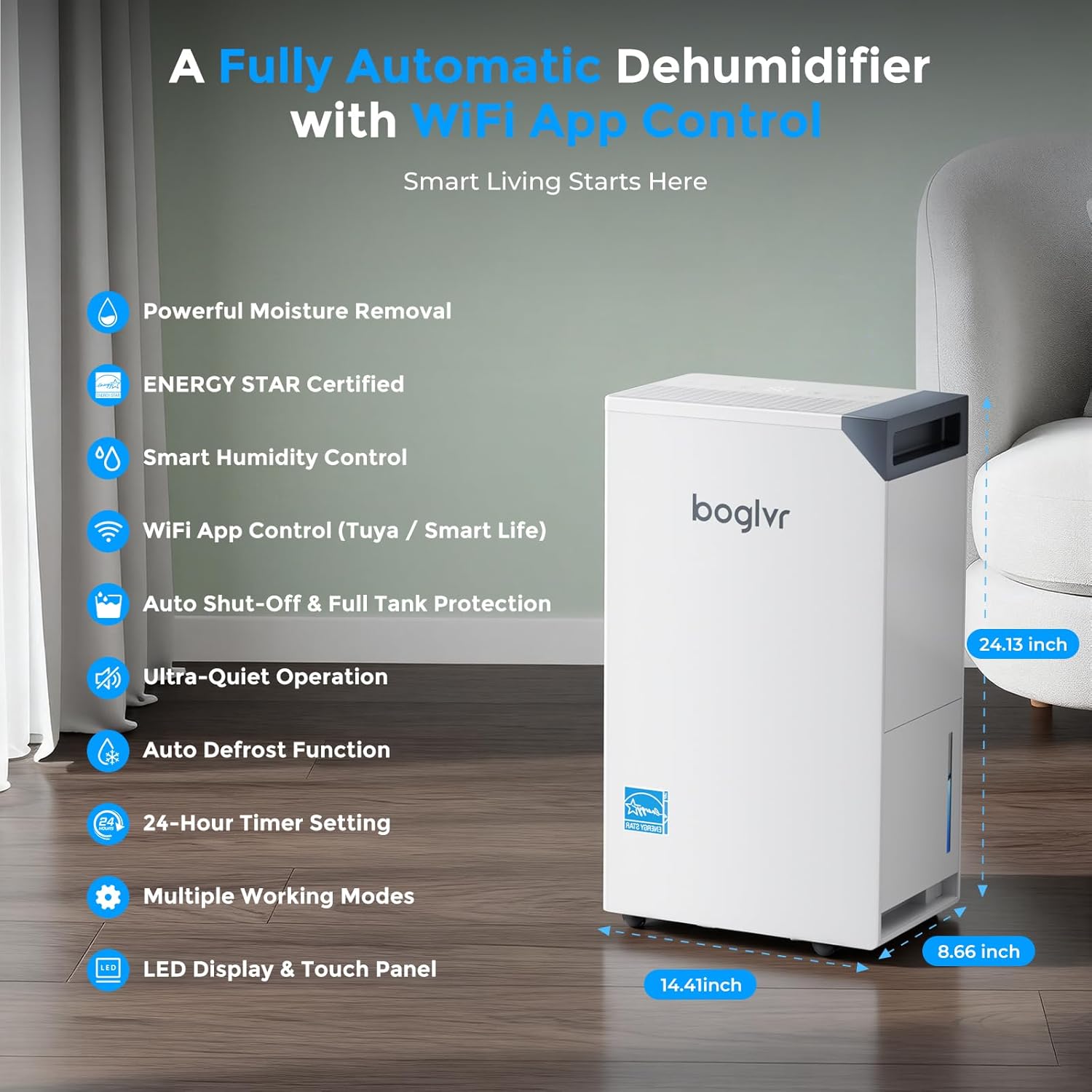
Figure 2: Front view of the dehumidifier with dimensions and feature icons.
4.1. Control Panel
The intuitive LED touch panel allows for easy adjustment of settings. It includes buttons for Lock, Timer, Fan Speed, Humidity Setting, Comfort Mode, and Power.
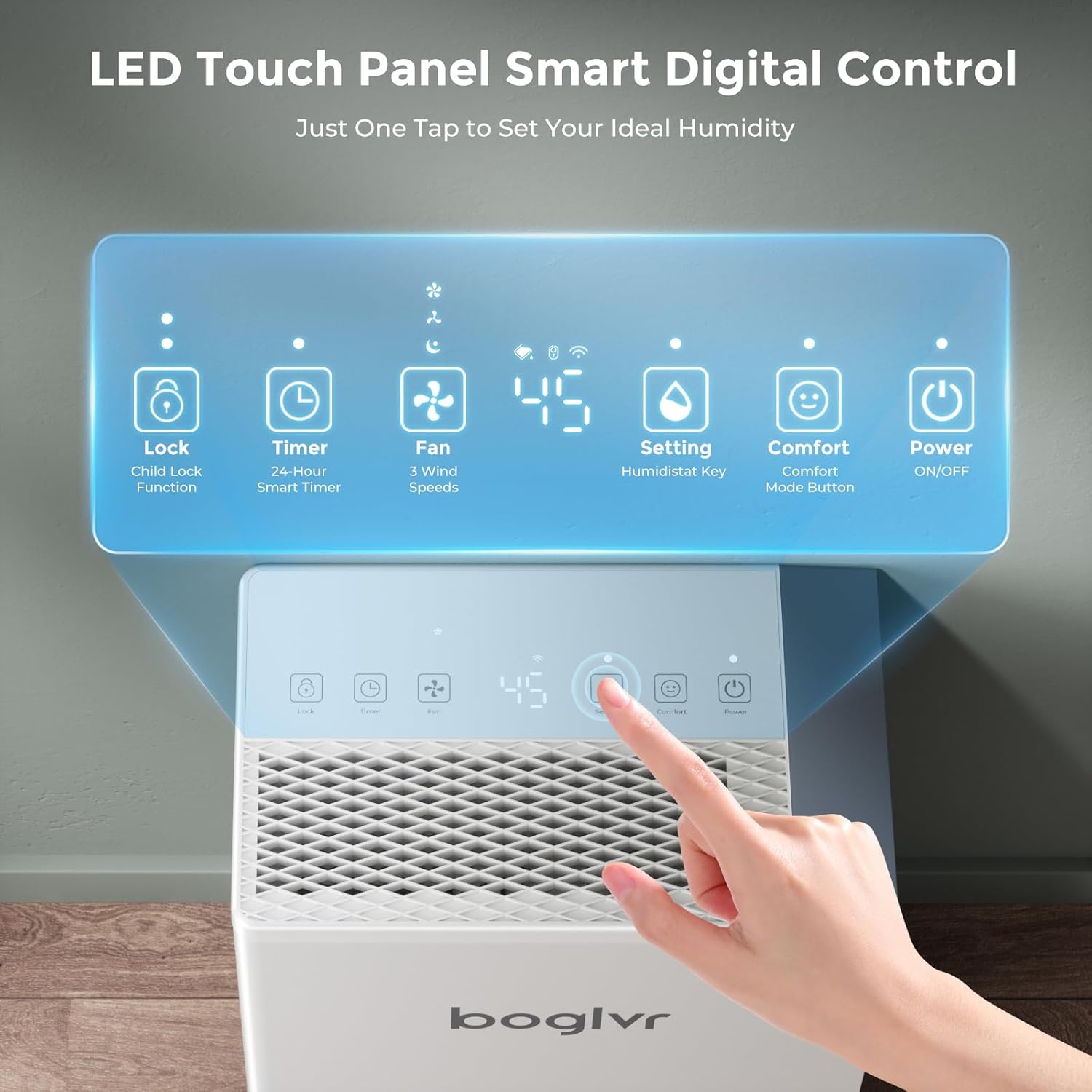
Figure 3: Detailed view of the LED touch control panel.
4.2. Design Features
The unit is equipped with a hidden handle, 360° swivel wheels for easy mobility, a removable and washable back cover for filter access, and a visible water tank to monitor water levels.

Figure 4: Illustration of the dehumidifier's user-friendly design elements.
5. Setup
5.1. Unpacking and Placement
- Remove all packaging materials, including any tape securing parts of the unit.
- Place the dehumidifier on a flat, stable surface. Ensure there is at least 8 inches of space around the unit for proper airflow.
- The unit features 360° swivel wheels for easy movement.
5.2. Power Connection
- Plug the power cord into a standard 120V, 60Hz grounded electrical outlet.
- The unit will power on and display the current humidity level.
5.3. Drainage Options
Your dehumidifier offers two drainage methods:
- Manual Drainage (Water Tank):
The unit collects water in its 5.5L (1.25-gallon) internal water tank. When the tank is full, the dehumidifier will automatically shut off and an indicator light will illuminate. Empty the tank by pulling it out, lifting the handle, and pouring the water into a sink or drain. Reinsert the tank firmly until it clicks into place.
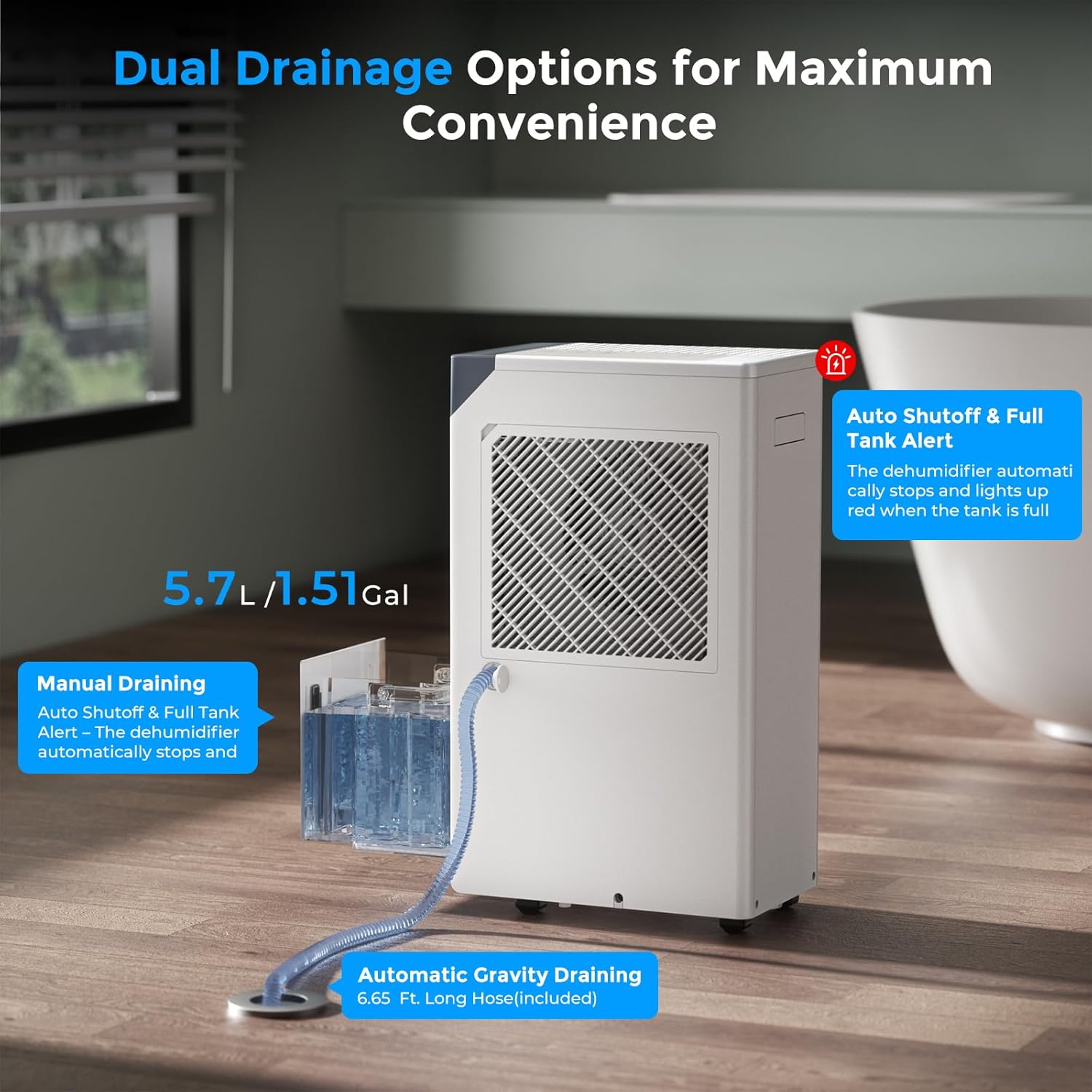
Figure 5: Illustration of manual and continuous drainage methods.
- Continuous Drainage (Drain Hose):
For continuous operation without needing to empty the water tank, attach the included drain hose. Locate the drain port on the side of the unit. Remove the rubber plug, connect the drain hose, and ensure it leads to a suitable drain (e.g., floor drain, sink) with a downward slope for gravity drainage. This method is ideal for basements or areas with high humidity.
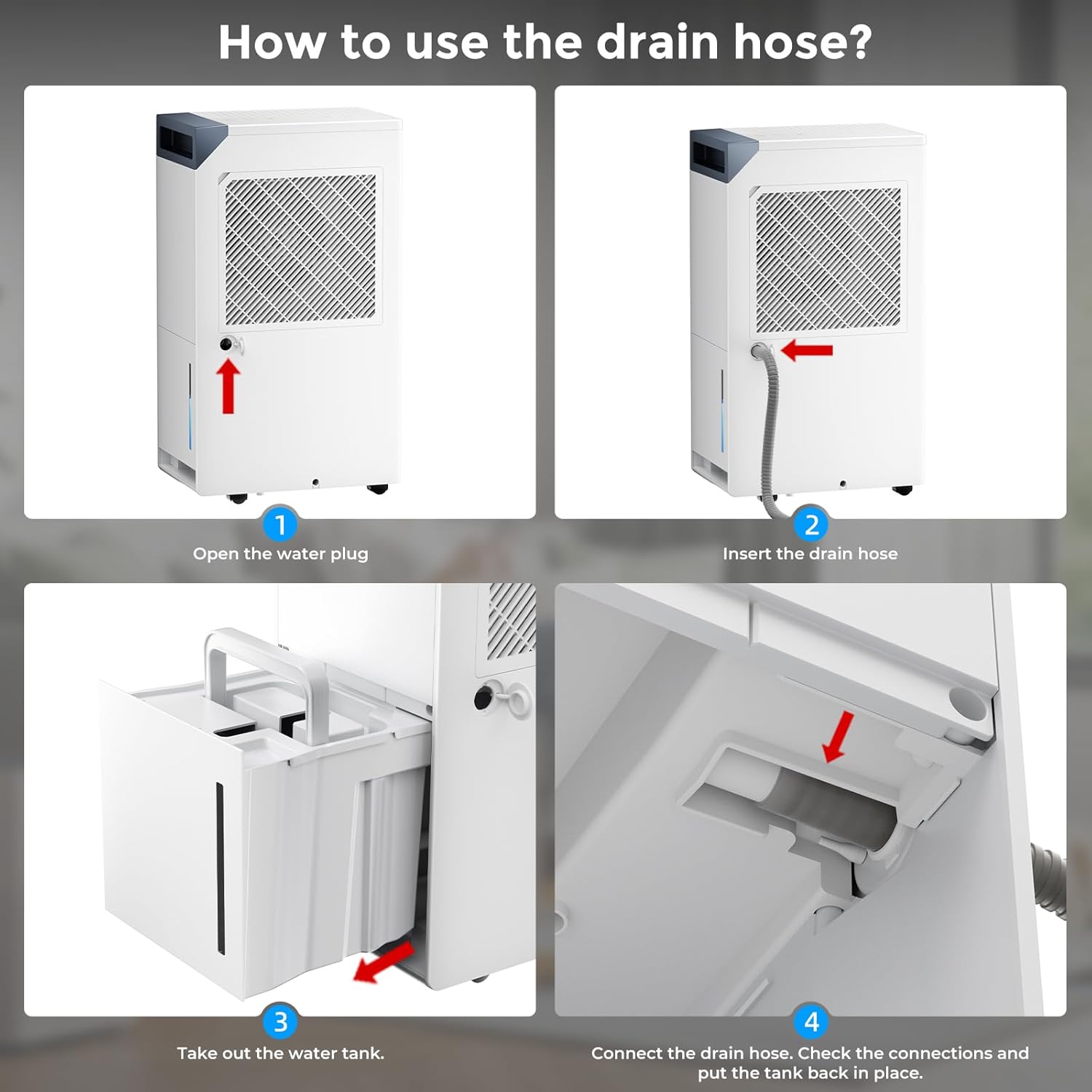
Figure 6: Step-by-step guide for connecting the continuous drain hose.
6. Operating Instructions
6.1. Control Panel Operation
- Power Button: Press to turn the unit ON or OFF.
- Setting Button: Adjust the desired humidity level (40%-80% RH). The unit will operate until the set humidity is reached.
- Fan Button: Select fan speed (Low, Medium, High).
- Timer Button: Set a 24-hour timer for automatic ON/OFF.
- Comfort Mode Button: Activates Comfort Mode, maintaining humidity between 45-55% RH.
- Lock Button (Child Lock): Press and hold for 3 seconds to activate/deactivate the child lock, preventing accidental changes to settings.
6.2. Operating Modes
The dehumidifier offers three intelligent modes:
- Custom Mode: Allows precise humidity control (40%-80% RH) for tailored comfort.
- Comfort Mode: Automatically maintains an ideal humidity range of 45-55% RH for daily living spaces.
- Continuous Mode: Provides powerful, nonstop dehumidification for very damp areas like basements or during rainy seasons.
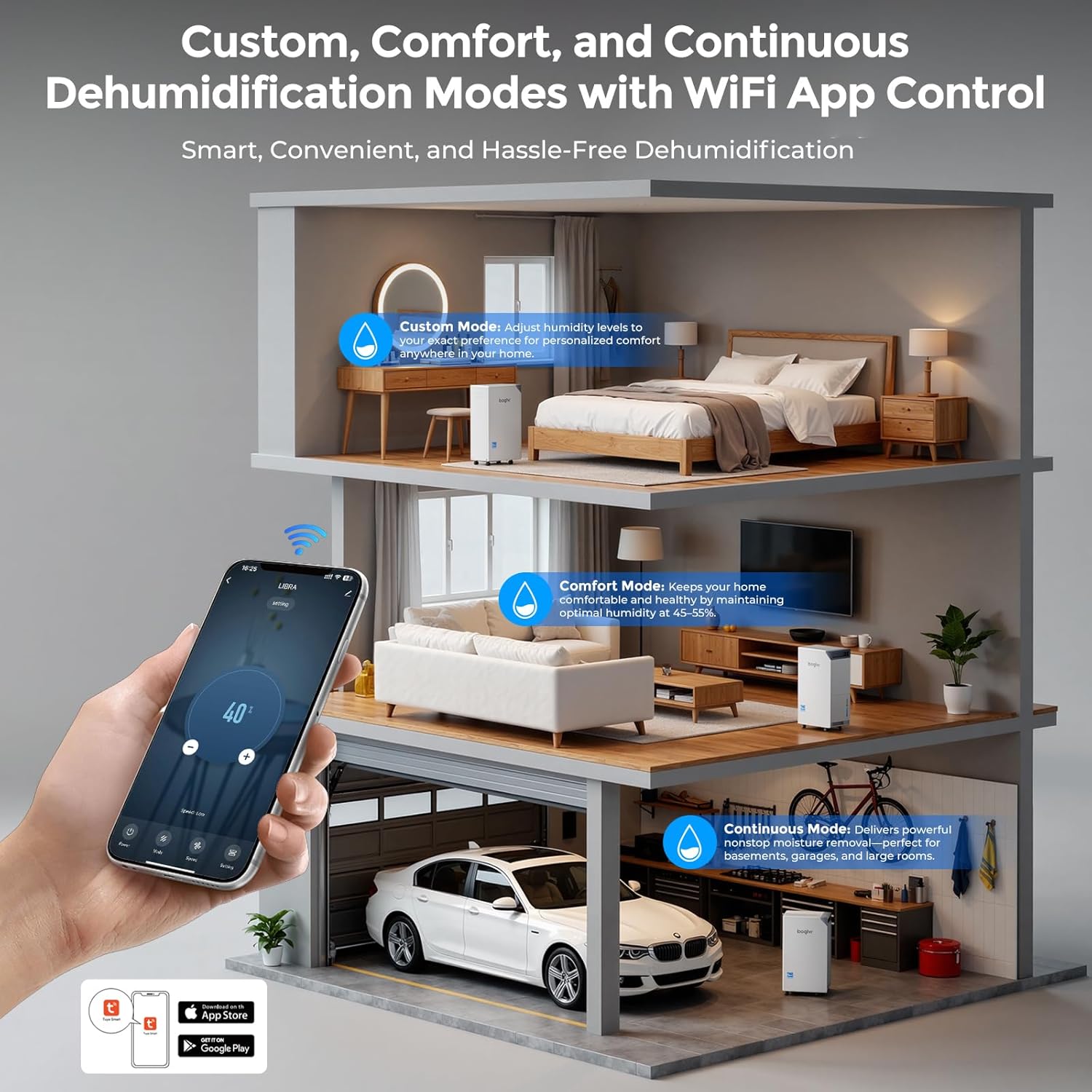
Figure 7: Overview of the three intelligent operating modes.
6.3. Smart WiFi App Control
Control your dehumidifier remotely using the Tuya or Smart Life app on your iOS or Android device. This allows you to adjust settings, switch modes, change fan speeds, set timers, and monitor real-time humidity levels from anywhere.
- Download the "Tuya Smart" or "Smart Life" app from your device's app store.
- Register or log in to your account.
- On the dehumidifier, press and hold the Timer button for 5 seconds until the WiFi indicator light flashes.
- In the app, follow the instructions to add a new device and connect to your dehumidifier.
6.4. Sleep Mode
For quiet operation during sleep, activate Sleep Mode. This reduces the fan speed and noise level to approximately 40 dB, ensuring a peaceful environment.
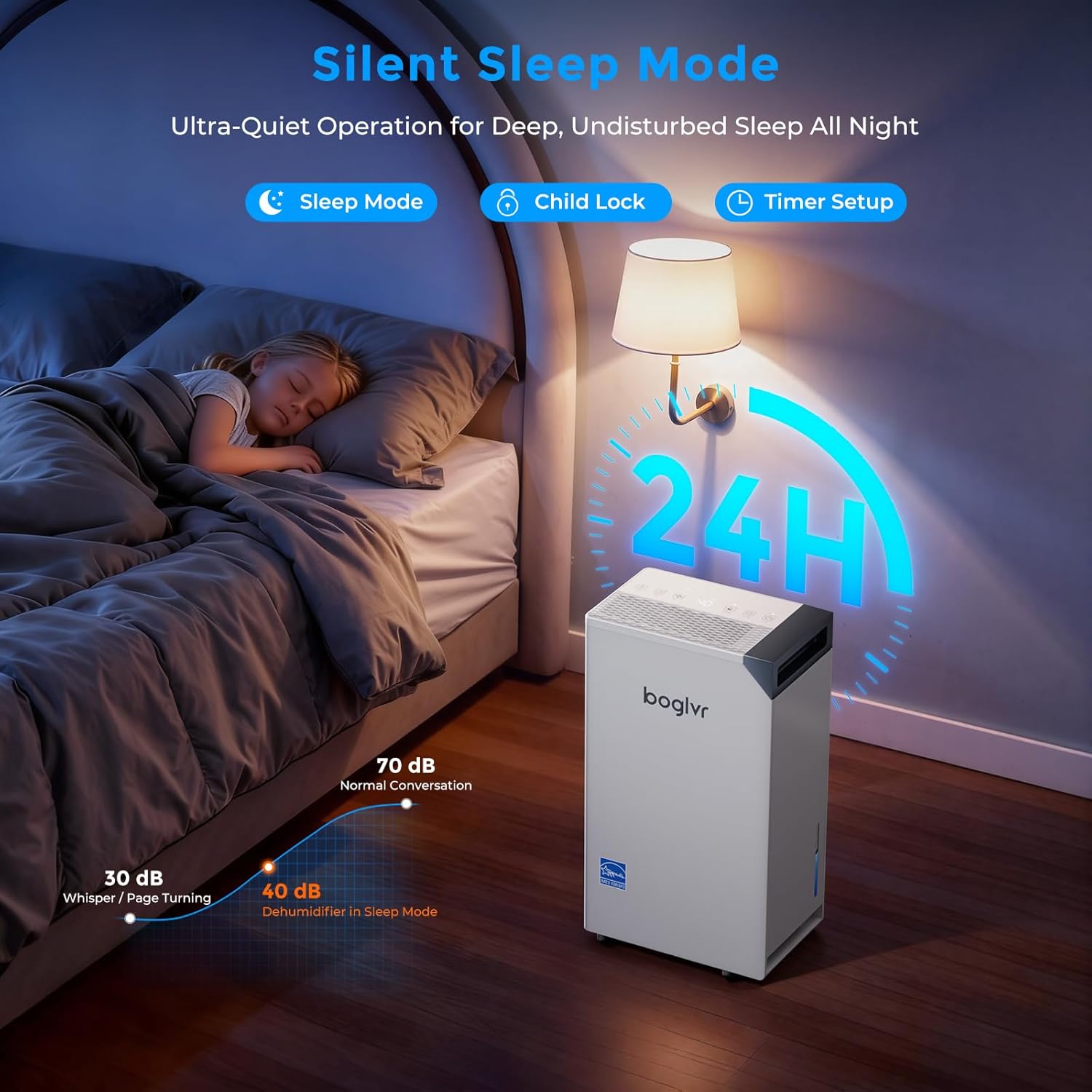
Figure 8: Dehumidifier in a bedroom, highlighting Silent Sleep Mode.
7. Maintenance
Regular maintenance ensures optimal performance and longevity of your dehumidifier.
7.1. Cleaning the Air Filter
- It is recommended to clean the air filter every two weeks or more frequently depending on usage and air quality.
- Unplug the dehumidifier from the power outlet.
- Remove the rear cover to access the washable filter.
- Wash the filter with warm, soapy water. Rinse thoroughly and allow it to air dry completely before reinserting.
- Snap the rear cover back into place.
7.2. Cleaning the Water Tank
- Empty the water tank regularly.
- Clean the tank with warm water and a mild detergent to prevent mold and mildew growth. Rinse thoroughly.
7.3. Storage
- If storing the unit for an extended period, ensure the water tank is empty and clean, and the filter is clean and dry.
- Wrap the power cord neatly and store the unit in a cool, dry place.
8. Troubleshooting
| Problem | Possible Cause | Solution |
|---|---|---|
| Dehumidifier does not turn on. | No power; Water tank full or incorrectly placed. | Check power connection; Empty and correctly reinsert water tank. |
| Unit runs but does not dehumidify. | Air filter clogged; Room temperature too low; Humidity setting too high. | Clean air filter; Ensure room temperature is above 41°F (5°C); Lower humidity setting. |
| Unit is noisy. | Unit not on a level surface; Air filter clogged. | Place on a level surface; Clean air filter. |
| Water leaks from the unit. | Water tank not properly installed; Continuous drain hose loose or clogged. | Reinstall water tank correctly; Check drain hose connection and clear any blockages. |
| WiFi connection issues. | Incorrect WiFi password; Router too far; App not properly set up. | Verify WiFi password; Move unit closer to router; Re-pair device in app. |
9. Specifications
- Model: LIBRA
- Brand: boglvr
- Dehumidification Capacity: Max 80 Pints/Day (52 Pints/Day DOE Standard)
- Coverage Area: Up to 4500 Sq.Ft.
- Water Tank Volume: 5.5 Liters (1.25 Gallons)
- Power Supply: 120V, 60Hz
- Wattage: 280 watts
- Noise Level: 40-45 dB
- Product Dimensions: 13.7"D x 8.7"W x 24.1"H
- Item Weight: 31.3 Pounds
- Special Features: Energy Star Certified, Smart Humidity Control (40%-80%), WiFi App Control (Tuya / Smart Life), Auto Shut-Off & Full Tank Protection, Ultra-Quiet Operation, Auto Defrost Function, 24-Hour Timer Setting, Multiple Working Modes (Comfort, Continuous, Custom), LED Display & Touch Panel, Child Lock, Fan Speed Control.
10. Warranty and Support
For warranty information or technical support, please refer to the contact details provided on the product packaging or visit the official boglvr website. Keep your purchase receipt as proof of purchase for warranty claims.


