
Introduction
Thank you for choosing the RichBird Z1 5-in-1 Foldable Wireless Charging Station. This versatile device is designed to simplify your charging experience by consolidating multiple charging needs into one compact unit. It features wireless fast charging, a built-in retractable cable, an additional Type-C output port, and an adjustable night light, providing a neat and efficient solution for your electronic devices.

Image: The RichBird Z1 5-in-1 Wireless Charging Station in use, simultaneously charging a mobile phone, Apple Watch, and AirPods, with a Type-C output port visible.
What's Included
Please check the package contents to ensure all items are present:
- 1 x RichBird Z1 Wireless Charging Station (with Built-in Retractable Type-C Cable)
- 1 x 30W Power Adapter
- 1 x User Manual
- 1 x Complete Box

Image: Visual representation of the package contents: the foldable charging station, 30W adapter, user manual, and product box.
Features
- 5-in-1 Charging: Simultaneously charges phones, AirPods, and Apple Watches.
- Wireless Fast Charging: Provides efficient power delivery to compatible devices.
- Built-in Retractable Cable: Features a 31.5-inch (approx. 80 cm) retractable Type-C cable for flexible charging and tidy storage.
- Additional Type-C Output Port: Offers an extra 10W wired charging option for other devices.
- Adjustable Night Light: Touch-sensitive control with four lighting modes: RGB, warm light, blue light, and green light.
- Foldable Design: Compact and portable for travel and space-saving.
- Adjustable Phone Stand: Supports both portrait and landscape modes for optimal viewing.
- Enhanced Safety: Built-in chip protects against over-temperature and over-voltage, extending battery life.
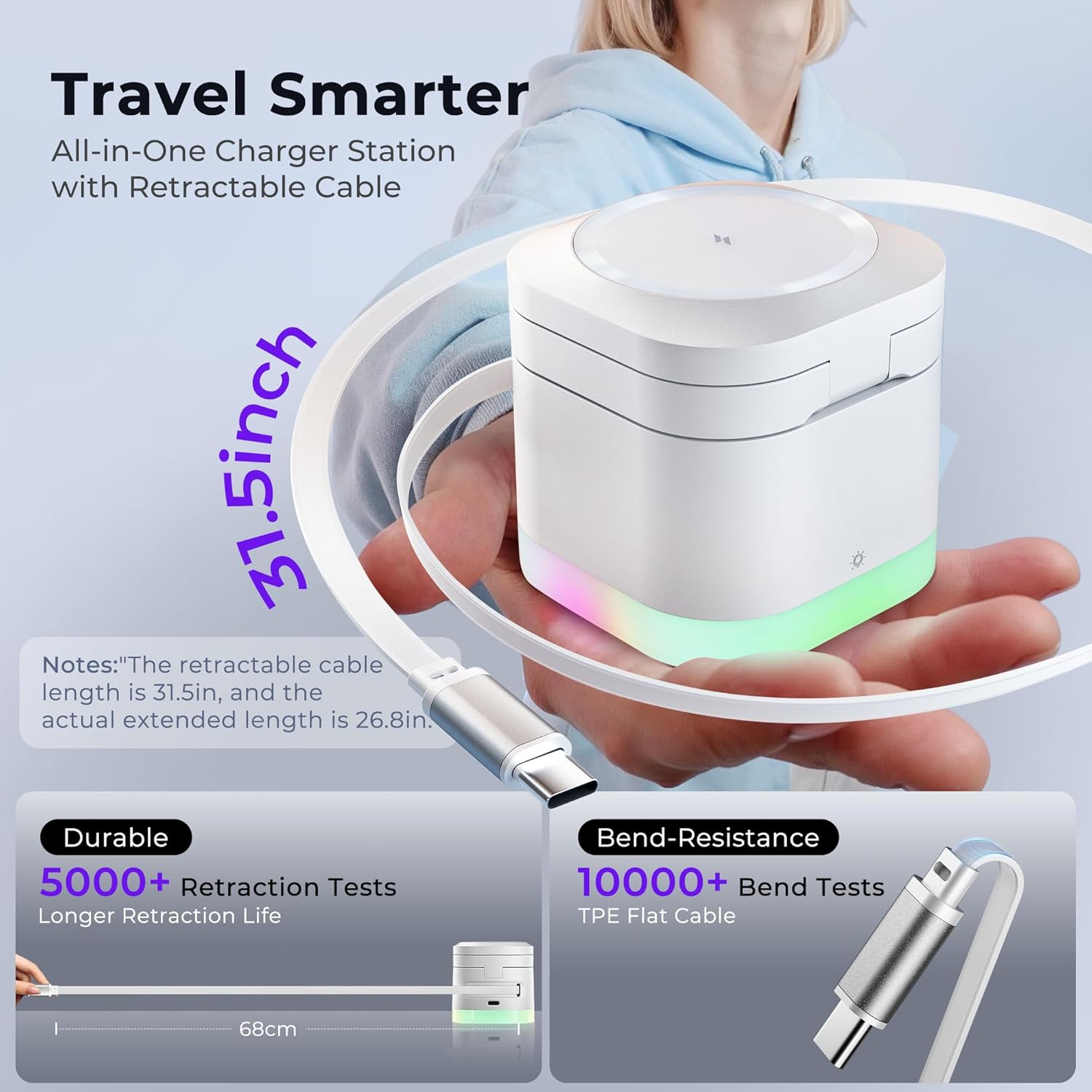
Image: The RichBird Z1 charging station demonstrating its 31.5-inch retractable cable, highlighting its durability and bend-resistance.
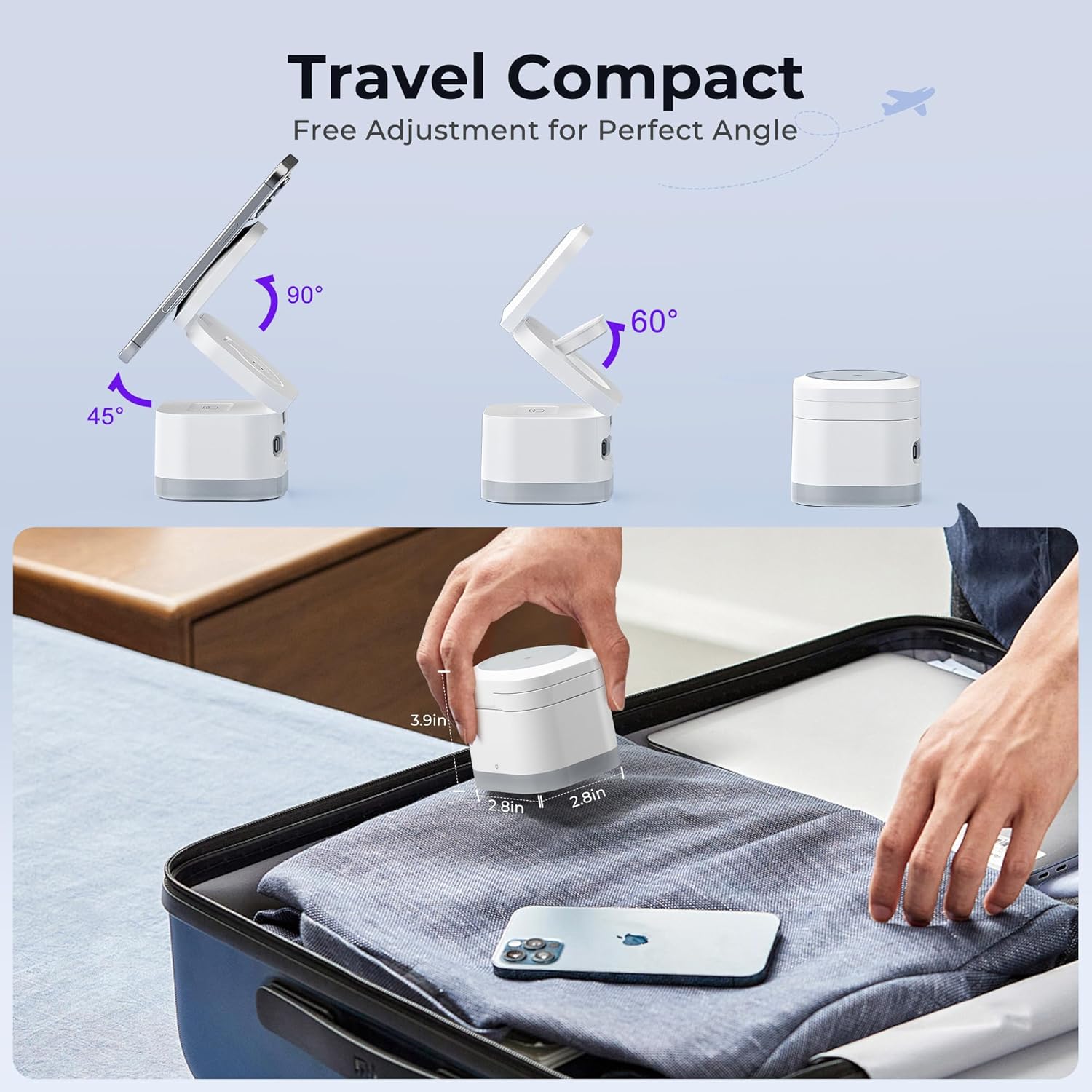
Image: The RichBird Z1 charging station showcasing its foldable design and adjustable angles for compact travel and versatile use.
Setup Instructions
- Unpack: Carefully remove all components from the packaging.
- Connect Power: Plug the provided 30W power adapter into a wall outlet. Connect the retractable Type-C cable from the charging station into the power adapter. Ensure the connection is firm.
- Unfold (Optional): Gently unfold the charging arms to your desired angle. The phone charging pad can be adjusted for vertical or horizontal viewing.
- Position Watch Charger: The Apple Watch charging module can be adjusted to accommodate different watch sizes and orientations.

Image: The RichBird Z1 charging station demonstrating its input connection via the retractable cable and the additional Type-C output port.
Operating Instructions
Charging Devices
- Mobile Phone: Place your compatible iPhone (12-17 series) onto the magnetic charging pad. Ensure it aligns correctly for optimal charging. The phone can be positioned vertically or horizontally.
- Apple Watch: Place your Apple Watch onto the dedicated charging module. Adjust the module as needed to fit your watch.
- AirPods: Place your AirPods (wireless charging case models only) onto the designated charging area at the base.
- Additional Device: Use the built-in retractable Type-C cable or the extra Type-C output port to charge another compatible device via wired connection.

Image: The RichBird Z1 charging station supporting a phone in both vertical mode for video calls and horizontal mode for media consumption.
Night Light Operation
The charging station features a touch-sensitive night light at its base. Simply touch the light icon to cycle through the four available lighting modes:
- RGB (cycling colors)
- Warm Light
- Blue Light (activates when phone is charging)
- Green Light (activates when earbuds are charging)
The blue and green lights serve as charging indicators for the phone and earbuds, respectively.
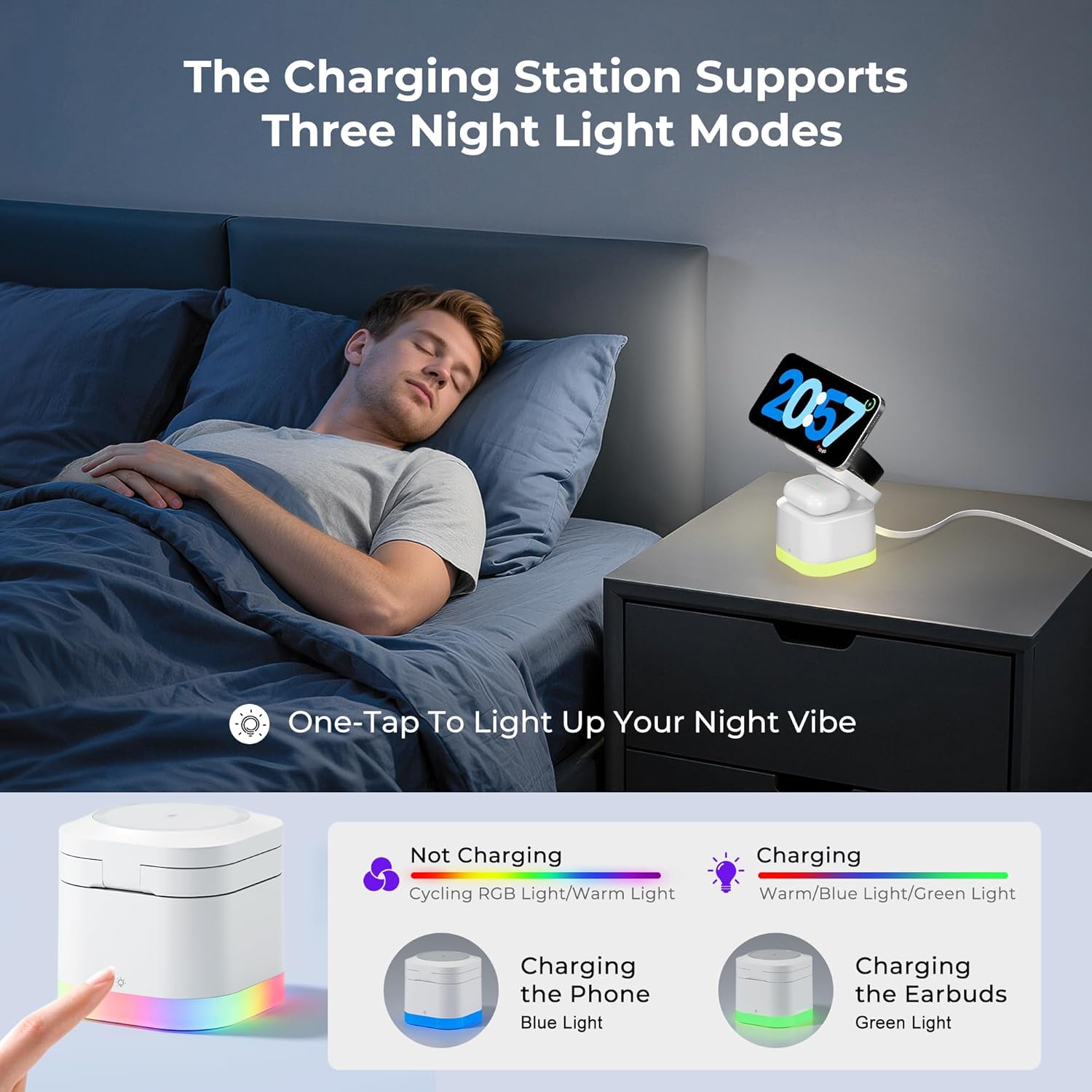
Image: The RichBird Z1 charging station illustrating its touch-sensitive night light with various color modes, including charging indicators.

Image: The night light on the RichBird Z1 indicating charging status: solid blue for phone, solid green for earbuds, and alternating blue/green for abnormalities.
Compatibility
- For iPhone: Compatible with iPhone 12, 12 mini, 12 Pro, 12 Pro Max, iPhone 13, 13 mini, 13 Pro, 13 Pro Max, iPhone 14, 14 Plus, 14 Pro, 14 Pro Max, iPhone 15, 15 Plus, 15 Pro, 15 Pro Max, iPhone 16, 16 Plus, 16 Pro, 16 Pro Max, iPhone 17, 17 Air, 17 Pro, 17 Pro Max. (Note: iPhone 8-11 series require a magnetic phone case for unfolded charging; otherwise, it only works when folded flat.)
- For Apple Watch: Compatible with iWatch S2, S3, S4, S5, S6, S7, S8, S9, S10, S11, SE, Ultra 3. (Note: Only for Apple Watch, not compatible with Samsung or other smartwatches.)
- For AirPods: Suitable for AirPods 2, 3, Pro, Pro 3 2 (only supports wireless charging case models).
- Type-C Output Port: Compatible with various devices that support Type-C charging.

Image: Phone case compatibility guide for the RichBird Z1, indicating that magnetic cases are supported, while regular cases, metal cases, or cases with magnetic pads/stands may interfere with magnetic charging.
Safety Information
To ensure safe and optimal use of your RichBird Z1 charging station, please observe the following safety guidelines:
- Use only the provided 30W adapter. Using an incompatible adapter may damage the device or pose a safety risk.
- Do not expose the device to water, moisture, or extreme temperatures.
- Avoid placing metal objects, credit cards, or other foreign materials between the charging surface and your device, as this may interfere with charging or cause overheating.
- Do not disassemble, modify, or repair the device yourself. Contact customer support for assistance.
- Keep out of reach of children and pets.
- Ensure proper ventilation around the charging station during use.
Maintenance
Proper care and maintenance will extend the lifespan of your charging station:
- Cleaning: Disconnect the power before cleaning. Use a soft, dry cloth to wipe the surface of the charging station. Do not use harsh chemicals or abrasive cleaners.
- Storage: When not in use, especially during travel, fold the charging station into its compact form to protect the charging surfaces and retractable cable. Store in a cool, dry place.
- Cable Care: Avoid excessive pulling or bending of the retractable cable to prevent damage.
Troubleshooting
| Problem | Possible Solution |
|---|---|
| Device not charging wirelessly. |
|
| Night light not working. |
|
| Slow charging. |
|
| Charging abnormality indicator (alternating blue/green light). |
|
Specifications
- Model: Z1
- Product Dimensions: 2.84 x 2.84 x 3.86 inches
- Item Weight: 12 ounces
- Brand: RichBird
- Connector Type: USB Type C
- Input Voltage: 120 Volts
- Total USB Ports: 1 (additional output)
- Wattage: 30 watts
- Special Features: Foldable, Fast Charging, Magnetic, Compact Size, Wireless Charging, Safe Charging, Charging Indicator, Travel-friendly.
Warranty and Support
RichBird products are designed for reliability and performance. For specific warranty details and terms, please refer to the warranty card included in your product packaging or visit the official RichBird website. If you encounter any issues or require technical assistance, please contact RichBird customer support through the contact information provided in your user manual or on the product's official support page.
Please retain your proof of purchase for any warranty claims.