
1. Introduction
The WAYSLA Ultrasonic Rodent Repellent is designed to deter rodents such as mice, rats, squirrels, and chipmunks from various areas, including vehicle engine compartments, garages, attics, basements, and storage rooms. It utilizes a combination of variable frequency ultrasonic waves and LED strobe lights to create an uncomfortable environment for pests, encouraging them to leave the protected area.

Image: Two WAYSLA Ultrasonic Rodent Repellent units.

Image: Illustration demonstrating the repellent's effect on rodents in a car engine, showing a 'before' state with rodents and an 'after' state with the repellent active.
2. Key Features
- Dual Deterrence Technology: Emits variable frequency ultrasonic waves (25kHz to 55kHz) and bright LED strobe lights to disorient and repel rodents.
- Intelligent Vibration Sensor: Automatically stops operation when vehicle vibration is detected (e.g., when the car is running) to conserve battery, and reactivates when vibration ceases.
- Safe and Humane: Non-toxic, chemical-free, and harmless to humans and household pets, as the ultrasonic frequencies are beyond their hearing range.
- Multi-Purpose Application: Suitable for use in car engine bays, garages, attics, basements, storage rooms, kitchens, and other indoor/outdoor areas prone to rodent activity.
- Durable Design: Constructed to withstand various temperatures and weather conditions for reliable long-term protection.
3. Product Components
Familiarize yourself with the components of your WAYSLA Rodent Repellent unit:
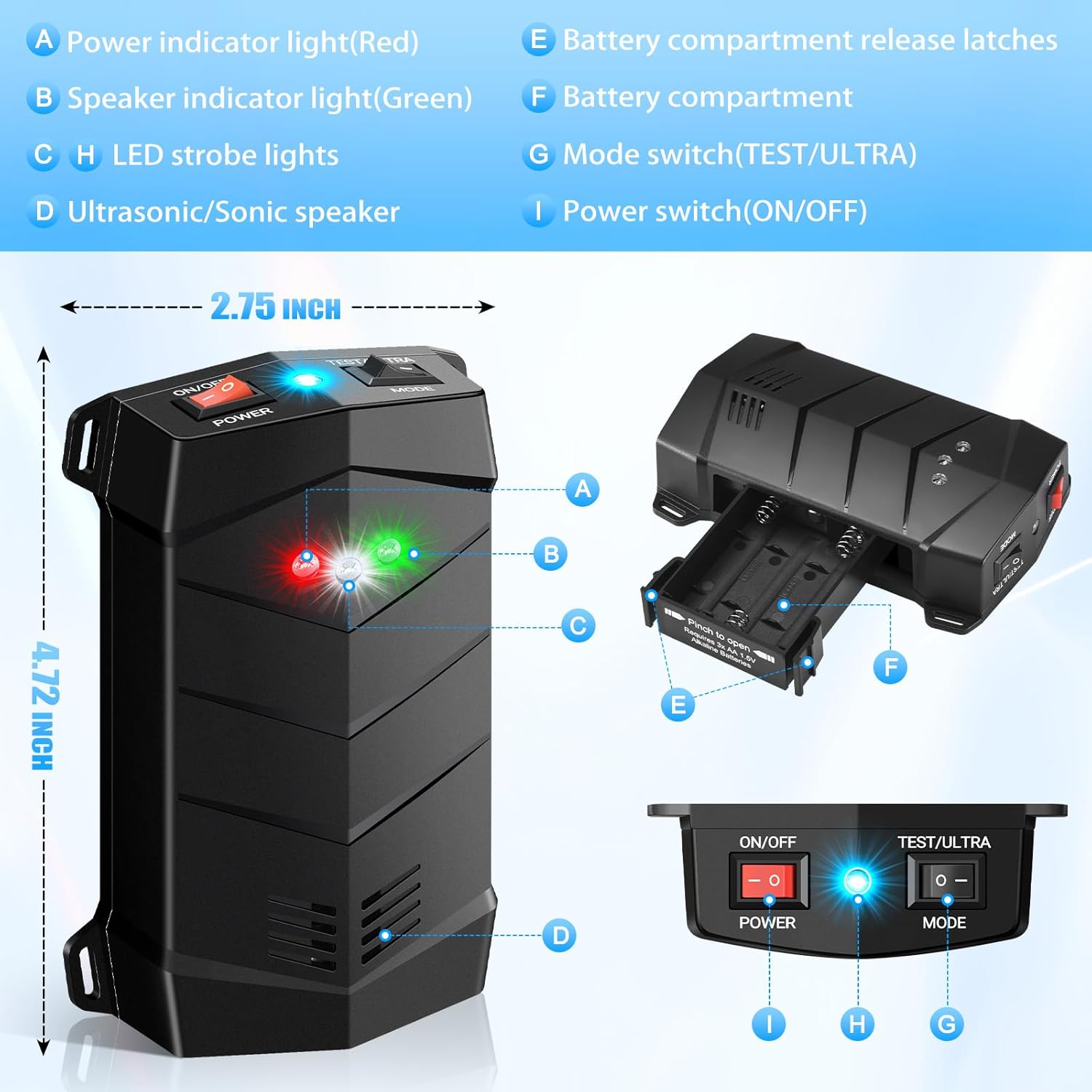
Image: Labeled diagram of the WAYSLA Rodent Repellent components.
- Power Indicator Light (Red): Indicates the unit is powered on.
- Speaker Indicator Light (Green): Indicates the ultrasonic speaker is active.
- LED Strobe Lights: Flashing lights for visual deterrence.
- Ultrasonic/Sonic Speaker: Emits sound waves.
- Battery Compartment Release Latches: Used to open the battery compartment.
- Battery Compartment: Holds the batteries.
- Mode Switch (TEST/ULTRA): Selects between audible test mode and inaudible ultrasonic mode.
- Power Switch (ON/OFF): Turns the unit on or off.
4. Setup and Installation
Follow these steps to set up and install your rodent repellent:
4.1 Battery Installation
- Locate the battery compartment on the unit.
- Press the battery compartment release latches (E) and slide open the battery compartment cover (F).
- Insert 3 AA batteries (not included) into the compartment, ensuring correct polarity (+/-).
- Close the battery compartment cover securely.

Image: Steps for battery installation and mode selection.
4.2 Placement
Choose an optimal location for the repellent based on your needs:
- For Car Engines: Place the unit under the hood in an area where it will not interfere with moving parts or get excessively hot. Secure it using zip ties or other appropriate fasteners to prevent movement during driving. Ensure the speaker (D) and LED lights (C) face the area where rodents are likely to enter or nest.
- For Indoor/Outdoor Areas: Position the repellent in areas with known rodent activity, such as garages, attics, basements, storage rooms, or kitchens. Place it on a flat surface or mount it to a wall, ensuring the ultrasonic waves are not obstructed by furniture, walls, or other objects.

Image: Examples of multi-purpose use in different environments.
5. Operating Instructions
5.1 Powering On and Mode Selection
- After installing batteries, slide the Power switch (I) to the "ON" position. The red Power Indicator Light (A) will illuminate.
- Select the desired operating mode using the Mode switch (G):
- TEST Mode: Slide the switch to "TEST". In this mode, the unit emits an audible sound, allowing you to confirm that the speaker is functioning. This mode is for testing purposes only and should not be used for continuous operation.
- ULTRA Mode: Slide the switch to "ULTRA". In this mode, the unit emits high-frequency ultrasonic waves that are inaudible to most humans and pets but highly irritating to rodents. The green Speaker Indicator Light (B) and LED Strobe Lights (C) will activate. This is the primary operating mode for continuous deterrence.
5.2 Intelligent Vibration Sensor Operation
The repellent is equipped with an intelligent vibration sensor for efficient power management, particularly when used in vehicles:
- Standby Mode (Driving): When the unit detects significant vibration, such as when a car engine starts and the vehicle is in motion, it will automatically enter standby mode. This conserves battery power and prevents interference with vehicle operation.
- Working Time (Parked): When the vehicle is turned off and no vibration is detected, the repellent will automatically reactivate and resume its ultrasonic and strobe light operation, providing continuous protection while the car is parked.
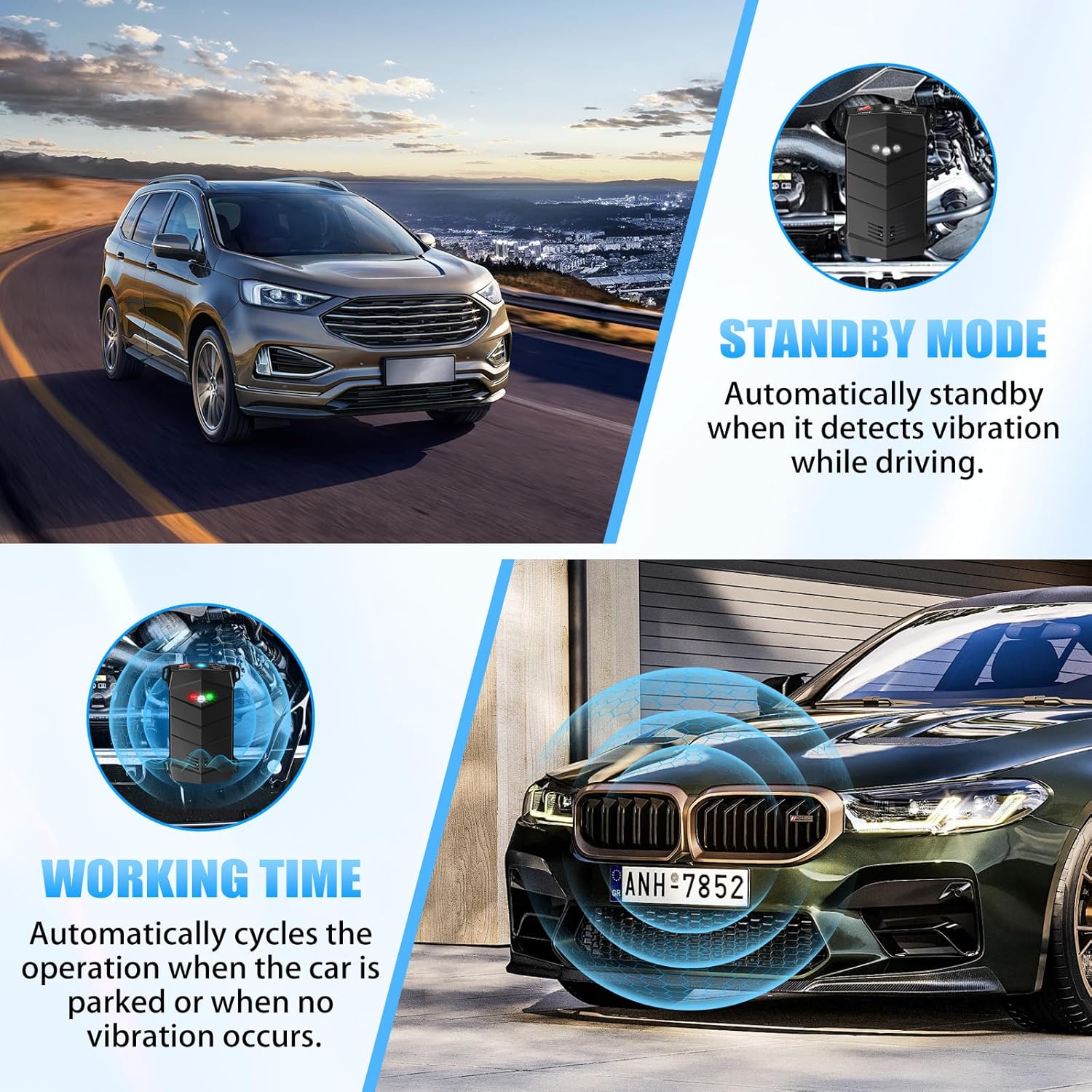
Image: Illustration of Standby Mode during driving and Working Time when parked.
5.3 Expected Effectiveness
Rodent repellency is a continuous process. Best results are typically observed after 2-4 weeks of continuous use. Rodents may initially show increased activity as they are disoriented before they are driven away from the area.

Image: Chart illustrating the expected timeline for rodent deterrence over 4 weeks.
6. Maintenance
- Battery Replacement: Replace batteries when the red Power Indicator Light (A) dims or the unit stops operating. Always use fresh, high-quality AA batteries.
- Cleaning: Periodically wipe the unit with a soft, dry cloth to remove dust or debris. Do not use harsh chemicals or abrasive cleaners. Ensure the speaker (D) and LED lights (C) are clear of obstructions.
- Placement Check: Regularly check the unit's placement to ensure it remains secure and unobstructed, especially in vehicle engine compartments where vibrations can cause shifting.
7. Troubleshooting
If you encounter issues with your WAYSLA Rodent Repellent, refer to the following common solutions:
| Problem | Possible Cause | Solution |
|---|---|---|
| Unit does not power on. | Batteries are dead or incorrectly installed. | Check battery polarity and replace with fresh batteries. Ensure the Power switch is in the "ON" position. |
| Rodents are still present after initial use. | Insufficient time for deterrence; unit obstructed; incorrect placement. | Allow 2-4 weeks for full effectiveness. Ensure the unit is in ULTRA mode. Reposition the unit to ensure ultrasonic waves are not blocked. Consider using multiple units for larger areas. |
| Unit is not activating when car is parked. | Vibration sensor malfunction or continuous slight vibration. | Ensure the unit is securely mounted and not experiencing constant minor vibrations. If the issue persists, contact customer support. |
| Audible sound heard in ULTRA mode. | Unit is in TEST mode; rare individual sensitivity. | Confirm the Mode switch is set to "ULTRA". While ultrasonic frequencies are generally inaudible to humans, some individuals may have higher sensitivity. |
8. Specifications
| Attribute | Value |
|---|---|
| Brand | WAYSLA |
| Model Number | RRCFE |
| Color | Dark |
| Material | Electronic Components, Plastic |
| Product Dimensions (L x W x H) | 5" x 5" x 3" |
| Number of Pieces | 2 (in 2-pack style) |
| Is Electric | Yes |
| Unit Count | 2.0 Count |
| UPC | 751912533239 |
| Item Weight | 7.8 ounces |
| Ultrasonic Frequency Range | 25kHz to 55kHz |
9. Safety Information
The WAYSLA Ultrasonic Rodent Repellent is designed with safety in mind:
- Non-Toxic: This device does not use poisons, chemicals, or traps, making it safe for environments with children and pets.
- No Harmful Substances: It produces no smells or harmful residues.
- Pet and Human Friendly: The ultrasonic frequencies emitted are specifically targeted at rodents' auditory and nervous systems and are generally beyond the hearing range of humans and common household pets like dogs and cats.
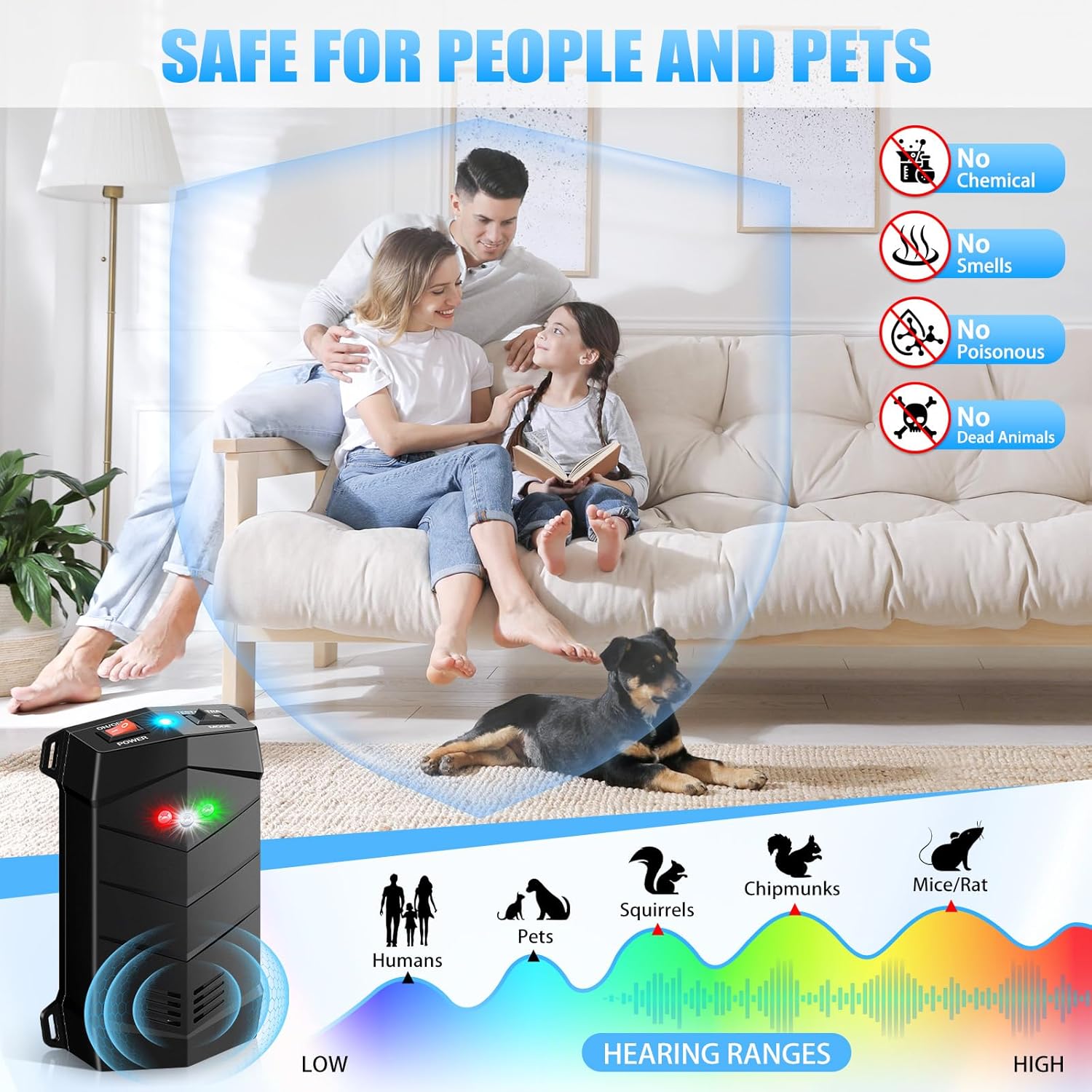
Image: Visual representation of the repellent's safety for humans and pets, along with a hearing range chart.
10. Warranty and Support
For warranty information, technical support, or any questions regarding your WAYSLA Ultrasonic Rodent Repellent, please contact the manufacturer directly through the retailer's platform or the contact information provided with your purchase. Keep your purchase receipt for warranty claims.