
1. Introduction
This manual provides detailed instructions for the installation, operation, and maintenance of your DewinLVD 3-Phase 4-Line WiFi Smart Energy Meter Circuit Breaker. Please read this manual thoroughly before installation and use to ensure safe and efficient operation of the device. This smart energy meter is designed for monitoring and protecting electrical systems in various environments, offering advanced features through the Tuya Smart App.
2. Product Overview
2.1 Key Features
- Smart WiFi Connectivity: Remote monitoring and control via the Tuya Smart App, providing real-time data on power consumption, current, voltage, frequency, and cumulative energy.
- Color LCD Display: Clear and easy-to-read measurement results directly on the device, enhancing user experience and data analysis.
- Wide Measurement Range: Supports AC voltage from 80-400V, currents from 1-100A, and power display up to 99999.9 kWh.
- Multiple Protection Functions: Includes over-voltage, under-voltage, over-current, voltage imbalance, current imbalance, phase failure, and overload protection.
- DIN Rail Installation: Standard 35mm DIN rail mounting for easy and reliable installation in various electrical systems.
- Flame-Retardant Material: Constructed from durable polycarbonate for enhanced safety.
2.2 Components
The DewinLVD Smart Energy Meter Circuit Breaker consists of the main unit and a user manual. Key components include the color LCD display, physical control buttons, WiFi module, and connection terminals.

Figure 1: DewinLVD Smart Energy Meter highlighting key features like Tuya integration, WiFi monitoring, DIN rail installation, real-time data, LCD display, and two-way measurement.

Figure 2: Close-up view of the smart energy meter showing the direction buckle design, smart WiFi chip, anti-theft lock design, and three-phase four-line design.
3. Specifications
| Parameter | Value |
|---|---|
| Communication System | Tuya Smart App |
| Material | Flame-retardant Polycarbonate |
| Rated Voltage | AC 380V |
| Maximum Current | 1-100A |
| Operating Voltage | AC 80-400V |
| Power Display Range | 0-99999.9 kWh |
| Rated Frequency | 50/60 Hz |
| Over-voltage Protection | 120-300V AC (Adjustable) |
| Under-voltage Protection | 80-210V AC (Adjustable) |
| Over-current Protection | 1.0A-100A |
| Reconnection Time (Delay) | 1-9999 seconds (Default: 3s) |
| Over-current Protection Time | 1-30 (Default: 5) |
| Display Type | Color Screen |
| WiFi Frequency | 2.4 GHz |
| Product Dimensions | 10 x 8 x 8 cm |
| Item Weight | 500g |
| Model Number | LDZDB02 |

Figure 3: Product dimensions and a summary of technical specifications.
4. Setup and Installation
4.1 Safety Precautions
- Installation should only be performed by qualified electricians.
- Ensure the main power supply is disconnected before installation to prevent electric shock.
- Verify correct wiring according to the provided diagram to avoid damage to the device or electrical system.
- Do not operate the device if it appears damaged.
4.2 Mounting the Device
The DewinLVD Smart Energy Meter is designed for standard 35mm DIN rail installation. Locate a suitable position within your electrical panel or distribution box.
- Ensure the DIN rail is securely mounted.
- Align the meter's mounting clips with the DIN rail.
- Press firmly until the meter clicks into place.
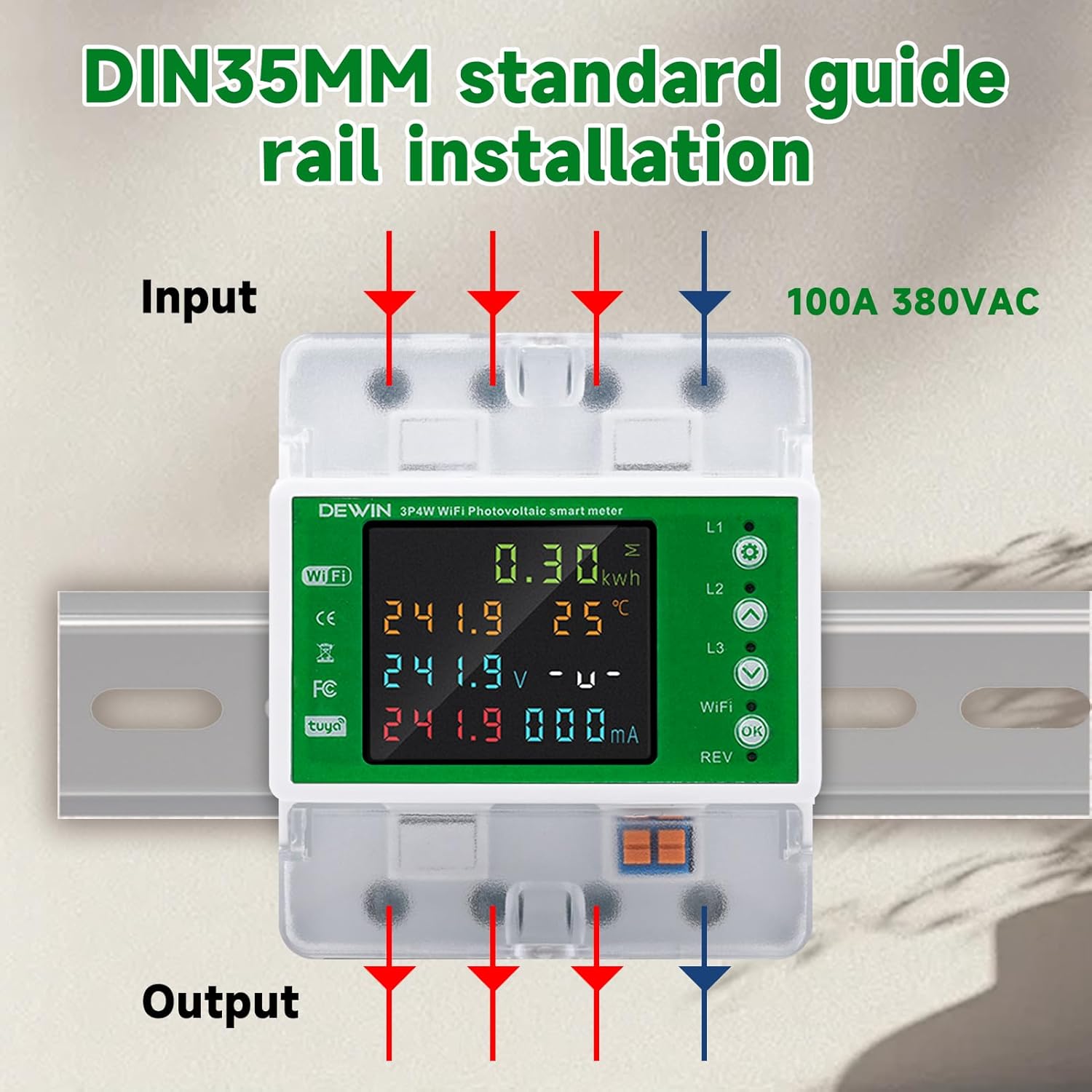
Figure 4: Diagram illustrating the input and output connections for DIN rail installation of the 3-phase 4-line smart energy meter.
4.3 Wiring Instructions
Connect the device according to the following wiring diagram. This is a 3-phase, 4-line device. Ensure all connections are tight and secure.
- Connect the three phase lines (L1, L2, L3) and the neutral line (N) to the input terminals.
- Connect the corresponding output lines to your load.
- The device supports 100A 380VAC.
Refer to Figure 4 for a visual guide on wiring connections.
4.4 App Connection (Tuya Smart App)
- Download the "Tuya Smart" app from your smartphone's app store (iOS or Android).
- Register or log in to your Tuya Smart account.
- Ensure your smartphone is connected to a 2.4 GHz WiFi network.
- Power on the DewinLVD Smart Energy Meter. The WiFi indicator on the device should start blinking.
- In the Tuya Smart app, tap "+" to add a new device.
- Select "Electrical" then "Circuit Breaker (Wi-Fi)" or "Energy Meter (Wi-Fi)".
- Follow the on-screen instructions in the app to connect the device to your WiFi network. This typically involves confirming the blinking indicator and entering your WiFi password.
- Once connected, the WiFi indicator on the device will become solid.

Figure 5: The smart energy meter displaying data, with a smartphone showing the Tuya Smart App interface for remote monitoring.
5. Operating Instructions
5.1 Local Display Operation
The color LCD display shows real-time electrical parameters. Use the physical buttons (usually "WiFi" and "OK" or similar) to navigate through different display modes or settings.
- Voltage (V): Displays the current voltage for each phase.
- Current (A): Shows the current flowing through each phase.
- Power (kW): Indicates instantaneous power consumption.
- Energy (kWh): Displays cumulative energy consumption.
- Frequency (Hz): Shows the system frequency.
- Temperature (°C): May display internal device temperature.

Figure 6: The meter's LCD display showing various electrical parameters and the physical buttons for interaction.
5.2 Remote Control via Tuya Smart App
Once connected to the Tuya Smart App, you can perform various functions remotely:
- Real-time Monitoring: View all electrical parameters (voltage, current, power, energy, frequency) from anywhere.
- Remote ON/OFF: Switch the circuit breaker on or off remotely.
- Scheduling: Set schedules for automatic power on/off.
- Protection Settings: Adjust over-voltage, under-voltage, and over-current protection thresholds.
- Energy Reports: Access historical energy consumption data and reports.
- Voice Control: Integrate with smart assistants like Amazon Alexa or Google Assistant for voice commands (e.g., "Alexa, turn on the circuit breaker").
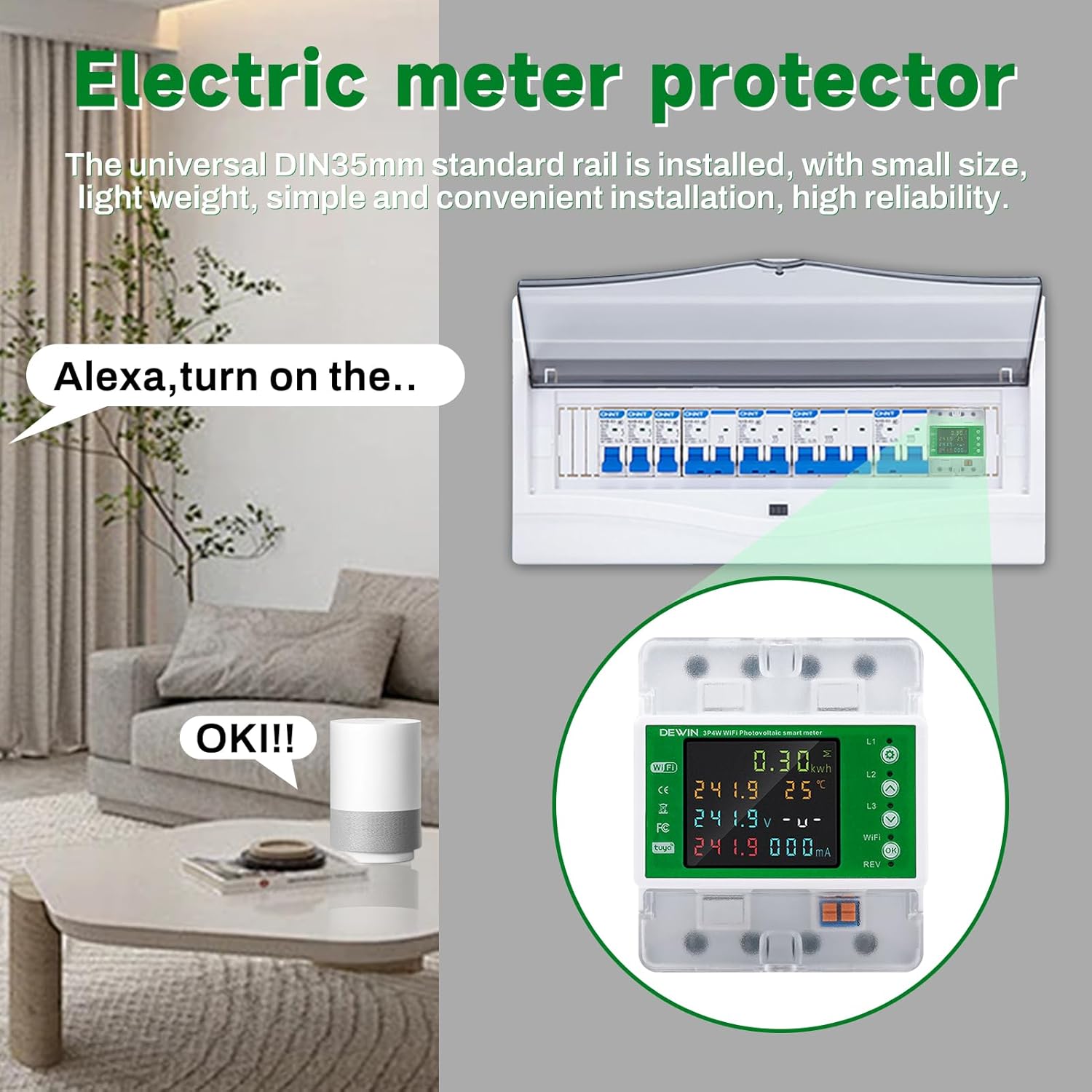
Figure 7: Example of smart home integration, showing the energy meter responding to voice commands via a smart assistant.
6. Maintenance
The DewinLVD Smart Energy Meter is designed for minimal maintenance. However, regular checks can ensure optimal performance and longevity.
- Cleaning: Periodically wipe the device with a dry, soft cloth. Do not use abrasive cleaners or solvents.
- Connection Checks: Annually, or as needed, verify that all wiring connections are secure and free from corrosion.
- Firmware Updates: Check the Tuya Smart App for any available firmware updates for the device to ensure you have the latest features and security patches.
- Environmental Conditions: Ensure the device operates within its specified environmental temperature range (-30°C to 70°C) to prevent damage.
7. Troubleshooting
| Problem | Possible Cause | Solution |
|---|---|---|
| Device not powering on. | No power supply; incorrect wiring. | Check main power supply. Verify wiring connections according to the diagram. |
| WiFi indicator not blinking/connecting. | Incorrect WiFi password; 5GHz network; device too far from router; network issues. | Ensure correct 2.4 GHz WiFi network. Move device closer to router. Reset device (refer to manual for reset procedure, usually holding a button). Check router settings. |
| App not displaying real-time data. | No internet connection on phone; device lost WiFi connection; app glitch. | Check phone's internet connection. Verify device's WiFi status. Restart the app. Reconnect device to WiFi if necessary. |
| Circuit breaker trips frequently. | Overload; short circuit; protection settings too sensitive. | Reduce load. Check for short circuits in the connected system. Adjust over-current/over-voltage protection thresholds in the app (consult a qualified electrician if unsure). |
8. Warranty and Support
8.1 Warranty Information
The DewinLVD Smart Energy Meter Circuit Breaker comes with a standard manufacturer's warranty. Please refer to the warranty card included in your package or contact your retailer for specific warranty terms and conditions. The warranty typically covers defects in materials and workmanship under normal use.
Note: Any unauthorized modification, improper installation, or misuse of the device will void the warranty.
8.2 Technical Support
For technical assistance, troubleshooting, or inquiries regarding your DewinLVD Smart Energy Meter, please contact your point of purchase or visit the official DewinLVD website for support resources. When contacting support, please have your model number (LDZDB02) and purchase information ready.
You can also refer to the "Tuya Smart" app's help section for common issues related to app connectivity and features.
9. Application Scenarios
The DewinLVD 3-Phase 4-Line WiFi Smart Energy Meter is versatile and suitable for a wide range of applications, including:
- Solar Photovoltaic Systems
- Electricity Metering Systems
- Commercial Buildings
- Residential Buildings
- Schools
- Hotels
- Laboratories
- Rental Properties
- Offices
- Dining Establishments

Figure 8: Examples of environments where the smart energy meter can be effectively utilized.