
Introduction
Thank you for purchasing the Pyle 32-inch Powered ATV/UTV Soundbar System. This manual provides detailed instructions for the proper installation, operation, and maintenance of your soundbar. Please read this guide thoroughly before use to ensure optimal performance and longevity of your device. This soundbar is designed to deliver powerful audio in outdoor environments, featuring a built-in Class D stereo power amplifier, multiple drivers, Bluetooth wireless streaming, auxiliary input, IPX6 waterproof rating, and customizable LED lighting.
Important Safety Information
- Ensure all connections are secure and properly insulated to prevent electrical shorts.
- Do not attempt to disassemble or modify the unit. This may void the warranty and pose a safety risk.
- Keep the soundbar away from extreme temperatures and direct sunlight for prolonged periods.
- Always use appropriate mounting hardware and ensure the soundbar is securely fastened to prevent detachment during vehicle operation.
- Disconnect power before performing any maintenance or installation procedures.
- Operating the soundbar at excessively high volumes for extended periods may cause hearing damage.
What's in the Box
Verify that all components are present before beginning installation:
- (1) 32-inch Powered Soundbar
- (2) Aluminum Clamp Base
- (4) Aluminum Clamp Base Buckles
- (4) 1.75-inch Aluminum Rings
- (4) 2-inch Aluminum Rings
- (1) 1.5-inch & 1.875-inch Rubber Pads Bag
- (1) Screw Bag
- (1) Audio Connection Cable, 3.5mm

Key Features
- Powerful Audio Performance: Equipped with a Class D stereo power amplifier, (4) 3.5-inch mid-bass drivers, and (2) 3.5-inch mid-range drivers for clear sound and deep bass.
- Wireless Bluetooth Connectivity: Bluetooth version 5.0 for seamless streaming from smartphones, tablets, and laptops.
- Auxiliary Input: 3.5mm audio connection cable for wired device connectivity.
- Weatherproof and Durable: IPX6 waterproof rating and weather-resistant exterior suitable for all outdoor conditions.
- Customizable LED Lights: Built-in LED lights with red, blue, and purple color options, featuring solid or pulsating modes.
- Sleek and Compact Design: Designed to fit seamlessly into various vehicles without compromising space.


Setup and Installation
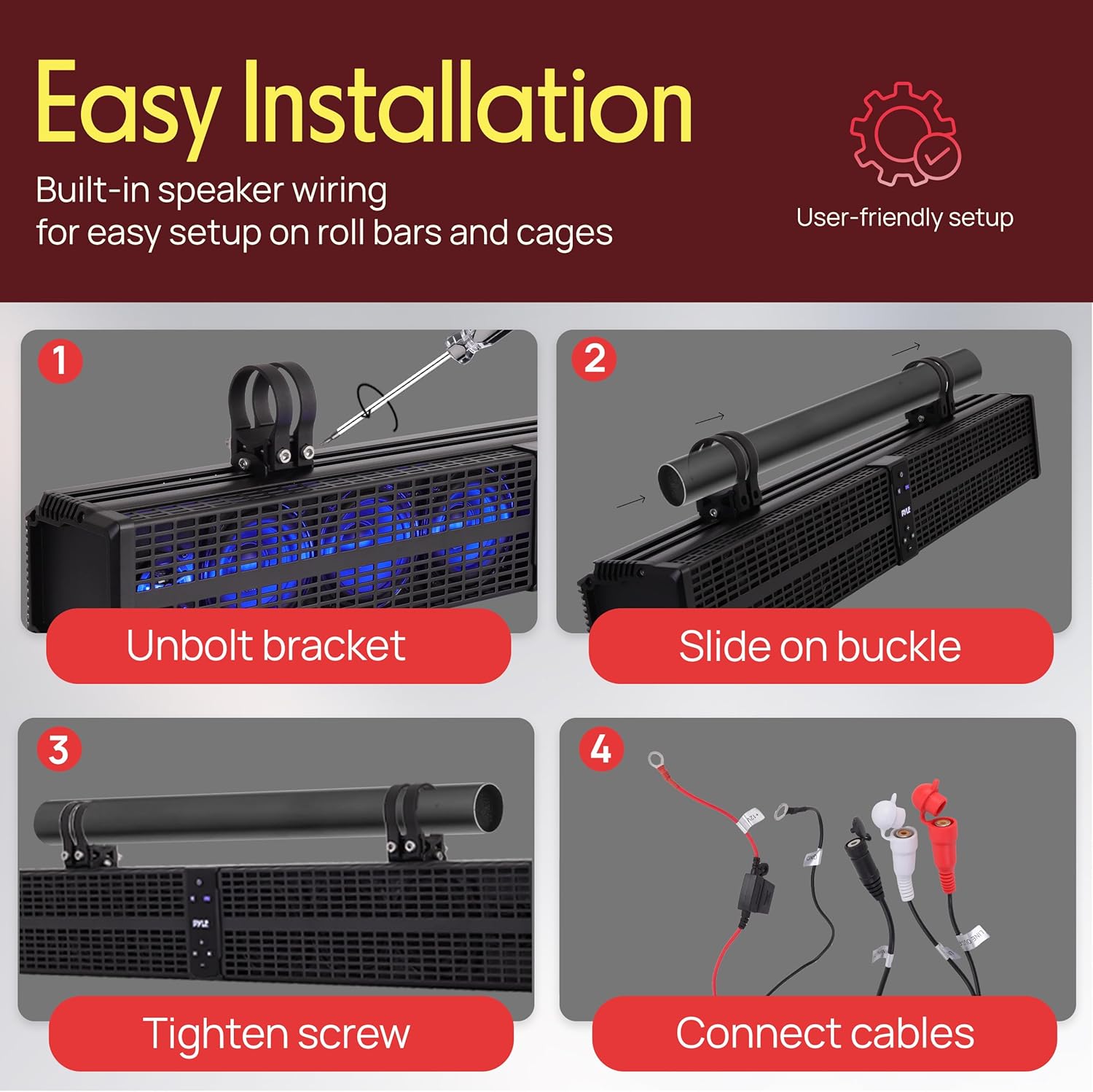
The Pyle soundbar is designed for easy installation on roll bars and cages. Follow these steps for secure mounting and wiring:
- Unbolt Bracket: Loosen and unbolt the aluminum clamp base from the soundbar.
- Slide on Buckle: Select the appropriate rubber pads and aluminum rings for your roll bar size (1.5-inch, 1.75-inch, 1.875-inch, or 2-inch). Slide the aluminum clamp base buckles onto your vehicle's roll bar.
- Tighten Screw: Align the soundbar with the clamp bases and securely tighten the screws to fasten the soundbar to the roll bar. Ensure it is firmly mounted and does not move.
- Connect Cables: Connect the power cables (red to positive, black to negative) to your vehicle's 12V battery. Ensure an inline fuse is used for protection. Connect the 3.5mm audio cable if using auxiliary input.
Operating Instructions
Power On/Off
Press the Power button ( ) on the control panel to turn the soundbar on or off.
Bluetooth Pairing
- Ensure the soundbar is powered on.
- Press the SRC button to switch to Bluetooth mode. The LED indicator will flash, indicating it's in pairing mode.
- On your mobile device, enable Bluetooth and search for available devices.
- Select "Pyle Audio" (or similar name) from the list to pair. Once connected, the LED indicator will stop flashing.
Auxiliary Input
Connect your audio device to the soundbar using the provided 3.5mm audio connection cable. Press the SRC button to switch to Auxiliary mode.
Volume and Track Control
- Use the + and - buttons on the control panel to adjust volume.
- Use the Previous and Next track buttons to navigate through your music.
- Press the Play/Pause button to control playback.
LED Lighting Effects
The soundbar features customizable LED lights. Use the dedicated LED control button (if available, or cycle through modes via SRC button if combined) to switch between red, blue, and purple colors, and select solid or pulsating modes.

Product Video
Watch this video for a visual overview of the Pyle Waterproof Powersport Sound Bar's features and capabilities.
Maintenance
- Cleaning: Use a soft, damp cloth to clean the exterior of the soundbar. Avoid using harsh chemicals or abrasive cleaners.
- Inspection: Periodically check all mounting hardware and electrical connections for tightness and signs of wear.
- Storage: If storing the vehicle for an extended period, consider disconnecting the soundbar from the power source.
Troubleshooting
| Problem | Possible Cause | Solution |
|---|---|---|
| No power | Loose power connection; Blown fuse; Vehicle battery low. | Check power cables and connections; Replace fuse if necessary; Charge vehicle battery. |
| No sound | Volume too low; Incorrect input mode; Device not connected properly. | Increase volume; Press SRC button to select correct input (Bluetooth/Aux); Reconnect device. |
| Bluetooth not pairing | Soundbar not in pairing mode; Device too far; Interference. | Press SRC to enter Bluetooth pairing mode; Move device closer; Turn off other Bluetooth devices. |
| Distorted sound | Volume too high; Poor audio source quality; Loose connections. | Reduce volume; Try a different audio source; Check all cable connections. |
Specifications
| Feature | Detail |
|---|---|
| Model Name | PWPSB3203 |
| Speaker Type | Soundbar |
| Speaker Size | 32 Inches |
| Speaker Maximum Output Power | 200 Watts |
| Connectivity Technology | Bluetooth |
| Bluetooth Version | 5.0 |
| Waterproof Rating | IPX6 |
| Product Dimensions (D x W x H) | 31.26" x 4.5" x 6.85" |
| Item Weight | 20 pounds |
| Material | Butyl Rubber Surround, Polypropylene Mica Cone |
| Mounting Type | Ceiling Mount (via clamp bases) |
| Included Components | Soundbar, Aluminum Clamp Bases, Buckles, Rings, Rubber Pads, Screws, 3.5mm Audio Cable |
Warranty and Support
Pyle products are designed and manufactured to the highest quality standards. For specific warranty information, please refer to the warranty card included with your product or visit the official Pyle website. For technical support or customer service inquiries, please contact Pyle customer support through their official channels.
You can find more information and support at the Pyle Store on Amazon.

