
1. Introduction
This manual provides essential information for the safe and efficient operation of the DOPZNJWF 2PCS-750WBPQ Variable Frequency Drive (VFD). This device converts single-phase 220V input to three-phase 220V output, specifically designed for 750W motors and water pumps, offering precise speed regulation. Please read this manual thoroughly before installation, operation, or maintenance.
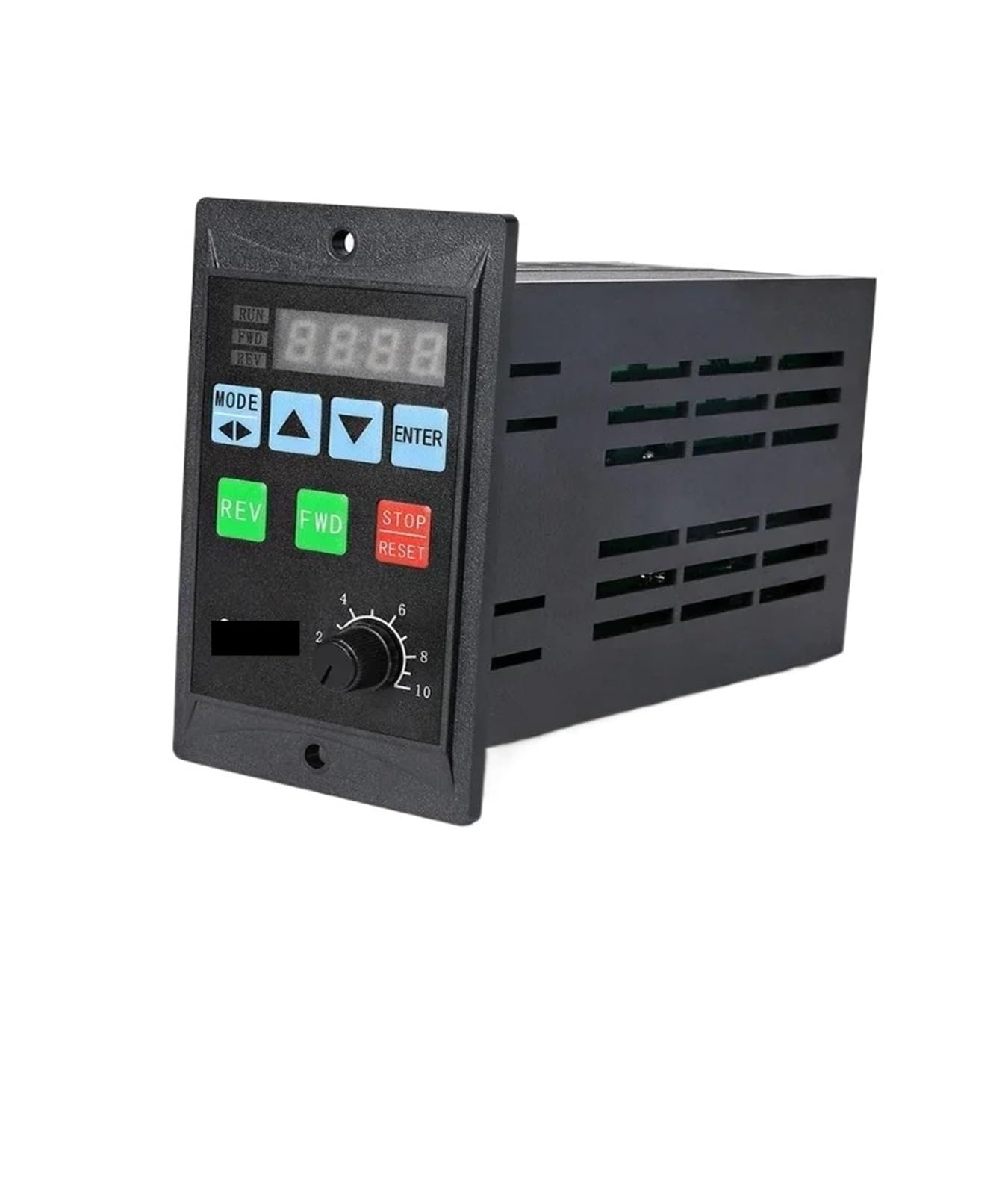
Figure 1.1: Front view of the DOPZNJWF 2PCS-750WBPQ Variable Frequency Drive.
2. Safety Information
WARNING: Improper installation or operation can lead to serious injury or death. Only qualified personnel should install, operate, and maintain this equipment.
- Always disconnect power before performing any wiring or maintenance.
- Ensure proper grounding to prevent electrical shock.
- Do not operate the VFD with damaged cables or if the casing is open.
- Verify input and output voltage compatibility with your motor and power supply.
- Keep the VFD away from moisture, direct sunlight, and corrosive environments.
- Do not touch internal components immediately after power-off, as residual voltage may be present.
3. Product Features
The DOPZNJWF 2PCS-750WBPQ VFD offers several key features designed for optimal performance and safety:
- Energy Saving and High Efficiency: Adjusts motor speed based on demand, reducing energy consumption and operational costs.
- Flexible Speed Regulation: Provides continuously adjustable speed over a wide range, adapting to various working conditions.
- Soft Start Function: Reduces current impact during motor startup, protecting equipment and the electrical grid.
- Comprehensive Safety Protection: Integrates multiple protection functions to prevent damage and ensure timely shutdown in case of faults.
- Easy Maintenance: Features a modular design and self-diagnosis capabilities for quick troubleshooting, minimizing downtime.
4. Specifications
| Parameter | Value |
|---|---|
| Model | 2PCS-750WBPQ |
| Input Voltage | Single-phase 220V |
| Output Voltage | Three-phase 220V |
| Rated Motor Power | 750W |
| Product Dimensions | Approximately 102.5mm (H) x 60.5mm (W) x 130mm (D) |
| Product Weight | Approximately 500g |
| Batteries Required | No |

Figure 4.1: Dimensions of the Variable Frequency Drive, showing height, width, and depth measurements.
5. Setup and Installation
Follow these steps for proper installation of the VFD:
- Mounting: Securely mount the VFD in a well-ventilated area, away from direct heat sources or excessive dust. Ensure adequate clearance for cooling.
- Wiring: Refer to the wiring diagram below for correct connections.
- Connect the single-phase 220V AC power supply to the L and N terminals.
- Connect the three-phase 220V motor to the U, V, W output terminals.
- Ensure proper grounding by connecting the ground wire to the PE terminal.
- Optional: Connect external control signals (e.g., JOG, RUN, STOP) to the corresponding terminals (X0, X1, X2, X3 for external sensors, Y0/Y1 for relay/analog output, GND, 12V, VI, A+, B- for communication).
- Initial Check: Before powering on, double-check all wiring connections for tightness and correctness.
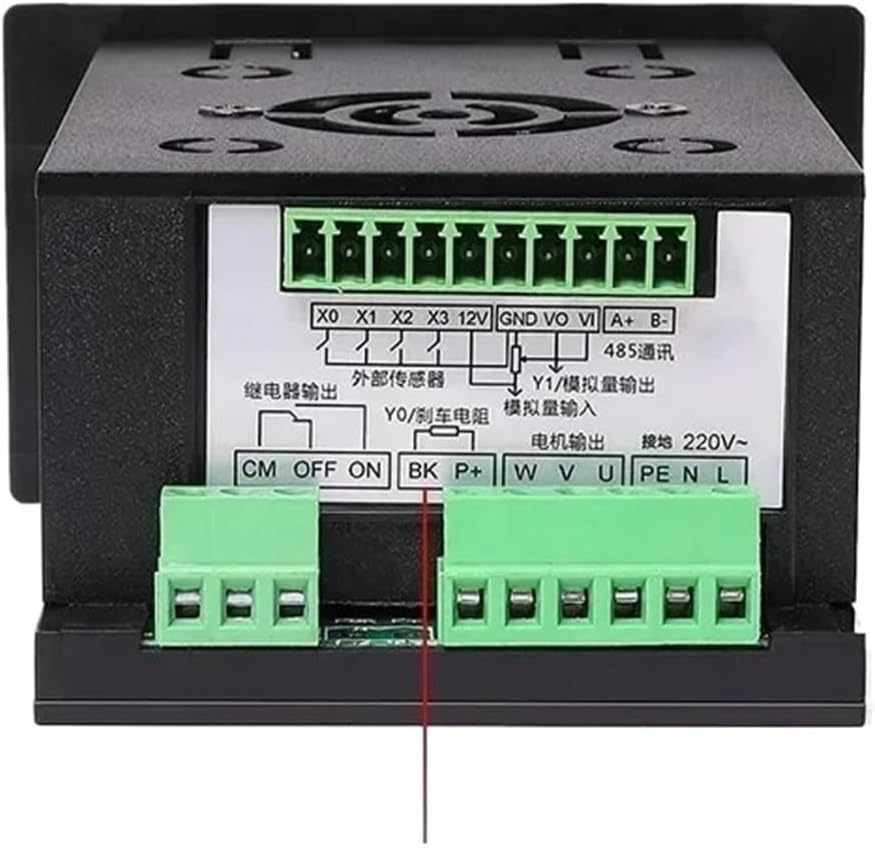
Figure 5.1: Wiring terminals for power input, motor output, and control signals. L and N are for single-phase 220V input, U, V, W for three-phase 220V motor output, and PE for ground. Additional terminals are for external control and communication.
6. Operating Instructions
The VFD features a user-friendly control panel for operation:

Figure 6.1: Front control panel of the VFD, showing the digital display, control buttons, and speed adjustment knob.
- Digital Display: Shows current operating frequency, speed, or parameter values. Indicators for RUN, FWD (Forward), REV (Reverse) are also present.
- MODE Button: Used to switch between different display modes or enter parameter setting menus.
- Up (▲) / Down (▼) Buttons: Used to navigate through menus or adjust parameter values.
- ENTER Button: Confirms selections or saves parameter changes.
- JOG Button: Initiates a momentary run at a preset jog frequency.
- RUN Button (Green): Starts the motor.
- STOP/RESET Button (Red): Stops the motor or resets fault conditions.
- Speed Adjustment Knob: A rotary potentiometer for manual speed control (0-10 scale, corresponding to frequency).
Basic Operation Steps:
- Power On: Connect the VFD to the power supply. The digital display will light up.
- Set Speed: Adjust the speed adjustment knob to your desired operating frequency/speed.
- Start Motor: Press the RUN button to start the motor. The "RUN" indicator will illuminate.
- Stop Motor: Press the STOP/RESET button to stop the motor.
- Parameter Settings: Use the MODE, Up/Down, and ENTER buttons to access and modify advanced parameters as needed. Refer to the detailed programming guide (if available separately) for specific parameter functions.
7. Maintenance
Regular maintenance ensures the longevity and reliable operation of your VFD:
- Cleaning: Periodically clean the VFD's exterior and ventilation openings to prevent dust accumulation, which can hinder cooling. Use a soft, dry cloth. Do not use liquid cleaners.
- Inspection: Regularly inspect all wiring connections for looseness or signs of damage. Check for any unusual noises or odors during operation.
- Environmental Conditions: Ensure the operating environment remains within specified temperature and humidity ranges.
- Fan Check: If equipped with a cooling fan, ensure it operates freely and is not obstructed.
- Power Cycle: If the VFD is to be stored for an extended period, it is recommended to power it on periodically (e.g., once every 6 months) for a short duration to maintain capacitor health.
8. Troubleshooting
This section provides solutions to common issues you might encounter:
| Problem | Possible Cause | Solution |
|---|---|---|
| VFD does not power on. | No input power; loose wiring; internal fuse blown. | Check power supply; verify wiring connections; consult a qualified technician for fuse replacement. |
| Motor does not start. | RUN button not pressed; incorrect parameter settings; motor overload; wiring error. | Press RUN; check parameter settings (e.g., frequency, start mode); reduce motor load; verify motor wiring (U, V, W). |
| Motor runs erratically or at wrong speed. | Speed knob setting incorrect; parameter mismatch; external interference. | Adjust speed knob; check frequency/speed parameters; ensure proper shielding for control wiring. |
| VFD displays a fault code. | Overcurrent, overvoltage, undervoltage, overheat, etc. | Note the fault code and refer to the VFD's detailed programming manual for specific fault descriptions and remedies. Press STOP/RESET to clear after addressing the cause. |
If the problem persists after attempting these solutions, please contact customer support or a qualified electrician.
9. Warranty and Support
For warranty information, technical support, or service inquiries, please refer to the documentation provided with your purchase or visit the official DOPZNJWF website. Keep your purchase receipt as proof of purchase.
For further assistance, you may contact the seller directly through the platform where the product was purchased.