
Introduction
This manual provides detailed instructions for the proper use and maintenance of your WDZP Treadmill Remote Control. Please read this manual thoroughly before operating the device to ensure optimal performance and longevity.
This remote control is designed as a replacement for various walking pads, including:
- Aiteid Walking Pad
- Rellfit T01-TL Walking Pad
- CIIHI C AM980 Walking Pad
- VITALWALK TM02GY Walking Pad
- Rockvale LF386 Walking Pad
Product Overview
The WDZP Treadmill Remote Control is a compact and ergonomic device designed for convenient operation of compatible walking pads. Constructed from durable ABS material, it is wear-resistant and lightweight, weighing approximately 0.10kg (0.22lb).
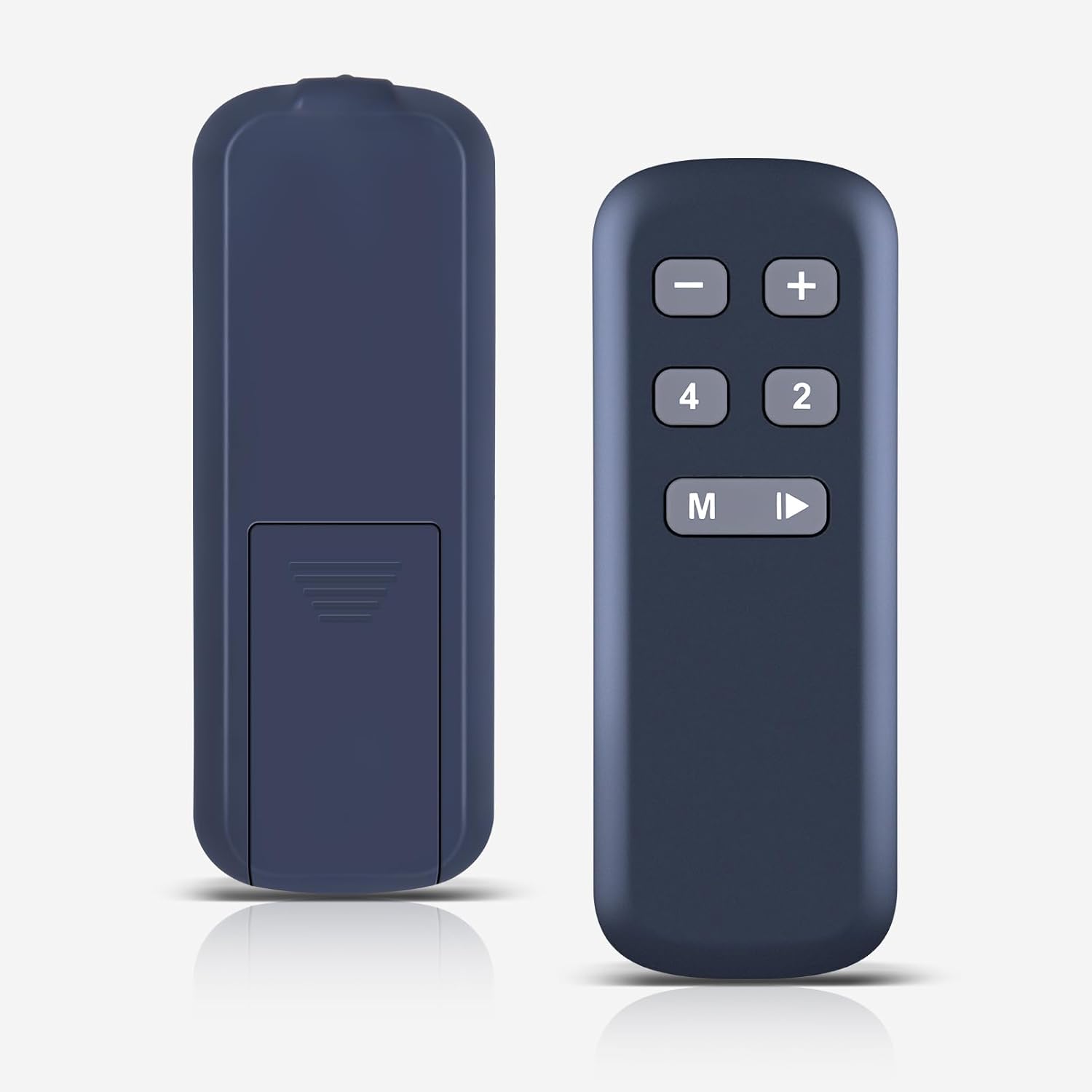
Image: Front and back view of the WDZP Treadmill Remote Control, showcasing its compact design.
The remote features a simple button layout for ease of use, providing quick and precise control over your treadmill's functions. Its infrared technology ensures a strong signal within a range of 12 meters (40 feet) and a 180-degree emission angle.

Image: The remote control with icons indicating stable performance, quality assurance, quick response, and strong signal transmission.

Image: A comparison illustrating the benefits of using a dedicated treadmill remote control, such as enhanced safety, ease of use, accuracy, and distraction-free operation, compared to relying on a phone or manual controls.
Setup
Battery Installation
The WDZP Treadmill Remote Control requires two (2) AAA batteries (not included) for operation. No programming or complex setup is required; simply install the batteries, and the remote will be ready to use.
- Locate the battery compartment on the back of the remote control.
- Slide open the battery compartment cover.
- Insert two AAA batteries, ensuring correct polarity (+ and -).
- Close the battery compartment cover securely.

Image: Visual guide demonstrating the simple three-step process for installing batteries into the remote control.
Operating Instructions
Once batteries are installed, the remote control is ready for immediate use with your compatible treadmill or walking pad. Ensure there is a clear line of sight between the remote and the treadmill's infrared receiver.
Button Functions:
- + (Plus) Button: Increases the treadmill's speed.
- - (Minus) Button: Decreases the treadmill's speed.
- M (Mode) Button: Cycles through different workout modes or programs available on your treadmill.
- Play/Pause Button (Triangle/Rectangle): Starts or pauses the treadmill's operation.
- 2 Button: Quick selection for a speed setting (e.g., 2 km/h or 2 mph, depending on your treadmill's units).
- 4 Button: Quick selection for a speed setting (e.g., 4 km/h or 4 mph, depending on your treadmill's units).
The infrared signal operates effectively within 12 meters (40 feet) and a 180-degree range, allowing flexible control during your workout.
Maintenance
To ensure the longevity and proper functioning of your WDZP Treadmill Remote Control, follow these simple maintenance guidelines:
- Cleaning: Wipe the remote control with a soft, dry cloth. Do not use liquid cleaners or abrasive materials, as these can damage the surface or internal components.
- Storage: Store the remote in a cool, dry place away from direct sunlight and extreme temperatures.
- Battery Replacement: If the remote's response becomes sluggish or inconsistent, replace both AAA batteries with new ones. Remove batteries if the remote will not be used for an extended period to prevent leakage.
- Avoid Drops: While durable, avoid dropping the remote control, as severe impacts can damage internal circuitry.
Troubleshooting
If you encounter issues with your WDZP Treadmill Remote Control, please refer to the following common problems and solutions:
- Remote is not responding:
- Check Batteries: Ensure batteries are inserted correctly with the correct polarity. Replace old batteries with new AAA batteries.
- Line of Sight: Verify there is a clear path between the remote's emitter and the treadmill's infrared receiver. Obstructions can block the signal.
- Distance: Ensure you are within the effective operating range of 12 meters (40 feet).
- Limited operating range:
- Replace Batteries: Weak batteries can reduce signal strength.
- Environmental Factors: Strong light sources or other infrared devices might interfere with the signal. Try operating in a different environment.
- Buttons are sticky or unresponsive:
- Clean Remote: Dust or debris might be under the buttons. Gently clean around the buttons with a dry cloth.
Specifications

Image: Diagram illustrating the dimensions of the remote control: 4.52 inches in length, 1.59 inches in width, and 0.59 inches in thickness.
| Feature | Detail |
|---|---|
| Brand | WDZP |
| Manufacturer | WDZP |
| Compatible Devices | Treadmill (Aiteid, Rellfit T01-TL, CIIHI C AM980, VITALWALK TM02GY, Rockvale LF386 Walking Pads) |
| Max Number of Supported Devices | 1 |
| Color | Black |
| Special Feature | Ergonomic |
| Package Dimensions | 1.5 x 1 x 0.55 inches |
| Item Weight | 0.705 ounces |
| ASIN | B0FJLR3QQ6 |
Warranty and Support
WDZP offers a 6-MONTH warranty for this Treadmill Remote Control. This warranty covers manufacturing defects and quality problems. If the product does not match your equipment or if you experience any quality issues, please contact our customer support for a free exchange or refund.
For further assistance, technical support, or warranty claims, please refer to the contact information provided with your purchase or visit the official WDZP store page on Amazon.