
1. Important Safety Information
Please read all instructions carefully before using the HOTWAVE Under Desk Elliptical Exercise Machine. Retain this manual for future reference.
- Seated Use Only: This machine is designed for seated use. Do not stand on the pedals or the machine at any time. Standing on the device may result in serious injury or damage to the unit.
- Stable Surface: Always place the machine on a flat, stable surface to prevent tipping or movement during use.
- Clearance: Ensure adequate space around the machine during operation to avoid obstruction or injury.
- Power Source: Use only the provided power adapter. Ensure the power outlet matches the machine's voltage requirements.
- Children and Pets: Keep children and pets away from the machine during operation.
- Medical Conditions: Consult a physician before starting any new exercise program, especially if you have pre-existing medical conditions.
- Maintenance: Regularly inspect the machine for any signs of wear or damage. Do not use if damaged.
2. Package Contents
Verify that all components are present in the package:
- HOTWAVE Under Desk Elliptical Exercise Machine (x1)
- Power Cord (x1)
- Remote Control (x1)
- User Manual (x1)
- Foot Straps (x2)

Image: The elliptical machine with its power cord, remote control, and user manual.
3. Product Overview
The HOTWAVE Under Desk Elliptical Exercise Machine is a compact and portable device designed for low-impact leg exercise while seated. It features both manual and automatic modes with 12 speed settings, controllable via a touch screen or remote control. This machine aims to promote leg activity, relieve stiffness, and support muscle strengthening without high impact on joints.
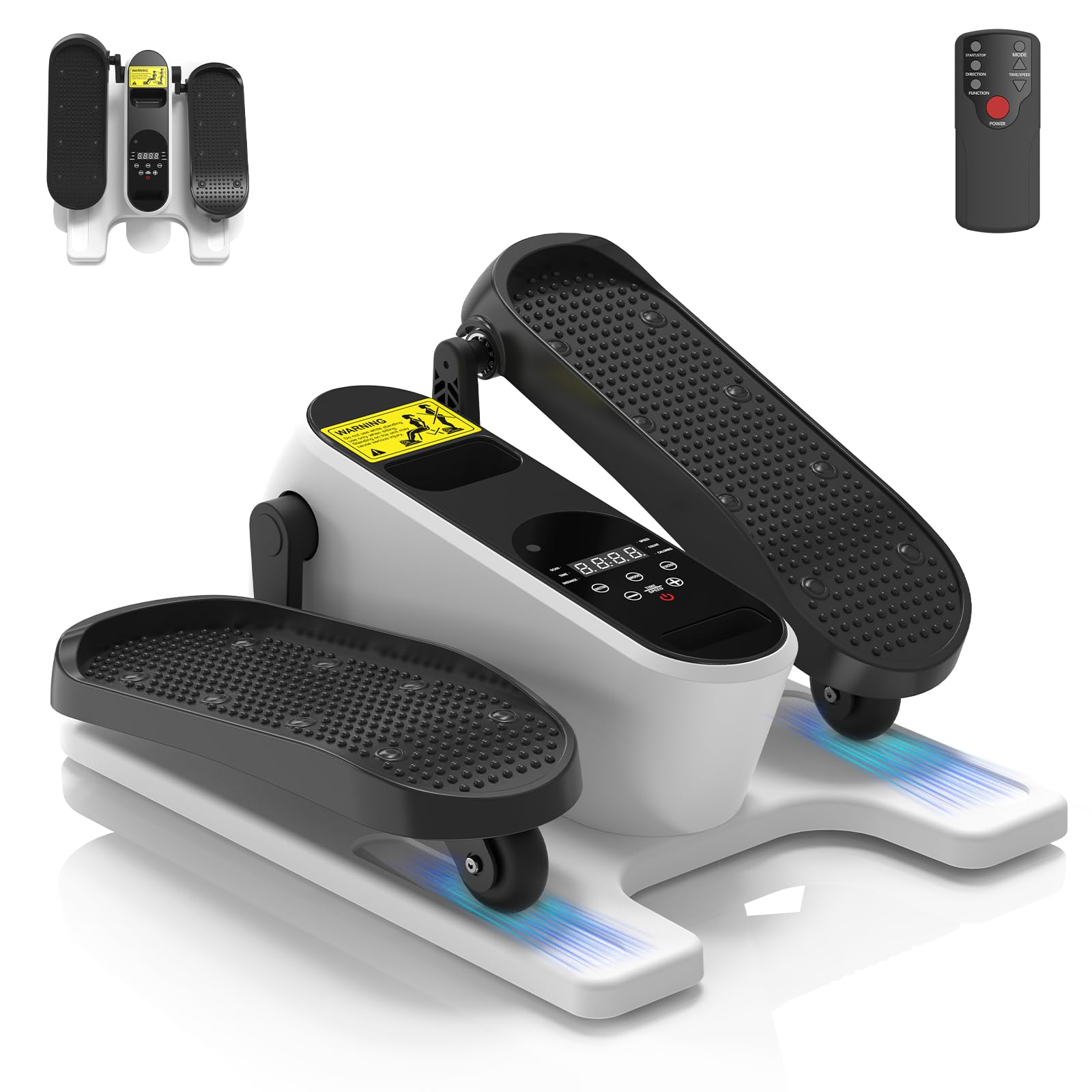
Image: The main unit of the HOTWAVE Under Desk Elliptical Exercise Machine.
4. Setup
- Unpack: Carefully remove all components from the packaging.
- Placement: Place the elliptical machine on a stable, level surface where you intend to use it (e.g., under a desk, in front of a sofa).
- Power Connection: Connect the power cord to the machine's power input port and then plug it into a standard electrical outlet.
- Remote Batteries: Insert the provided batteries into the remote control.

Image: A user demonstrating the elliptical's placement under a desk for exercise while working.
5. Operating Instructions
5.1 Power On/Off
- Using the Remote: Press the 'POWER' button on the remote control to turn the machine on or off.
- Using the Touch Screen: Press the power button on the machine's display panel to turn it on or off.
5.2 Modes of Operation
The machine offers two primary modes: Manual Mode (HR) and Auto Mode (P1-P12).
- Manual Mode (HR): In this mode, you manually control the speed and direction. Use the 'TIME/SPEED' buttons (+/-) to adjust speed and the 'DIRECTION' button to change the pedal rotation.
- Auto Mode (P1-P12): This mode features 12 pre-programmed exercise routines (P1 to P12) that automatically adjust speed and direction for a varied workout. Press the 'MODE' button to cycle through the programs.

Image: Visual representation of the Manual and Auto modes on the display panel.
5.3 Adjusting Speed and Direction
- Use the 'TIME/SPEED' buttons (+/-) on the remote or touch screen to increase or decrease the speed (1-12 levels).
- Press the 'DIRECTION' button to switch between forward and backward pedal rotation.
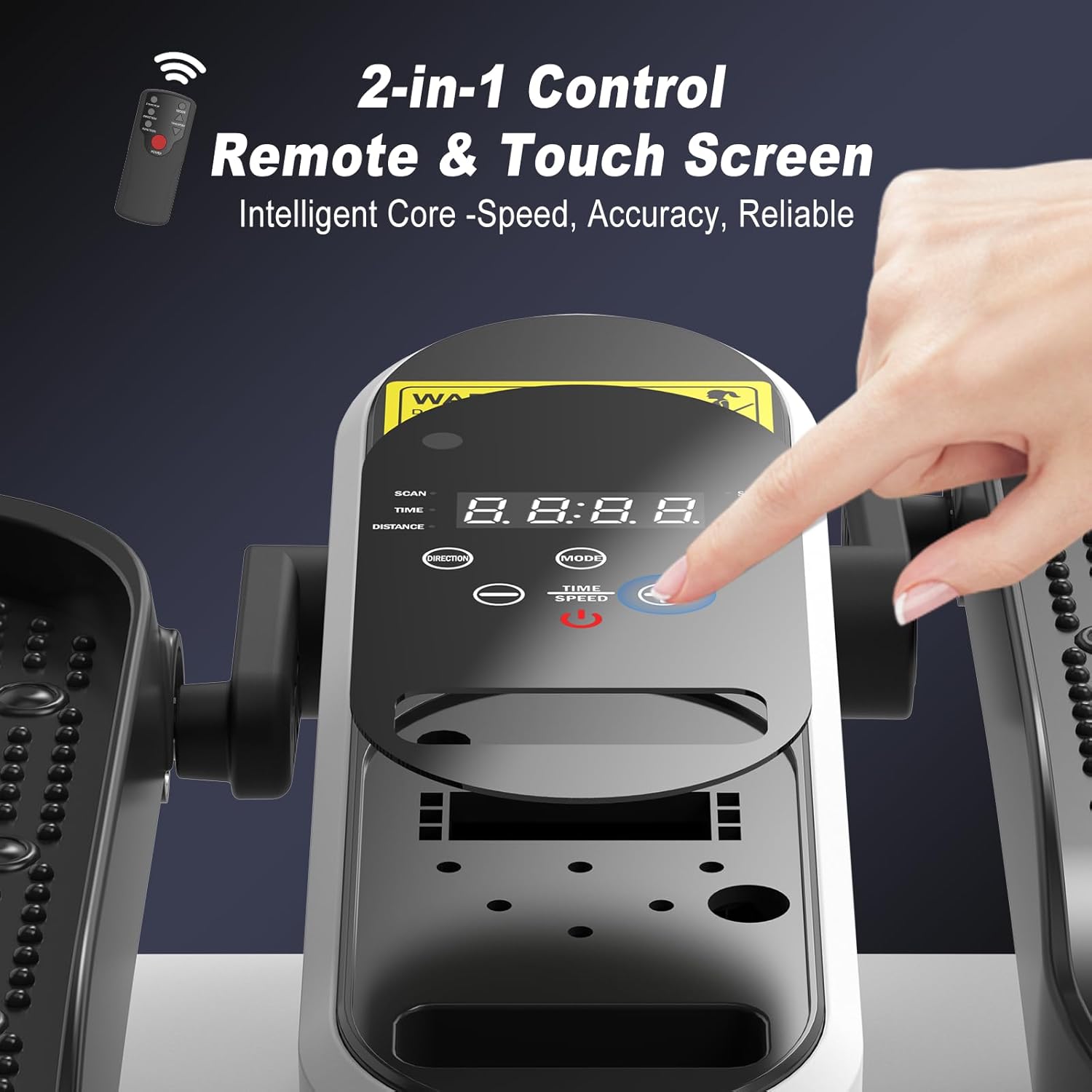
Image: The control panel and remote control for adjusting settings.
5.4 Using Foot Straps
For added security, especially for users with limited mobility, attach the foot straps over your feet and the pedals to keep your feet securely in place during operation.

Image: Close-up of the anti-slip foot pedals, which can be used with foot straps.
5.5 Visual Demonstration
Watch this video for a visual guide on operating the HOTWAVE Under Desk Elliptical Exercise Machine, including speed and direction adjustments.
Video: Demonstration of the HOTWAVE Under Desk Elliptical Machine's operation, including speed and direction changes using the remote control.
6. Maintenance
- Cleaning: Wipe the machine with a damp cloth after each use. Avoid using abrasive cleaners or solvents.
- Storage: Store the machine in a cool, dry place away from direct sunlight and extreme temperatures.
- Inspection: Periodically check all screws and connections to ensure they are tight and secure.
7. Troubleshooting
| Problem | Solution |
|---|---|
| Machine does not power on. | Ensure the power cord is securely plugged into both the machine and a working electrical outlet. Check if the power button on the machine or remote is pressed. |
| Pedals are not moving smoothly. | Ensure the machine is on a flat surface. Check for any obstructions under or around the pedals. Reduce the speed setting if necessary. |
| Remote control is not working. | Check and replace the batteries in the remote control. Ensure there are no obstructions between the remote and the machine's sensor. |
8. Specifications
- Brand: HOTWAVE
- Color: White
- Material: Acrylonitrile Butadiene Styrene (ABS)
- Weight Limit: 300 Pounds
- Model Number: HOTWAVE Elliptical Exercise Machine
- Included Components: HOTWAVE Elliptical Exercise Machine, Power Cord, Remote Control, User Manual

Image: Dimensions and portability features of the elliptical machine.
9. Warranty and Support
This product comes with a 365-day warranty. For any questions, technical support, or warranty claims, please contact HOTWAVE customer service through your retailer or the official HOTWAVE website.